Aurora: Getting Started as a Site Designer
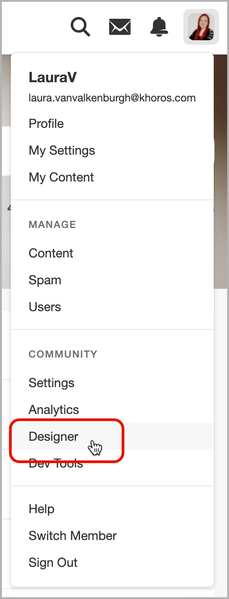
Welcome to Aurora! Aurora is Khoros’ re-imagined Community experience that leverages more than 20 years of experience and learnings in the digital community space. This introduction guides you through the most commonly used page template and theming tasks and provides links to the best articles for these tasks. Tip: Take a tour of Aurora in this 1-hour video training course, which will help you familiarize yourself with key Aurora features and concepts. Tip: Complete self-paced training that includes information about community design in the Khoros Academy Build Khoros Communities course. Let's get started! As a Site Designer, your primary responsibilities include: Creating and editing the theme of your site Designing the page templates used across your site Designing the templates used in email notifications (coming soon) As a Site Designer, you’ll spend much of your time in the Designer area. Note: To access the Designer area in the Khoros Community platform, you must have the Admin role (specifically, the Edit community settings permission grants access, but this permission also grants access to editing all parts of the community). Learn more about Roles and Permissions. Designer The Designer area is where you’ll perform most of your tasks. Go to Account Menu > Designer: In this area, you have access to: Theme Page Templates With these two areas, you’ll have the opportunity to design the look and feel of your entire community. Build your community’s theme The theme of your community encompasses your logo, the fonts, the colors, button and link formatting, avatars, and other UI elements across the site. Learn more about the Aurora Theme Editor. Design your community’s page templates There are many different page templates across the community that can be configured to create the desired look and feel that matches your brand. Page templates offer many different options for customization, such as navigation bar options, widgets, section organization, and more. To get started in designing your page templates, learn: about Page Templates how to use Page Templates how to create and arrange page sections on a Page Template how to configure the global Header & Footer about widgets 1.2KViewsSign in to react to this post
 2Comments
Aurora: Getting Started as a Community Administrator
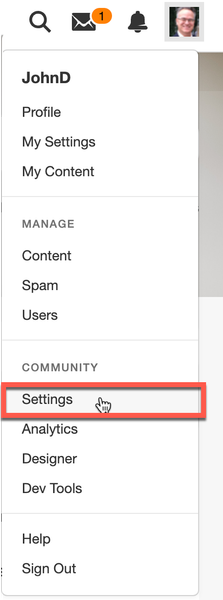
Welcome to Aurora! Aurora is Khoros’ re-imagined Community experience that leverages more than 20 years of experience and learnings in the digital community space. This introduction guides you through the most commonly used community features and administration tasks and provides links to the best articles for these tasks. Tip: Take a tour of Aurora in this 1-hour video training course, which will help you familiarize yourself with key Aurora features and concepts. Tip: Complete self-paced training in the Khoros Academy Build Khoros Communities course. Note: Please check out the training video for new Admins, available within the Community Setting area below. Let's get started! As a Community Admin, your primary responsibilities include: Configuring and maintaining your community’s site structure Administering and managing feature areas of the community Maintaining member accounts and community content per your company's values and goals Upgrading the community to take advantage of new capabilities Before you begin, be sure to work with the Community Manager to have a thorough understanding of your community’s audience and goals. As a community admin, you’ll spend much of your time in the Community Settings area. Note: As Admin in the Khoros Community platform, you must have the Admin role. Learn more about Roles and Permissions. Community Settings The Community Settings area is where you’ll perform most of your administrative tasks. To open the settings area, go to Account Menu > Settings: Community Settings are grouped into themed areas: Structure Features Users The Settings Shortcuts page provides shortcuts to the most commonly used community settings pages. Click around and explore all the settings in these areas. Below, we’ve captured some of the most common tasks you’ll need to perform. (Depending on how roles on your team are distributed, you may not need to do all these tasks.) Build out the structure of your community Configure general and feature-specific settings Manage roles and permissions Set up, enable, and manage features that drive more community engagement Please watch the training video which guides new Admins through the most commonly used features within settings to help accomplish community administration tasks. Build out the structure of your community In the Community Structure area, you can build out and organize the topography of your site. You can decide the best way to group related content into categories and boards and which content types to provide in each area. Learn more about Community Site Structure and best practices when creating your site. Configure general and feature-specific settings From the Features area, you can configure general site settings as well as feature-specific settings that determine how things behave in your community. Manage user roles and permissions In the Users area, you c…1.4KViewsSign in to react to this post0CommentsAurora Upgrade Playbook
Getting Started What is Aurora? "Aurora is a game-changing update to the industry-leading Khoros Communities solution, with a set of transformative capabilities that make it easier to deliver an exceptional member experience." Aurora is the major upgrade for Khoros Communities (Classic). First released officially on July 31st, 2023, Aurora is a total transformation of our top-notch community platform. We've completely revamped it, utilizing cutting-edge technologies and adopting a modern headless architecture. We have intentionally bolstered Aurora with powerful APIs that provide flexibility and robustness. From the very beginning, we've focused on creating an exceptional user experience, designing it with mobile-friendliness, performance, SEO, and accessibility in mind. It's a fresh start with a foundation built for the future of online communities. Jump to Features. Discovery: Am I ready for Aurora? The first step is to determine your readiness for upgrading to Aurora. There is no rush to move from Classic as of 2024, so it is essential to review where you stand and what you need in order to upgrade successfully. Secondly, it's good to remember that any change to your community presents an opportunity to revisit what success means and how your community experience supports success today and in the future. With this in mind, we encourage you to challenge yourself at each step of planning and ask, "How does this align to and support our business goals?" Getting started Understand Your Goals: While Aurora improves drastically upon the day-to-day community design, admin configuration, moderation, and end-user experience, in evaluating your readiness to upgrade to Aurora, ask yourself: What are your plans for the community in the coming year? How do they align with your business goals & strategy? Do you require certain features or integrations to support your community strategy and day-to-day management? How do you use them? Do you use SSO authentication? How does the authentication process work? (You may need to gather this information from the team that manages SSO at your organization.) How long will it take to gather resources to help you in the upgrade to Aurora? Evaluate Customizations: As a best practice, customizations should be limited to those where there is a clear business value and no alternative feature. With this in mind, we recommend you evaluate existing customizations in line with your community goals, and as part of your upgrade plan, consider your path to sunset any customizations you use today that do not provide measurable value to the community experience and its success. You may have custom features today (like widgets, special pages, etc.)—many of these can now be replaced with Aurora's built-in features. Where you can, we recommend switching to Aurora's features. It will not only save you the cost and effort to rewrite those components …4KViewsSign in to react to this post10CommentsAbout Khoros Community: Aurora
Aurora is Khoros’ re-imagined Community experience that leverages more than 20 years of experience and learnings in the digital community space. Aurora delivers a sleek, modern, high-performance UX framework that adheres to community best practices while still giving brands complete flexibility to make changes or updates to address their specific needs. While built on the same platform as Khoros Community Classic, Aurora includes significant changes in the new framework: New member experience: Aurora delivers both better performance (load times, mobile-friendly pages) and design (modern UX, beautiful layouts, and pre-configured community best practices). Aurora also provides more personalization, integration with other digital properties through syndication, and an overall better experience so that communities can more easily become the heart of any brand’s digital experience. New community manager experience: Aurora enables community managers and designers to build and customize pages easier with a visual Page Template designer and control the look and feel of the community with pre-defined and customizable themes to ensure that your community reflects the visual message and tone of your brand. Moreover, you no longer need to know how to code to build these pages. New developer experience: Aurora improves the developer experience so your developers can more easily find, use, test, and extend any integrations, custom objects, or data calls (in and out of the community) to extend the capabilities of your community to do something new and provide your members with a more customized experience. Backend and Platform changes: Aurora uses new front-end technologies like React and Storybook and leverages tools like Jest and Typescript for rapid iteration and robust design. On the data side, Aurora uses GraphQL (replacing LiQL) as the way to program API interactions and get data out of the platform. Finally, the entire architecture is completely built on modern cloud services from AWS and Docker. When you’re ready to dive in, we recommend starting with one of our Getting Started Guides: Getting Started as a Community Manager Getting Started as a Community Administrator Getting Started as a Site Designer New to communities? Check out our Community Basics and take a tour of Aurora in this 1-hour video training course, which will help you familiarize yourself with key Aurora features and concepts. Moving to Aurora Since Aurora is built on the same backend data architecture as Community Classic, existing customers do not need to do a full-scale migration to move to Aurora. However, most Community Classic customers do have some customization on the front end and UI. For these customers, some additional work is required to move to Aurora. Review the Aurora Upgrade Playbook and reach out to your account manager to learn more about what to expect when migrating to Aurora. Related …4.6KViewsSign in to react to this post0CommentsAurora: Getting Started as a Community Manager
Welcome to Aurora! Aurora is Khoros’ re-imagined Community experience that leverages more than 20 years of experience and learnings in the digital community space. This introduction guides you through the most commonly used features for common community management tasks and provides links to the best articles for these tasks. Tip: Take a tour of Aurora in this 1-hour video training course, which will help you familiarize yourself with key Aurora features and concepts. Let's get started! Community Managers often wear a variety of hats to develop and lead a community. Depending on how your team is organized, you could be responsible for one or more of the following: Working with senior stakeholders in the business to define a strategic plan for success for the community. This plan must align with the company's goals. Coordinating with stakeholders, including admins and developers who support in customizing and configuring the platform to support the strategic plan. Defining the community guidelines so that members feel safe and welcome and the content is relevant, helpful, and up to date. Lead and support the moderation team to moderate the community content and users. Let's dive into each of these areas: Building the Community Strategy Community Managers are the face of the community. They own the day-to-day management and implementation of the brand’s digital community strategy. As the Community Manager, you are primarily responsible for building and leading your community to align with your company's goals. Apart from these, in support of your company goals, you’ll be working to increase user engagement and advocacy, accelerating innovation, driving sales, and reducing sales costs. Before you start building your community, you must: Understand the audience: Who is the intended audience? What are they looking for? What is their level of experience? Decide the type of content that best: meets the audience needs drives site traffic improves peer-peer communication keeps users engaged Understand the stakeholders or internal audiences, including: Marketing team Product team Support team Analysts Legal team The answers to these questions help you develop a community strategy that connects members and your brand content, leading to your Community's Structure. Before you start building your community structure, you must understand what your business is trying to accomplish with your community. Hence, the structure of the community must align with the community's goals and objectives. Measuring your community health To build your community strategy, you must first determine what success means and how you will measure it. When measuring community, keep in mind that a healthy and successful community is one that meets the needs of your audience. For this, you must: Identify Key Performance indicators (KPIs) to measure community success. These KPIs must be…751ViewsSign in to react to this post0Comments


You’ve seen all recent content