Beginner’s Guide to Atlas
Welcome to Atlas! This is the place to learn and connect with digital pioneers and social business experts from around the industry - plus you'll find a wealth of resources and knowledge to get the most out of Khoros products and Atlas, the Khoros Community. Quick Start Guide Get registered Find answers Ask others for help or advice Mark posts as solutions (and give kudos) FAQs Access What areas of Atlas do all registered users have access to? What areas of Atlas do customers and partners have access to? How do I request elevated access to different areas of Atlas? Support How can I get help with technical aspects of a Khoros product? I’m having issues logging into Atlas - who should I ask for help? Training Where can I find training materials for Khoros products? How can I get one-on-one coaching for products? Contributing How can I help the community? What is the Titans program? Questions? Where should I post if I have questions? I’m stuck and I could use an assist. Helpful Resources Release Notes & Announcements Khoros Care Khoros Communities - Aurora Khoros Communities - Classic Khoros Marketing Tips & Ideas Khoros Insights Quick Start Guide 1) Get registered On the Atlas homepage, you can register by clicking "Register" at the top right of the navigation bar, then creating a username and password and entering your email address (only used for community notifications). 2) Find answers Use the search bar on the Atlas homepage to find answers to common Khoros product questions You can also find some helpful resources in the Khoros Insights blog under the Discover tab at the top of the page. 3) Ask others for help or advice (Customers and Partners only) Can’t find what you’re looking for? Visit any of the Discussions areas under the Help & Support tab in the top nav bar and click Create New Post to get some help. Be sure to briefly review the Community Guidelines before posting. 4) Mark posts as solutions (and give kudos) (Customers and Partners only) Don’t forget to use the thumbs-up button on helpful posts! If any solution was especially helpful, be sure to choose Accept As Solution at the bottom of the user’s reply. That’s it! If you can, be sure to pay it forward by subscribing to boards where your knowledge might help others, so you can get e-mails to help you chime in on questions from other community members. FAQs Access What areas of Atlas do all registered users have access to? Without customer/partner access, you can view product blogs and release notes for our products, as well as join webinars, and learn about our super user programs. What areas of Atlas do customers and partners have access to? Customers and partners get exclusive access to help and advice from the s… 5.1KViewsSign in to react to this post
 0Comments
Atlas Single Sign-On (SSO) & Registration for Marketing Customers
Marketing customers previously had to email Support or CommunityHelp to gain access to gated content in Atlas if they were using a Marketing Product. On March 17, 2020, we implemented single sign-on (SSO) so these requirements are no longer necessary. If you’re a marketing customer and would like to know more about how SSO will affect your access to Atlas, please read the FAQ below. How can Marketing customers register for Atlas? How can Marketing customers log in to Atlas? How should I log in or register if I use Khoros Marketing and another Khoros product? What if a Marketing customer clicks a link within the Marketing product? What if the Marketing customer uses a different email for Marketing and Atlas? What if the Marketing customer has multiple logins for different Marketing environments? What is SSO? What about Care and Community customers? Still having trouble? How can Marketing customers register for Atlas? The Marketing Customers button will allow Khoros Marketing users (formally Spredfast) to sign or register into Atlas via Signal Sign On (SSO). If you use Khoros Marketing and another Khoros product, we recommend you sign in using Marketing SSO. How can Marketing customers log in to Atlas? Marketing customers will be given the opportunity to log in to Atlas using their Khoros Marketing credentials. If the user has already registered for Atlas, Khoros will utilize SSO, to automatically log them into the page they were trying to get to. How should I log in or register if I use Khoros Marketing and another Khoros product? If you use Khoros Marketing and another Khoros product, we recommend you sign in using Marketing SSO. What if a Marketing customer clicks a link within the Marketing product? If a Marketing customer follows a link to documentation from within a Marketing product, this will trigger the flows above. What if the Marketing customer uses a different email for Marketing and Atlas? They will need to update their Atlas email to match the email they use for the Marketing platform. They can change their email address in their email settings page. If the user doesn’t change their email, they will have duplicate accounts. What if the Marketing customer has multiple logins for different Marketing environments? They can either set up multiple Atlas profiles or choose to log in with one natively through Atlas. What is SSO? Single sign-on is an authentication scheme that allows a user to log in with a single ID and password to any of several related, yet independent, software systems. What about Care and Community customers? We are investigating ways to provide SSO to all of our customers, but for now, Care and Community customers will still need to request customer access by emailing [email protected]. For more details, visi…113KViewsSign in to react to this post2CommentsHow to Register for Atlas
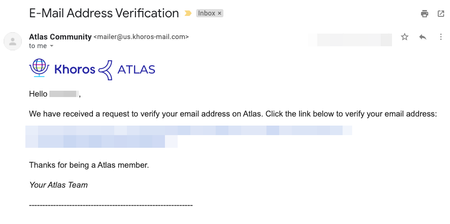
If you haven't already registered for Atlas, the Khoros community, this tutorial will show you how. All you need is a username, password, and a valid company email address. After you register, you can post to the community, receive email notifications, and lots more. It's quick and it's free! Option 1. Marketing Customers Registration Click on Register at the top right of the community, then the Khoros One SSO option. Learn more about logging in via SSO here. Option 2. Manual Registration Registering for Atlas Verifying your email Requesting Customer Access (if applicable) Requesting Case Portal Access (if applicable) 1.) Visit community.khoros.com. 2.) Click Register at the top-right corner. 3.) Click Register Now. 4.) Fill out the form and read and accept the Terms of Service. 5.) After you register, you must verify your email. Check your inbox and look for an email from the Atlas Community ([email protected]) and click the link to verify your email. If you don’t see the email after a few minutes, check your spam and promotional folders. If you still don't see the email, please contact us at [email protected]. 6.) If you are NOT a Khoros customer or partner, your registration is now complete. Welcome to Atlas! 7.) Customers and partners, once you have registered, please email [email protected] to request elevated access to Atlas. Without customer/partner access, you’re missing out on exclusive forums, customer ideas, the knowledge base articles, and much more! So don't hesitate to reach out, we'll get you sorted. 8.) If you also need access to Khoros Support Case Portal, please sign up here. Further instructions on signing up for Khoros Support here. SSO is used in the Atlas community and will not work in the Khoros Support Case Portal. You will need to make an account. Once you’re registered, visit the About Our Community area for more resources. Do you have any questions? Email us at [email protected]!29KViewsSign in to react to this post0Comments


You’ve seen all recent content