Khoros Communities 21.5 Release Notes
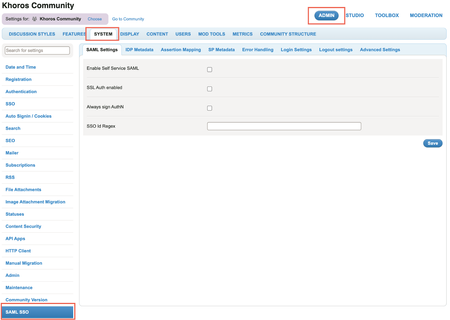
21.5 Release delivers self-serve SAML SSO as an out of the box core product feature, instead of a plugin-based approach. This release also includes enhancements around Events, Group Hubs and Community Analytics, and API updates. Content Features Self-serve SAML SSO Enhancements Remove the restriction on the number of Events node within a category Increase in the date range limit in Community Analytics reports Specify the default sort order for Group Hub List component Set the avatar size in a Group Hub card API Updates New FreeMarker sequence builder method Get node IDs of nodes displayed in the Group Hubs Listing Page You Found It. We Fixed It! Features Self-serve SAML SSO With this release, we’ve redesigned our existing SAML 2.0 integration to enable Community Admins to configure authentication for their Communities and integrate with their SAML IDP by themselves. SAML SSO is now available out of the box as a core product feature, instead of a plugin-based approach used earlier. This simplifies setting up SAML SSO in Communities and helps reduce the total cost of ownership. The key features in Self- serve SAML SSO include: Dynamic metadata: Supports up to three identity providers. Admins can integrate a maximum of three IDPs (that are XML strings) in the Admin panel instead of maintaining it in a config file. Dynamic entity identification: Admins can add the attribute name for the SSOID for their community. If this value changes, Admins can change the value and save it without restarting the Community. Dynamic assertion mapping: Admins can add all the attribute names in the SAML assertion in the Assertion Mapping tab in the Community Admin panel. This eliminates the need for maintaining a config file for Assertion mapping. Note: Communities launching post Community version 21.5 can opt to configure Self-serve SAML SSO while launching. Existing customers who want to switch to using self-serve SAML SSO must contact their Customer Success Manager or Account Executive. This process involves Professional Services (PS) engagement for user/SSO ID migration and may need to address other customisations such as user authentication workflows, custom user profile fields, and other customisations or integrations relying on user data. You can find the settings for Self-serve SAML SSO under Community Admin > Admin > SYSTEM > SAML SSO. Learn more about SAML SSO Learn more on how you can configure SAML SSO from the Admin panel Learn more about the SAML SSO tabs and settings in the Admin panel In the 21.4 release, we introduced the Feature Logs framework. This framework helps generate and view feature specific logs in components and endpoints. Developers and administrators can use these logs to monitor and debug during Community customisation. We are happy to announce that we are now explicitly providing you with… 2.3KViewsSign in to react to this post
 13Comments
Khoros Communities 21.7 Release
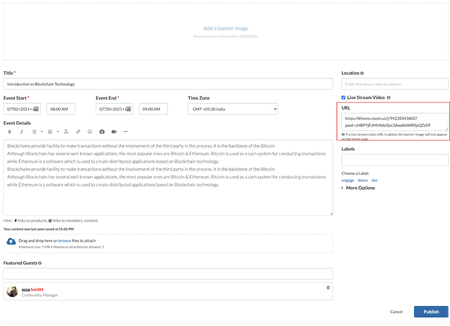
Features Integrate Zoom with Community Events API Updates RSVP API You found it. We fixed it! Features Integrate Zoom with Community Events Today, more and more meetings are moving to virtual spaces. Khoros Community Events now supports full integration with Zoom Meetings and Webinars. Integrating Events with Zoom enables community members to join the Zoom meetings and webinars directly from the community. With this integration you can: Create events to host Zoom meetings and webinars! All you have to do is paste in the Zoom URL. Now you can ask questions, discuss, and share follow ups to increase overall engagement in the threaded discussion. Host Zoom Meetings from a community event while providing full access to the Zoom options and features Host Zoom Webinars from a community event while providing full access to the Zoom options and features More info Learn more about the prerequisites required to host Zoom meetings and webinars from your community. Learn more about hosting a Zoom meeting and Zoom webinar on your community. Learn about mobile view for events with Zoom meetings and webinars. API Updates RSVP API We have updated the Events RSVP API to enable a member to add or remove the RSVP response on behalf of another member. Members with the “Create Events” permission now gain this ability. Learn more about move events API You Found It. We Fixed It. Earlier, the Internet Calendar Scheduling(ICS) files for community events uploaded incorrect schedule information in the Outlook calendar. This issue is now fixed, and all community events are now added to external calendar programs with correct information. We have fixed the issue where your editing position jumped to the beginning of a post while formatting any text at the bottom of a lengthy post. The issue with the preview of attachments to posts throwing misleading error messages is now resolved. You can now preview all attachments successfully. We have fixed the issue where some HTML characters in the case related fields in the Case Portal were encoded while sending information to Salesforce. Now, these HTML tags are no longer encoded. We have fixed the issue where the Top Tagged Posts widget displayed archived content. We have fixed the issue where the post count for a particular label on the Labels page did not decrease when posts with this label were archived. With this release, the post count for labels associated with archived posts will decrease as the post is archived. The Forum Topic Pages in Forums v5 with the Inline Editor enabled took more time than expected to load. We have improved the load time with this release, and all the inline reply controls load faster. We have fixed the performance issues with the load time when users with a larg…2.2KViewsSign in to react to this post18CommentsKhoros Communities 21.12 Release
Content Enhancement Slack application with Private Communities Create events with past dates API Updates Create events with past dates You Found it! We Fixed it! Enhancement Slack application with Private Communities You can now integrate the Slack application with private communities and perform the same actions (search, kudo, and reply) as you can with public communities. Learn more about the Khoros Community Slack Integration. Create events with past dates With this release we’ve removed the restriction on creating community events that were conducted in the past. You can now add past events to your community by creating them with older dates and uploading the recordings of the event. Note: This enhancement is available with Events Version 1.2. Learn how to achieve the same via APIs Learn more about Events API Updates Create events with past dates As mentioned above, you can now create events (occasions) that were conducted in the past via API. Note: This functionality is available in the Events version 1.2 & above. Learn more about the events, see messages and create occasion use-case. You Found it! We Fixed it! General Fixes Earlier, when you replied by quoting and editing another comment, you received an “invalid HTML” error message. We have fixed this issue. Now, you can successfully edit a reply by quoting and editing it. Earlier, pagination on a TKB board with more than 2000 articles did not behave properly. In cases where more than 2000 articles existed, clicking to go to the last page or a page that would have articles after the 2000th in the list took you to the page that listed the 2000th article instead. This issue is now fixed. Earlier, the "View solution in original post" link on accepted solutions did not direct to the floated solution. We have fixed this issue. Now, the link leads you to the original post in the thread. The issue that the Blog dashboard is visible to anonymous users is now fixed. The issue where the API (in v2) to update the featured guests for an event updated the event's time is now fixed. The issue where Group Hub owners were unable to access the Group Hub Admin panel is now resolved. There was an issue where topics from some communities did not escalate to Salesforce until the community was restarted. This issue is now fixed. Earlier, when visitors agreed to take the Value Analytics survey but submitted the answers after some time, they received an error message. This issue is now fixed. Now, visitors are properly redirected to the community page. Earlier, when an uploaded cover image for an event/forum message was deleted from the member’s image gallery using the API and then you used an API call to get the cover image information via API v2 , the call failed with an unexpected error. This issue is now fixed. The issue where user…1.1KViewsSign in to react to this post3CommentsKhoros Communities 22.6 Release
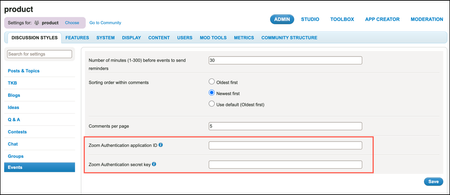
Content Enhancements Encryption of Zoom apiKey Salesforce Connector 4.3 (Early Access) Bug Fixes Enhancements Encryption of Zoom apiKey Earlier, Community Admins shared their organization’s Zoom apiKey and apiSecret values with the Khoros Support team to integrate the Zoom application with Community Events. With this release, Community Admins can now manually enter, update, and delete the Zoom API ID and secret key values in the Community Admin panel. These values are encrypted and stored in Khoros’ database. Since they are encrypted, external parties cannot access the API ID and secret key values. To add API keys: Go to Community Admin > Discussion Styles > Events. Specify the Zoom Authentication application ID and Zoom Authentication secret key fields. Click Save. Learn more on Integrate Zoom with Community Events Salesforce Connector v4.3 (Early Access) This version includes enhancements and addresses issues of the previous versions to improve overall Salesforce-Community integration experience. This version provides the following enhancements: Better controls over triggers and case-related emails Ability to use custom fields to map community and Salesforce contact objects SDFC API upgrades to the latest versions, and few other enhancements NOTE: If you want to be considered for the Early Access (EA) program, contact your CSM. If selected, CSM works with the Support and product teams to upgrade the Community Connector for the Salesforce version. Learn more on Connector for Salesforce package versions and upgrades Learn more about the issue fixes and enhancements on all Salesforce Connector Versions You found it! We fixed it! General fixes Earlier, there was an issue in some communities where digest notification messages were not sent out. This was due to the limit on the value of the unique identifier of messages specified in the database table. The issue is fixed. The digest notification tables are now independent of the unique identifier. Communities can now send as many digest notification messages as needed. When community admins or moderators added a comment to a post, a Moderator flag was added to the post. The issue is fixed. Now, comments from admins and moderators do not display the Moderator flag. When a community member other than an admin, moderator, or the owner of a post ran the API query to retrieve the details of a cover_image, they received a permission denied message. The issue is fixed. Now, members with appropriate permissions can successfully run this API call. Previously, when you removed a community member from a community, the database tables did not delete the subscription details. This led to failures when the community restarted or when a backup was done. This issue is fixed. Now, after removing a member, the community restarts successfully. Previously, when c…1.3KViewsSign in to react to this post8CommentsKhoros Communities 22.7 Release
22.7 is a minor release. As communicated earlier, minor releases contain defect fixes and minor enhancements. Minor releases are not made available in production by default. To request an on-demand upgrade, contact Support. Content Announcement Bug Fixes Announcement Virus Scanner Enablement We are happy to announce that we will be enabling Virus Scanner by default on communities. While this feature has been available and turned on currently for a number of communities, it was not enabled by default. Over the coming releases, it will be enabled by default across communities. This enablement is planned in a phased manner, starting version 22.8. Learn more about Real-time virus scanner Bulk Archive enabled for all communities With this release, the bulk archive feature is enabled by default for all communities. You no longer need to contact the Support team to have it enabled. Learn more about the Bulk Archive feature You found it! We fixed it! General fixes Previously, when community admins sent Event invitations to more than 2000 members via Private Message, the Private Message was not delivered to members and displayed an error message. This issue is fixed. Now, members receive Event invitations via Private Message successfully. Previously, when community admins sent Group Hub or Event invitations to users via email or Private Message and the maximum number of users per invite exceeded the defined limit, the system did not display an error message. This issue is fixed. Now, the system displays an error message that indicates that the number of recipients per invite has exceeded the limit. Previously, when users accepted a post with an image as a solution, and the image was in an album they did not have access to, the EntityUpdated event was not triggered, and nothing was written to the event log. This issue is fixed. Now, the events for accepted solutions with images are triggered and logged in the event log. Previously, when members executed an API v2 call to create posts and the maximum number of attachments per post exceeded the defined limit, the API response did not return a proper error message that indicated the respective limit. The issue is fixed. Now, the API response returns a proper error message. Previously, when community admins or moderators added a comment to a post, a Moderator flag was added to the post. This issue is fixed. Now, comments from admins and moderators do not display the Moderator flag. Previously, members received an incorrect notification count from the notification cache. This issue is fixed. Now, the notification cache returns valid values in the notification count. Previously, members could not find the Knowledge Base articles they had edited in the Salesforce platform. This issue is fixed. Now, the Salesforce platform displays all the Knowledge Base articles created or edited in the community. Previously, commu…809ViewsSign in to react to this post0CommentsKhoros Communities 22.9 Release
22.9 is a minor release. As communicated earlier, minor releases contain defect fixes and minor enhancements. Minor releases are not made available in production by default. To request an on-demand upgrade, contact Support. Content You found it! We fixed it! Previously, members with cloned ownership roles were not able to manage members of a hidden Group Hub as the Member Management option was not available to them. This issue is fixed. Now, the Member Management option is visible to members with ownership (cloned/non-cloned) roles, and can manage other members of the hidden Group hubs. The issue where the label filter component slowed down loading the community search page is fixed. Previously, when members tried to rate posts using the Me Too button, the button disappeared and the count of Me Too ratings was not displayed. This issue is fixed. Now, members can rate posts using the Me Too button and can view the count of Me Too ratings to the posts. Previously, the query to retrieve Event’s RSVP details in Community Studio returned the userid instead of the message’s ID. This issue is fixed. Previously, communities that allowed .tgml, rerx, .rpx, .fpg, .arw, and .lis files failed to upload such files successfully. This issue is fixed.589ViewsSign in to react to this post0Comments


You’ve seen all recent content