Community Classic 24.05
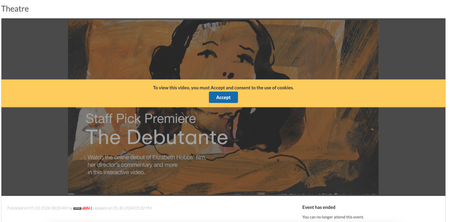
Member Experience Consent for third-party cookies usage in Events Removed limits on number of recipients for Private messages Member Experience Consent for third-party cookies usage in Events In Communities v23.10, we introduced an enhancement requiring users to explicitly consent for using cookies while uploading or viewing external videos in the posts. In this release, we have extended this enhancement to the Events. Now, members must explicitly consent to the usage of cookies when they use external videos to host Events on the Community. Below is an example of the consent banner on an events page: Removed limits on number of recipients for Private messages For communities in version 20.6 and later, messaging was limited to 10,000 users per message by default, with the option to configure this limit. With this release, we have removed these limitations altogether. You can now send messages to an unlimited number of users without any restrictions. 1.9KViewsSign in to react to this post
 8Comments
Khoros Communities 20.8 Release Notes
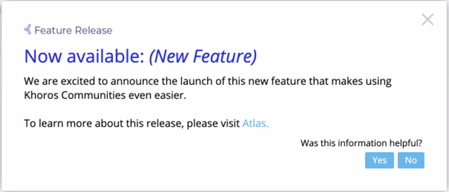
Community 20.8 delivers self-service for many Community page URL redirects, a sneak peek at improvements to Community in-app user guidance and help, as well as enhancements to several existing features and APIs. New Features API Updates Bug Fixes New Features and enhancement Coming Soon: Improved User Guidance and Help in Community URL redirect rules for Community pages Addition of new columns to Bulk Download of member data in Community Analytics Cookie Banner enhancements Coming Soon: Improved User Guidance and Help for Community In the coming months, we will be rolling out a new User Guidance/Help solution for Community and Community Analytics. First up will be in-app guides. These guides will provide you with a helpful information, including: New feature announcements Product alerts and notifications Tips to help you get the most out of community features Don’t be surprised if you start seeing guides like this in the coming weeks: And don’t worry, we won’t be spamming you with lots of pop-ups. These guides are intended to help you get the most out of the product and get out of your way fast. Next, we’ll be rolling out our new Resource Center, which you can open by clicking the question mark icon at the top-right corner of the application window. Use the Resource Center to get product help, access Release Notes, and learn about available Product Coaching sessions and community best practices. Note: Later this year, we plan to remove the existing Help drawer that appears at the bottom of the Admin and Studio apps. This feature-level help content will all be available within the Help section of the new Resource Center. Guides and Resource Center will be available in: Community Admin Studio App Creator Toolbox Moderation Community Analytics URL redirect rules for Community pages Over time, content on your community changes, moves, is deleted/archived, or replaced. When this happens, you want to make sure that Internet searches don’t show results that go to obsolete/missing pages. Or, sometimes, you might want to point people to newer or more relevant content. To help optimize these search results and make sure that people get to the right content, you can create redirects rules. Redirects enable you to keep page and link authority of your website when a website’s URL is redirected to another URL (for any reason). Basically, redirects help you keep the SEO of your website healthy and keep visitors engaged on your site. Properly defined redirects help keep your search rankings. The most common types of redirects are 301 (permanent) redirect and 302 (temporary) redirect. Previously, you needed to open a Support ticket to get these search redirect rules created. As of the 20.8 Release, you can create these search redirect rules yourself from Community Admin. Note: To create redirect rules other than 301 or 302 redirects, you must still …2.7KViewsSign in to react to this post26CommentsKhoros Communities 21.5 Release Notes
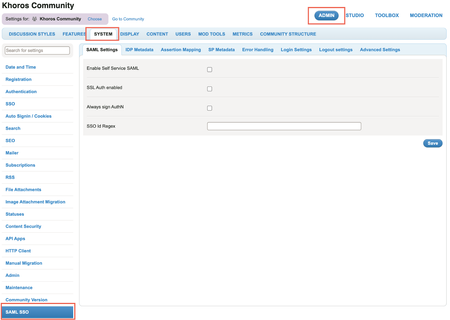
21.5 Release delivers self-serve SAML SSO as an out of the box core product feature, instead of a plugin-based approach. This release also includes enhancements around Events, Group Hubs and Community Analytics, and API updates. Content Features Self-serve SAML SSO Enhancements Remove the restriction on the number of Events node within a category Increase in the date range limit in Community Analytics reports Specify the default sort order for Group Hub List component Set the avatar size in a Group Hub card API Updates New FreeMarker sequence builder method Get node IDs of nodes displayed in the Group Hubs Listing Page You Found It. We Fixed It! Features Self-serve SAML SSO With this release, we’ve redesigned our existing SAML 2.0 integration to enable Community Admins to configure authentication for their Communities and integrate with their SAML IDP by themselves. SAML SSO is now available out of the box as a core product feature, instead of a plugin-based approach used earlier. This simplifies setting up SAML SSO in Communities and helps reduce the total cost of ownership. The key features in Self- serve SAML SSO include: Dynamic metadata: Supports up to three identity providers. Admins can integrate a maximum of three IDPs (that are XML strings) in the Admin panel instead of maintaining it in a config file. Dynamic entity identification: Admins can add the attribute name for the SSOID for their community. If this value changes, Admins can change the value and save it without restarting the Community. Dynamic assertion mapping: Admins can add all the attribute names in the SAML assertion in the Assertion Mapping tab in the Community Admin panel. This eliminates the need for maintaining a config file for Assertion mapping. Note: Communities launching post Community version 21.5 can opt to configure Self-serve SAML SSO while launching. Existing customers who want to switch to using self-serve SAML SSO must contact their Customer Success Manager or Account Executive. This process involves Professional Services (PS) engagement for user/SSO ID migration and may need to address other customisations such as user authentication workflows, custom user profile fields, and other customisations or integrations relying on user data. You can find the settings for Self-serve SAML SSO under Community Admin > Admin > SYSTEM > SAML SSO. Learn more about SAML SSO Learn more on how you can configure SAML SSO from the Admin panel Learn more about the SAML SSO tabs and settings in the Admin panel In the 21.4 release, we introduced the Feature Logs framework. This framework helps generate and view feature specific logs in components and endpoints. Developers and administrators can use these logs to monitor and debug during Community customisation. We are happy to announce that we are now explicitly providing you with…2.3KViewsSign in to react to this post13CommentsKhoros Communities 21.6 Release
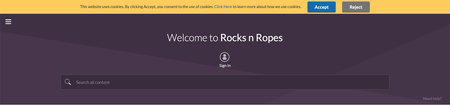
21.6 is a minor release. As communicated earlier, minor releases contain defect fixes and minor enhancements. Minor releases are not made available in production by default. To request an on-demand upgrade, contact Support. Content Enhancements Changes to the community cookie banner Bulk Download Member Data metrics to consider Events discussion style API Updates Moving events between boards using the Move API You found it. We fixed it! Enhancements Changes to the community cookie banner The community cookie banner now shows Accept instead of OK and includes a Reject button. The banner is displayed on your community site for each visitor until that visitor clicks the Accept or Reject button. Clicking the Learn more link opens the webpage that describes your cookie policy but does not dismiss the banner. Users must click Accept in the cookie banner and explicitly confirm their consent to activate the community cookies. Once accepted, the cookie banner will not appear in subsequent logins. If users click Reject, only the Type 1 cookies (“Strictly Necessary”) are set, and all other cookies are held back. Once rejected, the cookie banner will not appear in subsequent signins. If users do not Accept or Reject and browse the community, only the Type 1 cookies (“Strictly Necessary”) are set, and all other cookies are held back. The banner will continue to show in the subsequent signins. The table below shows the expected combinations when cookies need to be dropped Cookie Banner LithiumCookieAccepted Value User Action Drop Type 2/3/4 Cookies Disabled 0 N/A Yes Enabled 0 No action taken No Enabled 1 Click "Accept" Yes Enabled 2 Click "Reject" No Learn more on how to enable site-wide cookie notification banner. Bulk Download Member Data metrics to consider Events discussion style The metrics in the Bulk Download Member Data report will now consider Events discussion style along with the existing discussion styles. Henceforth, when you request the Bulk Download Member Data report for a particular time period(for example, March 2021), the Events discussion style will also be considered for computing the metrics. This enhancement is already available to all communities using Events and hence a support ticket is not needed. Learn more about metrics in Bulk Download Member Data. API Updates Moving events between boards using the Move API We have enhanced the existing Move API to now support the moving of events. You may want to move an event from one Events board to another when you find it more relevant to another Events board. With this release, using the Community v1 Move API, you can move an event along with its comments, RSVP information and invite data to another board. After a successful move, the destination board's permissions govern the event's access. Note: You can move only the event (which eq…1.7KViewsSign in to react to this post20CommentsKhoros Communities 21.10 Release
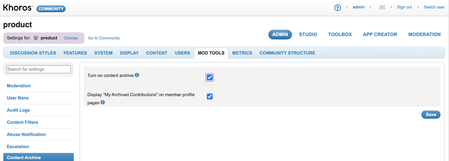
Content New Features Bulk content archive (Early Access) Enhancements Granular permissions to edit published blog articles Allow Co-Authors to edit published Blogs and TKB articles Userid field added to Bulk Download Member Data report Security Announcement API Updates Bulk Data API v2.0 Bulk content archive (EA) Allow co-authors to edit published articles Contributor types accessible through LiQL Attachments in Private Message You Found It. We Fixed It. New Features Bulk content archive (Early Access) We are happy to announce that we’ve extended the Content Archive feature to include support for archiving content in bulk. With the initial Content Archive release, you could archive only one article at a time. With bulk archive, you can archive multiple articles at once, making it easier to keep your content organized and up-to-date. With bulk archive, you can: Specify criteria to search for specific community content. Review the matching content and select all matching results or select one or more specific articles from the list. Archive the selected posts in bulk. Enablement To be considered for the Early Access (EA) program, contact your CSM. If selected, your CSM will work with the Support team to enable the feature. Once enabled, you can turn on/off the feature from the Admin panel. Go to ADMIN > Mod Tools > Content Archive > Turn on content archive. Note: If the Bulk Content Archive has not been enabled for your instance and the admin setting Mod Tools > Content Archive> Turn on content archive is turned on, you can archive only one content at a time. You can only restore or unarchive posts one at a time from the Archives page. There is no option to unarchive posts in bulk. All bulk archived content is moved to your community’s Archive Page. Check out this video to get an overview of the Bulk Archive feature. The video shows how you can bulk archive content from a TKB board with articles created at least one month ago, with no more than two views and no replies in the past one month. Bulk content archive 1. Click the Archives link under the Community dashboard on your community home page 2. Hover the Options menu 3. Click Bulk Archive 4. You will land on the Bulk Archive tool page. Choose from where you want to archive content. 5. In this example we choose Hi-Fi Products 6. Select the type of posts you want to archive. 7. In this example we choose TKB 8. Select how old the posts that you want to archive are. 9. In our example, we select posts that were created at least 1 month ago. 10. Enter a valid number for Maximum Views for the posts that you want to archive. This will enable the In the Past dropdown. 11. In this example, we e…3.1KViewsSign in to react to this post30CommentsKhoros Communities 22.1 Release
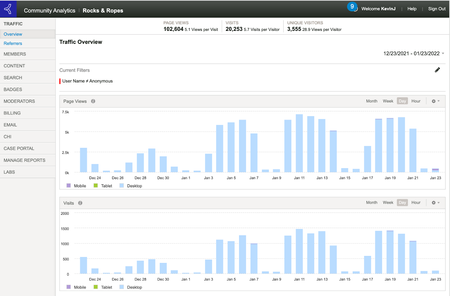
22.1 is a minor release. As communicated earlier, minor releases contain defect fixes and minor enhancements. Minor releases are not made available in production by default. To request an on-demand upgrade, contact Support. Content Enhancement Value Analytics survey export Filter anonymous user traffic in Community Analytics Announcement You Found it! We Fixed it! Enhancement Value Analytics survey export The Value Analytics survey questions and the corresponding answers from users were previously mapped to IDs and made available in the survey export. With this enhancement, if you so choose, the text of the questions and answers can be exported, instead of the IDs. Enablement Contact Support to have this enabled for your community. Filter anonymous user traffic in Community Analytics Community analytics users can now filter out anonymous user traffic from the community traffic metrics. Just set the User Name filter to Anonymous to filter out anonymous traffic. Announcement As part of our work at Khoros to continuously improve the security of our applications, we will be rolling out 'Shield Advanced & Additional Rate Limiting' for all of our customers soon. In addition to the network and transport layer protections that come with AWS Shield Standard, AWS Shield Advanced provides detection and mitigation against large and sophisticated DDoS(distributed denial-of-service) attacks near real-time visibility into attack and integration with AWS WAF Rate limiting protects your community and makes it more reliable when there is a spike in requests from a bad actor or a legitimate user who is intentionally or unintentionally trying to overwhelm the servers. You found it! We fixed it! General Fixes You can remove columns in analytics reports using Settings > Manage Columns. However, users were then not able to add the removed columns back to the reports. This issue has been resolved now. The issue where the ‘from/to’ fields in Private Messages were not searched for the entered username is now resolved. After creating an event, if the global language setting was changed, the Featured Guest component was not getting translated. This issue has been resolved. Anonymous users were able to open the unpublished Blog and TKB drafts through URLs. This issue has been fixed. When anonymous users tried to submit a post and were prompted to sign in, an exception error occurred during the sign-in process, and the post was not submitted. This issue has been fixed, and the error no longer appears.. When trying to add a Featured Guest to an Event, if the auto-suggest drop-down box didn’t show the username of the guest, users were unable to add the guest to the event. This issue has been fixed. Previously, authors and admins were not able to view the original image in a post if the image was pending moderation. We have fixed this iss…1.4KViewsSign in to react to this post19CommentsKhoros Communities 22.2 Release
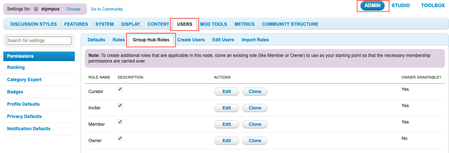
Content Features Bulk content archive (GA) OAuth 2.0 Client Credentials Flow Enhancement Group Hubs roles hierarchy (GA) Search for products on community Syndicate Comments List along with Product information Group Hub Name filter in Community Analytics API Updates CWA API Updates Bug Fixes Features Bulk content archive (GA) In the 21.10 release, we announced the EA of bulk content archive, which enabled you to search for outdated community content and archive multiple articles at once. Bulk Archive is now released as GA in Community release 22.2. Note: To enable this feature, contact Support. Learn more about Bulk content archive. Watch our Bulk content archive coaching video. Learn more about the bulk content archive APIs, Also see, Bulk Archive Content guide. OAuth 2.0 Client Credentials Flow Note: To enable this authorization, contact Support. In this release, we have added OAuth 2.0 Client Credentials Grant flow that reduces the usage of user name and password in the backend system. The client credentials flow enables server-to-server authorization which grants access to read data from the community, based on the access provided by the assigned role for the client app without the need of any user credentials. Learn more about, see OAuth 2.0 Client Credentials Grant flow. Enhancement Group Hubs roles hierarchy (GA) Currently, Membership Roles for Group Hubs exist only at the Group Hub level. To change permissions for these roles, you needed to go to each group hub to make the changes. For communities with several group hubs, this could be a time-consuming task. In this release, we’ve introduced a roles hierarchy for Group Hubs, enabling global management of group hub role permissions. Now, you can change the membership role permissions either at the community level or at the category level. The permissions for the roles cascade down to all the group hubs within the community or the category, respectively. Note: This feature is enabled for all customers by default. When you update your community to this feature, The OOTB permissions of existing group hubs will be set to default. These permissions will then be derived from the community level group hub roles. Any permissions that were previously changed explicitly for a group hub, will remain as is. You can change the permissions of any of these roles at the group hub level or category level. The permissions at the group hub level takes precedence over the roles defined at the category level, followed by the roles defined at the community level. When this feature is enabled, you can manage all group hub related roles (Curator, Inviter, Member, and Owner) from the Admin > Users > Group Hub Roles tab. These roles are now available at the community and category levels. What this means for existing group hubs: If you were using the out-of-the-box g…1.5KViewsSign in to react to this post5CommentsKhoros Communities 22.8 Release
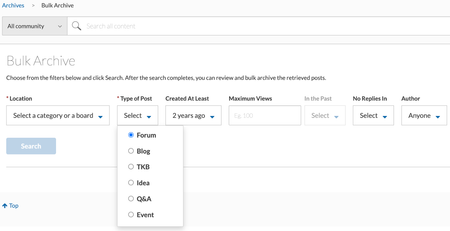
Content Enhancements Support for additional content types for Content archive Salesforce Connector v4.3 (General Availability) E-mail notification status information in the Bulk Download Member Data Enable Moderators to access Group Hubs in Community URLs to the Group Hubs .csv File Export API Fetch users subscribed to a label Support additional content type for content archival Bug Fixes General Fixes Accessibility Fixes Enhancements Support for additional content types for Content archive Previously, you could individually or bulk archive only KB articles, blog posts, and forum discussions. With this release, you can now archive Events, Ideas, and Q&A discussions. You can also unarchive (one-at-a-time) any archived ideas, events, and Q&A posts from the Archives page. The screenshot below displays the Bulk Archive page, now with the ability to archive all the above-mentioned discussion styles: You can also archive Ideas, Events, and Q&A posts from the post level menu options. Learn more about content archival and bulk content archival. Salesforce Connector v4.3 (General Availability) In community version 22.6, we released early access to SFDC v4.3. With this release, we are happy to announce the General Availability of this feature. Learn more on Connector for Salesforce package versions and upgrades Learn more about the issue fixes and enhancements on all Salesforce Connector Versions E-mail notification status information in the Bulk Download Member Data With this release we have introduced a new field - Email Notifications Allowed to the Bulk Download Member Data Report. For members who have opted not to receive email notifications, this field shows “No”. Otherwise, it shows “Yes”. To set whether or not to receive email notifications, click your profile image and go to My Subscriptions > SUBSCRIPTION & NOTIFICATIONS > Notification Settings. The screenshot below shows that the member has opted to receive email notifications. For this member, the Email Notifications Allowed column in the Bulk Download Member Data Report displays “Yes”. Bulk Download Member Data Report for the above example: Learn more about Bulk Download Member Data Report Enable Moderators to access Closed and Hidden Group Hubs in Community With this release, Moderators (who have permissions such as Mark posts as moderated, Bypass content filters, Bypass automatic spam rejection, and Approve, recall, or reject topics and posts) can access closed and hidden group hubs. When granted these permissions, moderators can moderate content within those group hubs without being a group hub member. This is controlled by a config, which is enabled by default (to disable it, contact Support). Note: To enable Moderators to access and moderate Group Hub content (Closed or Hidden) without being Group Hub member…1.9KViewsSign in to react to this post10Comments


You’ve seen all recent content