Help identifying XML fields for message attributes in Khoros data export
I'm working on a project where I need to parse and process a Khoros XML data export of my community, and I'm trying to map out the right entities and fields for several message-level attributes. Specifically, I'm trying to figure out which XML files, entities, and fields correspond to the following: Visibility scope of a message i.e how can I tell a message is private, draft or archived (API Reference) Whether the message is a solution and solution is marked by which user / user_id and when (time) (API Reference) Whether the message is read only or has comments blocked (API Reference) Moderation status - whether the message was rejected, approved etc (API Reference) Kudos - How can I find the kudos count and individual kudo for a message e.g user, time and weight info (API Reference) similarly, where is the MeToo data stored for a message? (API Reference) Any help with field names, entity references, look in would be a huge help. 33ViewsSign in to react to this post
 0Comments
How to parse <li-answer> <li-table> custom li tags into raw html
I was playing around with XML data dump of messages, and found custom HTML tags (<li-{type}> in the message content. From Khoros API (LiQL), I'm getting transformed HTML content, without any custom lithium HTML tags Tags example - li-answer, li-code, li-emoji, li-code, li-video, li-image etc How to parse such tags, and get content HTML like it is provided in the API using LiQL ?121ViewsSign in to react to this post1CommentHow to determine if a given node is visible to the public?
Hello! I am trying to figure out if it's possible, via API, to determine if a given node is visible to the public. E.g. is the "read posts" permission granted by default on that node. (which I suppose isn't a FULL check of the whole permissions tree but probably adequate for our needs) I've found that the roles collection will give you the list of roles for the node (https://developer.khoros.com/khoroscommunitydevdocs/docs/role-api-support#roles-collection-constraint-combinations ) - but that isn't actually helpful for figuring out what the permissions are, especially the DEFAULT permissions. I've also found the coreNode.permissions.hasPermission (https://developer.khoros.com/khoroscommunitydevdocs/reference/permissionshaspermissionpermission_identifier) call - but I think this can only be used to check if the user in context has a specific permission, not whether or not a node has a certain default permission. (I'm not actually a developer / won't be the one developing this, just trying to determine if a specific enhancement request is possible :-)) Thanks!!Solved1.7KViewsSign in to react to this post6CommentscoreNode.permissions.hasPermission context object probably is the closest you can get. But it's rather limited as you can only check for the current user AND current node. E.g. you cannot use it easily in a navigation component to show/hide elements without reading permissions.
I'm wondering what you are trying to build though that wouldn't work with Khoros built-in permissioning? The API is quite good at hiding stuff where the current user doesn't have read permissions. Isn't that sufficient for your use case?
Sign in to react to this post
Subscriptions to a label?
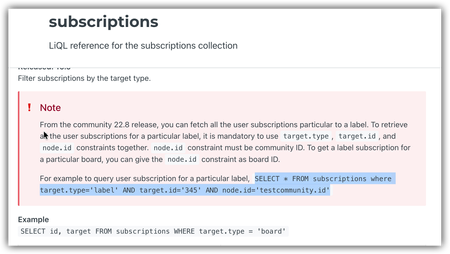
Hi all, I'm attempting to get the list of people who have subscribed to a label, but am struggling. The documentation is a bit confusing: It says both that you have to use a community ID as the node.id constraint but also that you can give the node.id constraint as a board id? Seems conflicting. And, regardless of the documentation, I get an error when I try to use a board ID (such as node.id='board:wireless-lan' where wireless-lan is the id of the board) My user has full admin permissions. Any ideas? I am not really a developer (as is probably evident!), just trying to pull a few bits of data for a stakeholder. Thanks!Solved2.7KViewsSign in to react to this post9CommentsI have been playing around for half an hour now and also only get subscriptions for the current user :( The target.id param seems to be always causing an error and therefor going against how it's documented even though it is returned in the resultset.
Sign in to react to this post

liqlAdmin in khoros aurora graphql API
Hi Folks, I want to add roles to the users using graphQL API given below. const ADD_USER_ROLE_MUTATION = gql` mutation addUsersToRole($roleKey: RoleKeyInput!, $users: [UserIdInput!]!) { addUsersToRole(roleKey: $roleKey, users: $users) { result { id name } } } `; const [addUserRole] = useMutation(ADD_USER_ROLE_MUTATION); addUserRole({ variables: { roleKey: { roleName: "role" }, users: [{ id: userId }] } }); The issue I am facing is that when this mutation is executed by an Admin user, the role is successfully added to the target user. However, when the same mutation is executed by a normal user, it fails to add the role due to permission denied errors. Is there a parameter or keyword that can be used in this mutation to allow a normal user to update their own roles or self-related data? For example, in Khoros Classic, we can use the liqlAdmin keyword in REST API requests to bypass such permissions. Is there an equivalent for GraphQL in Khoros Aurora? Thanks in Advance.Solved2.6KViewsSign in to react to this post13Comments- saikumarn1 year agoAdvisor
yogeshdixitChange the package name to "@customer/catfact-endpoint". If it still doesn’t work then request the Khoros support team to restart the community.
Sign in to react to this post

Dashboard Data Not Matching Reports — Need Help
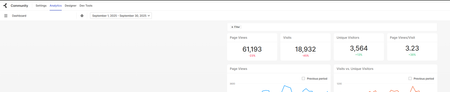
Hi everyone, I’m trying to pull dashboard data, pageViews, visits, uniqueVisitors, etc. but the numbers I’m getting aren’t matching. I’m really new to this and trying to get the data for reporting, and I’ve been stuck for a few months. I tried the Bulk API, but the numbers came out really low. So I decided to download the report from Analytics instead. Dashboard Report Can anyone explain why the dashboard numbers don’t match the report? Is anyone using a different method to get this data? I’m trying to bring everything into Power BI. Can I get this data using Aurora GraphQL API? Thanks!1.3KViewsSign in to react to this post2Comments
Looking for a Consultant for quick remote help
Need help with Khoros Community API integration. We're trying to sync user data from our CRM to Khoros using the REST API, but getting authentication errors when posting user profile updates. Can authenticate and retrieve data fine, but PUT requests to update user roles and custom fields are returning 401 errors. Need someone familiar with Khoros API permissions and user management endpoints. Should be 2-3 hours remote work to fix the API calls and test user sync. Need working by end of week.1.3KViewsSign in to react to this post2CommentsCan someone walk me through authenticating and using Postman with Aurora?
I'm a bit of a newbie when it comes to GraphQL and Postman and I'm struggling to work through the dev docs when it comes to authenticating and setting up the basics in Postman for testing in API calls in Aurora. We're looking ahead to migration and want to start getting familiar with basic API calls. Has anyone successfully got Postman and Aurora working? Is anyone willing to walk me through the bare minimum basics of getting this set up to authenticate into our Aurora instance and run a basic GraphQL call? I'm finding the dev docs pretty lacking currently so I'm turning to the expertise of the developer community here hoping someone has already figured this out. Or, if Khoros is reading this, can we have another Developer Webinar where we can walk through this? Or is this something you can offer through training or update the docs with more details? We've reached out to our CSM to see if we can get some 1:1 training but so far it doesn't look like that's an option right now.Solved2.6KViewsSign in to react to this post13Comments MattV2 years agoKhoros Staff
You have 4 authentication options when using Postman to authenticate with the API
- Session Key (local account username and password)
- Bearer token using SDK Key
- Access Token using pre-shared key (Dev Tools API apps)
- OAuth Grant Flow (Community SSO)
Option #1 is the easiest/best option, and what I use most commonly. This means you would login with an account created locally on the community (not using SSO). In the latest version of Aurora (24.08), you can create such as user through Admin > Users > Manage Users.
Setting up Postman
- Create a new collection
- Create a new Environment to use with this collection (to hold variables).
- sessionKey (secret) - leave blank
- hostname (default) - set to your communities hostname (URL without https://)
- username (default) - set to user created in community admin (or your username if local user)
- password (secret) - the users community password
- tapestry (default) - set to t5 (except for some special circumstances)
- sessionStartTime (default) - leave blank
- sessionLastUsed (default) - leave blank
- ht_username (default) - set if you need to login to the community with basic auth credentials (the browser login popup)
- ht_password (secret) - set if you need to login to the community with basic auth credentials (the browser login popup)
- In the collection pre-request script, add the pre-request script (included below)
- Create a new request in your collection
- Set the path to be POST https://{{hostname}}/{{tapestry}}/s/api/2.1/graphql
- Update headers:
Key: li-api-session-key
Value: {{sessionKey}}
- In the request body, add your GraphQL
- Execute Query
- Save your Query (and collection)
Collection Pre-Request Script
var sessionKey = pm.environment.get("sessionKey");
var hostname = pm.environment.get("hostname");
var tapesty = pm.environment.get("tapestry");
var ht_username = pm.environment.get("ht_username");
var ht_password = pm.environment.get("ht_password")
var username = pm.environment.get("username");
var password = pm.environment.get("password");
var sessionStartTime = pm.environment.get("sessionStartTime","");
var sessionLastUsed = pm.environment.get("sessionLastUsed","");

const thirtyMinsAgo = Date.now() - (1000 * 60 * 30);
const twoHoursAgo = Date.now() - (1000 * 60 * 60 * 2);

if (sessionLastUsed == "" || sessionStartTime == "" || sessionLastUsed < thirtyMinsAgo || sessionStartTime < twoHoursAgo || sessionKey == "") {
    console.log("authenticating");
    authenticate();
} else {
    pm.environment.set("sessionLastUsed", Date.now());
}

function authenticate(){

    const request = {
        url: `https://${hostname}/${tapesty}/s/restapi/vc/authentication/sessions/login?user.login=${username}&user.password=${password}&restapi.response_format=json`,
        method: 'POST',
        header: {
            'Authorization': 'Basic '+btoa(`${ht_username}:${ht_password}`)
        },
    };
    pm.sendRequest(request, function (err, response) {
        if (err) {
            console.error(err);
            pm.execution.skipRequest();
            return;
        }
        const data = response.json();
        if (typeof (data.response.error) !== 'undefined' && typeof (data.response.error.message) !== 'undefined') {
            console.error(data.response.error.message);
            pm.execution.skipRequest();
            throw new Error("Authentication failed (see console)");
        } else {
            console.log("key", data.response.value.$)
            pm.environment.set("sessionKey", data.response.value.$);
            pm.environment.set("sessionStartTime", Date.now());
            pm.environment.set("sessionLastUsed", Date.now());
        }
    });
}
Optional Post-Response script
if (pm.response.code == 401){ console.warn("Got unauthenticated response. Clearing variables."); pm.environment.set("sessionKey",""); pm.environment.set("sessionLastUsed",""); pm.environment.set("sessionStartTime",""); }Sign in to react to this post
Contraint conversationlastpostime in Api graphql getmessages does not work
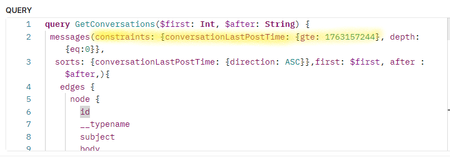
Hi everyone, Has anyone here ever tried using the messages API with the conversationLastPostTime constraint? In my case, the constraint is completely ignored — it doesn’t seem to have any effect at all. What I’d like to do is retrieve only the conversations starting from a certain date limit. But no matter what value I pass to conversationLastPostTime.gte, the results I get are not filtered by date. Has anyone else faced this issue, and did you find a workaround or a proper way to make this constraint work? Here’s the GraphQL body I’m using: Thanks a lot for your help482ViewsSign in to react to this post0Comments
The total number of views in bulk data table doesn't match the views display in community,
Hello all, I have a question, I search all the action keys of an article from the bulk data API table, Gives this result: ACTION_KEY COUNT(KHO.ACTION_KEY) moderation.mark-unread 1 visits.member-entrance 15 moderation.mark-read 1 messages.edit 1 view 57 visits.visit-summary 24 total counts is: 99 for all actions, and the view is 57, but the views display 181 in community. why the number of views in database doesn't match the views display in community, the difference between these two numbers is so significant. any idea?1.1KViewsSign in to react to this post4Comments