Khoros Communities 21.7 Release
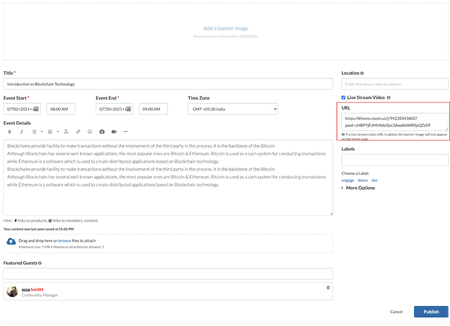
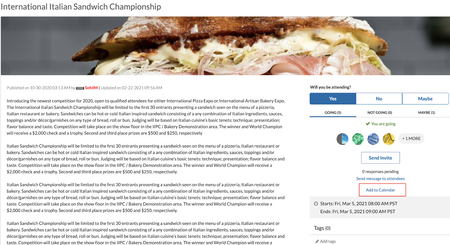
Features Integrate Zoom with Community Events API Updates RSVP API You found it. We fixed it! Features Integrate Zoom with Community Events Today, more and more meetings are moving to virtual spaces. Khoros Community Events now supports full integration with Zoom Meetings and Webinars. Integrating Events with Zoom enables community members to join the Zoom meetings and webinars directly from the community. With this integration you can: Create events to host Zoom meetings and webinars! All you have to do is paste in the Zoom URL. Now you can ask questions, discuss, and share follow ups to increase overall engagement in the threaded discussion. Host Zoom Meetings from a community event while providing full access to the Zoom options and features Host Zoom Webinars from a community event while providing full access to the Zoom options and features More info Learn more about the prerequisites required to host Zoom meetings and webinars from your community. Learn more about hosting a Zoom meeting and Zoom webinar on your community. Learn about mobile view for events with Zoom meetings and webinars. API Updates RSVP API We have updated the Events RSVP API to enable a member to add or remove the RSVP response on behalf of another member. Members with the “Create Events” permission now gain this ability. Learn more about move events API You Found It. We Fixed It. Earlier, the Internet Calendar Scheduling(ICS) files for community events uploaded incorrect schedule information in the Outlook calendar. This issue is now fixed, and all community events are now added to external calendar programs with correct information. We have fixed the issue where your editing position jumped to the beginning of a post while formatting any text at the bottom of a lengthy post. The issue with the preview of attachments to posts throwing misleading error messages is now resolved. You can now preview all attachments successfully. We have fixed the issue where some HTML characters in the case related fields in the Case Portal were encoded while sending information to Salesforce. Now, these HTML tags are no longer encoded. We have fixed the issue where the Top Tagged Posts widget displayed archived content. We have fixed the issue where the post count for a particular label on the Labels page did not decrease when posts with this label were archived. With this release, the post count for labels associated with archived posts will decrease as the post is archived. The Forum Topic Pages in Forums v5 with the Inline Editor enabled took more time than expected to load. We have improved the load time with this release, and all the inline reply controls load faster. We have fixed the performance issues with the load time when users with a large number of subscriptions navigate from the Notification Feed page. There was an issue with the notifications feed page, that when members use the notification bell icon to view new messages, the page was empty. The messages are loaded only after a page refresh. With this release, the notification feed page will display the notifications correctly when members access them from the bell icon. Khoros Communities has upgraded to the latest version of the XStream library. We have fixed the issue where users with simple HTML privileges could access and edit unpermitted HTML classes. This issue was specific to communities using a security feature designed to restrict allowed class values. This fix is available to all communities using this feature and are on version 21.5 or later. Note that this will prevent the use of all but a predefined list of values for HTML classes and can be customized on request. Reach out to Support if you have any questions or concerns. Accessibility fixes Earlier, the tooltip popup did not collapse when you clicked the Esc key, thus preventing users from viewing other controls. We have fixed this issue. On pressing the Esc key, the tooltip popup collapses for all tooltips across the community platform. There was an issue where the color contrast between community page elements and the background was insufficient for low-vision users to view the elements clearly. This fix ensures the contrast between foreground and background colors meets the WCAG 2 AA contrast ratio thresholds. We have fixed the issues where the JAWS screen reader did not identify the mandatory fields on the forms. Now, screen reader-dependent members can recognize the required fields, controls, and functionality. We have added titles for iFrame in the HTML code for all the dialog and drop-down menu components with this release. We have fixed the issue where the error message “Please input a complete URL”, while uploading an Image via URL to a given post, was not being read by VoiceOver. We have fixed the issue where while navigating on the search page, the tab focus and element role was not present on the “clear” link on the search form component. 2.2KViewsSign in to react to this post
 18Comments
Khoros Communities 21.4 Release Notes
Community 21.4 delivers a new framework that provides downloadable logs to help developers debug and troubleshoot during development or customisation, download ICS files for upcoming events, and enhancements to some of the Community features and APIs. Content New Features APIs Bug Fixes New Features Internet Calendar Scheduling file support for Events New permission to hide/unhide videos in video gallery Sorted list of Badge Image Feature Logs Internet Calendar Scheduling (ICS) file support for Events With the option to download events as ICS files, you can now download and add community events with a calendar of your choice. This file download includes upcoming events only. Note: To use this feature you must upgrade Events to version 1.1. Go to Admin > Studio > Events and select Events 1.1 version. You now have the option to download ICS files for an event for all the upcoming events in an Events node from the Options menu: from the email notifications you receive for updates to events you are subscribed to: Learn more about Events New permission to hide or unhide videos in video gallery We've introduced the Hide or unhide own videos permission to hide or unhide videos in your video gallery from other members as and when you upload them. You can find this permission under Admin > Users > Videos. Members with this permission can hide or unhide the video in their video gallery from other members while uploading a video directly to their video gallery or a post as shown below. If the Hide in video gallery option is selected, other members can view the video only in the posts it is inserted in and cannot view it in the video gallery. However, Admins, moderators and members with the "Approve Reject, or Recall videos" permission can view all videos, both hidden and public, in the video gallery. If this option is not selected, all members can view the video from that member's video gallery. The option to Hide in video gallery is not available to members who do not have the Hide or unhide own videos permission. By default, the videos are hidden. Note: All members can view videos that are public. If you want to hide all the existing videos in your community from the video gallery, contact the support team. Please note that this request marks all the existing videos as hidden. Once all videos are hidden, we cannot roll back to the previous state. For example, if 20 videos were public and 30 hidden, and we hide all videos, we cannot roll back to the state with 20 public and 30 hidden videos. You can manually make the required videos public. Learn more about uploading videos Sorted list of Badge Images We have made changes to the order in which the list of filenames for the badge images listed under the Admin>Users>Badges>Create>Badge Image appears. They now appear in alphabetical order, with numbers and special characters taking precedence. Feature Logs With this release, we introduce the Feature Logs framework that can be used to generate feature specific logs in components and endpoints to help developers and administrators monitor and debug during Community customisation. Create a ticket with Khoros Support to enable Feature Logging in your community. After Support has enabled the feature, you can generate feature logs in the Community in Community Admin. Logs are accessible through Toolbox. Learn more about Feature Logging in the Developer Documentation Portal. API Changes We've added two new methods to the utils FreeMarker context object to support our Feature Logs externalLogs.name.{name}.error externalLogs.name.{name}.info You Found It. We Fixed It. We've fixed the issue where members other than Admins and moderators could edit the SEO fields while editing posts. To achieve this, you must: Turn off the Allow canonical URL for Idea posts to be overridden settings (under Community Admin > Discussion Styles >Ideas) to restrict members other than Admins and Moderators from editing SEO fields. By default, set the Manage ideas and comments permission (under Community Admin > Users >Ideas) to Deny for all users other than Admins and Moderators. This restricts edits to the SEO fields for other members. We have fixed the issue where the date and time of blogs display the revised date. Now, when you edit and publish a blog, the post time doesn't change. We've fixed the issue where there was no option to order TKBs within GroupHubs manually. Manual ordering for TKB articles is now available at the TKB sub-node level for GroupHubs. We have fixed the issue where there were discrepancies in the total number of community users returned by API v2.3.2KViewsSign in to react to this post39CommentsKhoros Communities 20.11 Release Notes
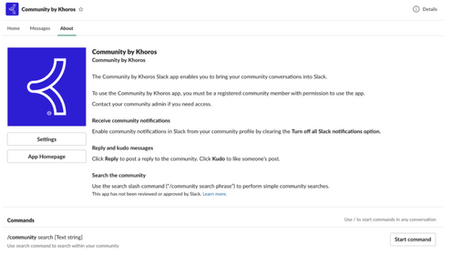
New Features Events (GA) Slack Integration (GA) Content Workflow and Approval improvements for Blogs and TKBs (EA) Email metrics (GA) Billing metrics (EA) Spam-related summary metrics in Community Analytics Filter for new posts in Community Analytics Multi-Factor Authentication (EA) Comments List Syndication (GA) API Updates Updated LiQL support to retrieve group hub members by membership role Create an abuse report for a private message Events (Occasions) API support Bug Fixes Events (GA) In the 20.10 Release Notes, we announced Early Access for our new discussion style, Events. We are excited to announce that Events is now in General Availability (GA). Note: Events is a paid feature but is included by default in certain community packages. To learn whether Events is included in your package or costs extra as well as request to have it enabled for your community, contact your Khoros Account Executive. Note: With the GA release, we provide API updates. While the front-end feature is called Events in the Community UI and feature documentation, the APIs and API documentation use the term occasions. Learn more about Events. Slack Integration (GA) In the 20.10 Release Notes, we announced Early Access for our Slack integration with the community. We are excited to announce that Slack integration is now in General Availability (GA) and enabled by default for all communities. Khoros Communities offers a Slack integration app that acts as a bridge between Slack and your community. Using the app, your employees can perform light-weight, common community tasks from within Slack. From the Community by Khoros Slack App, you can: Receive notifications Perform immediate actions (reply, kudo) Run simple community searches Learn more about setting up and using the Community by Khoros Slack app and participating in your community via Slack. Content Workflow and Approval improvements for Blogs and TKBs (EA) We are excited to announce the release of a new content workflow system to publish blogs and Tribal Knowledge Bases (TKBs). Blogs v3 and TKB v4 introduces a 3-step content-creation workflow that provides for authoring, editing and publishing. Note: You must open a support ticket to enable this feature. Content Workflow and Approval is the biggest change to the blogs and TKB discussion styles in several years and have been redesigned to focus on collaboration and usability. You now have more granular control over author, editor, and publisher permissions, enabling you to clearly define who can perform each task in the publishing workflow. Each blog or TKB article moves through different states and are assigned to members with specific roles. Thus, members always know what state an article is in, when it’s their turn to work on the content, and what they must do to move the article to the next step in the publishing workflow. This flowchart shows how an article moves through the publishing workflow and the tasks members with specific roles can perform. Content workflow and approval provides these blog and TKB enhancements: Granular Permissions: More robust permission structure to support different content roles Author, Editor, Publisher for different purposes create, review and publish respectively. Dashboard improvements: Improved article dashboard to track an article’s journey in the publishing workflow and make it easier to take relevant actions. Draft History view: A new component to track every action performed on an article until it is published. This records what action was done by whom and at what date and time. Compare two versions of a draft or published articles: Compare any two versions when the article is in the workflow process or after the article is published. The highlights show the differences between two versions of a draft or article. Internal comments: Provision to add internal notes for the article between the members collaborating on the draft. Notifications: Email Notifications to relevant community members at every stage in the Workflow. Learn more about Content Workflow and Approval improvements for Blogs and TKB. Email Metrics (GA) We now include the Email metrics feature in Community Analytics provides a set of key metrics that track the journey of an email from the moment it gets triggered in the community to the recipient opening and clicking on a community link in the email. Community Managers can measure the effectiveness of email notifications and take appropriate action to get the most of these triggered emails. To benefit from this feature, your community must: be on AWS use SendGrid as the email platform (Learn more about Khoros mail options) be on Community Release version 20.8 or above Learn more about Email metrics. Billing Metrics (EA) We are happy to announce the early access to Billing Metrics which provides more transparency to the metrics related to the billing of your community contract. By making Billing Metrics available in Community Analytics, you can easily access how your billing-related metrics trend against the contractual tier of your Community. Note: Reach out to your CSM to join the EA program. The Billing metrics shows the current usage against the contractual tier limits for the metrics subscribed to in the contract as per Salesforce data. Metrics also show the timeline view of usage of all the metrics subscribed to in the contract. Learn more about Billing Metrics. Spam-related summary metrics in Community Analytics The Summary view will now have the Spam metrics. In the Summary view you can view these two measures as SPAM TOPICS and MARKED NOT SPAM TOPICS. Filter for new posts in Community Analytics A filter for new Topics is now available in Community Analytics. This new filter (New Topics) considers only Topics created within the time period you select to compute the metrics and also to generate the CSV export. Note: This filter is available only for the Topics discussion style. Multi-Factor Authentication (EA) Khoros now provides support for Multi-Factor Authentication (MFA) to secure community access for users with privileged access rights (usually Admins). Enforcing an additional layer of security helps prevent unauthorized account access. After MFA is enabled for a community, the system mandates all privileged users (identified on the basis of certain elevated user permissions) to have this additional level of authentication to access the community. These users must: complete a one-time MFA setup for their account and add their account in an authenticator app provide a verification code generated by the authenticator app, in addition to the username and password for signing into the community. Note: As of now, MFA support is available only for non-SSO communities. To enable MFA for your community, open a Support ticket. Learn more about MFA. Comments List Syndication (GA) In 20.10, we announced EA of Comments List Syndication, our latest Community Syndication component. Comments List Syndication is released as GA as of Community release 20.11 and will be enabled for all customers by default. This syndication component supports simple SSO authentication flows (LithiumSSO and SAML). Authentication flows including additional levels of authentication, like multifactorial authentication, are not supported. Learn more in About Comments List Syndication. The GA release includes support of a new Comments List Syndication skin, based on our Responsive Skin. The Comments List Syndication skin is much leaner than the Responsive skin. We recommend basing your custom Comments List styling on the Comments List Syndication skin to improve load time performance of the component. A Comments List component uses the Comments List Syndication skin. You can create a custom version of this skin in Studio in order to match the look and feel of your Comments List to your brand's guidelines. See Comments List development and testing for more information. Also, see our new Comments List FAQ. API Updates We've updated LiQL support to retrieve owners and members from membership nodes, as well as introduced a new Occasions API to support the Events feature. Updated LiQL support to retrieve group hub members by membership role We have updated how to retrieve members from membership nodes by their membership role. (At this time, group hubs are the only node type that supports memberships. Group hub membership roles include: Member, Curator, Inviter, Owner) We added the grouphub.id constraint to the users collection as a simpler, more reliable way to retrieve users from group hubs. We recommend using these new constraints to retrieve owners and members. To get members of a group hub: SELECT id, login from users where grouphub.id = <groupHubId> To get members of a group hub by their role in the group hub: SELECT id,login FROM users WHERE grouphub.id = <groupHubId> and roles.name = 'Owner' Note: Prior to 20.11, you would use queries like these to get members and owners: SELECT id,login FROM users WHERE node.id = <nodeType>:<nodeId> SELECT id,login FROM users WHERE node.id = <nodeType>:<nodeId> AND roles.name = 'Owner' These legacy queries are still supported. Create an abuse report for a private message You can now create an abuse report with Community API v2 using a POST request to /api/2.0/threaded_notes/{threaded_note_id}/abuse_reports. This equivalent to selecting Report as Inappropriate from the Options menu in the Community UI. The request triggers an abuse report notification message that will appear in the Board ID set in the Board ID for private message abuse reports setting in Community Admin > Mod Tools > Abuse Notification. Note that the abuse report created cannot be queried with the /search endpoint or retrieved by ID. This API is supported with Private Messages v3 only. Learn more about Private Messages feature versions. Events (Occasions) API support Khoros is introducing API support for creating and managing Event messages through the Occasions API. As "events" is a common development term, we've decided to brand Event Messages as Occasions on the back end. From a functional and data standpoint, Events and Occasions are the same thing. The only difference is how you are interacting with them at the time, either through the front end (Events) or API (Occasions). The API allows for parity with the Communities Events feature which enables the creation and management of Events, invitations, RSVPs, etc. New API Endpoints: Create an Invitation to an Occasion Create an RSVP to an Occasion Update an RSVP Retrieve an Invitation Delete an RSVP Updates to Existing API Endpoints: Create a board Create a message Retrieve a message Update a message Delete a message Delete a board In addition to support through our API, we have added several new LiQL collections enabling you to retrieve information about Occasions, guests, and more. occasion_datas rsvps occasion_invites You Found It. We Fixed It. We have fixed the display issue where the "Change Node" modal window (Community Admin > "choose") was not usable if the community included a very large number of nodes.. We have fixed an issue in the page initialization script that caused some redirect loops in the 20.8 release. When using Forums v5, members who enabled the Automatically subscribe me to all topics or reviews I participate in setting under Profile settings > Notification Settings were not being auto-subscribed to those discussions and as a result did not receive any email notifications unless they manually selected the Email me when someone replies option for the thread. This issue has been fixed and members are now auto-subscribed when this setting is selected. We have fixed the issue where the Group Hubs Activity Feed was not being populated for 20.8 communities. Previously in Chrome or Firefox, you could not resize the Endpoints or Macros text boxes in Studio. This issue had been fixed, and you can resize these text boxes like you can in other areas of the application. To meet accessibility requirements, we have made changes to ensure that <iframe> and <frame> page elements are not empty and include unique title attributes.2KViewsSign in to react to this post3CommentsKhoros Communities 22.12 Release
Enhancements GDPR cookie banners We have updated our site cookies banner to reflect the expanded privacy considerations for community visitors. Visitors will be presented with a new Preferences button in addition to the Accept and Reject buttons on the cookies banner. Visitors who click Preferences are presented with more granular cookie privacy options to manage. After visitors confirm their selections, these preferences are saved in their browser and the banner disappears. Note: To enable this enhancement, you must update the Cookie Banner version (under Admin > Studio > Features) to v2. All strictly necessary cookies are selected by default for all visitors. After enabling cookie banner v2, only new community visitors or the visitors who have not accepted/rejected in the cookie banner v1 can view the cookie banner v2. Visitors' preferences for configurable cookies are saved for a period of 6 months by default. After 6 months, these cookies expire. If you want to change the default cookie expiration period, contact Support. Learn how to enable site-wide cookie usage notification banner You found it! We fixed it! General bug fixes In the 22.9 and 22.10 releases, the checkbox that indicates that users have read and accepted the Terms of Service no longer appeared on the SSO registration form. Additionally, communities that had customized the registration form and expected the checkbox to be present found that users were unable to complete registration. This issue is now fixed. Now, the Terms and Condition checkbox displays during the registration process and users can successfully register. Previously, when a non-Admin member with the Simple HTML Permission tried to post with empty lines in the beginning of the message, an error message saying Invalid HTML was displayed, and the empty spaces were automatically removed. This issue is fixed. Previously, when there were more than 250 Salesforce cases on the Case Portal, and you tried to download them, not all cases downloaded successfully. This issue is fixed. Previously, when members tried to archive community posts, and archival failed due to some reason, members were not able to archive the posts upon retrying. This issue is fixed. Now, posts are archived successfully upon retrying. Previously, when a bulk archive job was submitted with a value in the “Author” filter field and that author who submitted the bulk archive job was deleted from the community, the bulk archive page did not load properly. This issue is fixed. Now, the Bulk Archive page successfully loads the list of jobs even if one of the jobs has a deactivated member in the “Author” filter or if the member who ran a job has been removed from the community. We have fixed the issue where the "Marked as spam. Visit the spam quarantine to manage this message” notification did not display when you opened a knowledge base or blogs or QnA thread that was marked as spam. Previously, when you subscribed to a Forum board and set your notifications to be received in a digest, you received an error when you clicked the Unsubscribe option from the digest email. This issue is fixed. Previously, when Contests limited people to submitting only one entry per contest, the New entry button on the Entries tab was inactive. The button was enabled only after a page refresh. This issue is fixed. The issue that the cover images on community 22.10 displayed as broken images is now fixed. Earlier, when you tried to syndicate a message from the Message List tab under Admin> Content > Community Syndication, the Tags filter did not populate with the list of tags that the forum was already tagged with. This issue is fixed. Now, the result set will populate all the tags that the forum under consideration is tagged with. Previously, communities that supported uploading videos of a maximum of 10 GB failed to upload (timed-out) even if the size was less than 10GB. This issue is fixed. Now, you can successfully upload videos without being timed-out. Previously, when you searched for a product in the Associated Products field that had any special characters (other than numbers and alphabets) in its name, it did not return all the product names that matched the search keyword. For example, when you entered “reebok”, all the products association titles that matched with “reebok” showed up in the result set. But, when you searched for “reebok-”, the result set did not list the ones with the “-”. This issue is fixed. Previously, the API v2 refresh tokens were expiring unexpectedly. This issue is fixed. Now, the refresh tokens do not expire anymore and members can use them to refresh access tokens. Previously, in the API v2 LiQL queries, when you queried the banned field, the banned field was not returned in the response for all the users. This issue is fixed. Now, you can see the banned field in the response of the LiQL query for all the users. Previously, the Critical CSS service was not operating as expected in the production and staging environments of the community. This issue is fixed. Now, the Critical CSS operates in both production and staging environments. Previously, when members tried to attach a DTS (.dts), JMP DOE (.jmpdoe), or JMP Flow (.jmpflow) files to a draft post in the community, the files failed to upload and an error message was displayed indicating that the content type did not match its file extension and the file had been removed. This issue is fixed. Now, members can successfully attach these files while creating a new post or replying to a post in the community. Previously, in the API v2, when you try to update the state of a message to read-only by adding the true value and the read-only state of the message from the false to true value through a PUT request, the values are not updated in the response respectively. This issue is fixed. Now, you can update the state of the message to true and read-only state of the message from the false to true value. Previously, in a Forum topic, when members tried to edit a reply that was marked as a solution, the edit page of the original topic was opening instead of the reply editor. This led to difficulty for members to edit the reply. This issue is fixed. Now, members can edit the replies that are marked as solutions to the Forum topics. Previously, members with “Manage Own Articles” permission were able to move Blog posts of other members even if they did not have “Manage any article" permission. This issue is fixed. Now, members cannot move other Blog posts unless they have “Manage any article" permission. The issue where the prefix, “Re:” was included multiple times in the Subject of any replies instead of a single prefix is fixed. The issue where webinar attendees were unable to join a webinar through Khoros Events app due to recent zoom SDK upgrades is fixed. This fix is available from community v22.10 onwards. Accessibility bug fixes Previously, links on Broadcast and multicast messages in Private Messages v3 did not have discernible texts for images. This issue is fixed. The issue where the screen reader did not announce the control information in browse mode is fixed. Previously, the Group Hub node avatar link did not have accessible text for the screen reader to read. This issue is fixed.2.5KViewsSign in to react to this post30CommentsKhoros Communities 22.10 Release
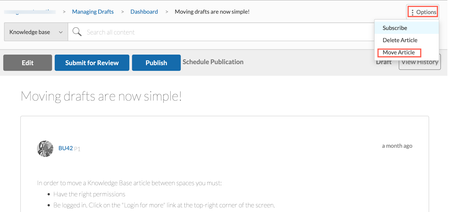
Enhancements Changed forum discussion subjects rendered properly in replies and community widgets Prior to this release, when the subject (or title) of a forum discussion was modified, any new replies inherited the modified subject. However, all the older replies continued to refer to the old subject. All widgets or places such as breadcrumbs, Permalinks, View History, Move Message flow, Spam Quarantine, My Contribution, Mentions, and Search results for replies showed the older title of replies. Now, all replies (new and existing replies) under a root discussion reflect the most current subject (or title). Also, the most recent subject displays wherever this discussion renders in the community. Note: To enable this enhancement on your community, contact Support. The config is not enabled by default in the community and you cannot turn off the config after it is enabled. Move Blog or Knowledge Base drafts to a different community location From time to time, you might want to move a blog or knowledge base draft to a more appropriate board. Or, you might want to move drafts out of a KB or Blog, or remove them from the community structure, but want to maintain the drafts. In these cases, you can now move these drafts to a different location. With this release, you can now move drafts to different boards. Just open the Options menu of the draft you want to move and click Move Article. Note: To use this feature, you must be on feature versions TKB v4 or later and Blogs v3 or later. Go to Studio > Features and select the appropriate versions for TKBs and Blogs. Permission Requirements To move a draft of a blog post, you must have the Manage any article permission. To move a draft of a KB article, you must have the Create, edit, publish, and manage articles permission. To move your own Blog drafts, you must have the Start New Article and Manage Own Article permission. Learn more about moving KB articles to a different knowledge base moving blogs post to another node. Remove EXIF data from images based on allowed listed tags With this release, when members upload the images such as Inline, Gallery, and Profile images to the community, community removes EXIF metadata that is not in the allowed list from the images. While removing this data, the community retains the allowed list of tags. This change is applicable only for the Inline, Gallery, and Profile images and for the ‘Download Images’ flow. Announcements EOL: Email a Friend and Invite a Friend capabilities With the 22.10 release, we have turned off and removed the Email a Friend and Invite a Friend capabilities for all communities, including releases prior to 22.10. The decision to turn-off these features is two-fold: minimal use of the features and the potential for email abuse of these features given the current throttling restrictions. There are already a wide variety of ways for people to easily share links across the web, including using their personal email. In the future, we will be looking at simple ways for people to share links with each other within the community via private messages and notifications. If you have questions about this change, contact your Khoros account manager. Redirects: HTTP-to-HTTPS for CloudFront backed communities With this release, we no longer allow HTTP traffic for all the CloudFront backed communities. All HTTP traffic to these communities is automatically redirected to HTTPS. This change is irrespective of the community version. API Updates Move Blog and Knowledge Base article drafts We have enhanced the existing Move API to enable you to move blog and knowledge base drafts. With this release, using the Community v1 Move API, you can move a blog or knowledge base drafts along with its comments and information to another blog or knowledge base board respectively. Note: To use this feature, you must be on feature versions TKB v4 or later and Blogs v3 or later. Go to Studio > Features and select the appropriate versions for TKBs and Blogs. Support for Message Archive and Unarchive Event Subscription In this release, we have updated the Community v1 Event Subscription API to support the MessageArchive and MessageUnarchive event subscriptions. Learn more about the Message Archive and Unarchive Event Subscription. You found it! We fixed it! General bug fixes Previously, when you ran the Kudo REST API in REST API v1 and v2 to give multiple kudos in quick succession to a member, the “Kudos given” count for that member was incorrect. This impacted Kudos Metrics in Community Analytics. This issue is now fixed. Now, when you run this API in quick succession, the Kudos metrics (net_kudos_events_received and net_kudos_weight_received count) increases only by 1 kudo per post. Earlier, when images were attached on a community page, some of the images displayed in their native resolution and others resized to a much lower resolution. This issue is now fixed. Now, when you attach images on any community page, they display close to the same size. Earlier, when you clicked any of the buttons on the Value Analytics Survey dialog box, the page focus scrolled to the bottom of the page. This issue is now fixed. Now, the page does not focus to the bottom of the page, but redirects according to the option you choose. Earlier, when you searched for labels in messages, the search returned only those labels with an exact match. It did not return those labels where the keyword matched with either the prefix or suffix. For example, assume that “Best Practices” and “Practices” are labels on your community. When you searched for “Practices” in the label section, the “Best Practices” label was not returned. Instead, only the “Practices ” label was returned. This issue is now fixed. Previously, when you tried to post an event with a Live Stream URL with emoticons in its title, you received an error message. This issue is fixed. Previously, when you uploaded a .SWRD file to a Case Portal, the upload failed. This issue is now fixed. Previously, when you added an emoji to any post on the community, the emojis appeared as broken images for a few seconds before the actual image displayed. This issue is now fixed. Previously, when members viewed notifications, the notifications count remained uncleared in the notification feed and received incorrect counts from the cache. This issue is now fixed. Now, when members view notifications, the notification feed clears the count and returns a valid count. Previously, in the Bulk Archive page, when members tried to re-submit the same search criteria after canceling the existing search, members were not able to perform the search and an error message was displayed indicating that the job already exists for the search criteria. This issue is now fixed. Now, members can perform the search by re-submitting the same search criteria after canceling the existing search. Previously, when non-SSO users tried to change their email addresses using dual authentication in the community, the email addresses were not updated but the user received a success message indicating that the email address had been updated. This issue is fixed. Now, non-SSO users can change their email addresses using dual authentication in the community. Previously, when members used API calls to get the user settings such as user signature on Studio, the API calls did not return value on the NotificationFeedPage. This issue is now fixed. We have updated the code to refresh the user cache before returning the settings for a user when loading the NotificationFeedPage. Previously, in the community, when members tried to access the archived posts of the deleted boards, an error message was displayed indicating that the specified parameters were invalid. This issue is fixed. Now, when members access archived posts of the deleted boards, they are redirected to the related URLs of the posts or indicated that the content has been archived. Previously, when members added a video URL or mentioned other members in their posts, the videos and mentions did not appear in the RSS feed reader as they did not render as valid HTML links in RSS feed. This issue is fixed. Now, videos and mentions added in posts appear in the RSS feed reader. Previously, when members tried to access any node or posts within the node and the URI path of the node contains asset or RSS keywords, the loaded page indicated that the members were not authenticated even if they were logged in to the community because of certain URI patterns. This issue is fixed. Now, the page successfully loads when members access the nodes which have asset or rss keywords in the URI paths. Previously, when community admins or moderators added a comment to a post, a Moderator flag was added to the post. This issue is fixed. Now, comments from admins and moderators do not display the Moderator flag. Previously, when members created content filter by enabling Ignore inline HTML and do not post option and inserted non-breaking spaces ( ) and HTML span tags (<span>) to any post through browser’s developer console, the content filter did not flag non-breaking spaces ( ) and HTML span tags (<span>) as spam and members were able to post the content in the community. This led to difficulty in identifying spam messages. This issue is fixed. Now, content filters flag non-breaking spaces and HTML span tags added in the posts through browser's developer console. Previously, when community members signed in to the community for the first time and their SSO IDs contained spaces at the beginning or end of their ID, the spaces added were stripped from SSO IDs. This led to authentication issues, which resulted in members signing in to the wrong account. This issue is fixed. Now, the spaces added in the beginning or end of the SSO IDs are not stripped, and these accounts are considered unique and valid. Previously, when community admins or moderators tried to update the SSO ID of a member account by adding space at the beginning or end of the same SSO ID, a new profile was created and the original profile was updated to the same SSO ID of the new profile as the space added was stripped from the SSO ID. This created duplicate profiles with the same SSO ID, which resulted in members logging in to the wrong account. Now, when community admins or moderators update the SSO ID of a member account by adding space at the beginning or end of the same SSO ID, a new profile is created that has a different SSO ID from the original profile. The issue where the Bulk Archive page displayed incorrect results when the specific bulk archive filters were applied is fixed. Previously, members with Manage own articles permissions were unable to move or delete their own blog posts to other nodes on the community. This issue is fixed. Now, for members to move or delete their own blog posts, they must have both the Start new article and Manage own article permissions and Manage own article permission on the destination node. For members to move or delete other member’s blog posts, they must have both the Start new article and Manage own article permissions and Manage any article permission on the destination node. Accessibility fixes Previously, there was no heading defined for the Managed Friends and Ignored pop-up window. Since screen readers had no information to read out, people using screen readers did not understand the purpose of the page. This issue is now fixed. The issue where the screen reader did not announce the state as ‘disabled’ for the disabled items in the Options menu on the Gallery page is fixed. Previously, the descriptive labels were not available for various fields (drop-down menus, search fields, and so on). Since screen readers had no information to read out, people using screen readers did not understand the purpose of these fields. This issue is now fixed. Previously, the links that are disabled (.lia-link-disabled) within the application due to user permissions did not meet the color contrast specifications for accessibility. This issue is fixed. Previously, the form elements on Community pages did not have labels. Users who depend on the screen readers found it difficult to navigate through the pages. This issue is fixed. We have ensured that every form element has a label.3.3KViewsSign in to react to this post33CommentsKhoros Communities 22.4 Release
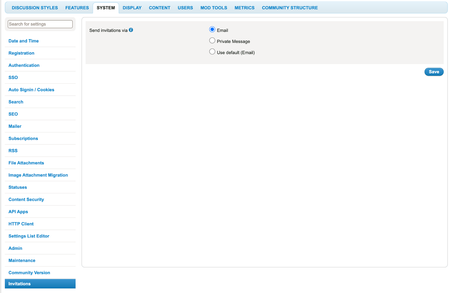
Content Enhancements Send Group Hub invitations by email Use external URL while archiving content API Updates External URL while archiving content Invite by Email for Group Hubs Contributor Type accessible through LiQL LiQL Updates Bug Fixes General Fixes Accessibility Fixes Enhancements Send Group Hub invitations by email Until now, you could send invitations to community members to join Group Hubs only via Private Messages. With this release, we’ve introduced the Invite by Email feature for Group Hubs. You can now send invitations for Group Hubs to non-community and community members via email. This also eliminates the limitation with communities that do not have the Private Messenger feature; such communities can send invitations via email. You also can track the invitations sent from the Member Management board. Enablement Contact the Support team to enable this feature. After the Support team enables the feature, go to Admin> System > Invitations and choose Email for Select Invitation via option. Send invitations When you send invitations for Group Hubs using the Email option, this window now opens: In the Enter usernames field, add the username of community members. In the Enter email addresses field, add email addresses of non-community and/or community members. In both the above cases, the invitations are sent to the email addresses only. Members who have already joined the Group Hub do not receive an invitation. You can send a maximum of 10,000 invitations at a time. You can copy/paste a list with a maximum of 10,000 email addresses. If you copy/paste a list of email addresses, all the invalid email addresses are ignored and the invitation is sent to the remaining valid email addresses. Track Email Invitations for open, closed, or hidden Group Hubs On the Member Management page, click the PENDING EMAIL INVITES tab. This lists the pending email invitations sent to community and non-community members. Learn more about inviting users to join Group Hubs via Private messengers and email Use external URL while archiving content Earlier, while archiving community content, you could redirect users only to pages within your community. With this release, while archiving content, you can add an external URL to redirect users. To use this feature, your community must Be on version 22.4 or later Have the Turn on content archive option turned on Have the Allow external alternate URLs option turned on While archiving content on communities that have this feature enabled and required settings turned on, you will now see the following popup: Learn more on archiving community content API Updates External URL while archiving content We have updated the Archive Messages and Edit a Suggested URL endpoints to support the external URL when the Allow external alternate URLs and Turn on content archive permissions are selected in Admin > MOD TOOLS > Content Archive. Invite by Email for Group Hubs We have updated the POST/Invite user to join node endpoint to create email invitations for both the community and non-community members to join the Group Hubs. Note: You must set the Send Invitation via permission to Email in Admin > System > Invitations. Contributor Type accessible through LiQL The current API to retrieve the contributors for TKBs and blogs returns both the co-authors and contributors together. With this release, we introduce a new constraint to list the co-authors and contributors of the published and unpublished blogs and TKBs separately. This new constraint, called contributor_type, is added to the messages object with two acceptable values: co-author contributor Note: The contributor_type constraint must be used in conjunction with the contributor.id constraint in the LiQL query. Learn more about contributor_type. LiQL Updates As first mentioned in the 22.3 Release Notes, we have updated the messages collection to honor the Hide messages in this board from the List option for a particular board. If you have enabled this option for a particular board, the messages will not appear in the response of a LiQL query. See messages collection. Note: This change could impact any customizations created in partnership with our services team that leverage hidden fields, so you should review these areas. We have removed the mandatory board.id constraint from the contributor.id constraint in the messages collection. We have added the new invite_type and external_user_email constraint in the invites collection to retrieve all the grouphubs invitations of the community and non-community members. You found it! We fixed it! General Fixes The issue where blog editors on communities with Blog v3 and v3.1 were unable to edit Post published articles in Awaiting review status is fixed. The issue where you could not successfully submit inline replies to posts on communities that use Products v1 and Forums v5 is fixed. Earlier, when regular users with permissions to comment submitted a comment on a topic, an error displayed indicating that they do not have sufficient privileges to perform this action. This issue is fixed. Earlier, in communities on 21.12, when you ran the query for occasion_data.live_stream_url, an error returned that indicated the object doesn't exist. This issue is fixed. The issue where some past events were not displayed in the calendar view is fixed. Earlier, when you tried to access the spam quarantine on communities v22.2 or later with enable.Products set to false, you received an error. This issue is fixed. Now, the spam quarantine page loads successfully, and you can review posts marked as spam. Earlier, on communities v21.7 and above, the board options menu intermittently toggled between Subscribe and Unsubscribe, even though you already subscribed to the board. This issue is fixed. Now, after you subscribe to a board, you receive notifications, and the board options menu displays Unsubscribe and vice-versa. Earlier, users with any of the required roles (MODERATOR,LithiumInternalApiUse, or KHOROS) granted to them by cloning the roles, and with the "Manage roles" permission set ALLOW GRANT, were unable to grant these roles to other users. This issue is fixed. Now, when you have any of these roles assigned to you, you will be able to grant other users these roles, provided you have the "Manage roles" permission set ALLOW GRANT. Earlier, you were not successfully signed out if you had enabled the Keep me signed in option and tried to sign out of the community using the /signout API. This issue is fixed. Earlier, when you subscribed to a label, the label was listed under User Profile > My Subscriptions. But after some time, when you visited this page, the label subscription was not listed. This issue is fixed. Now, under User Profile > My Subscriptions, you can see the labels that you subscribe to. The issue that returned an error when you tried to fetch the body of the post using LiQL in the API browser is fixed. Now, LiQL returns the body of the post. Earlier, the API to fetch user settings did not return correct value in the response since the cache had outdated the user object. This issue is fixed by populating the cache with updated user objects. Accessibility Fixes Earlier, the screen reader did not read the label name of the email address link on the user's profile page. This issue is fixed. Now, the screen reader announces the name of the label followed by its link as "Email null link." The issue that keyboard focus is lost after giving kudo to a post, is now fixed. The issue where Jaws does not announce the action you can perform on the kudos button, is now fixed.3.7KViewsSign in to react to this post40CommentsKhoros Communities 21.9 Release
This release brings a few enhancements on scheduling articles for publication and obtaining published URL when the articles are in draft state, and sending invites to community and non-community members via emails. We also have API updates around the same. With this release, you’re going to start seeing a new type of interactive documentation in our Release Notes and some knowledge base articles. To learn how to use and get the most out of this content, check out this quick 2-minute video attached with this blog. Content Enhancements Include time zone while scheduling knowledge base and blog articles for publication Send events invitations by email Preview published URL Announcement Deprecation of Transport Layer Security (TLS) 1.1 API Updates Include time zone while scheduling knowledge base and blog articles for publication Invite by email Events Bug fixes Enhancements Include time zone while scheduling knowledge base and blog articles for publication With this release, you can now set the time zone to use when scheduling Blog and KB articles for publication. Admins and members with authoring roles (author, editor, publisher) can see when and where a draft will be published. Note: To use this feature, you must be on feature versionsTKB v4.1 and Blogs v3.1. Go to Studio > Features and select 4.1 for TKB version and 3.1 for Blog version. 1. Open a new article or edit an existing one and click Schedule publication 2. Click the Calendar icon 3. Choose a date 4. Select Time zone 5. Choose a Time zone to schedule publication 6. Click Save 7. You can see the details of the schedule on the action bar. 8. To change this schedule, click the Update icon next to the schedule date time on the action bar. 9. Select Time zone 10. Choose a time zone 11. Click Schedule 12. The change is now updated. Here's an interactive tutorial https://www.iorad.com/player/1856850/Set-and-update-timezone Send events invitations by email Until now, you could send invitations to community members for events only via Private Messages. With this release, we’ve introduced the Invite by email feature for Events. You can now send invitations for events to non-community and community members via email. This also eliminates the limitation with communities that do not have the Private Messenger feature; such communities can send invitations for events via email. Note: To use this feature, Events must be on version 1.2. Go to Studio > Features and select 1.2 for Events version. Enablement To enable this feature, go to Admin> System > Invitations and select Email. About the feature Send invitations for public events: When you send invitations for public events using the Email option , you now see this pop-up window: In the Enter usernames field, add the username of community members In the Enter email addresses field, add email addresses of non-community and/or community members Members who have RSVP'd to the event do not receive an invitation. In both these cases, the invites are sent to the email addresses only. Send invitations for events in a private events: When you send invitations for events in a private Events board or a closed/hidden Group Hub using the Email option , you now see this pop-up window: In the Enter usernames field, add the username of members who belong to the private Events board or a closed/hidden Group Hub. The invites are sent to the email addresses only. Invitations for events in a private Events board or a closed/hidden Group Hub are sent only to members who have access to the board or are members of the Group Hub. Members who have RSVP'd to the event do not receive an invitation. Learn more on sending invites to non-community and community members via email Preview published URL Prior to this release, Blog and TKB authors could not know what the published URL for an article would be until they published it. With this release, authors can preview the published URL (the final URL when published) on the workflow page of the draft. You can share this URL with others, who might need to link to this article when it’s published. This example shows the preview of the URL when the article gets published. With this URL, you can proactively reference the article from anywhere in the community, but the link won’t work until the article is published. Note: To use this feature, you must be on feature versions TKB v4.1 and Blogs v3.1. Go to Studio > Features and select 4.1 for TKB version and 3.1 for Blog version. Announcement Deprecation of Transport Layer Security (TLS) 1.1 To improve our security and keep up with the latest security standards, Khoros will no longer allow TLS1.1 traffic to its communities. Moving to TLS1.2 (or higher) keeps communities secure and only allows the latest security protocols to be used while encrypting traffic between the end user and the community. End users will not notice any change to their experience. As long as no outdated connection protocols are being used, the transition is seamless. These changes are being rolled out during our regular maintenance windows and will take effect immediately. API Updates Include time zone while scheduling knowledge base and blog articles for publication We have updated the following TKB and Blog APIs: Create Message API to include the scheduled time zone Get Message API to display the schedule time zone details. Invite by email for Events We have updated the Events Invite API to include the invitees email addresses. When the Send invitations via permission is set to Email, you can send invitations via email. 1. Open a new article or edit an existing one and click Schedule publication 2. Click the Calendar icon 3. Choose a date 4. Select Time zone 5. Choose a Time zone to schedule publication 6. Click Save 7. You can see the details of the schedule on the action bar. 8. To change this schedule, click the Update icon next to the schedule date time on the action bar. 9. Select Time zone 10. Choose a time zone 11. Click Schedule 12. The change is now updated. Here's an interactive tutorial https://www.iorad.com/player/1856850/Set-and-update-timezone You found it! We fixed it! 1. Open a new article or edit an existing one and click Schedule publication 2. Click the Calendar icon 3. Choose a date 4. Select a Time zone 5. Choose a Time zone to schedule publication 6. Click Save 7. You can see the details of the schedule on the action bar. To change this schedule, click the Update icon next to the schedule date time on the action bar. 8. Select a Time zone 9. Choose a Time zone 10. Click Schedule 11. The change is now updated. Here's an interactive tutorial https://www.iorad.com/player/1854476/Schedule-publication-with-time-zone We have fixed the issue where members who did not have the ‘Create Event’ permission could not RSVP to events using API calls. With this release, members without this permission can RSVP for themselves using API calls. However, if they want to RSVP for another member, they must have this permission. We have fixed the issue where clicking the Knowledge Base Admin menu option from a forum topic page threw an error. The Community Page header icons were appearing in reverse order (User Profile, Private Messages, Notifications). We have fixed this display issue and now the icons display in the correct order (Notifications, Private Messages, User Profile). We have fixed the issue where selecting the checkbox for an emoji and then clicking on the Save option threw an error. With this release, when you choose emojis and save the changes, members can use them at the category level. We have fixed the issue where navigating to a tag page threw an exception error due to the page taking a longer than acceptable time to load. When members received an “Invalid HTML was found in the message body” error when submitting posts, they could not re-submit the post since they were blocked by flood controls. With this release, after the HTML errors are removed, members can re-submit posts successfully. There was an issue with archiving threaded posts. An error message displayed that the thread was archived but the thread still showed up in the community and was not archived . This issue is now fixed, and the thread successfully archives. Previously, when non-admin members clicked the link for an archived post that included a redirect URL, they were not directed to the alternate URL. This issue is now fixed. We have fixed the issue where archived posts were displayed in the kudos received and given for the posts components. Archived posts are no longer listed under these components. After communities upgraded to 21.8, there was an issue when attempting to access Community Analytics resulting in an error. This issue is now rectified. Earlier, if a forum thread with post kudos was archived before the post's author opened the kudo notification, an error message displayed the next time the author opened the notification feed. This issue is now fixed. The notification feed page loads as expected, and users can view the Kudo feed notification even if the post is archived. Earlier, a page break unexpected error was thrown while loading a board that was moved from one category to another, and the original category was deleted or had the ‘see categories’ permission set to deny. This was because the permissions and subscriptions related to the category were mismanaged. This issue is now fixed. The board/discussion style page loads as expected, respecting the permissions and subscriptions assigned to the user. Accessibility fixes There was an issue where the HTML image element for product mentions did not display an Alt image tag. This issue is now fixed. When the “Show Options” menu is open and users click the Escape key, the focus was not retained on the “Show Options” menu. This issue is now fixed. The screen reader read the toggle button for the list and calendar views on the Events page incorrectly. We have fixed this issue. The button now reads "List view of events" and "Calendar view of events", respectively. We have fixed the issue when pressing the Escape key on the invites dialog box that the focus moves to the top of the page and does not remain on the “Invite” button. We have fixed the issue with the JAWS screen reader reading out the “Star Message Subject” field instead of the “Message Subject” field when the focus is on the “Message Subject” field. When a community's TopLevelCategories is set to false and the language for the Value Analytics survey is set to a language other than English, the survey messages displayed in English. With this release, the survey messages display the language that the survey is set to under Community Admin > System > Value Analytics > Localization. We have removed the duplicate ID that was present in the Search results page Location drop-down menu. While replying to a message, the menu did not activate when the user focused on the “Show Options” menu inside the “Replying to:” section. This issue is now fixed. As the ‘Message List Component’ table is not defined in the source code, the screen readers did not readout the information for this control. This issue is now fixed.2.8KViewsSign in to react to this post30CommentsKhoros Communities 21.6 Release
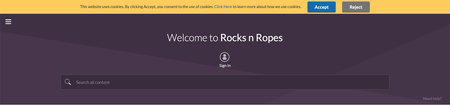
21.6 is a minor release. As communicated earlier, minor releases contain defect fixes and minor enhancements. Minor releases are not made available in production by default. To request an on-demand upgrade, contact Support. Content Enhancements Changes to the community cookie banner Bulk Download Member Data metrics to consider Events discussion style API Updates Moving events between boards using the Move API You found it. We fixed it! Enhancements Changes to the community cookie banner The community cookie banner now shows Accept instead of OK and includes a Reject button. The banner is displayed on your community site for each visitor until that visitor clicks the Accept or Reject button. Clicking the Learn more link opens the webpage that describes your cookie policy but does not dismiss the banner. Users must click Accept in the cookie banner and explicitly confirm their consent to activate the community cookies. Once accepted, the cookie banner will not appear in subsequent logins. If users click Reject, only the Type 1 cookies (“Strictly Necessary”) are set, and all other cookies are held back. Once rejected, the cookie banner will not appear in subsequent signins. If users do not Accept or Reject and browse the community, only the Type 1 cookies (“Strictly Necessary”) are set, and all other cookies are held back. The banner will continue to show in the subsequent signins. The table below shows the expected combinations when cookies need to be dropped Cookie Banner LithiumCookieAccepted Value User Action Drop Type 2/3/4 Cookies Disabled 0 N/A Yes Enabled 0 No action taken No Enabled 1 Click "Accept" Yes Enabled 2 Click "Reject" No Learn more on how to enable site-wide cookie notification banner. Bulk Download Member Data metrics to consider Events discussion style The metrics in the Bulk Download Member Data report will now consider Events discussion style along with the existing discussion styles. Henceforth, when you request the Bulk Download Member Data report for a particular time period(for example, March 2021), the Events discussion style will also be considered for computing the metrics. This enhancement is already available to all communities using Events and hence a support ticket is not needed. Learn more about metrics in Bulk Download Member Data. API Updates Moving events between boards using the Move API We have enhanced the existing Move API to now support the moving of events. You may want to move an event from one Events board to another when you find it more relevant to another Events board. With this release, using the Community v1 Move API, you can move an event along with its comments, RSVP information and invite data to another board. After a successful move, the destination board's permissions govern the event's access. Note: You can move only the event (which equates to a topic message). However, it is required to move the comments along with the event. Hence, always set the move_message.include_replies parameter to true. You found it. We fixed it! Earlier, users without relevant HTML privileges trying to reply with invalid HTML on Forums v5 received errors, and the errors were not being removed automatically. Then resubmitting the post resulted in post-flooding warnings, and the post never got published. With this fix, users will still receive the error message when they submit a post with HTML errors, but the errors will be auto-corrected, and they can successfully submit the post. The issue with the events not displaying in the calendar component in the Firefox browser is now fixed. We have fixed the Mobile View issues for Events Calendars, where after closing a tab with the details of a particular event, all events in the Calendar disappear. There was a dependency on the TKB discussion style to add or remove the list of co-authors in the Blogs discussion. This prevented the list of 'Co-Authors' from being displayed in the Blogs especially in those communities which did not have the TKB discussion style. With this release, we have removed this dependency. The performance issue with the media page load time is fixed. Previously, using the "message-list" component in Forums v5 and changing the display format for posts from Linear to Threaded displayed the list of articles TKB Page with a broken layout. Also, the avatars shifted to the right. With this release, we have fixed this issue. Now when you use this component, the TKB Page displays an undistorted list of articles. We have fixed the issue for communities with the email metrics feature enabled, where opening the invite URL in the email for a topic throws an error. Now, clicking the URL redirects you to the topic. We have fixed the issue where the 'Mark all content as spam' option did not work for messages beyond the first 2000 messages authored by a user. We have fixed the issue where the ‘Top Kudoed Posts’ widget displayed archived content. Accessibility fixes The issue with using the "tab" key on the keyboard to move focus from left to right between the options on the community page header is now resolved. Earlier the role attribute of the help icon “i” was read out as a link instead of a button. This issue is now resolved and will now be recognised as a button. The Microsoft Windows-specific issue with the state of a link selected on the Help page not being announced by a screen reader is resolved.1.7KViewsSign in to react to this post20CommentsKhoros Communities 22.2 Release
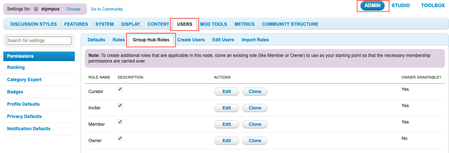
Content Features Bulk content archive (GA) OAuth 2.0 Client Credentials Flow Enhancement Group Hubs roles hierarchy (GA) Search for products on community Syndicate Comments List along with Product information Group Hub Name filter in Community Analytics API Updates CWA API Updates Bug Fixes Features Bulk content archive (GA) In the 21.10 release, we announced the EA of bulk content archive, which enabled you to search for outdated community content and archive multiple articles at once. Bulk Archive is now released as GA in Community release 22.2. Note: To enable this feature, contact Support. Learn more about Bulk content archive. Watch our Bulk content archive coaching video. Learn more about the bulk content archive APIs, Also see, Bulk Archive Content guide. OAuth 2.0 Client Credentials Flow Note: To enable this authorization, contact Support. In this release, we have added OAuth 2.0 Client Credentials Grant flow that reduces the usage of user name and password in the backend system. The client credentials flow enables server-to-server authorization which grants access to read data from the community, based on the access provided by the assigned role for the client app without the need of any user credentials. Learn more about, see OAuth 2.0 Client Credentials Grant flow. Enhancement Group Hubs roles hierarchy (GA) Currently, Membership Roles for Group Hubs exist only at the Group Hub level. To change permissions for these roles, you needed to go to each group hub to make the changes. For communities with several group hubs, this could be a time-consuming task. In this release, we’ve introduced a roles hierarchy for Group Hubs, enabling global management of group hub role permissions. Now, you can change the membership role permissions either at the community level or at the category level. The permissions for the roles cascade down to all the group hubs within the community or the category, respectively. Note: This feature is enabled for all customers by default. When you update your community to this feature, The OOTB permissions of existing group hubs will be set to default. These permissions will then be derived from the community level group hub roles. Any permissions that were previously changed explicitly for a group hub, will remain as is. You can change the permissions of any of these roles at the group hub level or category level. The permissions at the group hub level takes precedence over the roles defined at the category level, followed by the roles defined at the community level. When this feature is enabled, you can manage all group hub related roles (Curator, Inviter, Member, and Owner) from the Admin > Users > Group Hub Roles tab. These roles are now available at the community and category levels. What this means for existing group hubs: If you were using the out-of-the-box group hub permissions and had not made explicit changes to the individual group hubs, you will not experience any behavior change. However, you will have the additional capability to manage these roles' permissions globally. If you had changed permissions for individual group hub roles earlier, those changes would persist. So you will not experience any behavior change. If you want to change such permissions back to the default, you must set the permission value to 'default' in the required group hubs. Learn more about Group Hub roles hierarchy and how Group Hub role permissions are determined. Search for products on community With this release, we’ve added PRODUCT search in the ‘Search Results’ page to increase the findability of products in the community. Users can search information on the community’s ‘Search Results’ page and see the list of products that match the search query. They can then click the product they are interested in to get authentic information around it. Note: This feature is enabled for all customers by default. To use this feature you must be on Search v3.4 and Product v2.0. Goto Admin > Studio > Features to update to these versions. As shown in the image below, you can search for a product on the community’s ‘Search Results’ page. Click the PRODUCTS tab. Select from the Category and/or the Manufacturer dropdowns, to get the list of products. Assume that you select ‘Tents’ from the Category drop-down menu and “Quecha” from Manufacturer. As shown below, all products that are tagged with these two selections are listed. From here, you can click the product and view the product details. There can be cases where you do not want to use any of these dropdowns because some of the products are not categorized. In such cases, you can opt to disable the Category and Manufacturer dropdowns using the XML in the Studio. Useful links: Add a product to a product category using Community Admin Update to Search v3.4 and Product v2.0 Enable or disable Product Search and Filter using XML Syndicate Comments List along with Product information As mentioned above, you can now search for products in the community. Finding products makes it easier for customers to discuss them within the community. With this release, you can syndicate user-generated content or conversations around a product to external pages (for example external marketing or support pages) along with the product's information. By syndicating comments along with the product’s information on an external website, You can use community to cross sell and drive revenue Users always see or have access to authentic information about the product from the community. You can display product information in appropriate external websites, offering tips and tricks to increase sales on a marketing page or reduce calls to agents on a support page. Below screenshot shows the Product dropdown added to Community Syndication under ADMIN panel. Below screenshot shows product-id added to the code which you can add to the external website. This enables the product information to be syndicated along with the comments. Learn more about setting up comment syndication with product information Useful links: Comments-List-development-and-testing Comments-List-Syndication-FAQ Group Hub Name filter in Community Analytics We have added a filter for Group Hub Name. You can specify a Group Hub name to retrieve the metrics for Group Hub, Conversations, Members, and Membership for that Group hub. NOTE: This option is available to all customers, by default. As shown in the below screenshot, go to CONTENT > Group Hubs. Click Add a filter. Select Group Hub Name from the Filter by dropdown. API Updates CWA API Updates We have added count(*) support to fetch the count of draft articles for the content workflow feature. You can now combine the author.id or conversation.style constraints with the visibility_scope constraint to retrieve drafts filtered by conversation style or author ID. Learn more aboutLiQL reference for the messages collection, You found it! We fixed it! General fixes Earlier, TKBs and Blogs having “&” in their titles were saved as draft or submitted for review or publication, the title displayed “& amp;” instead of “&”. This issue is fixed. Earlier email notifications having “&” in their subjects displayed “& amp;” instead of “&”. This issue is fixed. Earlier, when you created or updated an API from Admin > System > API apps page, you received an error message. This issue is fixed. Earlier, when a post on the community that was escalated to Salesforce was moved to another board, the changes did not update in Salesforce. This issue is fixed. Now, when you move an escalated post to another board, the board details in the Salesforce also updates with the new board details. Earlier, there was a delay with the navigation slide-out menu. After a member joined a hidden group hub, it did not appear in the menu. This issue is fixed. There was an issue with the Kudo and Solution counts which were getting reduced in leaderboards when content was archived. Similar issue was observed with the APIs to get the kudo counts for a user. This is now fixed. Earlier the pagination in the spam quarantine page showed inconsistent behavior due to user access privileges and spam content was not displayed uniformly across pages. We have now fixed this. There was an issue with roles based badge creation , wherein once a badge was created (but not activated), the system did not show the correct count for the number of community users who would receive the badge on activation. This is now fixed. Scheduling of reports was not working for GroupHubs Membership under GroupHubs Overview in Community Analytics. This issue has been fixed now.1.5KViewsSign in to react to this post5CommentsKhoros Communities 21.5 Release Notes
21.5 Release delivers self-serve SAML SSO as an out of the box core product feature, instead of a plugin-based approach. This release also includes enhancements around Events, Group Hubs and Community Analytics, and API updates. Content Features Self-serve SAML SSO Enhancements Remove the restriction on the number of Events node within a category Increase in the date range limit in Community Analytics reports Specify the default sort order for Group Hub List component Set the avatar size in a Group Hub card API Updates New FreeMarker sequence builder method Get node IDs of nodes displayed in the Group Hubs Listing Page You Found It. We Fixed It! Features Self-serve SAML SSO With this release, we’ve redesigned our existing SAML 2.0 integration to enable Community Admins to configure authentication for their Communities and integrate with their SAML IDP by themselves. SAML SSO is now available out of the box as a core product feature, instead of a plugin-based approach used earlier. This simplifies setting up SAML SSO in Communities and helps reduce the total cost of ownership. The key features in Self- serve SAML SSO include: Dynamic metadata: Supports up to three identity providers. Admins can integrate a maximum of three IDPs (that are XML strings) in the Admin panel instead of maintaining it in a config file. Dynamic entity identification: Admins can add the attribute name for the SSOID for their community. If this value changes, Admins can change the value and save it without restarting the Community. Dynamic assertion mapping: Admins can add all the attribute names in the SAML assertion in the Assertion Mapping tab in the Community Admin panel. This eliminates the need for maintaining a config file for Assertion mapping. Note: Communities launching post Community version 21.5 can opt to configure Self-serve SAML SSO while launching. Existing customers who want to switch to using self-serve SAML SSO must contact their Customer Success Manager or Account Executive. This process involves Professional Services (PS) engagement for user/SSO ID migration and may need to address other customisations such as user authentication workflows, custom user profile fields, and other customisations or integrations relying on user data. You can find the settings for Self-serve SAML SSO under Community Admin > Admin > SYSTEM > SAML SSO. Learn more about SAML SSO Learn more on how you can configure SAML SSO from the Admin panel Learn more about the SAML SSO tabs and settings in the Admin panel In the 21.4 release, we introduced the Feature Logs framework. This framework helps generate and view feature specific logs in components and endpoints. Developers and administrators can use these logs to monitor and debug during Community customisation. We are happy to announce that we are now explicitly providing you with status and error logs to help with monitoring and debugging issues when you configure Self-serve SAML SSO for your community. Learn more about Feature Logging in the Developer Documentation Portal. Note: Along with enabling Self serve SAML SSO, the PS/Support team can also enable Feature Logs in your Community so that you can access the logs from the ToolBox while setting up SAML SSO. Enhancements Remove the restriction on the number of Events node within a category With this release, we have removed the limit on the number of Event nodes/boards you can create within a category or Community. Removing this limit allows you to host events specific to a product or exclusive to a particular set of members at the community level or within the same category instead of creating another category to create a new event board. However, you can have only one Event board within a Group Hub. Learn more about Events Increase in the date range limit in Community Analytics reports Earlier Community Managers had to stitch together multiple reports to build Year to date(YTD) reports since the maximum time range for Community Analytics reports was six months. With this release, the date range is increased to one year making it possible to easily view and download YTD reports. Note: You might experience a slight delay when the system fetches or downloads a year’s worth of data. There are no other changes to the way the Community Analytics report works. The look-back period remains two years, and 2000 is still the maximum number of rows available in all CSV exports(except the Bulk Download Member Data Report). Specify the default sort order for Group Hub List component You can now specify the default sort order for the grouphubs.widget.grid component, which displays Group Hub cards in the Group Hub Listing Page. You define the default sort order using a new initialSort parameter in the quilt XML. If the initialSort parameter is not included in the quilt XML for the component, the component is sorted by Member Count. Example: <component id="grouphubs.widget.grid" initialSort="alpha" /> Learn more about setting the initialSort parameter. Set the avatar size in a Group Hub card You can now control the image size of the group hub avatar displayed in a group hub card displayed in the Group Hub Listing Page. Set the default avatar size using the size XML parameter for the node.widget.avatar-limurs component in the Group Hub Card quilt. Supported options are tiny (the default), small, medium, and large. Example: <component id="nodes.widget.avatar-limuirs" size="small" /> Learn more about setting the avatar size in a group hub card. API Updates New FreeMarker sequence builder method We have added the utils.sequence.builder() method to the utils FreeMarker context object to create a sequence builder and build a sequence using a large number of items. Using a builder instead of concatenation improves performance and stability. Get node IDs of nodes displayed in the Group Hubs Listing Page We have exposed a new node subobject on env.context in the FreeMarker API. Returns a node context object. Chain calls from the node context object to get the node ID of the node in context. env.context.node has a single method, .displayId. and is supported only on the GroupHubCard (GroupHubCard.quilt.xml), which is used to format the grouphubs.widget.grid component on the Group Hub Listing Page. You found it! We fixed it! We have fixed the issue in Forums v5 where the HTML option was not available to members with the Allow user to use advanced HTML in posts and signatures permission grant and the Use full HTML in posts and signatures permission denied. We have fixed the issue where the solution count on the leaderboard did not match the user's actual number of solutions. We have fixed the issue that the preview of the avatar did not match the cropped image. We have fixed the issue where deleting the labels of a TKB article via API deletes the list of contributors along with the labels. Now, the list of contributors stays intact after deleting the labels. We have fixed the issue when members with periods or spaces in their usernames receive an error message while uploading or copy/pasting images. We have fixed the issue where the toolbar options in the message editor did not support keyboard shortcuts. Now, you can also access these options without the mouse and only with the keyboard keys. We have fixed the issue where the + sign to open the Community’s Tree Structure in the Admin panel was not available. We have fixed the issue where the Community structure in the Admin panel breaks after the Communities that use the Accessibility feature restart their Community. We have fixed the issue in Forum v5 where opening any post marked as spam did not display that post is marked as spam. We have fixed an SEO issue where the Open Graph URL did not match the Canonical URL. Now, they will be same, thus benefiting SEO.2.2KViewsSign in to react to this post13Comments