Khoros Iris AI 26.0 Release Notes – October 21st, 2026
Iris® AI 26.0 is the latest version release of both Khoros Care and Khoros Marketing, bringing both products together into a single, modern system designed for how customer engagement works today. Starting with this release, customer care teams handle their social conversations in Iris AI. Every case comes with AI analysis and a suggested reply. This release is available starting Wednesday, October 21st, 2026, and will be released in waves. Your Customer Success Manager will contact you before your team's move. Nothing changes in Khoros Care or Khoros Marketing until then. Highlights AI on your cases, configured by your admin. Summary, sentiment and suggested tags on new customer messages, plus draft replies from your AI templates that agents can edit. Agent View and Manage View in Iris AI. Your agents get the same queues, assignment, tagging, moderation and bulk actions they use in Khoros Care, in a new interface. Facebook and Instagram replies from Iris AI, with reply status shown in the thread, so agents know when the network has accepted a reply. X follows as soon as your X API key is connected. One case record across both products. Iris AI and Khoros Care share the same cases during the move, so a reply sent from either one shows in both. Agents see the full conversation history in Iris AI. How the move works Iris AI is the next version of Khoros Care & Marketing. Iris AI currently runs side by side on the same cases as Khoros Care. Agents can start in Iris AI while channels that have not moved yet stay in Khoros Care. Your sign-in link to Iris AI comes from your Customer Success Manager on your go-live day. During the move, please don't disconnect or reconnect a channel in Khoros Care. Your CSM will tell you when a channel has moved. Channels in this release Facebook: In Iris AI: read, reply and publish from Iris AI Instagram: In Iris AI: read, reply and publish from Iris AI X (Twitter): In Iris AI once your X API key is connected LinkedIn, TikTok, YouTube, Threads, Khoros Communities and others: Coming in the next updates; handled in Khoros Care until then What Iris AI includes Agent View Everything agents rely on in Khoros Care, plus: AI analysis: Summary, sentiment and suggested tags for the latest customer message. If a case shows no analysis, press Generate. AI draft reply: One editable draft for each of your AI templates. Press Use to put it in the reply box. Related Conversations: a badge in the case header opens a panel listing the customer's other conversations. Author profile card: the customer's network profile in the author panel. Reply status: a reply shows as pending in the thread until the network confirms it, and as failed if the network refuses it. Snooze: a conversation snoozed in Khoros Care shows as snoozed in Iris AI, with its real wake-up time. Manage View Works the same way as in Khoros Care: Open a case in full in the Agent View panel. Read-only case view for users without a conversation role. Moderation Status: set a conversation to Approved or Rejected. Bulk actions: bulk reassign, reopen and claim, all recorded in the case history. Filters: queue and date filters are saved between sessions, and quick search uses the same search rules as Khoros Care. Administration Facebook: a "Receive dark posts" switch on Facebook integrations. Instagram: comment grouping defaults to "Detect conversations" when no setting has been saved, matching Khoros Care. Bug fixes and improvements The inbox refreshes only the open lists and the open conversation, so adding a tag or claiming a case is no longer slowed by a full refresh. Faster first page load after sign-in. Sessions stay signed in through a brief network drop, including with several tabs open. When two people edit the same item, the second save shows a reload message instead of overwriting the first. Manage View columns refresh and page correctly, and column settings save only when changed. System tag groups appear first, in the same order as in Khoros Care. Analytics: custom report dates are saved, counts show a placeholder while loading instead of 0, and long card titles show in full on hover. Security: stronger browser security headers on all pages. Known limitations in 26.0 Internal notes added in Khoros Care don't show in Iris AI yet. The first time a new user opens Manage View, it may show no views. A hard refresh (Ctrl+Shift+R) fixes this. Reports stay in Khoros Care for this release. Coming next In the next update: reply box improvements (choose the account you reply from, insert a template at the cursor, full emoji picker), the attachment control switching off when a network or reply type doesn't accept attachments, internal notes from Khoros Care shown in the conversation, the Available queue fix, restoring a deleted user when you add their email again, and avatars from image hosts that need a sign-in. More channels enabled: LinkedIn, TikTok, YouTube, Threads and Khoros Communities. Publishing: Iris AI Publisher, the successor to Khoros Marketing publishing. Marketing customers keep using Khoros Marketing until then, and your CSM will plan the move with you. Currently, a demo view is available showcasing the publishing/marketing side of Iris AI. Full Reporting in Iris AI. Questions about your move? Contact your Customer Success Manager. 59ViewsSign in to react to this post
 0Comments
One year in, straight from us.
It has been a year since IgniteTech acquired Khoros, and I want to talk to you directly. There has been a lot of secondhand talk going around, none of it coming from us, and most of it from people who stand to gain from the telling. Enough of that. If you want to know something about Khoros, come to Khoros. Ask us. We will give it to you straight. Here is where we are. We did not buy Khoros to dress it up and sell it. That is the private equity playbook, and it is not ours. We are privately held, we keep what we acquire, and we run it for the decades, not the quarter. Khoros was losing millions. We made it profitable so it would not go dark. That took painful decisions, and I know some of them affected you. I am not going to gloss over that. It is also why Khoros is still here, on solid ground and able to invest in what comes next. And we have invested. We rebuilt the platform and shipped two AI-native products in under a year. Aurora AI reimagines community for the AI-answer-engine era and closes roughly 30% of community questions that never get a good answer. The brand-new Iris® AI replaces Care and Social Media Management, two products that ran separately for 15 years and never fully integrated. It brings social engagement and brand care into one platform, with publishing, moderating, engaging and analyzing all in one place. No other company offers enterprise community alongside enterprise social and brand care, and large enterprises are switching to us because of it. Everyone else still makes you choose. We have been the gold standard in customer community since Lithium (Khoros’ predecessor) pioneered the category in 2001, and then built the bridge to social when Lithium and Spredfast became one company, because community and social were never meant to live apart. That foundation has powered more than 4,000 community deployments since 2001 and draws 1.8 billion site visits a year. This first year post-acquisition was about putting the house in order. This next stretch is about innovation, building on the platform you count on. We are strengthening the online infrastructure and improving uptime, with faster, sharper incident response when something does go wrong. When we fix something now, we fix the cause, not the symptom. As part of that investment, we are turning on Community Guard for you, free for the next 60 days. It is a new protective layer for an internet that is not just people anymore. Communities like yours get crawled, scraped and hit by bots and automated agents that distort your analytics, consume capacity and put avoidable pressure on the experience. Community Guard catches that traffic before it reaches your community, while keeping the door open for real users and the discovery channels you actually want. The result is a cleaner, steadier community with real protection against bot abuse and traffic spikes. We are turning it on now because it is the right thing to do for our customers. Here is what all of this means: Stronger reliability and faster incident response as we harden the platform. Community Guard will be enabled and free for the next 60 days, screening bots and automated traffic before it reaches your community. Free migration from Community Classic to Aurora AI through the end of 2026. We are as visible as ever in this market, on our own terms. We have redeployed our presence to where our customers actually are, the independent events and conversations that are open to everyone. We were a key sponsor of Toronto Community Week 2025 and London Community Week 2025, and this year we are the headline sponsor of London Community Week 2026, which takes place July 7-9 in London, UK. Come find our product/engineering and commercial teams there as we lay out the real future of Khoros. The full story of the turnaround is at khoros.ai/transformation, and if you want to see Aurora AI, Iris AI or Community Guard in action, let us know and we’ll set it up. Year one was the save. Year two is what we saved it for. Eric Vaughan, Chief Executive Officer P.S. If anything you have heard about Khoros does not match this post, that is exactly my point. For the real story you can make proper investment decisions on, just ask us.468ViewsSign in to react to this post0Comments
Khoros Care, Marketing, Flow Release notes - May 15th 2026
Here is a list of the released features and bugfixes from this release period: Marketing (Spredfast) Faster Post Lists for High-Volume Accounts: Fixed a performance issue that caused post lists to time out for accounts with tens of thousands of posts. They now load in seconds Reliable Auto-Labeling: Fixed an issue where auto-labeling failed when label libraries were large, and improved diagnostics for duplicate native LinkedIn posts Threads Token Debugger Restored: Fixed an issue where the Threads token debugger returned 500 errors instead of results Flow RBM Message Delivery Retry: Rich Business Messaging deliveries now automatically retry on transient failures, so brief carrier hiccups no longer lose customer messages or strand conversations in bot mode Reliable Dropdown Menus on Sources Page: Fixed an issue where the Import CSV, Import Sheet, and Add Segment dropdowns intermittently failed on first click Web Channel & Gateway Reliability: Addressed stability issues in the web client channel and gateway services for more reliable real-time messaging Care Faster Tag Sync from Community to Care: Fixed an issue where community board renames and thread title edits required manual intervention to reach Care conversations. They now sync automatically, so agents see the latest titles and tags as they appear in Community TikTok / LinkedIn: Restored Visibility for Hidden Social Replies: Fixed an issue where TikTok and LinkedIn brand replies didn't reflect their hidden/visible state in Care, and where image-only Facebook Messenger messages were dropped during ingestion Facebook / LinkedIn: Brand Mention Ingestion for Personal Account Posts: Fixed an issue preventing Facebook brand mentions from personal accounts from reaching Care, and resolved a defect that made top-level LinkedIn brand mention posts unclickable in Posts columns Real-Time Reply Delivery for Agents: Fixed an issue that occasionally forced agents to refresh the page to see their replies. Replies now appear in conversations immediately Push Next Routing Reliability: Fixed an issue where conversations could get stuck unrouted after a transient indexing failure. Push Next now picks them up automatically once indexing recovers Reliable Bot-to-Agent Handoff: Fixed an issue where new conversations started seconds after an agent closed the prior case inherited stale ownership data. The bot now resumes cleanly and hands off to an agent as expected Accurate Bot-Handoff Queue Priority: Fixed an issue where queue position after a bot handoff didn't reflect the customer's actual wait time. It is now based on the earliest unanswered customer post, restoring expected SLA position Apple Messages for Business: URL Reliability: Fixed an issue where URLs were silently dropped when rich link previews failed. The URL is now sent as plain text fallback, so customers always receive what the agent intended, including in mixed text-and-URL messages Yelp Integration Recovery: Fixed a defect that prevented Yelp account reconnection attempts from completing Public Analytics Dashboards: Accurate Error State: Fixed an issue where public dashboards prompted for a password when the underlying service was briefly unavailable. Visitors now see a clear "not available" message Larger Analytics Report Exports: Fixed an issue where larger report exports timed out before completing. They now complete reliably Historical Team Membership Reporting: Fixed an issue where analytics response counts excluded agents who had since changed teams. Counts now correctly include agents who were members during the reporting window Report Download Safety: Fixed an issue where downloading a report while it was still generating caused the request to fail. It now returns a clean "in progress" response Analytics Role Refresh: Fixed an issue where role changes in the Care admin UI were held back by a cached session. Updates now take effect on the user's next analytics login Community Author Names in Care: Fixed an issue where community authors with empty login fields appeared as blank in Care. Their displayName is now used instead Cross-Case Tag Isolation: Fixed an issue where adding or removing a tag on one conversation incorrectly propagated the change to unrelated conversations Community Analytics: Readable Filters: Fixed an issue where board filter labels in Community Analytics overlapped when many boards were selected. The row now scrolls horizontally for readability LinkedIn / Instagram: No More Duplicate Cases: Eliminated a deduplication mismatch that caused LinkedIn and Instagram private messages to create duplicate cases or get mislabeled as External Response LinkedIn: Multi-Brand Mentions: Fixed an issue where the order LinkedIn delivered posts in could prevent multi-brand mentions from creating a case for every brand with BrandMentions enabled Survey Bot Reliability: Fixed an issue where NPS/CSAT survey bots failed when a customer conversation arrived without an identified language. They now fall back to a safe default Bot Conversation-Close Retry: Fixed an issue where conversation-close signals from bots were lost during brief network blips. The system now retries automatically Wider CRM Network Automation Coverage: Added CRM automation support for 12 additional social network configurations, including Brandwatch Cleaner Moderation Queues: Fixed an issue where already-moderated posts briefly reappeared in agent queues during sync Secure Forms Editor Restored: Fixed an issue with invisible labels in the Secure Forms admin editor that prevented administrators from editing forms SAML SSO Login: Fixed a blank-page failure that occasionally blocked SAML SSO sign-in Salesforce Embedded Care Session Preservation: Fixed an issue where agents using the embedded Care iframe inside Salesforce were unexpectedly signed out of Care in other browser tabs Instagram: Multi-Brand Token Routing: Fixed an issue where reconnecting one Instagram brand could affect sibling brands. Agents can now reliably respond to Instagram private messages across a brand family Threads: Account Reconnection: Fixed an issue where reconnecting an expired Threads account couldn't match the new token to the existing author Khoros Care Mobile App: Google Play Compliance: Updated the Care Android app to current Google Play standards, ensuring continued availability and updates via the Play Store. Proactive Chat Widget on iOS: Fixed keyboard overlap, the initial welcome message, numbered-list formatting, and unread-counter accuracy for a smoother mobile chat experience Brand Messenger: No More Image Flicker: Fixed an issue where uploaded images in Brand Messenger flickered on every poll. Previews now load once and stay put GDPR / CCPA Unified PII Deletion: Unified customer PII deletion across Care and the user-profile data store, with automated Facebook Data Deletion Callback support per Facebook Platform Terms Brand Messenger Push Notification Reliability: Fixed an issue where push notifications to the mobile app were silently dropped after token-library upgrades. They now deliver reliably230ViewsSign in to react to this post0CommentsKhoros K1, Care, Marketing, Flow Release notes - December 1st 2025
Khoros Care Customer Experience Improvements TikTok Response Labeling Enhancement: Agent responses to TikTok conversations are now correctly identified in the conversation timeline, eliminating incorrect "External response" labels that caused confusion for agents Trustpilot Data Recovery: Backfilled missing Trustpilot reviews that failed to process during authentication issues, restoring complete customer review data Community User Avatar Handling: Fixed issue where Community users without profile pictures caused processing failures, ensuring all Community posts are properly delivered to Care Brand Messenger Chat Reliability: Resolved bot response delivery issues in Brand Messenger widget, ensuring consistent message arrival and improved error logging for customer interactions Social Media Authentication & Message Processing: Resolved authentication issues and improved message processing reliability for social media channels, ensuring consistent delivery of customer messages Message Processing Reliability: Improved retry mechanism for failed message processing, reducing message delivery failures Performance & Scalability European Region Performance: Increased capacity in EU region to handle higher load during business hours, improving response times and system stability Proactive System Monitoring: Deployed comprehensive monitoring across US, EU, and APAC regions to validate core platform functionality including agent conversation handling, queue management, agent assist widgets, and dashboard access Admin Console Change Log Navigation: Change Log has been released from Beta and is generally available. User Management Enhancements: Improved batch user processing and cache synchronization to prevent data loss during user management operations Security & Platform Updates Security Enhancements: Deployed security fixes across multiple Care components: Analytics Dashboard: Critical security vulnerability patches Case Management Interface AI/ML Processing System Brand Messenger Chat Backend Publishing Interface: Latest security patches Messaging Authentication Khoros Marketing Platform Improvements Instance Management: Fixed server error that was preventing Marketing instance deprovisioning, improving platform lifecycle management User Moderation: Resolved issue preventing users from being banned in Marketing Inbox, restoring full moderation capabilities Stream Collections: Fixed deletion functionality for stream collections Infrastructure & Performance Social Gateway Updates: Deployed infrastructure improvements for enhanced reliability and performance Advertising Metrics Processing: Improved reliability of advertising metrics data collection by introducing safeguards to prevent processing failures Notification System: Improved stability of the notification system Enhanced Security Protocols: Strengthened database security protocols as part of ongoing security compliance efforts Khoros Flow AI & Platform Upgrades Claude 4.5 AI Upgrade: Upgraded AI model from Claude Sonnet 3.5 to Claude Sonnet 4.5 in Flow, providing enhanced AI capabilities for improved customer interactions and automated responses Integration Improvements WhatsApp Integration Upgrade: Updated WhatsApp channel integration to latest API version, improving message delivery reliability and media handling capabilities Care System Integration: Enhanced integration with Khoros Care to provide better tracking and visibility of customer cases across systems, enabling more seamless workflows between Flow and Care Security & Stability Security Vulnerability Remediation: Addressed known security vulnerabilities across Flow platform including CVE-2019-10744 (lodash), CVE-2020-7610 (bson), CVE-2021-26707 (merge-deep), and others by upgrading to latest secure versions of system dependencies Message Processing Improvements: Increased message processing capacity to handle larger messages and attachments, improving reliability for customers sending rich media content System Connection Resilience: Improved system resilience to prevent service interruptions during network connectivity issues, ensuring consistent message processing Monitoring & Operations Proactive Feature Monitoring: Implemented comprehensive monitoring for dashboard performance and bot response times with automated alerting Data Pipeline Optimization: Optimized data processing pipeline, significantly improving performance and reducing processing delays Platform-Wide Updates Security Comprehensive Security Fixes: Applied critical security updates across all Khoros products, including user interfaces and backend services System Reliability Enhanced Error Handling: Improved system resilience with better error recovery mechanisms Deployment Process: Streamlined release processes for faster, more reliable updates721ViewsSign in to react to this post0CommentsKhoros K1, Care, Marketing, Flow Release notes - December 15th 2025
Here is a list of the released features and bugfixes over the last two weeks: Marketing (Spredfast) Enhanced Analytics Data Processing: Fixed critical data processing workflows to ensure analytics reports display accurate metrics and insights without delays Improved Platform Reliability: Addressed stability issues that affected content publishing and analytics workflows during peak usage periods Flow Configurable Search Precision: You can now customize how many documents are analyzed when using AI search reranking, allowing you to balance between search speed and result accuracy based on your needs Faster AI Training Completion: Training jobs now complete significantly faster by running at higher priority, reducing wait times when setting up new AI capabilities Multi-Language Agent Handover: Fixed chatbot prompts that were always in English - the "connect with an agent" suggestion now appears in the same language as the customer's conversation Improved System Responsiveness: Optimized background processes to reduce latency and improve overall platform performance during high-traffic periods Care Instagram: Accurate Ad Content Attribution: Fixed an issue where Instagram ads from other accounts were incorrectly appearing under your brand - ads now correctly filter to show only content owned by your configured Instagram account Instagram:Better Multi-Brand Response Handling: When managing multiple Instagram brand accounts mentioned in a single conversation, the system now correctly identifies and uses all relevant brand tokens for responses, preventing missed reply opportunities TikTok: Correct Response Attribution: TikTok replies are now properly labeled as your brand responses instead of being marked as "External Response" - improving conversation tracking and reporting accuracy LinkedIn: Reliable Comment Deletion: LinkedIn comment deletion now includes verification and automatic retry logic to ensure comments are successfully removed, with clear logging of success or failure status Facebook Messenger: Clean Secure Chat Invitations: Secure chat invitation links sent via Facebook Messenger now display cleanly without showing raw URLs or incorrect "Post edited" labels in the agent timeline Fixed Moderation Column Updates: Posts now automatically disappear from Community Moderation columns after being moderated, instead of remaining visible with a spinning indicator indefinitely Support for Authors Without Profile Pictures: Fixed a critical issue preventing Community posts from authors without profile pictures from appearing in Care - these posts now process correctly and reach your agents Prevent Duplicate Cases: Eliminated race condition that created multiple cases when customers sent rapid messages - now ensures only one case is created per customer conversation, even during high-traffic periods Clearer Integration Connection Errors: Integration connection failures now display helpful error messages explaining what went wrong, instead of generic errors Validation for Account Switching: Prevents accidental integration misconfiguration by blocking attempts to reconnect an integration with a different account than originally configured, with clear error messaging Dark Mode Toggle Visibility: Dark mode toggle now only appears in applications that support it, removing confusion in apps like Khoros One where it wasn't functional Automatic Tag Accuracy: Fixed incorrect "Emojis Only" tagging being applied to conversations containing only @mentions - tags now accurately reflect actual emoji presence Enhanced Chat Widget Stability: Improved chat widget reliability and performance for end-user interactions Platform-Wide Security Critical Security Patches Addressed Remote Code Execution Vulnerabilities: Patched multiple critical CVEs (CVE-2019-14540, CVE-2019-14379, CVE-2019-16335, CVE-2019-16942, CVE-2017-7657, CVE-2020-9546, CVE-2020-9547, CVE-2020-9548) with CVSS scores of 9.8 related to deserialization exploits and HTTP smuggling attacks Updated Security Libraries: Upgraded jackson-databind, Jetty WebSocket, Netty codec-http, and commons-collections to latest secure versions across multiple platform components Enhanced Application Security: Applied comprehensive security patches across Care, Marketing, and Analytics components to protect against known vulnerabilities889ViewsSign in to react to this post0CommentsKhoros K1, Marketing, Care and Flow release cadence
As part of our ongoing commitment to reliability and transparency, we have adopted a continuous delivery model for Khoros K1, Care, Spredfast Marketing and Flow. This means improvements, fixes, and enhancements are deployed to production incrementally rather than through large, infrequent releases. This approach minimizes operational risk, accelerates value delivery, and ensures that your environment benefits from the most stable and secure version of our product at all times. We recognize that visibility into product evolution is essential for planning and governance. To provide this transparency, we are introducing a regular changelog where you can review all functional, performance, and stability updates that have been deployed. Each entry will briefly describe what has changed and when, serving as a single source of truth for product updates. Our initial plan is to publish changelog updates on a regular cadence (approximately bi-weekly) on the release notes space, ensuring timely and consolidated communication without excessive notifications. As the product continues to evolve, we may adjust this frequency to align with customer needs and product maturity—always maintaining consistency and clarity in how updates are communicated.689ViewsSign in to react to this post0CommentsKhoros Care v24.11.1
Khoros Care updates do not require any downtime. This release will be deployed with no expected impact to your operations until you configure the new features. If you do not yet see the new features, they will be pushed to your system soon. New Features Apple App Store integration Update: Due to a deprecation from Apple that was not announced ahead of time, the legacy iOS App Store integration was made unavailable earlier than expected. For that reason, we've updated the What if I'm using the legacy integration? section since initial publication of these release notes. The Apple App Store can now be integrated directly with Khoros Care, enabling agents to respond to ingested reviews on their iOS apps directly from Care instead of requiring an admin to respond natively from within the App Store Connect console. This new-and-improved integration enables more efficient feedback management and creates more timely interactions with customers. Previously, due to Apple API limitations, while Apple App Store reviews could be ingested, they could be responded to using only an external response workflow that required copying and pasting into Care to accurately record that responses had been made. Because the new integration we’ve introduced is an entirely new setup that allows responses within Care, there will be no migration from the legacy integration (see What if I’m using the legacy integration?). Agent experience Admin experience What if I’m using the legacy integration? Agent experience With this integration, agents can now respond to App Store reviews directly from Agent View. When an admin enables additional settings, agents can also edit or delete their responses as necessary. Additionally, just like with other integrations, App Store review conversations can be routed, tagged, and prioritized. Tagging also enables Khoros users to report on analytics for these conversations. For more information about the agent experience with the Apple App Store integration, refer to Respond to Apple App Store reviews. Admin experience The integration also enables a self-service authentication experience. Adding the integration is just like adding other integrations to Care in the admin user interface. To add the new Apple App Store integration: Sign in to Khoros Care as an Admin user and go to Settings > Integrations > Source Integrations. Select the Apple App Store icon. Enter the Issuer ID. Enter the Key ID. Enter the Private Key Value. Select Add. Your Issuer ID, Key ID, and Private Key Value referenced above can all be found in your Apple App Store Connect account. If the Key ID does not exist, you can generate that from there as well. Note: You can download the Private Key Value only once. Store this value somewhere secure and use it only for the integration with Khoros Care. Admins can adjust the following channel integration settings: Display Name: Enter the desired display name for the integration. Who can respond with this account: Select Owner, All, or Specific Work Queues. Below Moderator Actions, select whether you want to Allow agents to delete posts (their own responses) and whether you want to Allow agents to edit responses. Select Country: By default, the United States is already selected. If you need to pull reviews from other locations, select Add Country and add additional countries as needed. For more information about configuring this integration, see Integrate Care with Apple App Store. What if I’m using the legacy integration? You must transition to the new integration if you want to continue to ingest Apple App Store reviews. The legacy integration is no longer available due to Apple deprecating the functionality for this feature. Only the new integration can be used to respond to reviews, but it cannot be used to respond to reviews from the legacy integration. You do not need to turn off the old integration as it will no longer work. Refer to Admin experience for setup steps for the new integration. Be sure to reconfigure your work queues with the appropriate tags, which are grouped under the new Source tag Apple App Store, for the new integration. The existing legacy integration conversations will still exist within Care, so reporting on tags (grouped under the Source tag iOS App Store) for those conversations will still be available after the cut-off date. Note: In a future release, we will update the legacy integration icon’s color to further differentiate between the legacy and new integrations. Note regarding conversation history: If an author left a review when the legacy integration was in effect in your Care instance, any new reviews that same author leaves after you’ve set up the new integration will be part of a new conversation in Care. WhatsApp integration message receipts When agents send messages on behalf of their brand, they can now view its status: Sent, Delivered, or Read. For more information about working with WhatsApp conversations, refer to Network Capabilities: WhatsApp Cloud API. Developer Experience Customization for Messages We have updated the documentation for customization support for the chat messages in Modern Chat widget. This includes the ability to customize the different elements in the chat messages. You can find out more in Android Customization and iOS Customization. You Found It. We Fixed It. All integrations An issue in which agents were unable to respond to conversations, especially after sending a secure form, has been fixed. Apple Messages for Business integrations Agents can now attach supported file types to Apple Messages for Business responses as expected. Brand Messenger integrations In Brand Messenger conversations, agents can now view correct line break formatting in their responses. Facebook integrations Hiding Facebook comments containing media now works as expected. Response tab The cursor no longer jumps to the beginning of the message when you highlight text to delete or edit it.1.1KViewsSign in to react to this post0CommentsKhoros Care v24.06.2 Release Notes
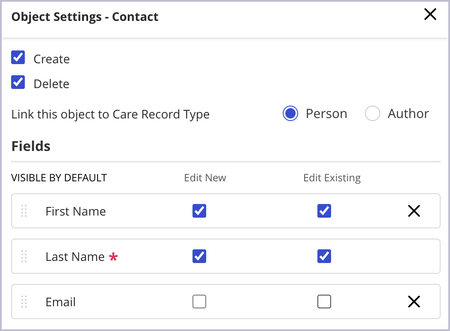
Khoros Care updates do not require any downtime. This release will be deployed with no expected impact to your operations until you configure the new features. If you do not yet see the new features, they will be pushed to your system soon. New Features CRM Connector Updates To ensure that admins can specify values to be automatically populated but also uneditable during manual case creation, autofill rules are now applied to conversations even when the Edit New or Edit Existing options are turned off at the object level. We've updated conversation text to include the author's name, providing better context and clarity within discussions. To enable more precise automation, automation rules with Conversation as the Source Type now evaluate each message received by the author. We’ve introduced the new Automatically add future posts to case setting. This enables you to configure whether the case created by automation receives future updates from the case in the CRM and is turned off by default. Refer to the CRM documentation for more information about the CRM Connector. Care Analytics: Raw Author Export We’ve added a new Community Email* column to the Raw Author Export that contains each author’s community email address when available. Learn more about the Raw Author Export.513ViewsSign in to react to this post0CommentsKhoros Care v25.06.2 Release Notes
Khoros Care updates do not require any downtime. This release will be deployed with no expected impact to your operations until you configure the new features. If you do not yet see the new features, they will be pushed to your system soon. New Features Survey and Welcome Response support for LinkedIn private messages Surveys and Welcome Responses are now supported for LinkedIn private messages, which we released in Khoros Care v24.09.1, granting you automation capabilities to enhance the experience of your users. Refer to Network Capabilities: LinkedIn and About LinkedIn Private Messages in Care for more information about the LinkedIn integration with Care. Welcome Responses enable brands to send an automated message to a user to acknowledge that their message was received, especially in cases where an agent cannot respond immediately. Refer to Welcome Responses to learn how to implement this feature. Automated surveys enable brands to send surveys to users to assess the quality of the interaction or services provided to the customer. Refer to NPS/CSAT Customer Feedback for information about implementing surveys. Note: LinkedIn supports only plain text surveys. LinkedIn public message character count increase Agents can now send up to 3,000 characters in public LinkedIn messages from Care. This has been increased from the previous limit of 1,250 characters. While an agent is entering a response, a countdown of the character limit is displayed to indicate to the agent how close they are to reaching the limit. For more information about LinkedIn content that be sent from and ingested into Care, refer to Network Capabilities: LinkedIn. Post Status Escalation tag In this release, the new Post Status system tag, found below System > Moderation > Inbound, is now available along with a new child system tag, Escalated. This tag is applied automatically to Khoros Community posts whose post status fits it. This tag can be used to route, prioritize, and report on conversations as desired. Refer to the Khoros Care Tag Glossary for more information about available tags. For more information about routing and prioritization, refer to Use tags and tag rules to route conversations and Use tags to create priority rules. Hashtag visibility improvement In the Common Conversation Panel, hashtags are now stylized for improved visibility after agents have published their responses. Previously, hashtags were stylized to stand out from the text while an agent was drafting their response, but after publication, they were displayed as plain text. Now, they appear highlighted in blue after publication, similar to how they appear in native applications. The hashtags are clickable for Instagram but not for other networks. You Found It. We Fixed It. Push Next configurations In Push Next configurations, conversations are now correctly pushed only to one agent instead of appearing to be pushed to multiple.542ViewsSign in to react to this post0CommentsKhoros Care v25.05.2 Release Notes
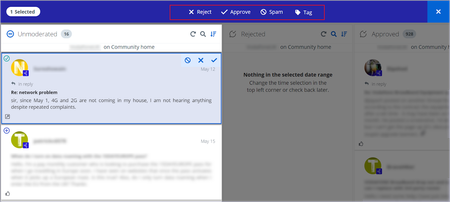
Khoros Care updates do not require any downtime. This release will be deployed with no expected impact to your operations until you configure the new features. If you do not yet see the new features, they will be pushed to your system soon. New Features Manage View: bulk tagging in Moderation columns Moderation columns in Manage View now contain the option to Tag posts in bulk. This enhancement improves the moderator experience in Manage View as you can now bulk Reject posts, Approve posts, mark posts as Spam, and Tag posts in your moderation columns you’ve already set up with your desired filters. This option was previously available on Post columns and functions the same way as it does on those columns. Learn more about the Moderation column and actions in Manage View, how to perform bulk actions in Manage View, and how to perform bulk tagging in Manage View. ES query optimizations Datastore queries have been made more efficient, resulting in quicker data retrieval in several areas, including Manage View, and improved system stability. You Found It. We Fixed It. LinkedIn private messages You can now send email addresses and other text containing the @ symbol in private messages. Note that @mentions are not allowed in private messages as limited by the LinkedIn API, but text with the @ symbol is now supported. In addition to allowing the @ symbol, following special characters are now supported in LinkedIn private messages: | (vertical bar) { } (curly brackets/braces) [ ] (square brackets) ( ) (parentheses) < > (angle brackets) # (pound sign) * (asterisk) _ (underscore) ~ (tilde) Manage View Manage View columns now show images and profile avatars as expected.1.3KViewsSign in to react to this post13Comments