We’ve Joined the Instagram Partner Program!
We’re excited to announce that we are now part of the Instagram Partner Program, a program that helps marketers find the best-in-class technology partners to drive successful results for Ad Tech, Community Management, Content Marketing and Media Buying. Inclusion in the program provides us with deeper access to features that help brands monitor conversations, engage with customers and showcase their visual style on Instagram. With over 500M users, Instagram is a key mobile destination for brands and here at Lithium we are continuing to invest in tools and features that allow our customers to make Instagram part of their Total Community strategy. We have a deep history of incorporating Instagram capabilities into our products, from using the platform to help calculate Klout Scores to implementing it into our newest features for Lithium Reach and Response. In fact, we recently shared that Instagram support for Reach is GA, and users can report on engagement metrics in the Shared Dashboard, Monitor Wall and using exportable reports. Many Lithium customers are currently using Instagram for customer engagement through Lithium Reach and Response including Electronic Arts, HSN, Petco, StubHub and more. Let us know if you’d like to be one too! 8.9KViewsSign in to react to this post
 2Comments
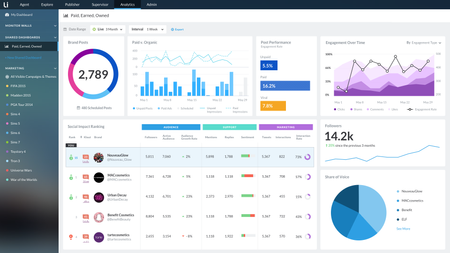
Lithium Integrates Paid, Earned & Owned Social in One Platform for Digital Marketers
Think of your last interaction with a company. Did you call them? Email them? Tweet them? Visit a store? Research products on their website or read their reviews? If you’re like more and more customers, then your interaction involved typing on a mobile device. And let’s be honest, most of our communication with each other is increasingly digital, too. According to a recent Harris Poll, 65% of customers will stop using a brand’s product (even if they love it) if they have a bad experience with the brand. Since these experiences are likely to be digital, the stakes are incredibly high. Brands are listening to customers across more digital channels, responding to more conversations, publishing more content, finding new ways to reach customers…all with higher expectations for authenticity and brand stewardship. It’s exhausting! What makes this overwhelming job for digital marketers and care even harder is treating each initiative separately. A thousand ad-hoc cuts vs a cohesive plan smartly executed. Paid, earned and owned Social play roles at each stage of the consumer journey—from the way brands acquire new customers, to how they serve and grow existing ones. And the management of PEO is optimized when approached holistically. A unified approach to PEO simplifies and advances a brand’s digital CX strategy. For example, consider analytics and the ROI story a unified dashboard tells vs separate, siloed views. Lithium announced integrations today with best-in-class partners across the digital spectrum, bringing PEO together and earning a position as a leader in the SMMS market by Forrester. We're thrilled to roll out: Ads integrations: with paid ad automation tools Brand Networks, Nanigans, and Smartly.io, Lithium now supports the most ads integrations in the market enabling marketers to schedule and analyze paid ads alongside organic content. Listening integrations: social intelligence platforms Netbase and Synthesio allow marketers to sharpen their campaign strategies, act upon trends and intelligence, and better manage brand health. Social Impact Ranking: new competitive benchmarking capabilities allow marketers to measure how they stack up against competitors in areas like influence, sentiment, audience, and more. Comprehensive mobile publishing: available on Android and iOS, Lithium’s mobile app offers sophisticated capabilities, such as easy live-tweeting and the industry’s only way to auto-schedule posts for the optimal time of day. Learn more in our press release.7KViewsSign in to react to this post0CommentsPractical Strategies To Handle Volume Spikes and Restricted Capacity
With an influx of volume and unpredictable spikes, there are good options to better operationalize your agents in Khoros Care. This article highlights immediate automation opportunities and offers some strategy and guidance on how to proceed. We hosted a webinar where we further discussed this topic. Check it out on-demand! Automation Welcome Responses (Learn more) Before more advanced chatbot and automation use-cases, you should consider auto-responding when you are not staffed and setting engagement expectations when you are. Be transparent, and although customers may wish you to respond all the time, they will feel better knowing you’ve heard them and will get back to them. If there is a spike in volume, letting them know it might be five minutes until an agent is available will help keep them from getting as frustrated as fast. If you have already integrated your own chat-bot into Khoros Care, you may be doing this today with our Automation Framework and Current TAR api. You should have your bot set expectations when it hands over to an agent about when the agent will be able to engage. If you do not yet have a chatbot, Khoros has been planning to add the ability to configure “Simple Welcome Responses” in our platform. And because of the current situation, we are accelerating this work. “Simple Welcome Response” will allow you to send an auto-response when customers initiate new private conversations with you. This will be a free feature and we are starting its Early Access program today with the ability to have auto-responses by language, work queue, and business hours. At the moment, Khoros will need to manage the configuration of the Welcome Responses for you and we expect self-service capabilities by mid-May. To participate in the “Simple Welcome Response” Early Access program and request configuration changes, please contact your Khoros representative. Automation - Triage and FAQ Deflection Chatbots Beyond basic welcome messages, relatively simple chatbots can also have a profound impact on your customers’ experience. We recently released Khoros Bot, a chatbot intended for triage and FAQ deflection, but note that it does take at least a few weeks to put a new bot in place. Please contact your Khoros representative if you’d like to learn more. The key is to always make sure the chatbot is not getting in the way of the customer getting help from a person. The chatbot can gather information to help an agent be more effective quickly, or if it can deflect frequently asked questions away from an agent to give them more capacity. It is worth highlighting again, that a chatbot needs to get out of the way quickly if it doesn’t understand or a customer wants an agent, especially in these times of emotional stress. Workflow & Resourcing With an influx of conversations occurring directly or indirectly about a crisis, update your tagging, routing, and prioritization rules to account for the additional volume. Additionally, configure shared dashboards to analyze the impact and measure the utilization of your agents. If you are an admin that needs help enacting the below best practices, our product coaches are here to help. Click here to book 1:1 time with a product coach to help you manage your increased volume. Book time with a Product Coach Tags Supporting Product Doc: Creating Tag Rules Create a conversation tag with keywords, phrases, and hashtags that specifically mention the crisis. Here is a sample COVID-19 lucene rule for you to use. Create a separate tag(s) for conversations where customers don’t mention the crisis specifically, but are posting about issues or problems related to the it. These can be specific to your company, brand, or industry. (These may be tags you already have in place) When creating the rule, check the option to retroactively apply the tag to all open conversations. Work queues and smart views Supporting Doc: Set Up Smart Views To isolate conversations related to a crisis such as the 2020 pandemic for responding and/or reporting purposes, create a work queue and/or smart view that includes the conversation tags you created above. Use a work queue if you have a dedicated team of agents assigned to respond to crisis issues and assign the newly created queue to the correct team(s); use a smart view and assign to the correct team(s) if these responding duties don’t fall to a dedicated team. Click here to book 1:1 time with a product coach to walk through how Smart Views can be used across Analytics dashboards and widgets, Agent View, and Manage View based on your role and business needs. Priority rules Supporting Doc: Set Priority defaults Consider whether crisis related content should have a higher, or dedicated priority. If yes, change your priority rules and map the newly created crisis tags you created above to the new priority rule. Shared Dashboard & Notifications Create a crisis-focused shared dashboard and configure notifications. Below are several widgets we recommend including on the dashboard. Some of these widgets should be filtered to your specific crisis work queue/smart view, while others should display metrics for all work queues, ensuring you have a full picture of your Care operations: Incoming Conversations - See how volume has increased/spike since the start of crisis related issues. Online Agents - A live view of how many agents are online. You can also this widget by your dedicated crisis work queue, if applicable. Queue Backlog - How is your team keeping up with the incoming volume? Is your backlog staying steady, or consistently increasing? Average TAR, Median TAR, Response Times, and Responses Meeting TAR - These widgets provide a breakdown of your response times. Are you consistently meeting/missing your SLA targets. Agent States - Have your agents been logged in and available to work during their scheduled shift hours? Top Tags - How many customers are posting to you about the crisis, and how do those tags stack rank against your other care issues? Live Workforce Utilization - (coming very soon) This new Analytics widget gives you insights into utilization percentage of teams and individual agents. If your team is fully utilized and still can’t keep up with incoming volume, you should consider adding additional agents. CSAT/NPS - Filter this widget by your crisis work queue/smart view to measure the quality of agent responses. Notifications Volume Alerts - configure incoming posts widgets to act as an early warning indicator when volume crosses your desired threshold with intervals of 5, 10, 15, 30 min or 1 hour. TAR SLA Alerts - Track when you are missing your SLA targets in a specific time period. SHARE - Once your dashboard is created, share it with the appropriate members across your team and organization, including executives and leaders from other departments. Remember, you can share these Shared Dashboards freely, as Dashboard viewer users will not count toward your seat licenses. New Response Templates Create response template(s) for repeatable responses specific to a crisis and share them with your agents. If there are multiple responses, use the header [CRISIS NAME] to organize them Staffing If you have purchased Casual (Flex) User hours, consider using those named users now to help with capacity. Casual (Flex) users are designed to offer flexibility during times of high volume or crisis. They are purchased in bundles of 5,000 hours and calculated cumulatively, when users are active in Khoros Care. Remember, you are not limited in terms of the number of Flex Users -- only the number of hours they are active in Khoros Care. If you wish to add additional Flex User hours, please contact your Khoros representative. Manage View Supporting Doc: Getting around Manage View Views can be created and shared within Manage View that target all conversations about the crisis for visibility and bulk actions Configure Columns - Columns within Manage View can configured to view conversations/posts across specific channels that include keywords, hashtags, and pre-created crisis tags Bulk Actions - Within each Manage View column, users can bulk reassign to a different work queue, change priority, snooze, close, and reopen conversations Share Manage View - Users with the Manage View Creator or Manage View Admin role can share the newly created view with other Manage View users by clicking the blue share icon in the top right corner5KViewsSign in to react to this post0CommentsIntroducing Khoros Bot Today
We are thrilled to announce today’s release of Khoros Bot, our chatbot now available in Khoros Care. Building on the intelligence in Khoros Care today--like automatically flagging inbound posts as “actionable” for prioritized routing and also analyzing sentiment, Khoros Bot is the next stage in our AI journey. AI is absolutely critical as customer service departments become digital-first. According to Forrester, the three megatrends for customer service in 2020 all revolve around AI, "leveraging automation, data, and agents together to exploit each of their unique strengths." Khoros Care flexibly integrates with Khoros Bot — and any bot provider(s) — to facilitate resolution reporting and conversation continuity between agents and bots across a broad set of messaging channels — including in-app messaging, WhatsApp, Apple Business Chat, Facebook Messenger, WeChat, Twitter DM, among others. By automating predictable parts of the customer conversation, you can shorten time to first response, deliver better customer experiences, and free agents to focus on resolving complex issues. Khoros Bot is ready-to-use and can be deployed within weeks for many critical customer care use cases, including: Welcome Chatbot: Greet consumers, indicate support hours, or offer expected speed-of-answer. Triage Chatbot: Do upfront legwork to determine consumer intent, gather initial information, and hand off context to agents for faster resolution. Top Issue Chatbot: Fully automate resolution for the top volume drivers. Conversation Management Chatbot: Automate select workflows (such as make a payment, track a shipment, etc.) across conversations. Getting a successful bot initiative off the ground (or re-booting an existing initiative) should involve thoughtful cross-functional planning and analysis, which is why Khoros also offers expert guidance on bot strategy through Khoros Strategic Services. Working as an extension of your team, Strategic Services creates the right plan for bots to best represent your brand to customers and deliver ROI, including: Volume driver analyses to identify common patterns and which conversations can be automated. Toolkit creation with brand voice, implementation workflows, and agent handoff process recommendations. Post-launch performance audit and optimization. Khoros Bot is an exciting milestone in our continuing AI journey. We are here to partner with you on your optimal bot strategy and help you achieve fast time to value in automated engagements. Please reach out to your Khoros Account Team or request a demo for more information.13KViewsSign in to react to this post8Comments
Instagram Comment threading... it's heeeereeee!
We’re excited to announce that Instagram has made changes to their API in recent weeks that allow us to thread public comments and replies (nested below comments) in Khoros Care similar to how they appear in the native Instagram app. We know that not being able to visualize Instagram comments and replies with hierarchy was the source of a lot of frustration in the past, and our Channel Alliances team at Khoros (AmyO and AliciaK ) has been advocating on your behalf for this API change now for over a year. We hope that this will further unlock your work on the Instagram platform inside our products. Why this matters / what’s changing: We can now show you threaded (or nested) comments and replies in the platform so that you have full context on what users are talking about. Previously, it was very difficult to respond without having the context on the full conversation. It also means that any responses will be nested in the right place as well… no more Instagram faux-pas. Hurrah!! Here is an example of a threaded conversation in Instagram native app, and how it is rendered in Khoros Care for the agent. Note: The update is live in Khoros Care as of November 11, 2021, no other action is required on your part to take advantage of the new functionality, and all new conversations are being created with the proper context on the hierarchy.3.8KViewsSign in to react to this post1CommentHow We Built It: Maia
Hi! My name is Travis. I lead the team that created Maia, the Khoros chatbot. It’s pronounced MY-uh, in case you were wondering. Maia is Khoros’s new virtual guide, assistant, and friend. I’d like to take a moment and reflect on the process of creating Maia. By giving you some insight into how we created our bot, we hope to give you some inspiration for your own chatbot journey. In anticipation of the release of Khoro’s newest product, Modern Chat, an amazing chat program that has AI and bot capabilities, I approached my leadership team with a concept for our own chatbot. The idea was to build a bot named Maia, that would provide both sales and support functionality, and eventually serve as a true virtual helper throughout all of our products. The bot’s name was inspired by the Khoros Community, Atlas. The Greek titan Atlas had a child named Maia, who was also the parent of the Greek god of messengers, Hermes. Maia is all about communication and helping you navigate Atlas, so I thought this would be a perfect name. The project was approved and a team was put together, consisting of a Product Manager, Developer, and Conversational Designer. This is the minimum amount of people I would recommend if you are using a chatbot development software; you should expect to have a larger team of developers if you are going to make a bot from scratch. At the same time, Khoros put together a group of stakeholders that would ensure the bot was serving in the best interest of every team across the company. This group is called a “Center of Excellence.” This has worked really well, and has fostered great cross-functional collaboration. Building a bot is not easy. There are many pitfalls you will encounter, but we’ve found that an easy way to avoid a lot of those pitfalls is to have a clear and concise vision for the bot, then start simple to implement that vision. From there you can iterate and add additional experiences and flows. We wanted Maia to serve as a Sales and Support assistant. It needed to both be able to help the sales team find new leads, but also to help existing customers navigate all things Khoros. Of course, we couldn’t do all of that overnight, so for the first phase, we only focused on Atlas and Khoros.com, with the plan to expand into Khoros products in a later phase. Adding a bot to a product is more nuanced than just having a navigational assistant - it takes careful planning and execution. Users' needs in the product are usually more immediate, so we want to ensure that we are providing a relevant experience. Once we had a plan and vision in place, it was time to think about the bot’s identity and persona. Studies have shown that bots with distinctive personalities drive more engagement than bots who are merely functional. When creating Maia, we wanted to make sure it had a personality that would help users while still being engaging and fun. One thing to always remember is not to try to pass your bot off as human, ever. This can be seen as deceitful to consumers. However, you can still have a bot that is clearly a bot with a human-like personality. When considering Maia’s personality we really wanted to get it right, so I enlisted the help of a peer who is an independent filmmaker and knows her stuff when it comes to character creation. NatalieH came through for us with some incredible insights and a personality for Maia. As a digital engagement platform, Khoros helps our customers connect with their customers. Therefore, Maia had to be a model for helping people connect. We looked to the people who are really good at connecting with customers, our Product Coaching team. They are a delightful mix of nerdy, helpful, and hip. Basically, everything we would want Maia to be. Once we had the personality down, Natalie used those characteristics and tone to build a “voice” guide, so no matter who is writing the dialogue, Maia's voice will always be consistent. The name, personality, and voice were set. We were ready to design and build Maia. The Khoros Brand Design team gave us an incredible design for Maia's avatar. We spent a good amount of time thinking of all the ways a bot could help our users, and let me tell you, there are a lot of things a bot can do. We narrowed it down to four main themes and started in a very basic way, knowing that we would iteratively improve over time. The themes were Sales, Education, Support, and Company Updates. Each theme was given three possible offshoots and then branches out into a spider web of possible things Maia could help people with. I did this by mapping flows that would end in desired outcomes. Once I knew where I wanted the user to end up, I could train Maia to get them there. I also didn’t add too much activity into any one flow, instead opting for many little flows that work together to accomplish bigger things. That way, we can edit the little flows over time without disrupting the overall experience. Creating flows is kind of like drawing a treasure map. You have to account for user behavior, which is hard because people are complex. Luckily, Modern Chat has a pretty great AI that helps me train Maia without having to program every little thing. Once the map is drawn, the bot Developer and I worked together to build Maia. I built the flows and the developer built integrations that would allow Maia to actually do things. For example, we built an integration with StatusPage so you can ask Maia what the status of any of our solutions is. We then extensively tested the functionality on a staging website and worked out most of the bugs. July 13, 2020, was the big day. I was very proud to introduce Maia to the world. I hope you’ve had a chance to interact with Maia, and if they weren't super helpful, or didn’t recognize what you told them, just remember that every day they get a little better. You can be part of improving Maia by clicking on the little chat bubble in the lower right-hand corner and saying “hi.” I would love to hear your thoughts about Maia or chatbots in general in the comments.5.6KViewsSign in to react to this post3CommentsA Day in the Life of a Social Media Manager
Social media management can be a round-the-clock job. We sat down with Janice Kim (JaniceK), Lithium’s Senior Manager of Marketing and Social Media, to learn her best-kept secrets for making the most of social. What are your day-to-day responsibilities? 7:00 AM Check email quickly to make sure no social issues happened overnight that need immediate addressing. 8:00 AM Grab my morning chai latte and sit down to monitor our social channels for Lithium and Klout on Lithium Response. With over a million followers on Twitter and Facebook, we need an enterprise-grade tool that can scale for Lithium and Klout. 9:00 AM Escalate issues as necessary to the appropriate folks internally. Listen to our customers, users, and followers and respond in a timely fashion. 10:00 AM Manage incoming requests from cross-functional partners asking for social promotion of various content. Gather images and re-size them for the right social networks, review content in order to write a relevant tweet or post, schedule the social promotion for the best time to reach that audience. 11:00 AM Explore new ways to innovate with our social media strategy. For example, we just rolled out bitly links with our lith.tc domain for brand marketing purposes. 12:00 PM Quick lunch break with my laptop or mobile device always nearby! 1:00 PM Live-tweet a relevant webcast or a live event to insert our voice in the social conversation and generate new followers and prospects. 2:00 PM Check our social channels for inquiries or comments that require a response. It’s important to be prompt with replies! Re-assign help-related Klout tweets to our Klout Support team as appropriate, so they can follow-up with the right response. 3:00 PM Grab an afternoon sugar fix (a Reese's peanut butter cup usually does the trick) and keep moving! Find social content that’s relevant to our audience and schedule tweets/posts for tomorrow for both the Lithium and Klout audiences. Manage our online calendar of social promotions on Lithium Reach. 4:00 PM – Create Click to Tweets for various partners in our organization- for upcoming press releases, for our internal team of Tweeters who lend extra muscle to promote our content, for webcast panelists, etc. 5:00 PM – Check our social channels again for any new comments/inquiries and respond accordingly. 9:00 PM – One last check on our social channels before logging off for the night to address any pressing issues. Social media management can be a 24/7 job- and you’re dealing with incoming posts in all different time zones- but it’s critical to show your customers you’re there for them around the clock. What is your favorite thing about your job? I love connecting with our followers – it’s fun to get a glimpse into how they think and what their needs, likes, and wants are. And being able to assist them or point them in the right direction is rewarding. How do you handle trolls? First, my advice is to take it as a compliment. If you don’t have trolls, your brand hasn’t truly arrived in the social media world! Secondly, respond tactfully with humor. Lastly, set the record straight by countering fiction with fact. If the trolls are spreading rumors or inaccuracies about your brand, it’s important to clear up the tales as quickly as possible, but with grace and kindness. With such a small team managing both Lithium and Klout social channels, how do you scale your social media program? Having the right social media management and marketing tools is crucial, particularly when you’re a small team like us. Lithium Reach and Response have been a lifesaver, especially as our customer base continues to grow. With Reach, we went from using 6 tools down to 1 tool to manage our social marketing and publishing. My team members can upload assets and draft social posts themselves, and then with the tool’s approval permissions in place, I’m the one to review and approve the posts. Everything takes place in our social marketing/publishing tool. This eliminates the need for time-consuming back-and-forth outlook emails, excel spreadsheets for sharing content and editorial calendars, native posting, and even link shortening as Reach integrates with bitly and shortens the links automatically within the tool. These features streamline the process incredibly and make our scrappy team very nimble. With Response, we can easily assign tweets internally to the appropriate folks to handle. This allows for a quick response from our internal team of subject matter experts. And the user doesn’t have to witness any silos in our organization. What tools or features of those tools have been most useful in your work? I love that Response automatically shortens links in our tweets with the Bitly integration. This saves valuable time by removing a previously manual step. I also love that Reach determines the best time to post for us – this removes the guess work from the process and allows me to just select a general time range when I want something posted. Then, I sit back knowing the tool is smarter than me when it comes to reaching our audience at the optimal time. What advice do you have for someone new to social media management? Here are my top 4 tips: Study other brands in the process of finding your unique brand voice. Then make sure you deploy that brand voice consistently across all your posts- this will require training other team members to publish and respond in that same voice. Enlist the help of tools to make your day-to-day job easier and more efficient. Technology should be your best friend! Have fun! When you’re genuinely enjoying social conversations with your followers, your conversations will be more authentic and engaging. Challenge yourself to measure the social media impact to your business. This will give you executive-level support to secure budget for resources like technology tools and team personnel, and it will ultimately prove that you’re adding value. Join the conversation with me on Twitter @LithiumTech, @Klout, and @JaniceKim100!4.6KViewsSign in to react to this post0CommentsLithium CX Files: Post Office UK Achieves and Proves Social Marketing ROI with Lithium Reach
“We wanted to prove the ROI of social media.” Darren Jones, Social Media Manager – UK Post Office “Lithium Reach has really helped address our pain points.” As our social media team has grown, so has the scale and complexity of our social media marketing efforts. However, with all that growth came a number of challenges as well, as you could only imagine. We found ourselves spending way too much time on administrative activities and far too little time actually being proactive and showing our creativity with social media. That equation needed to flip. It honestly wasn’t until we introduced Lithium Reach into our workflow that we realized what we’d been missing all along. Having a single, central platform for managing all of our social publishing alone really was a game changer for our team. Plus, it made it possible for us to start seeing, measuring, and proving ROI attached to our social media marketing campaigns like we’d never been able to do in the past. “We’ve seen a number of improvements with Lithium Reach.” Lithium Reach has made social media marketing quite simple for us. It has helped us avoid posting duplicate pieces of content, reduce go-to-market time from 45 minutes to a whopping 20 minutes, and manage all social media accounts and users under a single dashboard. For all of these reasons (and many more), we’ve been able to make our social media efforts work a lot harder for the business, not only helping us work towards and achieve our team’s marketing goals, but also helping to deliver on the UK Post Office’s overarching business goals. These improvements have also made it possible to secure continued support from the senior leadership team, further validating the powerful role that social media continues to play in reaching, engaging, and communicating with Post Office’s customers. “Moving forward, we will see more collaboration between marketing and customer care.” I don’t think we ever fully realized what we could do with social media until we brought Lithium Reach and Response under one roof – especially as it relates to using social media as an extension of the customer care team. What is clear for success, now and well into the future, is a much closer relationship between the marketing and customer care teams. The lines are now blurred. Marketing in the digital world is truly about building relationships. First and foremost, we want our customers to be happy and to have a positive experience with our brand at every touch point. And the only way to do that is to break down silos and focus squarely on the customer experience. It’s pretty clear to me that social media will play a massive role with this. ABOUT DARREN JONES Darren heads up Social Media Manager at Post Office, a commercial business with a public purpose, which has the largest retail network in Europe, with branches all sitting at the heart of local communities. They continue to be the leading mails retailer and their financial services business is amongst the fastest growing in the UK. Post Office have connected communities and customers with the products and services they need for centuries, and Darren is always busy finding ways to translate this digitally using social media. Outside of Post Office, Darren previously the led the social media activity for the premium beauty division of the fastest growing online retailer in the UK, The Hut Group. ABOUT UK POST OFFICE With over 370 years of service, Post Office is the UK's largest retail network and the largest financial services chain in the UK with more branches than all of the UK’s banks and building societies put together. They also have growing direct channels such as contact centers and online—meaning they’re there for more customers, in more ways. They have connected communities and customers with the products and services they need for centuries—and that isn't going to change. But Post Office is now more than it ever was—an independent multi-channel business, with a vibrant, fast-growing financial services business, separated from Royal Mail and embarking on a new era of growth, modernization and customer excellence in serving the UK population.7.9KViewsSign in to react to this post1CommentImportant: New Setup Instructions for Publishing and Responding on Instagram
Facebook and Instagram are reevaluating the information they share with others and have begun making changes to help protect the privacy of their users. As part of this effort, they recently announced a switch to a new v2 API. Lithium has been working diligently to update our integrations and completely switch to the new required Instagram API. To migrate, you must complete the steps below as soon as possible. By completing these steps promptly, you ensure that your information will continue to flow through Lithium seamlessly. Waiting to complete these steps may result in your integrations failing to work as expected. If you have already completed these steps (including emailing Lithium support as directed in Step 4), no further action is required on your part. 1. Convert your Instagram account to a Business Account and link to your Facebook pages Facebook and Instagram require you to have an Instagram Business Account that is connected to your Facebook page in order to have an Instagram integration in Lithium. Note that you can only connect one Instagram account to one Facebook page, and vice versa, so you must have as many Facebook pages as you have Instagram accounts. This is required for all Instagram accounts managed in Lithium. Note: If your Instagram account is already a Business Account, you must revert it to a Personal Account before proceeding. Reverting to a Personal Account will remove Insight data. Facebook recommends saving your current insight data before performing this step. If you need assistance reverting an Instagram handle to a personal account, contact support so we can walk you through the process. More information about Facebook's current position on this can be found here. Learn how to connect your Instagram account to your Facebook page. During this process you will be prompted by Facebook to upgrade your Instagram account to a Business Account in order to properly link the two handles. 2. Add and verify all your Facebook and Instagram integrations to Lithium SMM Facebook now requires that brands link their Facebook pages to Instagram accounts. This means that, for every Instagram account that you want to add to Lithium SMM, you must link it to a Facebook page. To link your pages, you must add your integrations in Lithium. Learn how to add your Facebook account to Lithium. Learn how to add you Instagram account to Lithium. 3. Reconnect all your Facebook accounts For Lithium to switch you to the new Instagram API, you must reconnect your Facebook account: Sign in to Lithium SMM. Go to Admin > Social Integrations. Click Edit next to the Facebook page you need to reconnect. Click Reconnect. Note: Make sure your pop-up blocker is OFF. If your pop-up blocker is on, the reconnect screen will keep spinning, and it will appear that nothing is happening. Add your Facebook credentials. 4. Toggle each Instagram integration off and then back on You must toggle each Instagram integration off and then back on under Admin > Social Integrations. Be sure to disable the integration for about 10 seconds before turning it back on. 5. Contact Lithium Support to associate your Instagram account with your Facebook page in Lithium Our Support Team will help you link your accounts. You can only map one Instagram account to one Facebook page. They cannot overlap. Fill out the following template and file a case through the portal after you have reconnected your Facebook account. -- Subject: Enable Instagram Publishing To: [email protected] Hello, Support Team! Will you please connect the following Facebook and Instagram accounts? Connection 1: Facebook: [ Facebook Page Name 1 as seen in Admin > Social Integrations ] Instagram: [ Instagram Account Name 1 as seen in Admin > Social Integrations ] Connection 2: Facebook: [ Facebook Page Name 2 as seen in Admin > Social Integrations ] Instagram: [ Instagram Account Name 2 as seen in Admin > Social Integrations ] -- Our Support Team will alert you when they’ve linked your accounts and migrated your integration to use the new Instagram v2 APIs. By completing these steps as soon as possible, you will ensure that your information will continue to flow through Lithium as expected.16KViewsSign in to react to this post6CommentsSolving Customer Problems, Made Easier
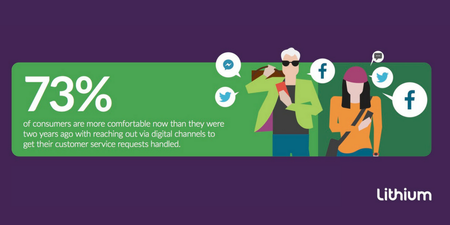
The evolution of digital and social media has dramatically changed the entire customer service dynamic. Online communities and social media channels have now become increasingly important methods for getting support or answers to simple questions. In fact, according to Sapio Research, 73 percent of consumers are more comfortable now than they were two years ago reaching out via digital channels for customer service. This tells us that consumers want to be able to connect with brands in whatever way they want – preferably in a quick, one-to-one fashion – and on the channel of their choice. This could be via Facebook Messenger, tweets rerouted to Twitter Direct Messages, web chats, community forums, or even messaging through a brand’s mobile app. Gartner has even suggested that, by 2019, over 80 percent of people around the world will have used a social channel as an initial point of contact for brand-related support from peers, a community, or a brand itself You’re likely seeing a trend here. Think about your own experience. When given a choice to sort out dinner plans with a friend, for example, do you pick up the phone and call or do you shoot off a quick text message with the hope (or, rather, the expectation) of getting an immediate response? Likely, if you’re like a growing majority of consumers, you probably went the text route. Why? Because it’s quick and easy – and typically gets you an instant response. So, it should come as no surprise that consumers now expect brands to manage their customer service needs in the same way they go about their day-to-day interactions. For one, messaging is asynchronous, which is a fancy way of saying that it can happen anywhere, at anytime, on any device, and across virtually any platform or media channel. It’s in-the-moment. For example, you step out quickly for a coffee. You’re not happy with the service you got, so you send a tweet from your phone to the company to air your concern. Now, you’re back at the office and in front of your computer. You see a response from the company asking to move the conversation to DM. In a matter of minutes, you’ve managed to have a cross-channel customer service experience – probably without even realizing it. That’s why we’re so excited to announce the launch of Lithium Messaging, an asynchronous messaging solution for brands to seamlessly and securely communicate to customers in a more personalized way across social, web, and mobile – all at an efficient, manageable scale. This adds more digital touchpoints for brands to reach customers, including: Private messaging in a brand’s mobile app Click-to-chat on a brand’s website Secure messaging transfer from social channels Messaging in a brand’s community With Lithium Messaging, you can centrally manage conversations across these touchpoints and create stellar customer experiences wherever and whenever your customers reach out to you. Sprint, a U.S.-based telecommunications company, has recently tapped into Lithium Messaging with Secure Verification to authenticate customers from social in a secure, Sprint-owned environment. This has allowed the company to resolve customer service issues without asking them to call an agent, reducing Sprint’s customer call backs by 77 percent. Check out our press release to learn more.4.6KViewsSign in to react to this post0Comments