Communities 2021: Mid-year Update
Greetings from the Communities team. We hope you, your family & friends are staying safe and healthy. As we finish the first half of the year and enter the second, let’s review where we are and also take a sneak peek into some exciting things on the anvil. Our goal is to help you build a comprehensive engagement strategy with your brand community - a vibrant space where your users find answers, develop expertise, share experiences, and in that process build your brand. A brand community that connects across dot com, SEO, social engagement, and digital care. Expanding user engagement: One of the key strategic objectives with the Communities roadmap is powering new and additional use cases for expanding end-user engagement. Last year, we took a big step in this direction with support for Group Hubs. Group Hubs enable creation of spaces within a Community around specific topics and special interests. While continuing to enhance Group Hubs capabilities, we added a new discussion style in Events early this year. Communities and Events go hand-in-hand. Support for a diverse choice of video technologies, Zoom being the latest, means that you can now go live from Communities. Glad to see your enthusiastic adoption of this new discussion style as you make your Communities the home for your brand's events. In addition to ICS support, enhanced Events APIs (1, 2), and Event Analytics released last month, we are currently readying support for Invite-by-email for Events. Events: Now supporting live Zoom events Redesigned with a focus on collaboration and usability, also released earlier this year was content workflow and approval enhancements for Blogs and TKBs. With granular permissions, a new dashboard, article history views, compare versions, internal comments and enhanced notifications, this enables teams of different sizes to collaborate on new & existing articles at scale without getting in each other's way. Nothing differentiates a community more than quality content. Redesigned Blogs and TKBs make it easier than ever to produce quality crowdsourced content in the community without the need for any external tools. Discussions and comments add a spark of excitement and engagement to most content because they can transform mundane browsing experiences into interactive conversations with experts. For example, Comments List Syndication creates a comment box on any external web page. The comments are mirrored in your community, effectively creating a network of interactive conversations across different web properties. In addition, the comment moderation is all handled through the Community Admin capabilities that already exist in the community - making it cost-effective and customizable for all types of pages. First half of this year, we further enriched Syndication capabilities and this continues to be a focus going forward as well. Many thanks for your feedback, ideas and suggestions around these. We are all ears and are looking into further enhancing the capabilities via extending Invite-by-email to Group Hubs, easier ways to administer Group Hubs, more granular permissions for Blogs and the like. Community Management & Security: Another key investment area is enabling easier management of Communities. Recent additions include support for Multi-Factor Authentication (MFA), Self-Serve SAML SSO, new permission controls for Video, Feature logs, and a host of other enhancements. While MFA provides an additional layer of security to help prevent unauthorized account access, SAML SSO is now available out-of-the box as a core product feature, instead of the plugin-based approach used earlier. This simplifies setting up SAML SSO in Communities and reduces the total cost of ownership. Feature logs can be used to generate feature specific logs in components and endpoints to help developers and administrators monitor and debug during Community customisation. Feature logs can be accessed in the Community Admin via Toolbox. We believe that video should be tied exclusively to the community message it was originally part of and these new permission controls are a step in that direction. Over the course of the last few months, we have also been beefing up community moderation capabilities via Engagement Manager (called Manager View earlier). Sporting a new moderation column, Engagement Manager supports an intelligent implementation of bulk processing whereby moderators can select a set of posts and take actions such as Approve, Reject, or Mark as Spam. This year, we also announced a partnership with Samurai Labs, an AI firm dedicated to preventing online violence, to help detect potentially offensive content. Offensive content can be automatically removed from communities without exposing moderators to this stressful material, ultimately creating healthier and more positive communities. Coming very soon is support for Bulk Content Archive. With a variety of filters around age, location, type and activity of the content, this upcoming feature makes it significantly easier to find and archive stale content in a few clicks. Analytics & Insights: With Billing metrics you can now access how your billing-related metrics trend against the contractual tier of your community. This metrics shows the current usage against the contractual tier limits for the metrics subscribed to in your contract. Metrics also shows the timeline view of usage of all the metrics subscribed in the contract. Also added this first half were support for Event Analytics and view upto 12-months at a time. Event Analytics provides key metrics such as RSVP responses, number of unique visitors to an Event page. It helps you measure the success of your community events and improve their engagement. As covered in our June roadmap webinar, a set of new Community Manager (CM) dashboards is in the works. Real-time insights with a bias for action, these new dashboards will include 2 key elements: a community snapshot, a summary view of a set of configurable headline metrics of your community - number of Active Members, Page Views, Unique Visitors so on a community dashboard, a ready reckoner to what has happened/happening in the community - what topics are trending and needing attention, how are key indicators like time-to-first replies faring, how is the user activity shaping up etc While we are working on these, we wanted to share that the beta rollout of the new CM dashboards is delayed by a quarter than originally planned. This delay is due to a change in the platform for these new dashboards. We wanted to fast track consolidation of all community analytics in one single interface, i.e. combine Admin Metrics, Community Analytics and the new CM dashboards into a single tool, over time. We completely understand and share your excitement around these new dashboards and will move forward on this, on priority. We will share further updates, as soon as we have them. Community Management Dashboards: Community Snapshot Voice-of-Customers (VoC) leveraging CX Insights is another key project we are excited about. VoC will help you further to build an actionable view of users to create world-class experiences. More details to come! New Community Experience: The new Community UI service, codenamed Project Aurora, is progressing well. Please watch the detailed breakout-session in our last webinar for a walkthrough of the key elements of this new, transformational community experience. The new community experience offers: a new, modern, beautiful user experience, that is ready out-of-the-box, accessible and optimized for web performance the community managers with simple front-end tools to theme & configure a new admin interface an enhanced developer experience This gives you a community platform that is ready off-the-shelf, with significantly reduced need for customizations (hence cheaper to maintain) and easy to develop against, thus reducing the Total Cost of Ownership (TCO). All this without any need for data migrations as the underlying platform remains the same while the front-end is re-imagined. Blog Article View User Avatars New Admin Interface While we will continue to share updates in our future webinars and via discussions on Atlas, do drop us a note if you have any questions or need any additional details. This is a major investment into the future of communities. We would want to work with you every step of the way and look forward to partnering with you as we bring this to life. In addition to these, we are also working on upgrading our back-end Search platform, enhancing Accessibility and improving Performance. Query Builder, our proposed tool for on-demand insights on content & members in the community is also in the works. As part of the mid-year review, we are proposing to move out Community - MS Teams integration and Ghost Authoring & Transfer Ownership for Blogs & TKBs from this year's roadmap to next year's. These remain on our backlog as priority items and we will bring them back to the roadmap as soon as some of the currently active projects such as the New Community Experience and CM Dashboards are close to roll out. This adjustment helps us to focus our energies on a limited number of high profile projects at a time and deliver them with quality. Hope this was helpful. As always, we would love to hear your feedback, thoughts, and suggestions. 8KViewsSign in to react to this post
 8Comments
Community vs. Social Network
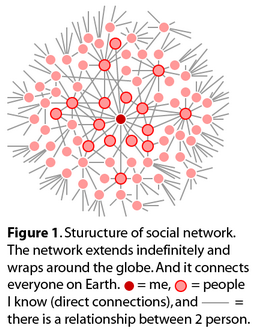
Michael Wu, Ph.D. is Lithium's Principal Scientist of Analytics, digging into the complex dynamics of social interaction and online communities. He's a regular blogger on the Lithosphere and previously wrote in the Analytic Science blog. You can follow him on Twitter at mich8elwu. Welcome back from the Memorial Day long weekend! In my last post, I promised that I’d cover some new topics this time, so I am going to share with you a research project that I’ve been conducting recently on the relationship between social networks and communities. Since 2008, “social media” has become a heavily-used buzz word in the corporate world. The question is “what is social media?” Many seem to equate social media to Facebook-liked social networking sites; others seem to think that they are blogs, the Twitter family of applications for micro-blogging, Flickr, YouTube, or similar type of content sharing Web 2.0 applications. Yet, answers to this question may still range from social collaboration sites (like Wikipedia, Delicious, or Digg) to online communities (like those we host for our enterprise clients or Yahoo! Answer). Well, they are all correct to some extent, and these are functional classifications of social media. Author and blogger Brian Solis, introduced another classification of social media, based on the types of conversation. He called it the conversation prism. However, if you want to understand social media from a relational and social anthropological perspective, you will find that there are really only two major types of social media: Social Networks Online communities Human social networks and communities actually pre-date their online counterpart for millennia. Both are very well-established and robust social structures that have survived the test of time. And they have emerged and reemerged as civilizations collapse and rise. Humans are naturally predisposed to gravitate to and desire this type of interaction. For this initial post of the mini blog series, I hope to offer you a perspective that lets you see some basic differentiating features between these two types of social media. Later on, I will show you what we can learn about them from studies in social anthropology. Social networks Everyone has their own social network (whether online or offline). Everyone has friends, families, and people they are acquainted with. An online social networking site simply makes our social networks visible to others who are not in our immediate network. So the single most important feature that distinguishes a social network from a community is how people are held together on these sites. In a social network, people are held together by pre-established interpersonal relationships, such as kinship, friendship, classmates, colleagues, business partners, etc. The connections are built one at a time (i.e. you connect directly with another user). The primary reason that people join a social networking site is to maintain old relationships and establish new ones to expand their network. With this knowledge, it should be obvious why Facebook, MySpace, and LinkedIn are social networks as opposed to communities. One interesting feature about people’s social networks is that they are extremely unique. It is actually very difficult to fake a Facebook or LinkedIn profile, because your friends (or who you connect to) will collectively identify you. Moreover, because people generally do not compartmentalize their life (unless you are a secret agent for the CIA or some cryptic government agencies), people typically have only one social network. Even for the CIA agents, it could be argued that they have only one social network; it’s just that their network has two or more components that have little overlap. Communities Unlike social networks, communities (both online and offline) are more interesting from a social anthropological perspective, because they often consist of people from all walks of life that seem to have no relationship at all. Yet, as we’ve learned from history, communities are very robust social structures. So what is it that holds these communities together? Communities are held together by common interest. It may be a hobby, something the community members are passionate about, a common goal, a common project, or merely the preference for a similar lifestyle, geographical location, or profession. Clearly people join the community because they care about this common interest that glues the community members together. Some stay because they felt the urge to contribute to the cause; others come because they can benefit from being part of the community. Due to the multifaceted lifestyle of modern living, any individual is often a part of many different communities. Moreover, communities can overlap and are often nested. For example, a geographical community, say a town, may contain sub-communities living in different parts of the town that are connected by a finer geographical granularity. But at the same time, the same town may contain several different ethnic communities that are connected by the ethnicity. Now, do you see why Yelp, Wikipedia, YouTube, Flickr, Digg, the blogosphere, etc., are just communities? Yelp is a community of, originally, food enthusiasts; where as members of the Wikipedia community are passionate about cause of the internet encyclopedia project. YouTube and Flickr are nested communities of video and photography enthusiasts respectively, and they may belong to other sub-communities within the YouTube and/or Flickr community. These sub-communities may simply be your friends and relatives, or people are interested in high dynamics range photography (with 61,000 members) or time lapse videos. In Summary Social Networks (see Figure 1) are: Held together by pre-established interpersonal relationships between individuals. So you know everyone that is directly connected to you. Each person has one social network. But a person can have different social graphs depending on what relationship we want to focus on (see Social Network Analysis 101). They have a network structure. Communities (see Figure 2) are: Held together by some common interests of a large group of people. Although there may be pre-existing interpersonal relationship between members of a community, it is not required. So new members usually do not know most of the people in the community. Any one person may be part of many communities. They have overlapping and nested structure. Now that you know the basic difference between social networks and communities from a relational perspective, next time we can discuss more interesting questions, such as the dynamics of tie formation, or what it means to businesses. I haven’t yet decided what I will write, so let me know if there are any interesting topics that you want me to dig into. In the mean time, comments, questions and critiques are all welcomed. Related Blogs Social Network Analysis 101 How Do People Become Connected? Community vs. Social Networks 2 From Weak Ties to Strong Ties: Community vs. Social Networks 3246KViewsSign in to react to this post44CommentsLithium Community 18.12 Release Notes
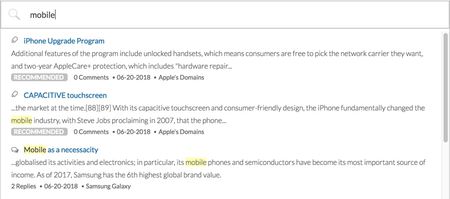
New Features Promoted Search Places included in search results SEO improvement: Rich Google search results for forum pages Updates to the message editor Real-time virus scanner for file attachments Content mentions @Mention notification email template name change Me Too metrics provided in LSI Improved REST API call reporting in Toolbox In-app reference documentation for email template context objects Improved badge assignment performance Update to the Vitality quilt Studio endpoint authentication error handling API changes Promoted Search From time to time, you might want specific community content to display at the top of the search results list when users search for specific keywords or phrases. With Promoted Search, you can now associate specific searches to specific community URLs to “boost” specific pieces of content to the top of the search results list. Here’s how promoted search results mapped to the keyword “mobile” might display: Let's look at a few scenarios where Promoted Search might be useful. A community admin can use Promoted search to point end-users to official company information, such as the GDPR policy or some specific product documentation. An admin could also use Promoted Search to create awareness about company announcements, event campaigns, news items, or certain products. Consider an instance where one of your products is experiencing a service outage. You might create an article that describes the issue and possible workarounds. During the outage, you could promote this article to the top of search when a customer searches for the keyword outage. After the outage is resolved, you could delete the promoted search rule. Note: To use Promoted Search, you must be on Search version 3.0 and or above. Learn more about Feature Versions. Create Promoted Search rules To create a Promoted Search rule: Sign in to the Community as an admin or a user who has permission to create promoted search rules. Go to Content > Promoted Search. By default, all promoted search results display with the “Recommended” label in front of it. For example: To change the default label open the Promoted Search Indicator drop-down menu and choose the label you want. Or, select None. Click Add a Rule. Note: After you start adding rules, the Add a Rule button displays at the bottom of the rules list. Enter the keyword(s) or phrase and the content link (full URL) of the community content you want to promote. Note: Separate multiple keywords/phrases with commas. Multi-word phrases require an exact match. Click Add. Optionally, you can set the priority order of the rules you create. Sometimes, you might want to create multiple rules for the same keywords/phrases. Use the priority field to indicate the order in which content that maps to the same keywords appears in the search results list. Note: For any given search, a maximum of two promoted search results will be shown. To edit or remove existing rules: Go to Content > Promoted Search. Find the rule in the list you want to edit. Click Edit. Edit the Priority, Keywords, and Content Link, as needed. Click Save. To delete a Promoted Search rule, click Remove next to the rule. Turn Promoted Search rules on and off From time to time you might want to temporarily turn off Promoted Search rules. For example, you might want to turn rules off while you add new rules, change existing rules, or change the ranking order of rules. Or, maybe the rules you’ve created promote certain content during specific times or a temporary event on your community. Rather than deleting the rules or turning off Promoted Search, you can temporarily turn off the processing of these rules, effectively turning off Promoted Search. Just click Enabled or Disabled above the rules list. This way, you don’t lose all the rules you’ve built when the feature is disabled. You can continue to manage the rules (add/edit/delete) in the disabled state. Grant users permission to create promoted search rules To create and edit promoted search rules, users must have the Create promoted search rules permission. To grant someone the ability to create promoted search rules: Sign in to community as an Admin. Go to Users > Permissions. Click Edit Users tab and search for the user to whom you want to grant this permission. (Alternatively, you can go to the Roles tab and Edit the permissions for all users with a specific role.) Scroll down to the Search permissions and Grant the Create promoted search rules permission. Click Save. Places included in search results In addition to showing specific content in search results, search results now return community “places”. Places are boards, categories, or groups that include the search term in their name or description. For example, if you searched for “iWatch”, boards and categories with “iWatch” in their name or description will display in the Places search results area. Up to 3 places are displayed in the Places search results area. Note: To include places in search results, you must be on Search version 3.2. Places is enabled by default when you upgrade Search to version 3.2. If you want to disable the Places feature, you must file a ticket with Lithium Support. Learn more about Feature Versions. In addition to Places being returned in the auto-suggest results, the Search Page now includes a Places view: If you see the Places tab, but the listing of Places does not appear, check to see whether your Search Page quilt includes the search.widget.node-search component: Open Studio > Pages. Click Change and select the Search > Search Page to open the Search Page quilt. Click Switch to XML View. Add <component id="search.widget.node-search" useTabVisibility="true" /> to the main-content section: <add to="main-content"> <component id="search.widget.message-search" useTabVisibility="true"/> <component id="search.widget.user-search" useTabVisibility="true"/> <component id="search.widget.note-search" useTabVisibility="true"/> <component id="search.widget.node-search" useTabVisibility="true" /> </add> Click Save. SEO improvement: Rich Google search results for forum pages Starting with the 18.12 Release, the markup for all community forum pages has been updated to support the latest Google Q&A Structured Data guidelines, described here. Now, when someone searches on Google and a forum page from your community appears in the Google search results, a rich preview displays similar to this: Note: Google will not start showing this rich preview for forum topics from your community immediately. The new markup will increase the likelihood that Google will use a rich search results format. Read more about Google's structured data policies here. The search result listing highlights the solved answer (if it exists) and other answers in carousel format with the number of votes/kudos each has received. Updates to the message editor With the 18.12 release, we have updated to the 4.7.13 version of the TinyMCE message editor, which includes a number of fixed issues, listed on the TinyMCE site. Note: We previously announced the availability of the updated message editor in the 18.9 release, but we put the upgrade on hold to investigate some potential issues with the upgrade. These issues have been addressed in the 18.12 Release. All Community customers will be upgraded to TinyMCE 4.7.13 when they are upgraded to 18.12. We strongly recommend testing your message editor and TinyMCE features thoroughly on your stage environment after the state environment is upgraded before your production environment is upgraded to 18.12. Real-time virus scanner for file attachments Lithium’s real-time virus scanner service checks for viruses in files attached to posts to protect your community from becoming a distribution point for malicious software. Basically, this service: Scans all attachments while they are being uploaded and removed any malicious attachments before getting posted to the community. Keeps the service’s virus definitions up to date. Periodically scans previously uploaded files to catch any malicious files based on latest virus definitions and updates. (Infected files are automatically removed, any references to the file are removed.) By default, this service is disabled. To have it enabled, open a Support ticket. As an Admin, you can define who should receive the Virus Scan results email, which is delivered as a daily digest. You can also set the time of day that the email is sent out the recipients. Note: In addition to the daily digest email, real-time notifications are also displayed. If malicious attachments are found, a CSV file is attached to the daily digest email that provides the following information for each attachment: Community User ID of the person who attached the file URL of the post to which the file was attached Date when the attachment was added File name of the attachment To set the Virus Scan daily digest email distribution options: Sign in to Community as as Admin. Go to System > File Attachments. In the Send virus scan daily digest email to field, enter the email addresses (separated by commas) of the people who should receive the email. In the Run the virus scan daily digest at this time field, enter the time of day (PST) that the virus scan email should be sent out. Note: For the real-time virus scanner feature to work properly, you must enter values for both the Send virus scan daily digest email to and Run the virus scan daily digest at this time settings. Click Save. Now, when an error is detected with an attachment, the file is removed and an error is displayed: Email templates and notifications for virus detection emails The Virus Scanner Service includes a new email template (Virus Scanner Digest Report), which is sent to the predefined list of people to report the results of the daily virus detection scan. You can view the content of the Virus Scanner Digest Report in by going to Studio > Text Editor > Email Text and selecting the template from the email template drop-down list. Like all community email templates, you can edit their content to meet your specific needs or company voice. Learn more about editing content of email templates. Content mentions We are announcing the Early Access release of a new feature called Content Mentions. Content Mentions enable users to call out specific posts within the body of a message. It's a way to quickly embed a link to other content in the community. To get started with this new feature: Open a ticket with Lithium Support to enable content mentions. Requirement: Content mentions is supported only on Responsive communities. Set the Mentions feature to version 2 in Studio > Features. (You will not see the Mentions feature in Studio > Feature tab until Support has enabled it for you.) Grant users the Mention content in posts permission in Community Admin. Note: The Early Access release does not support email notifications when a user's message is mentioned in a post, and content keyword search supports only full word searches. Email notifications and prefix search will be included in the GA release. You will see the new email template in Studio, but you will not able to set notification preferences at this time. Content mentions are supported in all conversation styles in both topics and replies/comments. Here’s how it works Let’s say you're responding to a forum topic and you want to link to another post that includes some helpful information. Using the Rich Text editor, type the @ symbol. A default list of suggestions appears in a pop-up. Note: When User Mentions are enabled on the community, users appear at the top of the suggestion list. Type a few letters of a keyword in the subject or body of the message you want to link to. As you type, search results with messages matching that keyword organized by conversation style appear in the pop-up. You may enter multiple words in the mentions pop-up. When multiple words are entered, all words must be present in the subject and/or body. When you select an item in the list, Community adds the subject of the post with a hyperlink in the body of your message. Note: The content mention link does not currently work in Preview Mode. Mentions UI update Mentions v2 updates the look of the mention search pop-up UI. This same change will also affect the look of the Product Mentions search pop-up UI when Mentions v2 is enabled. With Mentions v1, the mention search looks like this: With Mentions v2, the mention search looks like this: Content Mentions documentation To learn more about Content Mentions, see: About @Mentions Enable @Mentions Set @Mentions permissions @Mention notification email template name change We have changed the name of the @Mention notification email template in Community Admin to @Mention user notification to differentiate it from the new @Mention content notification email template. This change does not affect your code and customers will be unaware of the update. The @Mention user notification email template file name (email_content.template.mentions.text) is unchanged. Me Too metrics provided in LSI Me too is a community feature provided in our Forum and Q&A discussion styles that enable users to indicate that they are experiencing the same issue or agree with another user’s comment. Prior to 18.12, this metric was reported only in Admin metrics; now this metric is included in LSI. The Me Too metric helps community moderators understand what the most important topics/issues are. To view Me Too metrics in LSI: Sign in to LSI. Go to Content. Click Forums or Q&A. In the Top # table, open the Settings menu and click Manage Columns. Select Me Too. Click Save. The Me Too metrics are displayed: Improved REST API call reporting in Toolbox We have improved the REST Usage tab in Toolbox to display the LiQL queries used in the page. LiQL queries are used with the Community API v2 /search endpoint. Previously, we simply showed the /search endpoint in the REST Usage table. When more than one LiQL query was made in a component, it was difficult to tell which query applied to the /search entry in the list. Now we show the LiQL query in the table instead of the /search endpoint to help you better identify heavy LiQL queries. In-app reference documentation for email template context objects We have moved email template context object documentation into the Studio > Text Editor > Email Text tab. Because context objects are often specific to the template in which they are used, you will now find the definition of Velocity context objects and methods used in an email template below the email template editor a new Email Template API Reference section. The Email Template API Reference section includes two subsections. The Variables Used in the Template subsection lists the context objects used in the template along with their definitions. Note: Variables used in logic like for loops do not appear in this list. This is because those variables are used specifically within that logic and are not able to be extracted programmatically. If you are familiar with the Velocity template language, the variables in these cases will be easy to decode. The Email Template Context API subsection is for advanced users and developers customizing email templates. This section provides API reference documentation for the top-level, nested, and enum objects available for use in the template. Improved badge assignment performance We have made performance improvements to the Badges feature. Awarding badges to 2 million users now takes less than 2 minutes. Previously awarding badges to 100,000 users would take approximately nine minutes. Update to the Vitality quilt The out-of-the-box Vitality quilt (vitality.quilt.xml) used on the default Community Page includes the Community Metrics component (community.widget.metrics-display) to show the count of registered users. The Community Metrics component currently has the li-metric-name parameter value, which dictates the metrics displayed by the component, set to completed_registrations. This metric includes fully-registered, partially-registered, and in some cases, deleted users. We have updated the out-of-the-box Vitality quilt to use a new li-metric-name value (completed_registrations_computed) which displays the count of fully-registered users only. To see this change, you must update the Community Home feature version to 3.1 in Studio > Features. If you have customized the Vitality quilt If you have customized the Vitality quilt and you want to use the new completed_registrations_computed metric in the Community Metrics component, you must make the following changes in your custom quilt. In the quilt XML, change: <component id="community.widget.metrics-display" li-metric-name="completed_registrations"/> to <component id="community.widget.metrics-display" li-metric-name="completed_registrations_computed"/> Change the CSS class used by the quilt from: lia-vitality-metrics-display-completed-registrations to lia-vitality-metrics-display-completed-registrations-computed Update the text key used by the Community Metrics component. Take the value of the text key: li.community.metrics-display.completed and apply it to this text key: li.community.metrics-display.completed-registrations-computed Studio endpoint authentication error handling We currently allow customers to authenticate Studio Endpoints using a Session Key. Starting in 18.12, Community will throw a 403, Forbidden HTTP response code along with an error response if the session key used has expired. The error response differs depending on the content type. The following table outlines the error response format if the restapi.session_key is an invalid (i.e. expired) token. content type error response text/html5.7KViewsSign in to react to this post79CommentsKhoros Communities 21.1 Release Notes
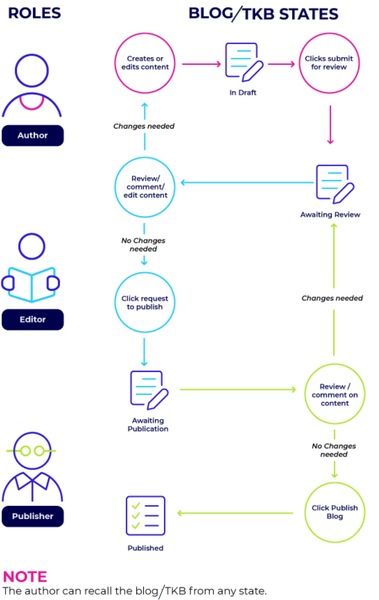
We begin this year with GA releases for Content Workflow and Approval for Blogs and TKB discussion styles along with API, Spam enhancements, Multi-Factor Authentication, Events Analytics, and Billing Metrics. We have also added a new blog just for our developer community! Features API updates Bug Fixes Features Content Workflow and Approval improvements for Blogs and TKBs (GA) Multi-Factor Authentication (GA) Enhancements for Spam Management Billing metrics (GA) Events Analytics (GA) Enhancement to temporarily disable community emails Announcement: Temporarily disabling Print Knowledge Base option in Tribal Knowledge Bases. New Developer Blog Content Workflow and Approval improvements for Blogs and Tribal Knowledge Bases(TKBs) (GA) In the 20.11 Release Notes, we announced Early Access for Blogs v3 and TKB v4 with a 3-step content-creation workflow to publish articles. This is now available for General Availability (GA). These new versions are designed to focus on collaboration and usability for higher quality articles. This flowchart shows how an article moves through the publishing workflow and the tasks members with specific roles can perform. Each article moves through different states and is assigned to members with specific roles. Thus, you always know what state an article is in, and your entire team is clear on their and others’ responsibilities. Content workflow and approval provides these blog and TKB enhancements: Granular Permissions: More robust permission structure to support different content roles - Author, Editor, Publisher for different purposes- create, review and publish respectively. With granular control over author, editor, and publisher permissions, you can clearly define who can perform each task in the publishing workflow. Learn more about roles and permissions in Blogs v3 and TKB v4. Dashboard improvements: Improved article dashboard to track an article’s journey in the publishing workflow and make it easier to take relevant actions. Learn more about Dashboard improvements for Blog v3 and TKB v4 Draft History view: A new component to track every action performed on an article until it is published. This records what action was done by whom and at what date and time. Compare two versions of a draft or published articles: Compare any two versions when the article is in the workflow process or after the article is published. The highlights show the differences between two versions of a draft or article. Internal comments: Provision to add internal notes for the article between the members collaborating on the draft. Notifications: Email Notifications to relevant community members at every stage in the Workflow. Note: When you upgrade Blogs to Blogs v3, all members with the BlogAuthor role in the previous versions will continue to have the BlogAuthor role in v3. However, in v3, BlogAuthors cannot post blogs directly, they can only send it for review. When you upgrade TKB to TKB v4, members with Start new articles and edit drafts permission will continue to have the permission after upgrade. You must assign members the BlogEditor, BlogPublisher, TKBAuthor,TKBEditor and TKBPublisher roles. We recommend that you use the default roles, instead of custom roles, as the workflow notifications are based on the default roles and sent to members who have these roles. Enablement: For Blogs v3, goto Studio>Features>Blogs and choose v3. For TKB v4, goto Studio>Features>TKB and choose v4. Learn more on quilt changes for Blogsv3 and TKBv4 Learn more about Content Workflow and Approval improvements for Blogs and TKB. Multi-Factor Authentication (GA) With this release, we announce the General Availability (GA) of Multi-Factor Authentication (MFA). Enabling MFA in your community enforces an additional layer of security which helps prevent unauthorized account access. After MFA is enabled for a community, the system mandates all privileged users (identified on the basis of certain elevated user permissions) to have this additional level of authentication to access the community. These users must: complete a one-time MFA setup for their account and add their account in an authenticator app provide a verification code generated by the authenticator app, in addition to the username and password for signing into the community. Note: As of now, MFA support is available only for non-SSO communities. To enable MFA for your community, open a Support ticket. Learn more about MFA. Enhancements for Spam Management We’ve introduced enhancements to make it easier to manage spam on your community. With the new Spam Quarantine page, you can seamlessly help combat spam while also reducing the risk of losing legitimate content in your community. We’ve also made it easier to mark all the posts from users you want to ban from your community as spam when you ban them. This eliminates the hassle of searching for the posts and then marking them as spam while you ban users. Note : These spam enhancements are available to all customers. Spam Quarantine Page Following are the list of enhancements to the Spam Quarantine page: A new look and feel of the Spam Quarantine page. You can select multiple posts to mark them as Not Spam. You can see whether a post was auto classified as spam by the system, or by a moderator. You can filter out all the auto classified posts for quick review. You can select multiple posts to Hide them. The spam posts that you hide will not show up on the Spam Quarantine page. By doing so, you can avoid re-evaluating them for their content. However, the hidden posts will show up on the search results when you search in the Spam Quarantine page. Learn more about Spam Quarantine. Ability to mark all posts of a user as spam while banning the user from your community While banning a user from the user’s profile page, check the Mark all content as spam option to mark all the posts of that user as spam and move them to Spam Quarantine. This also deletes all the Private Messages sent by that user. Note: Ensure that the Match exact username and Match exact email address checkboxes are selected and the user details are of the user whose profile page you are on. Learn more about banning users from the community. Deleting Private Messages sent by a member while marking all their posts as spam Earlier, the Mark all content as spam option to mark a member’s posts as spam, did not handle the user’s private messages. You had to manually delete all the private messages from that user. In this release, we extend this functionality to delete all the private messages sent by the user. This option is available under the Moderator Controls section in the user’s profile page. Billing metrics (GA) We now bring you General Availability for Billing Metrics in Community Analytics. With Billing metrics you can access how your billing-related metrics trend against the contractual tier of your Community. This metrics shows the current usage against the contractual tier limits for the metrics subscribed to in your contract. Metrics also shows the timeline view of usage of all the metrics subscribed in the contract. Note: Open a support ticket to enable Billing Analytics in your community. Learn more about Billing Metrics. Events Analytics (GA) We are happy to announce the general availability of Analytics for our brand new discussion style - Events. With Event Analytics you can measure success around the Events in your community and improve engagement and usage. It provides you key metrics to measure the value delivered by Community 'Events' as a discussion style, which includes Events in your community RSVP responses Unique visitors to the Event page List of members By applying the Event ID (Thread ID)filter, you can list the members who were invited to that event responded with an RSVP to that event visited that Event page Learn more about Events Analytics. Enhancement to temporarily disable community emails Up to now, to temporarily pause notification emails to community members, you were required to open a support ticket. In this release, we introduce the ability to enable Admins to temporarily disable emails sent from your community to the community members. Admins can use this option to pause notification emails while performing maintenance work on the community, such as consolidating boards and/or updating the community board structure, refining rank structure, or in the event of a spam attack. However, members will still receive user registration, password reset, and email update notifications. This option is available in the Admin settings under the Maintenance tab. Announcements: Temporarily disabling the TKB Print Knowledge Base option. We are working to improve the performance of the TKB Print Knowledge Base feature. As such, we are temporarily disabling this feature. If you need to use this feature during this time, reach out to our Support team. New Developer Blog A new blog dedicated to our development and engineering community is now available in the Dev Network area of Atlas. Our goal with this new blog is to share information, tip and tricks, success stories, and other topics of interest to developers and engineers working with Khoros' many products and solutions. In a general audience blog format, we rarely get the opportunity to explore how our APIs and software features can help engineers build successful solutions around Khoros products. This is where the new Developer Blog comes in. It's a chance for us to "get into the weeds" about how you can get the most out of Khoros' APIs for your next project. Do you have a successful project or innovative solution that you would like to share with the Khoros dev community? Email us and let us know. We'd love to have you as a guest author. API updates 21.1 introduces several new capabilities to the endpoints responsible for creating and updating messages in Community API v2. These new capabilities are centered around the new content workflow system: Apply a draft status to new TKB articles and blog posts. Perform edit actions on drafts ahead of submitting them for publication. Submit TKB articles and blog posts for publication. Return articles from a review state back to a draft state for additional author action. Return an edited article or post to the editor for additional action. Recall an article to a draft state (performed by an author). Publish an article. Schedule, update, or cancel a publication time for a new post or article. Nominate a forum topic to become a TKB article. Approve/reject a nomination (forum topics nominated to become TKB articles). Add and remove contributors to a blog post or TKB article. We have also added several new LiQL capabilities for the new content workflow system. These include: Retrieve content workflow information for a specified message. Retrieve messages with a draft, in_review, in_approval, or nominated state within a board. Retrieve the current publication status for a message. Retrieve messages for a specified board where a targeted user is listed as contributor or coauthor. You Found It. We Fixed It. We have fixed the issue where images for badges loaded in SVG format were not displayed in the user’s View All page for badges. We have fixed the issue where legitimate posts were marked as spam when they were edited and published multiple times. We have fixed the issue where case creation in our case portal was taking longer than expected3.1KViewsSign in to react to this post21CommentsKhoros Communities 20.1 Release Notes
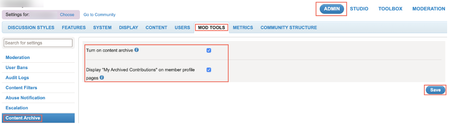
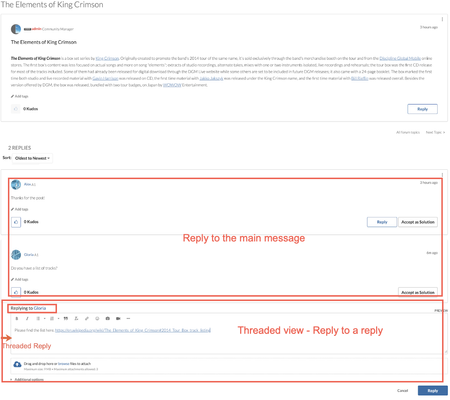
New Features Update to the Khoros Communities release schedule Content Archive (EA) Inline Replies and Threading (EA) Additional Leaderboard filters Community Syndication: Message List EA update API Updates Group Hubs API Membership APIs Content Archive API Update to the Khoros Communities release schedule Khoros Communities is moving away from a monthly release cadence and a staggered upgrade system. Starting with the next release, we are moving to a 6-week release cycle with a 100% upgrade target. We believe this new release cadence will improve overall quality, value in each release, and innovation. We are keeping the same “year.month” release-naming scheme. For example, the next Community release, which all customers will receive, will arrive in March and be called the 20.3 Release. We value all our Khoros Community customers and appreciate your patience as we roll out this new system and any minor bumps we might incur during this change. Learn more about this change. As always, your feedback is always welcome. Content Archive (EA) In the 19.10 Release, we announced the Early Access release of Content Archive. With this feature, Community Managers can archive a topic/article directly from the Options menu for each Forum topic, TKB, or Blog article. To enable the Content Archive feature community admins can go to Admin > Mod Tools > Content Archive. The My Archived Contributions option appears under My Profile > Topics I’ve Participated in component when Display “My Archived Contributions” on member profile pages is granted to the member. Here, members can view all their archived contributions. Use the Content Archive feature to ensure that fresh and relevant content shows up in your community. Moving outdated or low-use content to the archive can help improve the findability of more critical community content. With the 20.1 Release, the Content Archive EA includes some new features. As the contents of the archive grows over time, it becomes more difficult to find the specific article you want. For quick retrieval, use the search options available under Archives in your community. Note: Archived contents can be accessed only by permissioned community members (primarily Community Admins/Moderators). Content Archive analytics With the 20.1 release of Content Archive, we now include Content Archive metrics. Archived Content metric measures the number of contents archived. These new metrics are available in Community Analytics > Content and Community Analytics > Moderators. Learn more about the Content Archive feature. Learn about Content Archive API support below. Inline Replies and Threading (EA) To better organize discussions and keep context meaningful, we have introduced an Inline Replies and Threading feature. With Inline replies, you can reply to another reply and continue the discussion in a separate, single thread. Note: To participate in the In Replies and Threading EA, you must open a Support ticket and request access. Note: By default a post or a reply has 5 levels of threaded(indented) replies. Any reply after the fifth reply would be at the same level of indentation as the fifth reply. This is configurable upto 8 levels. Contact support to configure the levels of indentation. By default, the community setting to display posts is set to Linear Format. Please edit this setting on the Discussion Styles > Posts & Topics > Topic Display tab to enable threading. Enable Forums Version 5 You must upgrade Forums to Version 5 to enable Inline Replies and Threading. Go to Studio > Features. In the Forums drop-down list, select 5. Click Save. Learn about quilt changes for forums that are customized according to community needs. Learn more about the Inline Replies and Threading feature. Additional leaderboard filters We have introduced a new time filter (The last 3 Months) in both the Kudos & Accepted Solutions tabs. Also, under the Accepted Solutions, you will now see the Time Range options in sync with the options available under the Kudos tab. To change the time range filter for Kudos or Accepted Solutions leaderboard components for 3 months: Go to Community Admin > Features. Click Kudos or Accepted Solutions on the left pane. 3. Set the time range option to The last 3 Months. 4. Click Save. Learn more about Kudos and Accepted Solutions. Community Syndication: Message List EA update In the 19.10 Release, we announced the Community Syndication Message List feature and we’re excited to share some new functionality. You can now display content in a Card View similar to what you might see on your .com blog announcements. This enables you to include images from the community as part of the message, creating more visually engaging content to bring users into the community. Toggle back and forth between List View and Card View to refine the look and feel of your Message List using the configuration panel and see the content updated in real-time in the preview window. Additionally, you can now select content from across multiple categories to be viewed in a single Message List. Refine the list of messages by selecting a single discussion style like blogs or select multiple discussion styles (forums, TKBs, blogs or ideas) into a single list. Curate the content by choosing one or multiple tags, labels, or authors to keep in control of what to display. If you’ve imported your product catalog into community and want to bring community content about a specific product into your e-commerce experience, you can pull the content tagged with a product association to refine content only about that specific product. We are finishing up analytics for this feature as well as doing some final performance testing prior to releasing the feature as Generally Available. If you are interested in learning more, send a private message to RayC. API Updates We've added API support for: Group Hubs Node Memberships Content Archival Group Hubs API We've added Community API v2 Create, Update, and Delete support for group hubs. Perform actions involving membership (such as viewing members of a group hub, inviting users, and managing requests to join) using the Membership APIs. Examples Create a group hub curl -X POST \ https://[COMMUNITY DOMAIN]/api/2.0/grouphubs \ -H 'Content-Type: application/json' \ -H 'li-api-session-key: [SESSION KEY]' \ -d '{ "grouphub": { "id": "shutterbugs", "title": "Shutterbugs", "membership_type": "closed_hidden", "conversation_styles": [ "forum", "blog", "tkb" , "idea", "qanda", "contest" ], "parent_category": { "id": "groupHubs" } } }' Edit a group hub curl -X PUT \ https://[COMMUNITY DOMAIN]/api/2.0/grouphubs/shutterbugs \ -H 'Content-Type: application/json' \ -H 'li-api-session-key: [SESSION KEY]' \ -d '{ "grouphub": { "description": "A place where we can talk photography." } }' Delete a group hub curl -X DELETE \ https://[COMMUNITY DOMAIN]/api/2.0/grouphubs/shutterbugs \ -H 'li-api-session-key: [SESSION KEY] Get group hub details GET calls are made using the /search endpoint with a LiQL query passed as the value of the q parameter. curl -X GET \ 'https://[COMMUNITY DOMAIN]/api/2.0/search?q=SELECT+topics.count%28%2A%29+FROM+grouphubs+WHERE+id+%3D+%27knittingGroupHub%27' \ -H 'li-api-session-key: [SESSION KEY]' Make LiQL queries to the v2 grouphubs collection to get details about a group hub, such as the group hub's parent and location in the community structure, and the count of topics and messages in the group hub. Make queries to the V2 messages collection to get message details. You can also use calls on the v1 Message and MessageDiscussion objects. Make queries the v2 nodes collection to get a group hub's child nodes or to get a list of group hubs in the community or within a category. You can also use calls on the v1 GenericNode object. Make queries to the v2 subscriptions collection for group hub subscription information. You can also use calls on the v1 Subscription object. Make queries to the v2 boards collection for information about a child board in a group hub. You can also use calls on the v1 Board object. Make queries to the membership_requests collection create a request to join and to accept or deny a request to join LiQL examples These example queries will get you started with some common group hub tasks. Get the count of topics on a group hub SELECT topics.count(*) FROM grouphubs WHERE id = 'knittingGroupHub' Get the last 5 messages posted to a group hub SELECT subject,body, author,href,view_href FROM messages WHERE grouphub.id = 'knittingGroupHub' ORDER BY post_time DESC LIMIT 5 Get the details about a group hub's child nodes SELECT id,title,href,view_href FROM nodes WHERE parent.id = 'grouphub:knittingGroupHub' ORDER BY message_activity.core_property_change_time Get a list of group hubs in a category SELECT id,title,view_href,href FROM nodes WHERE parent.id = 'category:groupHubs' More to come Look for the ability to set the group hub avatar via the API in the next release. Membership APIs Membership nodes are nodes that have members, membership roles, and optional access restrictions. At this time, a group hub is the only node type that supports membership. We've added new Community API v2 collections to support membership actions. Important! We have deprecated the memberships collection introduced during Group Hubs EA. The memberships collection supported retrieving join date, node, and user details associated with a specific membership. The memberships collection is deprecated as of Community release 20.1. Retrieve membership details using the membership_nodes and members collections as described below. Note: We discovered issues with the members and membership_nodes collections soon after the release of 20.1. We will be replacing these collections with new fields and constraints on the users and nodes collections to retrieve members of a node and the nodes to which the user is a member. Collection Object Actions Supported tasks membership_requests membership_request GET POST PUT Retrieve requests to join a membership node. Must be constrained by node ID. Send a request to join Approve or deny a request to join invites invite POST Send invitations to join a membership node Examples Retrieve requests to join a membership node SELECT * FROM membership_requests WHERE node.id = 'grouphub:developerNetwork' Retrieve requests to join a node SELECT * FROM membership_requests WHERE node.id = 'grouphub:developerNetwork' Send a request to join a membership node URL: /api/2.0/nodes/<node.id>/membership_requests Method: POST Body: { "data" : { "type" : "membership_request" } } cURL example curl -X POST \ https://[COMMUNITY DOMAIN]/api/2.0/nodes/<node_type>:<node_id>/membership_requests -h 'Content-Type: application/json' \ -h 'li-api-session-key: [SESSION KEY]' \ -d '{ "data" : { "type" : "membership_request" } }' Approve or deny a request to join URL: /api/2.0/nodes/<node_type>:<node_id>/membership_requests Method: PUT Body: { "data" : { "type" : "membership_request", "approve_request" : "<true or false>", "user_id" : <ID of the user who requested to join> } } cURL example to approve curl -X PUT \ https://[COMMUNITY DOMAIN]/api/2.0/nodes/<node.id>/membership_requests -h 'Content-Type: application/json' \ -h 'li-api-session-key: [SESSION KEY]' \ -d '{ "data":{ "type":"membership_request", "approve_request":"true", "user_id":2 } }' cURL example to deny curl -X PUT \ https://[COMMUNITY DOMAIN]/api/2.0/nodes/<node.id>/membership_requests -h 'Content-Type: application/json' \ -h 'li-api-session-key: [SESSION KEY]' \ -d '{ "data":{ "type":"membership_request", "approve_request":"false", "user_id":2 } }' Send invitations to join a membership node URL: /api/2.0/nodes/<node_type>:<node_id>/invites Method: POST Body: { "data":{ "type":"invite", "invitees":[ { "id":<id of first person to invite> }, { "id":<id of next person to invite> }, { .. } ], "role":{ "name":"<membership role title. Member is default>" }, "body":"Please Join My GH" } } cURL example curl -X POST \ https://[COMMUNITY DOMAIN] /api/2.0/nodes/<node.id>/invites -h 'Content-Type: application/json' \ -H 'li-api-session-key: [SESSION KEY]' \ -d ‘{ "data":{ "type":"invite", "invitees":[ { "id":5 }, { "id":6 } ], "role":{ "name":"Owner" }, "body":"Please Join My GH" } }' More to come Stayed tuned for API support for the following tasks in the next release: Accepting an invitation to a membership node Removing and assigning roles from/to members in a membership node Content Archive API We've added API support for Content Archive. The Content Archive API supports: Archiving a message Updating an archived message (adding or updating a suggested URL) Removing a message from the archive Retrieving archived content Archive a message URL: /api/2.0/archive curl -X POST \ https://[COMMUNITY DOMAIN]/api/2.0/archives/archive \ -H 'Content-Type: application/json' \ -H 'li-api-session-key: [SESSION KEY]' \ -d '[{ "messageId" : "251", "suggestedUrl" : "<full URL to suggested content>" }]' Edit an archived message URL: /api/2.0/archives/suggestedUrl Method: PUT curl -X PUT \ https://[COMMUNITY DOMAIN]/api/2.0/archives/suggestedUrl \ -H 'Content-Type: application/json' \ -H 'li-api-session-key: [SESSION KEY]' \ -d '[{ "messageId" : "251", "suggestedUrl" : "<full URL of suggested content>" }]' Remove a message from the archive URL: /api/2.0/archives/unarchive Method: POST curl -X POST \ https://[COMMUNITY DOMAIN]/api/2.0/archives/unarchive \ -H 'Content-Type: application/json' \ -H 'li-api-session-key: [SESSION KEY]' \ -d '[{ "messageId" : "251" }]' Retrieve archived content URL: /api/2.0/search?q=<LiQL query> Method: GET curl -X GET \ 'https://[COMMUNITY DOMAIN]/api/2.0/search?q=SELECT%20id%2C%20author%2C%20subject%20FROM%20messages%20WHERE%20visibility_scope%20%3D%20%27public%27%20AND%20author.login%20%3D%20%27User2%27' \ -H 'li-api-session-key: [SESSION KEY]' When retrieving messages, you can filter by visibility_scope in the WHERE clause of a query to the messages collection. To include archived content along with public content, use a visibility_scope of public_and_archived. To retrieve only archived content, use a visibility_scope of archived. Example LiQL queries select id, author, subject from messages where visibility_scope = 'public_and_archived' AND author.login = 'User2' select id, author, subject from messages where visibility_scope = 'archived' AND author.login = 'User2' You Found It. We Fixed It. When creating a new case via the Case Portal, some members reported receiving an error message and being instructed to correct the highlighted fields and resubmit the request. However, no fields in the form were highlighted. Additionally, sometimes the case was created and other times it was not. Both of these issues have been fixed. We have fixed the issue where the Community Batch API with Post JSON was not returning any users for some communities. Previously, there were some discrepancies between the results for the /users/id/<user id>/posts and /users/id/<user id>/posts/count REST API v1 calls. Now, these calls produce consistent results.3.2KViewsSign in to react to this post16Comments15.9 Release Notes
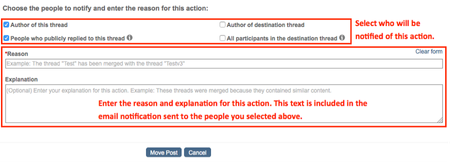
The 15.9 Release introduces the new Lithium Responsive platform. Lithium Responsive optimizes your community for a wide range of devices from mobile phones to tablets to desktop monitors. Using Lithium Responsive, you can provide a consistent and modern brand and user experience everywhere, ensuring a feature-rich community on all devices. Customer demand has been high for this feature, and we cannot accommodate all customers at this time. The 15.9 release also includes several other productivity and search optimization improvements, including the ability for moderators to add a reason explaining why they are editing, moving, or deleting messages and send an email notifying users of the action taken. To help with SEO, we’ve added the ability to customize title tags for community pages and have enhanced our metadata descriptions so when threads that have accepted solutions are returned in search results, it is clearly indicated that the issue is “Solved”. Other improvements include a new setting to prevent people from giving kudos to implemented Ideas and support for several more criteria you can use to create community badges. Finally, we’ve cleaned-up and improved several of the Community Admin settings so that it’s much clearer what each state of the setting does. New features and enhancements Lithium Responsive Reason notification option added to message moderation workflow Improved metadata descriptions to indicate when threads have been marked with accepted solutions Title tag optimization for SEO Prevent users from giving kudos to completed ideas and contests Support for new criteria for badge rules Text improvements to several Community Admin settings API changes Lithium Responsive This year, Lithium has been working hard to migrate the Community product to a responsive web design platform. The 15.9 release marks the first of several launches on this new platform and the start of an evolving user experience journey. Customers engage with your Lithium Community throughout the day whether they are on the go or relaxing at home. They can start a conversation on their laptop and continue it on their mobile device while waiting in line for coffee. Our goal is to adapt your customers’ Community experience seamlessly across devices so that they can connect when they want, wherever they are. Lithium Responsive, our responsive user experience solution, optimizes your community for a wide range of devices from mobile phones to tablets to desktop monitors. Using Lithium Responsive, you can provide a consistent brand and user experience everywhere, ensuring a feature-rich community on all devices. There are many exciting technologies coming together for this product, and we want to ensure that you have the best possible experience. For this reason, adopting Lithium Responsive must be done in cooperation with Lithium Professional Services. Note: Customer demand has been high and we cannot accommodate all customers at this time. If you are interested in moving to a responsive solution, contact your Account Manager for more information. Reason notification option added to message moderation workflow Site content moderators sometimes need to take action on user content by moving, editing, and deleting user messages. Reasons for these actions can vary, from better site content organization to corrective action on inappropriate content. Up to now, communication to users about the reason for the action taken on their messages could be a bit hit and miss, since it relied on moderators completing a few extra steps to ensure proper communication. To simplify this process and improve communication of these moderation actions, we have added a “Reason” section to the appropriate pages when moderators (or any user with the new Send reason notifications permission) attempt to move, edit, or delete messages. Now, when a user with the Send reason notifications permission edits, moves, or deletes a message, a new reason notification area appears: The moderator can opt to notify different groups of people about the change being made and enter custom text that provides as much detail as they want. The Reason and Explanation text is then added to the email notification sent to the chosen recipients. The availability of the reason area is controlled by the Send reason notifications user permission. We recommend granting this permission, which is denied by default, to your community Admins and Moderators. Note: The reason notification workflow/notifications feature is not enabled by default. Contact Lithium Support to have this feature enabled for your community. To grant the reason box moderation permission: Go to Community Admin > Users > Permissions. Scroll down to the Moderation section. Grant the Send reason notifications permission. Click Save. To use the new reason notification workflow: Sign in to the community as a member with the Send reason notifications permission. Go to the message or reply you want to edit, move, or delete. Open the Options menu and choose the appropriate action. In the reason section, choose the people who should be notified about this change. Note: Recipient options include Author of thread, Recent participants in thread, Author of destination thread (Move only), and All participants in the destination thread (Move only). Enter the Reason and Explanation. The text you enter here is used in the email notification sent to the indicated recipients. Each recipient receives an email that indicates the message impacted and the action taken. If you want, you can edit the source content of the email template in Studio, just like any other email template. The “from” address is the same as all other system emails. To view and edit the source content of the new Moderation reason notification email template: Go to Studio > Text Editor > Email Text. Open the Select Email Template menu and select the Moderation reason notification option. Click View. Review and edit, if necessary, the email template text to your liking. Note: Do not edit or remove the Reason and Explanation lines. These lines are automatically populated with the Reason and Explanation text you entered when you edited, moved, or deleted the message. Click Save. Improved metadata descriptions to indicate when threads have been marked with accepted solutions We have enhanced the descriptions in the metadata for our topics so that when people perform searches (for example, on Google), the results returned by the search engine indicate when the question/thread is “Solved”. With this optimization, threads with accepted solutions will be clearly indicated, hopefully resulting in people being more inclined to click through to view the thread on your community. Here’s what’s changed: Before this enhancement, the metadata below the <title> tag looked like this: Now, when a thread is marked as solution, the metadata includes much more information, including user-facing search results text to indicate that the thread is solved: There is nothing you need to do to get the benefit of this improvement. It’s all done for you behind the scenes. Title tag optimization for SEO Admins can now make it easier for search engines to find and categorize community pages by defining unique PAGE TITLE tags in the header of each page/URL. To take full advantage of this tag (based on how search engines, like Google, process and display search results), title tags are limited to 60 characters. We highly recommend you make the tags for each node unique and include your brand name in the title. Note: If you do not enter a value in this field, Lithium creates one using the node name and brand name (for example, “Node title – Brand name”). To enter a page’s Title tag text that appears in web search results: Go to Community Admin > System > SEO. In the Text for the Title tag in Page header field, enter a unique text string (up to 60 characters). Click Save. Support for new criteria for badge rules We’ve added several new badging criteria options that you can use when creating community badges. Many of these new badge options pertain to member-related activities. The new badge criteria include: Changed profile avatar: Award a badge when a member changes their profile avatar from the default image with an uploaded, external image. Number of signins: Award badges based on the number of times members sign in to the community over a specific time period. Message views: Award badges based on the number of messages members view over a specific period of time. (Advanced editor only) Registration date: Award badges based on when people registered with your community. (Advanced editor only) Sign-in date: Award badges based on member sign-in activity during a specific date range. (Advanced editor only) Time since registration: Award “anniversary” badges based on when members registered for your community. Values can be in days, months, or years. Learn more about creating new badges and view the full list of supported badge criteria. Prevent users from giving kudos on completed Ideas We have added a new setting for Idea Exchanges so you can prevent people from giving kudos to Ideas that have a status of completed. Enabling this setting locks down the kudos granted to an idea when the idea is marked with a “Completed” status. To prevent users from giving kudos to completed ideas: Go to Community Admin > Discussion Styles > Ideas. Select Prevent users from giving kudos on completed Ideas. Click Save. When enabled, members will not be able to kudo completed Ideas: Text improvements for several Community Admin settings In our ongoing effort to make our community management tools easier to use, we recently completed a review of our community admin settings that were a bit confusing. Specifically, there were several settings where you enabled or disabled the setting by clicking a checkbox. For example, the Posts & Topics checkbox option “Use the Rich Text Editor by default” was confusing since it wasn’t clear what the non-checked setting implied. To make these settings more clear, we have converted over a dozen of these checkboxes to radio button choices. In the example above, the setting now appears as: Note: None of these changes will impact existing settings on your community; all of your current settings are retained. The following table lists before and after text for the setting labels we improved. Admin Page Previous Checkbox Text New Radio Button Text Posts & Topics > Settings Use the Rich Text Editor tab by default Default editor to use for posts · Rich Text Editor · HTML Editor Posts & Topics > Settings Default reply subject line is "Re: <previous subject>" Default subject line to use in replies · Re: <previous subject> · Empty Posts & Topics > Settings View topics immediately after posting After posting a topic, take user to the · Topic page · Board that topic is contained in Posts & Topics > Topics Display Sort topics by time of most recent post Sort topics by · Time of most recent post · Original posting date TKB > Settings Let designated contributors publish articles Users who can edit TKB articles · Author and any contributors promoted to Assistant Publisher · Author only TKB > Settings Grant kudos on TKB articles to the article's original owner Grant kudos on TKB articles to · The article's original author · No one Blogs Show full name of blog authors For blog authors, show name as · Full name and user name · User name only Mobile Use Community Wide Search Set default search scope to · Entire community · Just the current discussion style (Forum, Blog, TKB, etc.) Mobile Use mobile view for tablets When viewing the community on a tablet, use · Mobile view · Desktop view Mobile Show community announcement on all pages Show announcements on mobile devices on · Node, Category, and Community pages · Community home page only Mobile Display images in page Display images in posts · Inline in the message body · As separate from the message body Private Messages Show both read and unread private messages In the community page Private Message component, show · Read and unread messages · Unread messages only Private Messages Use Token Input for Private Messages Enter user names · From a pop-up list (Token Input) · As a comma-separated list of user names System > Date & Time Use Relative Dates (three hours ago) Display dates as · Relative dates (e.g. three hours ago) · Absolute dates (e.g. Nov-15-1966) System > RSS Use the teaser for the RSS feed content Content to use for RSS feeds · Teaser or body · Always body System > File Attachments Make all attachments public Set attachment access to · Public · Private User > Profile Defaults Display names with last name first Display names as · Last Name, First Name · First Name, Last Name User > Profile Defaults Show both online and offline friends in My Friends component In the My Friends component, show · All friends (online and offline) · Online friends only API Changes The following API changes have been added for 15.9. != constraint now supported on Board and Category v2 collections We now support queries that that filter out a specific board or category. For example: SELECT * FROM boards WHERE id != ‘board1’ SELECT * FROM categories WHERE id != ‘category1’ Review Invitation API to generate tokenized URLs In 15.4, we added a feature that enables you to send invitations to users to write a product review. This feature supported a manual process for uploading email addresses and product IDs in a CSV file to Community Admin, and then Community Admin would generate a list of tokenized URLs to send to your users that included the invitation. We added an API that generates tokenized URLs in addition to the Community Admin workflow. This feature is supported from 15.5 and later. The APIs require OAuth 2.0 for authentication. For full details, see Invite users to write a product review. New Components New Klout Connect Component for Mobile v1 We’ve added a new component you can place onto Mobile v1 quilts that enables community members to connect their community account to their Klout account. When they connect their profiles, the actions they take on your community influence their overall Klout score and topic expertise. You can find the component in the Klout section of the components list in Studio > Page. You can use the component on any Mobile quilt. Mobile quilts begin with “Mobile,” such as Mobile Community Page or Mobile Category Page. You Found It. We Fixed It. We identified that notifications and subscriptions were sometimes lost due to network and other unknown issues. We’ve rectified this behavior by adding a layer of redundancy to our framework, enabling us to store and resend notifications/subscriptions that might not have been sent. We have fixed the Number of days to wait before sending reminder email setting under Admin > Features > Accepted Solutions so that it now accepts integers between 1 and 30. Previously, you received an error if you entered a number less than 7. We have fixed the issue where URLs pasted into private messages were being converted to plain text. Now, the URL is pasted correctly and retains the link. We have fixed the issue where links added to knowledge base articles were not clickable. Previously, if you copied or bookmarked the URL for a non-first page of a thread (for example, the third page of posts in a thread) and then tried to go to that page, but the page was no longer there (posts were removed so that the third page was no longer needed), you would see a blank page. Now, instead, you are taken to the last active page in the thread. You no longer get an error when you try to send a test email to yourself in Studio for the Answer accepted as solution or Kudos notification email templates. We have fixed the issue where the maximum character length for the badge description field was not being respected based on the value entered in the input.cfg file. Now, if you enter a value more than the 150-character default, this value is respected when entering a description while creating a badge. We have fixed the issue where your metrics_summary_report notification was not delivered, if your default language was set to Finnish. Previously, if you were using the Mondrian skin and had a numbered list that exceeded 9 steps, the double-digit numbers would get cut off. We have fixed this display issue and now all numbered steps appear correctly. We have fixed the issue where you could not filter your community search for Private Messages, if you had top-level categories enabled on your community site. Previously, in these cases, the Private Messages option did not display in the search drop-down menu; now it does. Anonymous users can no longer submit multiple reviews from an account with the same email address.2.6KViewsSign in to react to this post21CommentsIntrinsic vs. Extrinsic Rewards (and Their Differences from Motivations)
Before I delve into today’s topic, let me share an exciting announcement. Last week Lithium launched the first feature of our Premium Gamification products. The Badging feature is just the first of many more that we plan to add to our already robust gamification engine. I’m excited to see more of my gamification theory and work being productized in the near future! Don’t’ forget to let me know your comments on the new badging features. Looking for practical examples? Watch this session with Domo, Videotron, and SAS from our Engage Conference in September 2019. OK back to lifting the fog! Last time I discussed motivation and the difference between intrinsic and extrinsic motivations. Now we can go one step further to talk about rewards and the difference between intrinsic and extrinsic rewards. Although motivation and rewards are both very critical to the design and implementation of gamification strategies, few gamification practitioners can articulate the subtle differences between intrinsic motivations vs. intrinsic rewards. Some even treat these distinctive concepts synonymously, which is ridiculously wrong. Since this post builds on the concepts introduced in my last post, if you haven’t read it yet, please take a few minutes to do so. It is critical to understand the fundamental concepts around motivation before jumping into today’s discussion. Review it here: Intrinsic vs. Extrinsic Motivation. Rewards vs. Motivation As you may recall, motivation is the reason that drives someone to do something (i.e. a behavior or an activity). Reward is a completely different animal. It is what you get for doing something rather than the reason for doing it in the first place. A simplistic way to look at the difference between motivation and reward is that motivations generally come before the behavior, but rewards come after the behavior. So what is the distinction between intrinsic and extrinsic rewards? Intrinsic vs. Extrinsic Rewards An intrinsic reward is an intangible award of recognition, a sense of achievement, or a conscious satisfaction. For example, it is the knowledge that you did something right, or you helped someone and made their day better. Because intrinsic rewards are intangible, they usually arise from within the person who is doing the activity or behavior. So “intrinsic” in this case means the reward is intrinsic to the person doing the activity or behavior. An extrinsic reward is an award that is tangible or physically given to you for accomplishing something. It is a tangible recognition of ones endeavor. For example, it’s a certificate of accomplishment, a trophy or medal for winning the race, a badge or points for doing something right, or even a monetary reward for doing your job. Because extrinsic rewards are tangible, they are usually given to the person doing the activity; as such, they are typically not from within the person. Therefore, extrinsic rewards means the reward is extrinsic to the performer of the activity or behavior. Here is an important distinction that I like to emphasize. When talking about rewards, intrinsic rewards are those that originate from within the person, and extrinsic rewards are those that originate from something beyond the person. However—as you might recall the previous post—when talking about motivation, intrinsic and extrinsic has nothing to do with whether the motivation originates from within the person or outside the person. Instead, it means whether the motivation is intrinsic to the activity or not. Why People are Confused about Reward vs Motivation Here is the tricky part, so stay with me. Some people may be driven by rewards. So rewards can sometimes be the reason that drives people to do things. Thus the rewards we get, can sometimes be the motivation. However, people do thing for many reasons beyond the rewards, so there are many motivations that are not rewards. Since rewards can sometimes be a motivation, is it an intrinsic motivation or extrinsic? This is an important question and one that has confused many in the gamification industry. You see, I said it was tricky! It’s not difficult to see that doing something for the rewards is just the opposite—at least in spirit—of doing something simply for the love of doing it (i.e. intrinsic motivation). So when an activity or behavior is motivated by rewards, it is always extrinsically motivated. In other words, when rewards become the reason that drives someone to do some activity or behavior, they won’t be doing it purely for its own sake anymore. Therefore all rewards—both intrinsic rewards and extrinsic rewards—are by definition extrinsic motivations (i.e. extrinsic to the activity or behavior). Conclusion Just because we happen to use the same set of words (i.e. “intrinsic” and “extrinsic”) to describe two different concepts (i.e. rewards and motivation), it doesn’t mean those words mean the same thing. This is an unfortunate consequence of the fact that human language is simply not precise enough compared to mathematics and computer science. This is compounded by the fact that academic research tends to be very narrowly focused, and disparate disciplines often do not have enough communication with each other. When speaking about motivation, the terms “intrinsic” or “extrinsic” means intrinsic/extrinsic with respect to the behavior—whether or not the reason for doing something is simply the love of doing that very thing. But when speaking about rewards, these same terms mean intrinsic/extrinsic with respect to the person—whether or not the reward originates from within the person doing the activity. Next time you talk to a person or company claiming to be experts in gamification, ask them about the difference between intrinsic/extrinsic rewards vs. intrinsic/extrinsic motivation. I guarantee you will be able to spot the fakes from the professionals. I hope the last two posts have removed some of the confusion/fog on this topic. Please let me know your comments or any other clarifications you would like. Related Blogs What Drives Us—Are You Intrinsically Motivated? Gamification Tenet #7: Knowing Your Players—Trigger, Simplify, Then Motivate How to Design for Long-Term Behavior Change—Part 1: New Habit Formation Michael Wu, Ph.D. is Lithium's Chief Scientist. His research includes: deriving insights from big data, understanding the behavioral economics of gamification, engaging + finding true social media influencers, developing predictive + actionable social analytics algorithms, social CRM, and using cyber anthropology + social network analysis to unravel the collective dynamics of communities + social networks. Michael was voted a 2010 Influential Leader by CRM Magazine for his work on predictive social analytics + its application to Social CRM. He's a blogger on Lithosphere, and you can follow him @mich8elwu or Google+.511KViewsSign in to react to this post11CommentsKhoros Communities 20.8 Release Notes
Community 20.8 delivers self-service for many Community page URL redirects, a sneak peek at improvements to Community in-app user guidance and help, as well as enhancements to several existing features and APIs. New Features API Updates Bug Fixes New Features and enhancement Coming Soon: Improved User Guidance and Help in Community URL redirect rules for Community pages Addition of new columns to Bulk Download of member data in Community Analytics Cookie Banner enhancements Coming Soon: Improved User Guidance and Help for Community In the coming months, we will be rolling out a new User Guidance/Help solution for Community and Community Analytics. First up will be in-app guides. These guides will provide you with a helpful information, including: New feature announcements Product alerts and notifications Tips to help you get the most out of community features Don’t be surprised if you start seeing guides like this in the coming weeks: And don’t worry, we won’t be spamming you with lots of pop-ups. These guides are intended to help you get the most out of the product and get out of your way fast. Next, we’ll be rolling out our new Resource Center, which you can open by clicking the question mark icon at the top-right corner of the application window. Use the Resource Center to get product help, access Release Notes, and learn about available Product Coaching sessions and community best practices. Note: Later this year, we plan to remove the existing Help drawer that appears at the bottom of the Admin and Studio apps. This feature-level help content will all be available within the Help section of the new Resource Center. Guides and Resource Center will be available in: Community Admin Studio App Creator Toolbox Moderation Community Analytics URL redirect rules for Community pages Over time, content on your community changes, moves, is deleted/archived, or replaced. When this happens, you want to make sure that Internet searches don’t show results that go to obsolete/missing pages. Or, sometimes, you might want to point people to newer or more relevant content. To help optimize these search results and make sure that people get to the right content, you can create redirects rules. Redirects enable you to keep page and link authority of your website when a website’s URL is redirected to another URL (for any reason). Basically, redirects help you keep the SEO of your website healthy and keep visitors engaged on your site. Properly defined redirects help keep your search rankings. The most common types of redirects are 301 (permanent) redirect and 302 (temporary) redirect. Previously, you needed to open a Support ticket to get these search redirect rules created. As of the 20.8 Release, you can create these search redirect rules yourself from Community Admin. Note: To create redirect rules other than 301 or 302 redirects, you must still open a Support ticket. The ability to create, edit, or delete redirect rules is granted through the Manager redirects permission, located under Admin > Users > Defaults > SEO Redirects. This permission is denied by default. We recommend enabling this permission for Admins or other trusted community members. Members with this permission have access to the Redirect Rules tab under Admin > System > SEO. Learn more about setting up members to create redirect rules and how to manage these rules from Community Admin . Addition of new columns to Bulk Download of member data in Community Analytics Bulk Download Members Data provides a snapshot of member activity and community influence. With the 20.8 release, this report will include Registration Start Date, Registration Completion Date, and Registration Status columns. Registration Start Date is the timestamp (UTC) when the member initiates the registration process. The Registration Completion Date is the timestamp (UTC) when the Registration Status changes from “Partially Registered” to “Registered". If the registration was completed more than two years ago, the Registration Date will be empty in the Bulk Download Members Data report. With the addition of these columns, you can now filter the list of members who completed their registration within the time frame selected for the report. Learn more on download community member metrics. Cookie Banner enhancements Currently, when users visit the community the cookie banner appears and prompts them for consent to use site cookies. The Click Here link opens the webpage that describes your cookie policy, but it does not dismiss the banner. As of today, clicking OK or continuing to use the site is considered as user consent to add or set all community cookies. With the 20.8 release, we have changed this behavior. Users must now click OK in the cookie banner and explicitly confirm their consent to activate the community cookies. Continuing to use the site will not be considered as a user consent anymore. If users do not provide their explicit consent, only the Type 1 cookies(“Strictly Necessary”) are set, and all other cookies are held back. With this release, we also re-classified the LithiumVisitor and VISITOR_BEACON cookies into Type 1. Learn more about cookies found in Khoros communities. API Updates api.mark_read view count update The Community API v2 api.mark_read query parameter now increments the view count for messages for anonymous as well as signed-in users. See Mark a message as 'read' for more information about the api.mark_read query parameter. Constrain message queries by messages posted or edited in the past n days We have added new fields, constraints, and sorts to enable you to constrain queries to the messages, reviews, and review_comments collections by posts that have been posted or edited in the past n days. In this context, the term posts refers to topics, replies, and comments for all conversation styles (forum, idea, TKB, QandA, group, blog, contest) including reviews and review comments. See Get messages posted or edited in a specified range of time for more information and examples. Developer Documentation improvements We've given our Community API v2 endpoint and LiQL documentation a refresh in order to improve usability and the search experience. See our announcement in the Community Blog. Here's a quick look. You'll now find the endpoint documentation in the API Reference section, organized by HTTP method type. You'll find LiQL reference information in the Guides section with our LiQL guides and examples. API v2 and LiQL reference now appear in Search results. Our legacy API v2 experience will remain in place for two weeks to ease the transition. We hope that you find these changes helpful. You Found It. We Fixed it We have fixed the issue where images that were uploaded when sending a private message from a mobile device were placed in the sender’s public image album instead of their hidden album. We have fixed the issue where users were not appearing in the @mentions pop-up menu, despite typing in their entire user name. Previously, when you sorted the list of Group Hubs by different criteria, the number of group hubs was returned each time. This display issue has been fixed. Previously, the Net Accepted Solutions metric key worked only in Studio and not the SDK. This issue has been fixed, and the key is now available via the SDK. We have fixed the issue where the Real-time Virus Scanner took a very long time to complete attachment scans or in some cases, never completed the scan.2.6KViewsSign in to react to this post26CommentsKhoros Communities 20.3 Release Notes
Hello from Khoros! We hope that you, your co-workers, and your loved ones are safe and well. We're still here, so continue to reach out to us on Atlas and other channels. As always, your success is important to us. Community 20.3 brings General Availability (GA) for Community Syndication Message List and Content Archive, as well as improvements to search, analytics, the Salesforce Connector, and the Community API. Read on to learn more. New Features API Updates Bug Fixes New Features Community Syndication - Message List GA Content Archive GA Search enhancements Product Associations Analytics Khoros Salesforce Connector 4.2 In-line replies and threading EA Updates to the Custom Tags UI in Community Admin Migration of videos from Ooyala to Brightcove Community Syndication - Message List GA Syndication Message List component. We're happy to announce that the Message List component is now in General Availability (GA). See About Message List Syndication for more information and instructions for implementation and launch. See this blog post to learn about how we added Message List syndication to developer.khoros.com. To recap, Message List enables you to create a read-only list of publicly accessible posts from your Community and display it on an external website. For example, you could create a list of messages from forums within a category that have a particular label applied. You could highlight blog articles that reference a specific product and put that on a product page. Mix and match from the following to define your unique message list: Location in the community structure Discussion style type, optionally filtered by attributes such as accepted solutions, featured articles, and idea status Label Product name Username or Rank During the EA period, we received some very helpful EA customer feedback that led to some improvements from our initial version of this feature. (Thank you, @BekaD12!) Read on to learn more. Feature requirements Message List is enabled by default when you upgrade to Community 20.3. You'll find the configuration options in Community Admin > Content > Community Syndication. As with other Community Syndication and ActiveCast components, you must enable Content Security Policy and whitelist all domains where you embed ActiveCast components, or the ActiveCast components will not render. See Enable Content Security Policy (CPS) for ActiveCast for instructions. Dedicated skin for the Message List component We created a new parent skin called Community Syndication. You'll find this skin in Studio > Community Style > Properties with our other parent skins. While Community Syndication is based on Responsive Skin, it is much leaner than Responsive (we’ve reduced the overall CSS file size by ~95%, from 2.3 MB to 118KB) and using it with the Message List component dramatically improves performance and load times. You can use our default Community Syndication skin or you can create your own customized version using the Community Syndication skin as a base. We are planning to make improvements so that we can use this skin with the Community Syndication Q&A component and any future syndication components (not legacy ActiveCast). Warning: Do not use the Community Syndication skin or a skin with Community Syndication as its parent as the skin for your entire community. Additional filtering support for discussion styles When you filter by the Forum, Q&A, Idea, or TKB discussion style, you can choose a Style Attribute to further filter the list of messages. Style Attributes are allowed when filtering by a single discussion style. For example, you can only select messages from forums or only from knowledge bases. (You can still use the Labels, Product, Tags, and Authors filters though.) These are the Style Attribute options for each discussion style: Forum - Accepted Solutions Only Q&A - Accepted Solutions Only Ideas One of the core idea statuses. Custom idea statuses are not currently supported as a filter. Knowledge Base - Featured Articles Only Content Archive GA In the 19.10 Release Notes, we announced Early Access for the Content Archive feature. This feature is now available for GA. You can enable the Content Archive feature from Admin > Mod Tools > Content Archive. With Content Archive: Community Managers can archive a topic/article directly from the Options menu for a Forum topic, TKB, or Blog article. You can view all your archived contributions. You can Unarchive an article from the Content Archive. You can delete archived contents. The count of user stats such as # kudos, # replies etc., will remain the same post-archival of a content. You can provide a link to an updated/related content while archiving. Though this is optional, it is best practice to provide a related link to relevant content while archiving. For instance, if a google search result suggests content that was archived in your community and the user clicks on that link, he will be automatically redirected to the related content in your community instead. As the redirection occurs for several users, the google crawlers understand that the old link is replaced, and boost up the new link's ranking instead of the old link. Note: The suggested URL must be a URL within your community. Learn more about Content Archive. Search Enhancements With this release, we have improved the search functionality with exact phrase search and by removing “stop words” while populating the recommendation widget. Each of these are explained below. Exact phrase search You can now use double quotes around search terms to get search results that exactly match the phrase within the quotes. The system searches and displays results found in the message body, subject, labels, and attachments. To activate this feature: Go to Admin > System > Search. Disable the Include punctuation while searching setting. Click Save. Below example shows how the exact phrase search works: Search for brick house (no quotes): Say you click on Homes from the results listed. You can see that the words brick and house are searched for, but not as a single phrase or in that order. Let’s see how exact phrase search fetches results for “brick house”: You can see that the content Stories for Kids is listed because, it contains the phrase brick house: Note: Exact phrase searches do not: support special characters (for example, "Apple&Orange" searches for "apple orange") display in autosuggest results return tags in the results support nested quotes (for example, “Product number “12345””) support multiple phrases with quotes (for example, “brick house” “sheep skin”) Removal of common words from Recommendation Widget results We’ve improved overall search performance by excluding commonly used words (also called “stop words”) while populating the recommendation widget. Common stop words include a, an, the, in, on. For example, let’s say someone searches for wolf and then clicks the result Wolf in sheep’s skin: The Recommendation Widget on the right pane suggests contents that match the words from the title, in this case Wolf, sheep’s and skin, but excludes the word in. Hence, search is only on the primary keywords (excluding stop words) and relevant results are fetched. Product Associations Analytics With this release, we introduce Product Associations Analytics to measure the usage of products in your community. Product Associations is an important Community feature as it links a brand’s e-commerce website to the Community content and vice-versa. You can improve its adoption by analyzing related metrics such as: The number of times a specific product is tagged to any community post The number of times a specific product is mentioned (using # followed by product name)in any community post The number of times a product is viewed on the brand domain from the product page or from a product mention The number of product page views when the associated product in the community page is clicked and viewed The number of accepted solutions in any type of community post that has a specific product association in the first post or any of the replies A new tab called Products is listed under the CONTENT tab as shown below. Learn more on Product-Association Analytics. Khoros Salesforce Connector 4.2 We have addressed the open issues with Salesforce Connector 4.2. All documents and package details for Salesforce Connector 4.2 are updated. In-line Replies and Threading EA We had announced the EA release for In-line replies and threading in the 20.1 release. This feature is still available for EA. To participate, you must open a Support ticket and request access. Updates to the Custom Tags UI in Community Admin We made some minor changes to the Edit List Tag and Edit Attribute Tag modals in Community Admin. These modals appear when you click the Edit Tag button in Community Admin > Mod Tools > Custom Tags > Edit Tags. We have updated tooltips and field names in the modal and we added the ability to view example LiQL calls. The updates do not change the functionality of custom tags. Instead, we made the updates to help developers and Community Administrators understand which custom tag data to use when retrieving custom tags and filtering messages by custom tags using the Community API. These updates coincide with improvements to the Custom Tags API described in the API Updates section of these release notes. Migration of videos from Ooyala to Brightcove This announcement is for communities using Ooyala Integration (Video). Community videos uploaded after upgrading to 20.3 will be supported by BrightCove. All videos uploaded prior to 20.3 will also be migrated to BrightCove. This backend integration change is necessitated by Brightcove’s acquisition of Ooyala. Note that there will not be any change required by community admins for this migration. Also, there will not be any change in the video uploading experience for the community members. Support for Ooyala videos will be discontinued from June1, 2020 and if your community is not on 20.3 or above, you will not be able to use videos. For any further clarifications, reach out to Support. API Updates Group Hub API changes We have added support for setting and editing a group hub avatar via the API. Note that this changes your POST and PUT request format to the /grouphubs endpoint. Note the change from Content-Type from application/json to application/x-www-form-urlencoded. Note: Customers who have created customizations using POST and PUT requests to the /grouphubs endpoint are advised to update their code to use the new Content-Type in the header and the new request body format. Create a group hub with an avatar To set or edit a group hub avatar,include the following Headers and Body Parameters in a POST (to create) or a PUT (to edit) request to the following endpoints, respectively: /grouphubs /grouphubs/<group hub id> Headers li-api-session-key [SESSION KEY] If using Session Key authentication Authorization Bearer [TOKEN] If using OAuth authentication client-id [CLIENT ID] If using OAuth authentication Content-Type application/x-www-form-urlencoded Body Parameters avatar The full path to the avatar image api.request A grouphub JSON object definition Create a new group hub with an avatar Include the avatar parameter in the POST request body. Here is an example grouphub object for a new group hub. Place it in the api.request body parameter. { "grouphub":{ "id":"<internal grouphub ID>, "title":"<display title>", "membership_type":"<open, closed, or closed_hidden>", "conversation_styles":[ "<string array of discussion styles included in the group hub>" ], "parent_category":{ "id":"<optional internal ID of the parent category>" }, "description":"<optional description of the group hub>" } } cURL example (Session Key) curl -L -X POST 'https://[COMMUNITY DOMAIN]/api/2.0/grouphubs/' \ -H 'li-api-session-key: [SESSION KEY]' \ ] -H 'Content-Type: application/x-www-form-urlencoded' \ -F 'avatar=@/PATH/TO/AVATAR/avatar.jpg' \ -F 'api.request={ "grouphub": { "id": "shutterbugs", "title": "Sutterbugs", "membership_type": "closed_hidden", "conversation_styles": [ "forum", "blog", "tkb", "idea", "qanda", "contest" ], "parent_category": { "id": "groupHubs"} } }' cURL example (OAuth) curl -L -X POST 'https://[COMMUNITY DOMAIN]/api/2.0/grouphubs/' \ -H 'Authorization: Bearer [TOKEN]' \ -H 'client-id: [CLIENT ID]' \ -H 'Content-Type: application/x-www-form-urlencoded' \ -F 'avatar=@/PATH/TO/AVATAR/avatar.jpg' \ -F 'api.request={ "grouphub": { "id": "shutterbugs", "title": "Sutterbugs", "membership_type": "closed_hidden", "conversation_styles": [ "forum", "blog", "tkb", "idea", "qanda", "contest" ], "parent_category": { "id": "groupHubs" } } }' Updated group hub developer guides: Group Hubs API support Create a group hub Edit group hub properties and child boards Edit group hub details including the avatar Include the avatar parameter in the PUT request body. Here is an example grouphub object for an existing group hub. Place it in the api.request body parameter. { "grouphub":{ "title":"<display title>", "membership_type":"<open, closed, or closed_hidden>", "conversation_styles":[ "<string array of discussion styles included in the group hub>" ], "parent_category":{ "id":"<optional: internal ID of the parent category>" }, "description":"<optional description of the group hub>" } } Add or edit only the avatar on an existing group hub Include the avatar parameter in the PUT request body. Here is an example grouphub object for an existing group hub. Place it in the api.request body parameter. { "type": "grouphub" } Membership API updates As a result of customer feedback, we have finalized the Community API v2 Membership APIs with some changes. (Thank you for your patience.) Membership API Developer Guides: Membership API support Send and accept invitations to a membership node Send, retrieve, approve, and deny a request to join a node Membership API LiQL support We have removed the members and membership_nodes collections. These collections are no longer supported. Membership is now handled using the nodes, users, and roles collections, and the invites and membership_requests subcollections on nodes to manage Invitations to and requests to join membership nodes. Note: At this time, group hubs are the only nodes that support membership. Use these endpoints on the nodes collection for the following tasks: Endpoint Task Added POST /nodes/<node.type>:<node.id>/membership_requests Send a request to join a membership node 20.1 PUT /nodes/<node.type>:<node.id>/membership_requests Approve or deny a request to join a membership node 20.1 POST /nodes/<node.type>:<node.id>/invites Send invitations to a membership node 20.1 PUT /nodes/<node.type>:<node.id>/invites Accept an invitation to a membership node 20.3 Membership API LiQL support To retrieve data around memberships, membership nodes, and membership roles, you'll use LiQL queries to the users, roles, nodes and membership_requests collections. To access the data, use a GET request to the /search endpoint or use one of the FreeMarker methods that enable you to make calls to the Community API. With LiQL you can get: A list of members in a membership node (i.e., a group hub) User details (such as join_date) for the members of a node User details for users with a specified membership role assigned (such as Member, Owner, or a custom membership role) A list of membership roles available on a node Data about membership roles applied to a user on a node A list of membership nodes to which a user belongs A list of pending requests to join a membership node Note: The join_date field is not returned from a query to the users collection unless node.id is included in the WHERE clause. If the user is not a member of the node or if the node is not a membership node, the query will return null. Note: To retrieve membership role data from a LiQL query to the roles collection, you must include node.id in the WHERE clause. Note: A query to the nodes collection is made based on the permissions of the user making the request unless the query is constrained by user.id in the WHERE clause. When constrained by user.id, the query is made based on the permissions assigned to that user. Note: Remember that the results of a LiQL query are dependent on the permissions of the user making the request. In other words, if a user is not allowed to see roles, roles details are not returned. Users collection queries Retrieve a list of members of a specified membership node SELECT id,login FROM users WHERE node.id = '<node.type>:<node.id>' Retrieve user details from a membership node SELECT login, id, join_date FROM users WHERE node.id = '<node.type>:<node.id>' Retrieve user details for users with a specific role SELECT * FROM users WHERE roles.id ='<role prefix:node id:role title>' Example group hub role ID: g:developerNetwork:Member Roles collection queries Retrieve a list of membership roles available on a membership node Note: If the node in the WHERE clause is not a membership node (i.e., a group hub), then the query will return the core roles on the node. SELECT * FROM roles WHERE node.id = '<node.type>:<node.id>' Retrieve data about a membership role applied to a user SELECT * FROM roles WHERE users.id = '<user.id>' and node.id = '<node.type>:<node.id>' Nodes collection queries Retrieve the list of membership nodes to which a user belongs SELECT join_date, title FROM nodes WHERE user.id = '32' Retrieve node details for nodes of a specified type (e.g., all group hubs) for a specific user Note: If user.id is not specified in the WHERE clause, then the query is made with the permissions applied to the user making the request. SELECT title,join_date FROM nodes WHERE user.id='17' AND node_type='grouphub' Membership_Requests collection queries Retrieve pending requests to join a membership node SELECT * FROM membership_requests WHERE node.id = '<node.type>:<node.id>' Improved custom tag API support We have improved our API v2 custom tag API support so that you can now retrieve and set both attribute and list type custom tags. Read on to learn about the new fields and constraints to the Message and Custom_Tag objects. The improvements enable you to: Get messages filtered by custom tags and custom tag values Get custom tags filtered by message ID Get messages filtered by custom tags and custom tag values Get messages filtered by a custom tag with a LiQL query to the messages collection. New fields on the messages collection custom_tag_scope - A custom tag key and value set on the message. This field appears in the response only when it is explicitly included in the SELECT statement and when the custom_tags.id constraint is included in the WHERE clause. New constraints on the messages collection custom_tags.id - The key for the custom tag you want to filter by. When this constraint is used, custom_tag_scope is included in the response. custom_tags.value - Used only when filtering by a List custom tag. The value key of the List custom tag you want to filter by (e.g., messages with the Color custom tag set to Red). Can be used only when custom_tags.id is also included in the WHERE clause, and is used only when filtering the response by a list type custom tag. Use the equals operator to filter to a single value (custom_tags.value='red') or IN() to filter to multiple values (custom_tags.value IN ('red', 'blue')). Use custom_tag_scope in the SELECT statement of a LiQL query to the Messages collection specifying the custom tag key as the value of custom_tags.id in the WHERE clause. To filter further to messages with a specific value of the tag, also include custom_tags.value in the WHERE clause. Examples SELECT id, custom_tag_scope FROM messages WHERE custom_tags.id = 'color' SELECT id, custom_tag_scope FROM messages WHERE custom_tags.id = 'color' AND custom_tags.value = 'red' SELECT id, custom_tag_scope FROM messages WHERE custom_tags.id = 'color' AND custom_tags.value IN ('red', 'blue') The response includes a custom_tag_scope field (a custom_tag_message_scope object) that includes the value and the display text of the custom tag assigned to the message. custom_tag_scope for a list custom tag "custom_tag_scope" : { "type" : "custom_tag_message_scope", "value" : "green", "text" : "Green" } custom_tag_scope for an attribute custom tag "custom_tag_scope" : { "type" : "custom_tag_message_scope", "value" : "true", "text" : "true" } Get custom tags filtered by message ID Get custom tags for a specific message with a LiQL query to the custom_tags collection. New field on the custom_tags collection message_scope - The custom tag value and display text for a custom tag applied to the specified message. You must explicitly include message_scope in the SELECT statement and the messages.id constraint in the WHERE clause of a LiQL query to include message_scope in the response. possible_values - The possible values for a List custom tag. Not used with Attribute custom tags. This field is not returned by default. You must specifically include it in the SELECT statement. Example SELECT id, text, message_scope FROM custom_tags WHERE messages.id = '1267' message_scope for a list custom tag "message_scope" : { "type" : "custom_tag_message_scope", "value" : "white", "text" : "White" } message_scope for an attribute custom tag "message_scope" : { "type" : "custom_tag_message_scope", "value" : "true", "text" : "true" } New Custom Tag Developer Guides See these new guides in the Developer Doc Portal: Custom Tag API support Return whether any posts have specific custom tag Get messages with a given custom tag applied Get custom tags on a given message Set or update a custom tag on a message You Found It. We Fixed It. We have fixed the issue where customers could not delete an attachment when editing a message. We have fixed the issue where images in Boards, Blogs, and TKBs were being mistakenly converted to data-lia-image tag when certain custom plug-ins were used in the message editor. This transformation no longer occurs and the images render properly. We have fixed the issue where users could download but not preview images in forums, blogs, and TKBs. Previously, unexpected errors were being thrown on the Community Analytics Members > Value Analytics page. This issue has been fixed. We have fixed the issue where search produced intermittent, unexpected errors when search pagination was enabled. Previously, the common.widget.slide-out-nav-menu sporadically showed different nodes for authenticated members. Now, the slide-out menu consistently displays the nodes you have permission to access. Previously, when posting multiple replies to forum posts at the same time, file attachments were added to the wrong post if the replies were autosaved. This issue has been fixed. Previously, when a user sorted topics by the newest to oldest (newest posts are listed first) and attempted to access page 1 of a group topic either by clicking page 1 or by viewing the group itself and clicking on the topic title, they were redirected to the last page in the topic list. As a result, the most recent X number of posts could be inaccessible depending on how the UI is configured. This behavior has been fixed and users can now access page 1 of the sorted topic list and see the most recent posts in the thread. We have fixed the issue on AWS-hosted communities where any request taking longer than 60 seconds displayed a Cloudfront timeout error. Previously, creating an anchor to a specific part of the page using the Link/Unlink button in the message editor added an additional "http://" to the URL rendering the link useless. This issue has been fixed and now anchor tags are coded properly and work as expected. When exporting large Community Analytics reports against AWS-hosted communities, sometimes 504 gateway errors were thrown and the report process was cancelled. This issue had been fixed and reports now export fine. Previously, if a message has been edited, further edits done to that same message using API V2 would not be successful in specific scenarios. This issue has been fixed. In API V2, the query SELECT * FROM users WHERE online_status = 'online' was producing duplicate results. This issue has been fixed and now each online user is returned only once. We have fixed the issue where users were not able to schedule Page View reports from Community Analytics. Additionally, we have fixed other problems related to the creation, management, and delivery of scheduled reports. We have fixed various issues relating to user data not getting properly synced with their corresponding Salesforce records. Previously, there was a link to the Group Hub names under the membership tab. Now, they are not clickable. Previously, you could view the membership tab when you drill down to group hubs. Now, we have replaced it with the member tab.3.9KViewsSign in to react to this post38CommentsKhoros Communities 20.5 Release Notes
Community 20.5 might look like a light release, but we have one big update that affects the single most used feature for nearly every customer - the GA of Inline Replies and Threading for Forums! In addition, our teams are working on exciting features currently in development and beta. There are also some nice additions to the Developer Experience. We've added support for batched and JSON-based requests to Community API v2, and we've added details about Studio endpoint customizations in Toolbox. New Features and Update Bug Fixes New Features and Updates Inline Replies & Threading (GA) JSON-based Search Queries in API v2 Batch Requests to Community API v2 Studio Endpoint REST calls in Toolbox Functions and lists now supported in the same search query Inline Replies and Threading (GA) In the 20.1Release Notes, we announced Early Access for our Inline Replies and Threading feature. This feature is now in General Availability (GA). With Inline Replies and Threading you can reply to the main message or reply to a reply. This helps to better organize discussions and keep the context of the discussion meaningful. To use this feature you must be on Forums v5. By default, a post or a reply has three levels of threaded(indented) replies. Any reply after the third reply would be at the same level of indentation as the third reply. This is configurable up to eight levels. Contact Support to configure the levels of indentation. Learn more about the Inline Replies and Threading feature. Learn more about Inline Replies and Threading with examples Learn about quilt changes for forums that are customized according to community needs. JSON-based search queries in API v2 The Community API v2 /search endpoint can now take a raw JSON body in a POST request. A POST request enables you to make multiple search queries in a single request. POST also supports making subqueries in the same request. (Subquery support enables you to make a second query within the same request in cases where a field of an object returns a LiQL query in the response instead of the subobjects -- for example topics on the board resource.) Note: JSON-based queries are supported over HTTP only. If you are writing a Freemarker customization, you should continue to use LiQL strings. JSON-based queries use the same principles as LiQL-based queries. We describe these principles in Using LiQL. See our collection documentation for the fields, constraints, and sorts supported for each Community API v2 resource type. We'll look at a couple of quick examples here in the release notes. Find the full documentation for making JSON-based queries in the Developer Documentation Portal. JSON-based query example The following example JSON is equivalent to these two LiQL queries: SELECT id, view_href, subject, board FROM messages WHERE board.id = 'developerDiscussion' ORDER BY 'is_solution' DESC LIMIT 5 SELECT id, title FROM boards WHERE id = 'developerDiscussion' Create a separate subobject for each collection to query that includes the fields, constraints, sorts, and other entities as needed. Example JSON body [ { "messages": { "fields": [ "id", "view_href", "subject", "board"], "constraints": [ { "board.id": "developerDiscussion" } ], "sorts": ["is_solution"], "limit": 5 } }, { "boards": { "fields": [ "id", "title"], "constraints": [ { "id": "'developerDiscussion'" } ] } } ] HTTPS Example POST /api/2.0/search HTTP/1.1 Host: [COMMUNITY DOMAIN] li-api-session-key: [SESSION KEY] Content-Type: application/json [ { "messages": { "fields": [ "id", "view_href", "subject", "board"], "constraints": [ { "board.id": "developerDiscussion" } ], "sorts": ["is_solution"], "limit": 5 } }, { "boards": { "fields": [ "id", "title"], "constraints": [ { "id": "developerDiscussion" } ] } } ] JSON-based subquery example This example JSON body requests the id, subject, and author.login fields for the last five topic messages posted to the photography board. First, the query definition requests the topics in the board, and then defines the subquery. This saves you from having to make a separate call. [ { "boards": { "fields": [ "topics" ], "constraints": [ { "id": "photography" } ], "subQueries": { "topics": { "fields": [ "id", "subject", "author.login" ], "limit": 5 } } } } ] Batch requests to Community API v2 A POST to the /batch endpoint enables you to make multiple calls to Community API v2 in a single request. You can make Create, Read, Update, Delete, and Query calls within the same batch request. Calls are passed to the /batch endpoint in a raw JSON body. Each call is a separate object in an object array. Each call is executed in the sequence in which it is submitted with the top call running first and the bottom call running last Each call is executed independently (not in a transaction). In other words, if one call fails, successful calls made before are not rolled back. A failed call, by default, does not prevent calls after it from running; however, you can change this behavior by passing the api.batch.break_on_error query parameter set to true. The number of calls allowed in a batch request is 50. Note: The /batch endpoint is supported over HTTPS only. It is not supported in FreeMarker methods that make requests to the Community API (E.g., rest, restBuilder, liql) . Note: Endpoints supporting the following resources are not allowed in requests made with the /batch endpoint: Auth, Product_Catalog, Schema, and Archive. We'll look at a quick example below. Find full documentation in the Developer Documentation Portal. Batch request example A batch request looks something like this: POST /api/2.0/batch HTTP/1.1 Host: [COMMUNITY DOMAIN] Content-Type: application/json Cache-Control: no-cache [ { "create": { "type": "board", "entity": { "id": "batchRequestForum", "conversation_style": "forum", "title": "Batch Request Forum", "description": "I created this forum using the /batch endpoint", "allowed_labels": "predefined-only", "parent_category": { "id": "batchRequestTestCategory" } } } }, { "create": { "type": "message", "entity": { "board": { "type": "board", "id": "batchRequestForum" }, "subject": "First message", "body": "I created this message using the /batch endpoint" } } }, { "read": { "type": "board", "id": "batchRequestForum", "fields": [ "id", "title", "description", "conversation_style", "parent_category", "topics" ] } }, { "update": { "type": "board", "id": "batchRequestForum", "entity": { "description": "This is my updated forum description. I updated it using the /batch endpoint" } } }, { "read": { "type": "board", "id": "batchRequestForum", "fields": [ "id", "title", "description", "conversation_style", "parent_category", "topics" ] } } ] Studio Endpoint REST calls in Toolbox The REST Usage tab in Toolbox now includes Studio endpoints. Hover over the name of the endpoint to view the number of requests to the Community REST API. Note: You cannot click into an endpoint section of the pie graph to drill down to see the individual calls. Functions and lists now supported in the same search query You can now request both a function (like topics.count(*)) and a list (like topics) in the same query to the /search endpoint. Previously, a query like SELECT topics, topics.count(*) FROM boards WHERE id = 'MyBoard' would only return the count. You Found It. We Fixed It. We have fixed the issue where attachments could not be previewed before or after publishing a post/article using the Preview function. This display issue has been fixed. Previously, some customers received errors when attempting to view the Members > Value Analytics metrics in Community Analytics. This issue has been fixed, and the metrics display properly. We have fixed the issue where community members on PCs were not seeing the visual indicator for unread messages. This issue has been fixed, and unread messages now display in bold text on PCs. We have fixed the issue where Salesforce records were not getting updated when someone deletes themselves from the community. Now, this profile update is synced properly. Previously, if you tried to copy/paste images from the clipboard to the message editor (a feature that was introduced in the 19.6 release), the image was not pasted into the editor. This issue has been fixed. When members clicked the Send this user a private message button on the user profile page on a community using Private Messages v3, they were taken to the private message page without an open dialogue box to start crafting the message. This navigation issue has been fixed. We have fixed the issue where users with unverified email addresses were not presented with the message to verify their email address after attempting to post a question from the Ask a Question component. Previously, these users saw a blank page without any instructions on how to proceed. Previously, when you created an anchor to a specific part of the page using the Link/Unlink button in the message editor, an extra "http://" was added to the URL rendering the link ineffective. This issue has been fixed. We have fixed the issue where if a message has been previously edited, additional edits made to that same message via API v2 were not applied, despite serving a 200 response. Now, all edits via API v2 are processed correctly. We have fixed issues with the Mobile editor v1/v2, where the cursor would jump to other portions of the page while editing a post. Now, the cursor remains in the appropriate place while editing. This issue is fixed only for android devices. We have fixed the issue where the date/time sorting of featured topics via the API was not sorting properly. Previously, when a Case was escalated from the Case Portal to Salesforce and then the Case was closed in Salesforce, the case status was not updated to Closed in the original Case Portal message. This is now fixed. Previously, if a user tried to reply to a comment beyond the second page on a message that had over two pages of replies, the inline message editor threw an error. This issue has been fixed. The location field is now properly synced between a member’s community account and the corresponding Salesforce record. Previously, if you attempted to unarchive an article from the Content Archive that included a semicolon (;) in the title, an error was thrown and the unarchive failed. This issue has been fixed. You are now able to schedule reports for Page Views in Community Analytics. Additionally, we have fixed other issues with regard to creating and managing scheduled reports and those reports being delivered successfully. Previously, “spoiler” text (message text that is not displayed until the reader clicks the spoiler link) was included in Community subscription emails. This content is no longer included in any Community emails. This fix delivers on this idea submitted to the Khoros Communities idea exchange. Augmented our blacklist of FreeMarker unsafe methods to prevent instantiation of arbitrary Java objects. We upgraded to a stronger password-based hashing algorithm.2.4KViewsSign in to react to this post21Comments