Khoros Communities 19.12 Release Notes
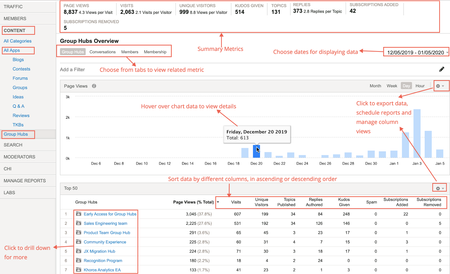
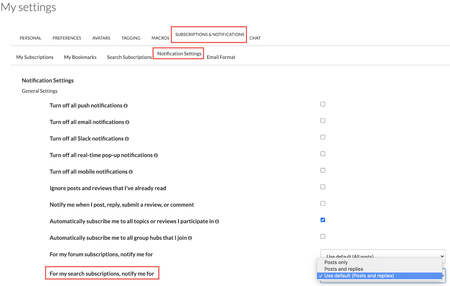
Khoros Communities 19.12 brings: New Features API Updates Bug Fixes New Features Group Hubs GA Private Messages v3 GA Enhancements to Search Subscriptions GA Group Hubs GA In the 19.8 Release Notes, we announced Early Access for our exciting new Group Hubs feature. Group Hubs is now in General Availability (GA). Group Hubs are our next generation to Groups. Therefore, we plan to sunset the legacy Groups feature late 2020. We believe you will find the extended capabilities and improvements to the user experience more than enough motivation to adopt this new way for your community users to interact. Group Hubs is enabled by default for all new Khoros Communities customers. Also, Group Hubs will be enabled by default for any customers who do not have Groups and are on Responsive. Any customers with Groups currently enabled must migrate to Group Hubs. Work closely with your Customer Success Manager (CSM) during the migration. See Group to Group Hubs migration for an overview of the migration path. Khoros will not initiate Group Hub enablement. After reading through the migration documentation, contact your CSM to begin the process. Group Hub membership types Every group hub has a membership type that controls access to the hub. A group hub can be: Open Closed Hidden In Open group hubs, all community users can browse and kudo all content, reply to posts, and comment on posts. Group hub members can create new content as well as browse, reply, and comment. Closed group hubs are visible to all users, but only members of the group hub can access content. Non-members do not have read or reply permissions for closed group hubs. Content in closed group hubs appears in the search results to group hub members only. Non-members who try to access a closed group hub are directed to a page explaining that the group hub is closed and that the user must request access. Members can create new content as well as browse and reply to existing content. Community users access Hidden group hubs either by invitation or by being added to the group hub directly in Community Admin. Hidden group hubs are hidden from non-members in the Community UI and cannot be searched. Non-members attempting to access the URL to a hidden group hub’s Group Hub Page or child nodes are directed to an error page. Requirements Group Hubs requires: Community version 19.12+ A Responsive skin Private Messages version 2+ Note: The Private Messages feature is required to send invitations to group hubs and to receive notifications that requests to join have been approved. In addition to Private Messages being enabled for the community, the community member receiving the invitation and receiving the approval notification must explicitly opt-in to receive private messages in My Settings > Preferences > Private Messenger. Important! Group Hubs provides new components. Two of these components, Group Hubs and My Group Hubs are not included on any pages by default. We recommend adding the Group Hubs component to the Community Page and/or the Category Page. We recommend placing the My Group Hubs page on the View Profile Page and/or the Community Page. See Group hub components to learn more about how these components work. See to learn how to add a component to a page. Group Hub Analytics With this release, Group Hub analytics are available in Community Analytics (formerly Lithium Social Intelligence). You can view metrics related to Group Hub activities on your Community using Group Hub analytics. The Community Analytics page now displays all the board types aligned under the All Apps tab. A new tab called Group Hubs is listed under the CONTENT tab. The metrics provided here are similar to the existing ones in Community Analytics. Additionally, information related to membership details like subscriptions added and removed to group hubs, number of members joined or left the group hub, invites sent and accepted are provided. Group Hub APIs Community API v2 supports Read actions via LiQL queries to the Grouphubs and Memberships collections. Create, Update, and Delete actions will be supported in the upcoming Community release 20.1. Update: The Memberships collection has deprecated with release 20.1. We recommend against creating any customizations using the Memberships collection. See the 20.1 Khoros Communities release notes for the new membership APIs. We are so sorry. We are making updates to the Membership API once again. Please wait until 20.3 when we will release the final updates. Group Hub integration with Khoros Care Group Hubs content flowing into Khoros Care will be supported in the upcoming Community 20.1. Group Hubs documentation Find Group Hubs documentation in the Group Hubs knowledge base. We recommend the following articles for an overview: About Group Hubs Group hub discovery and engagement Group Hubs API support Group Hubs best practices Group to Group Hubs migration Private Messages v3 GA In the 19.12 Release, we're announcing the GA of Private Messages v3. With the GA Release, we have added these features: Changes in Mobile View Option to copy/paste a comma-separated username list in the Send To field Search within private messages Upload files as attachments API support for threaded private messages Note: With the release of Group Hubs, when a group hub name is added to the Send To field, all the members having membership with the group hub are added. Changes in Mobile View We have introduced a new design for Private Messages UI in Mobile View. All functionalities remain the same. Messages grouped by conversation in threaded format Expanded view of a conversation Option to copy/paste comma-separated username list in the Send To field With this release, you can now paste a list of comma-separated usernames. This feature is useful when you have a list of users whom you want to send messages on a regular basis. You can copy/paste the list of user names in the Send to field and the usernames are automatically derived. Any invalid Usernames are removed from the list and the rest are added. An error message is displayed stating which Username was removed. Search within Private Messages To help you find messages in a crowded inbox, we have introduced search functionality. This is available in both desktop and mobile views. Just type the text you are looking for in the search bar. You can also choose from where you want to pull the message to narrow down your search. Click the Close (X) icon to navigate back to the Inbox. Note: Searches are not case sensitive and search for the exact match. Upload files as attachments You can now upload files as attachments to your private messages. Members must have the Upload file attachments to Private Messages permission to add attachments to private messages. You can find this permission under Admin > Users > Permissions. With these permissions set, you can also drag-and-drop/upload file attachments when composing private messages: API support for threaded private messages In the 19.12 release, we have added API support for Private Messages feature version 3. Threaded private messages (Private Messages v3) uses new Community API v2 objects: notes_thread - represents a private message thread threaded_note - represents a message in a private message thread private_messages_view - represents the view of the private message mailbox: inbox or outbox The Private Messages v3 APIs are independent of the inbox_note and outbox_note objects. Customizations that include inbox_note and outbox_note should continue to work after upgrading to Private Messages v3, but inbox_note and outbox_note do not support the threaded message UI. The Community API v2 enables you to: Create a threaded message between one sender and one recipient Create a new note in an existing thread Create a threaded message to multiple users (non-broadcast) Create a threaded message (broadcast) Reply to a private message (single recipient) Reply to a private message (multiple recipients) Retrieve private messages on a private message thread Retrieve private notes threads for a user Mark private message threads as read or unread Delete private message threads See the following guides in the Developer Documentation Portal for more information: Private Messages APIs and feature versions Threaded private message API support Enhancements to Search Subscriptions (GA) Search Subscriptions trigger notifications when a post containing a set of keywords created primarily by the community admin or moderator is posted to the community. Some communities use top-level categories to partition their community by some criteria (for example, different languages). The current Search Subscription feature sends notifications to members regardless of the top-level category. That is, the member is notified even if the subscribed keyword is posted in a different top-level category. This is also the case when the top-level categories are of different languages. To reduce the notification noise, this enhancement restricts the scope of notifications to the top-level category that the member most recently saved the search subscription. In the below example, the member belongs to Portugal top-level category, but logged into Argentina top-level category. If he/she hits SAVE, he/she moves from Portugal top-level category to Argentina. The member is notified only when apples, oranges are posted in Argentina top-level category and not when posted in Portugal. A message is displayed as highlighted below. Email notifications contain the post text and the link to the post, so that you know why you are notified. The notification also has the option to reply via email and have it posted to the thread. Even if the post contains the search text appearing multiple times, only one notification is sent. If the text appears in the Subject of a reply to a post, then notification is not sent. Note: To enable this feature, open a Support ticket. Learn more about Search Subscriptions. API Updates Community API v1 Get the count of unread messages in a board or category To deliver on this idea from kandulmadhu, we have added the following endpoints to Community API v1 to retrieve the count of unread messages in a board or category for the current user: /boards/id/[id]/messages/unread/count /categories/id/[id]/messages/unread/count Pass the ID of the board or the category in the endpoint path. cURL examples (Session Key authentication) curl -X GET \ 'https://[COMMUNITY DOMAIN]/restapi/vc/boards/id/[BOARD ID]/messages/unread/count?restapi.response_format=json' \ -H 'li-api-session-key: [SESSION KEY]' curl -X GET \ 'https://[COMMUNITY DOMAIN]/restapi/vc/categories/id/[CATEGORY ID]/messages/unread/count?restapi.response_format=json' \ -H 'li-api-session-key: [SESSION KEY]' Note: If using OAuth, pass Authorization and client-id in the header as described in the The Community API v1 call. Response example { "response": { "status": "success", "value": { "type": "int", "$": 14 } } } Community API v2 Private Message API (threaded private messages) We've added the notes_thread and threaded_note objects and CRUD support for Private Messages feature version 3. See Threaded private message API support in the Developer Documentation Portal for full details. See Return promoted topics first in a LiQL response We've added the is_promoted field and the include_promoted constraint to support returning Promoted topics at the top of LiQL responses. When is_promoted is true in a response from the messages collection, the topic has been promoted in search results in Community Admin > Content > Promoted Search. The is_promoted field can be used in a SELECT statement. When include_promoted is set to true in the WHERE clause of a query to the messages collection, any topics defined in Community Admin > Content > Promoted Search appear first in the result set followed by the organic search results (search results regardless of promoted items). For any given search, a maximum of two promoted topics are returned in the response. Promoted topics are included in the response in addition to the number of items specified by LIMIT in your query. For example, if you set LIMIT to 5 and two promoted items exist, the results set will include 7 items. This matches the experience of the Community UI, which includes promoted items at the top of search results and also again in the response. The ORDER BY clause defines the order of the organic search results, whereas the Priority of promoted search items (set in in Community Admin) dictates the order of the promoted results. See About Promoted Search and Create Promoted Search rules to learn more about the Promoted Search feature. Example query SELECT subject, id, author, view href FROM messages WHERE subject MATCHES 'dogs' AND include_promoted = true ORDER BY post_time DESC LIMIT 5 You Found It. We Fixed It. We have improved the performance when returning badge counts. We have improved security against Cross-Site Scripting (XSS) when submitting an attachment as part of a topic or reply. We have fixed an issue where customers were seeing JavaScript errors like the following when landing on Forum Page or loading the Message Editor: TypeError: aa is undefinedlia-scripts-body-min.js:formatted:42636. Issues with customers experiencing a Cloudfront timeout error for requests taking longer than 60 seconds have been resolved. Subscription notifications are now being sent properly after Blog and TKB articles are published after being saved multiple times as a draft. We have fixed an issue where the @mention drop-down list was not showing the correct results even when the exact username was entered in the UI. @mentions is now working as expected. TinyMCE with Editor v2 no longer adds an unwanted "http://" to the URL when creating an anchor within the same page. Performance issues with label-based searches when hierarchical labels is enabled have been resolved. We have fixed a bug with Alt-Text on images where the Alt-Text was set to the image file name if no Alt-Text was specifically set on an image using the alt attribute of the <li-image> element, even if the image had a caption. Now, the image caption is set as the Alt-Text unless a user manually overrides the alt attribute in the HTML tab in the Editor. If no caption is set, and there is no alt attribute defined, the Alt-Text will default to the image file name. Community error pages now include CSP or X-Frame-Options headers. Due to inconsistencies with Search subscription notifications, we no longer allow customers to create search subscriptions with search terms entered on multiple lines. For example, a user can no longer enter: Peaches Apples Pears This fix helps ensure that the Community app recognizes and interprets the subscription correctly and that customers receive Search subscription notifications as intended. The notification after the successful nomination now says "Success! This topic was nominated as an article to the <board title>. View Dashboard." instead of "Success! This topic was nominated as an article to the <board ID>. View Dashboard." Customers reported losing the ability to copy/paste images into the Editor from the clipboard with Community release 19.9. We have fixed this issue. We have resolved "Resource not found" errors encountered when inserting an image with the Image Uploader and then editing the uploaded image. Relative dates are now translated into Russian correctly. Image links to images uploaded to Community and rejected via moderation now correctly show an 'unavailable' image instead of the rejected image. Selecting Options > Print in a TKB comment now takes you to the Print Page as expected. Floated topics that were unfloated and then floated again at a later date now appear at the top of the message list as expected, instead of retaining its original float timestamp. 4.8KViewsSign in to react to this post
 76Comments
Khoros Communities 22.4 Release
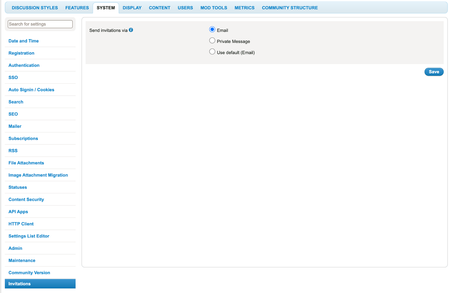
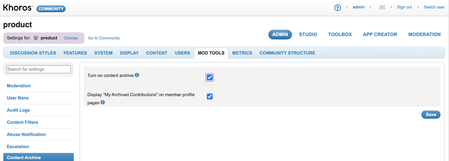
Content Enhancements Send Group Hub invitations by email Use external URL while archiving content API Updates External URL while archiving content Invite by Email for Group Hubs Contributor Type accessible through LiQL LiQL Updates Bug Fixes General Fixes Accessibility Fixes Enhancements Send Group Hub invitations by email Until now, you could send invitations to community members to join Group Hubs only via Private Messages. With this release, we’ve introduced the Invite by Email feature for Group Hubs. You can now send invitations for Group Hubs to non-community and community members via email. This also eliminates the limitation with communities that do not have the Private Messenger feature; such communities can send invitations via email. You also can track the invitations sent from the Member Management board. Enablement Contact the Support team to enable this feature. After the Support team enables the feature, go to Admin> System > Invitations and choose Email for Select Invitation via option. Send invitations When you send invitations for Group Hubs using the Email option, this window now opens: In the Enter usernames field, add the username of community members. In the Enter email addresses field, add email addresses of non-community and/or community members. In both the above cases, the invitations are sent to the email addresses only. Members who have already joined the Group Hub do not receive an invitation. You can send a maximum of 10,000 invitations at a time. You can copy/paste a list with a maximum of 10,000 email addresses. If you copy/paste a list of email addresses, all the invalid email addresses are ignored and the invitation is sent to the remaining valid email addresses. Track Email Invitations for open, closed, or hidden Group Hubs On the Member Management page, click the PENDING EMAIL INVITES tab. This lists the pending email invitations sent to community and non-community members. Learn more about inviting users to join Group Hubs via Private messengers and email Use external URL while archiving content Earlier, while archiving community content, you could redirect users only to pages within your community. With this release, while archiving content, you can add an external URL to redirect users. To use this feature, your community must Be on version 22.4 or later Have the Turn on content archive option turned on Have the Allow external alternate URLs option turned on While archiving content on communities that have this feature enabled and required settings turned on, you will now see the following popup: Learn more on archiving community content API Updates External URL while archiving content We have updated the Archive Messages and Edit a Suggested URL endpoints to support the external URL when the Allow external alternate URLs and Turn on content archive permissions are selected in Admin > MOD TOOLS > Content Archive. Invite by Email for Group Hubs We have updated the POST/Invite user to join node endpoint to create email invitations for both the community and non-community members to join the Group Hubs. Note: You must set the Send Invitation via permission to Email in Admin > System > Invitations. Contributor Type accessible through LiQL The current API to retrieve the contributors for TKBs and blogs returns both the co-authors and contributors together. With this release, we introduce a new constraint to list the co-authors and contributors of the published and unpublished blogs and TKBs separately. This new constraint, called contributor_type, is added to the messages object with two acceptable values: co-author contributor Note: The contributor_type constraint must be used in conjunction with the contributor.id constraint in the LiQL query. Learn more about contributor_type. LiQL Updates As first mentioned in the 22.3 Release Notes, we have updated the messages collection to honor the Hide messages in this board from the List option for a particular board. If you have enabled this option for a particular board, the messages will not appear in the response of a LiQL query. See messages collection. Note: This change could impact any customizations created in partnership with our services team that leverage hidden fields, so you should review these areas. We have removed the mandatory board.id constraint from the contributor.id constraint in the messages collection. We have added the new invite_type and external_user_email constraint in the invites collection to retrieve all the grouphubs invitations of the community and non-community members. You found it! We fixed it! General Fixes The issue where blog editors on communities with Blog v3 and v3.1 were unable to edit Post published articles in Awaiting review status is fixed. The issue where you could not successfully submit inline replies to posts on communities that use Products v1 and Forums v5 is fixed. Earlier, when regular users with permissions to comment submitted a comment on a topic, an error displayed indicating that they do not have sufficient privileges to perform this action. This issue is fixed. Earlier, in communities on 21.12, when you ran the query for occasion_data.live_stream_url, an error returned that indicated the object doesn't exist. This issue is fixed. The issue where some past events were not displayed in the calendar view is fixed. Earlier, when you tried to access the spam quarantine on communities v22.2 or later with enable.Products set to false, you received an error. This issue is fixed. Now, the spam quarantine page loads successfully, and you can review posts marked as spam. Earlier, on communities v21.7 and above, the board options menu intermittently toggled between Subscribe and Unsubscribe, even though you already subscribed to the board. This issue is fixed. Now, after you subscribe to a board, you receive notifications, and the board options menu displays Unsubscribe and vice-versa. Earlier, users with any of the required roles (MODERATOR,LithiumInternalApiUse, or KHOROS) granted to them by cloning the roles, and with the "Manage roles" permission set ALLOW GRANT, were unable to grant these roles to other users. This issue is fixed. Now, when you have any of these roles assigned to you, you will be able to grant other users these roles, provided you have the "Manage roles" permission set ALLOW GRANT. Earlier, you were not successfully signed out if you had enabled the Keep me signed in option and tried to sign out of the community using the /signout API. This issue is fixed. Earlier, when you subscribed to a label, the label was listed under User Profile > My Subscriptions. But after some time, when you visited this page, the label subscription was not listed. This issue is fixed. Now, under User Profile > My Subscriptions, you can see the labels that you subscribe to. The issue that returned an error when you tried to fetch the body of the post using LiQL in the API browser is fixed. Now, LiQL returns the body of the post. Earlier, the API to fetch user settings did not return correct value in the response since the cache had outdated the user object. This issue is fixed by populating the cache with updated user objects. Accessibility Fixes Earlier, the screen reader did not read the label name of the email address link on the user's profile page. This issue is fixed. Now, the screen reader announces the name of the label followed by its link as "Email null link." The issue that keyboard focus is lost after giving kudo to a post, is now fixed. The issue where Jaws does not announce the action you can perform on the kudos button, is now fixed.3.7KViewsSign in to react to this post40CommentsKhoros Communities 22.10 Release
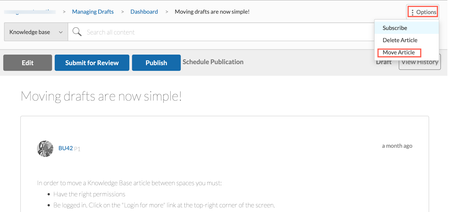
Enhancements Changed forum discussion subjects rendered properly in replies and community widgets Prior to this release, when the subject (or title) of a forum discussion was modified, any new replies inherited the modified subject. However, all the older replies continued to refer to the old subject. All widgets or places such as breadcrumbs, Permalinks, View History, Move Message flow, Spam Quarantine, My Contribution, Mentions, and Search results for replies showed the older title of replies. Now, all replies (new and existing replies) under a root discussion reflect the most current subject (or title). Also, the most recent subject displays wherever this discussion renders in the community. Note: To enable this enhancement on your community, contact Support. The config is not enabled by default in the community and you cannot turn off the config after it is enabled. Move Blog or Knowledge Base drafts to a different community location From time to time, you might want to move a blog or knowledge base draft to a more appropriate board. Or, you might want to move drafts out of a KB or Blog, or remove them from the community structure, but want to maintain the drafts. In these cases, you can now move these drafts to a different location. With this release, you can now move drafts to different boards. Just open the Options menu of the draft you want to move and click Move Article. Note: To use this feature, you must be on feature versions TKB v4 or later and Blogs v3 or later. Go to Studio > Features and select the appropriate versions for TKBs and Blogs. Permission Requirements To move a draft of a blog post, you must have the Manage any article permission. To move a draft of a KB article, you must have the Create, edit, publish, and manage articles permission. To move your own Blog drafts, you must have the Start New Article and Manage Own Article permission. Learn more about moving KB articles to a different knowledge base moving blogs post to another node. Remove EXIF data from images based on allowed listed tags With this release, when members upload the images such as Inline, Gallery, and Profile images to the community, community removes EXIF metadata that is not in the allowed list from the images. While removing this data, the community retains the allowed list of tags. This change is applicable only for the Inline, Gallery, and Profile images and for the ‘Download Images’ flow. Announcements EOL: Email a Friend and Invite a Friend capabilities With the 22.10 release, we have turned off and removed the Email a Friend and Invite a Friend capabilities for all communities, including releases prior to 22.10. The decision to turn-off these features is two-fold: minimal use of the features and the potential for email abuse of these features given the current throttling restrictions. There are already a wide variety of ways for people to easily share links across the web, including using their personal email. In the future, we will be looking at simple ways for people to share links with each other within the community via private messages and notifications. If you have questions about this change, contact your Khoros account manager. Redirects: HTTP-to-HTTPS for CloudFront backed communities With this release, we no longer allow HTTP traffic for all the CloudFront backed communities. All HTTP traffic to these communities is automatically redirected to HTTPS. This change is irrespective of the community version. API Updates Move Blog and Knowledge Base article drafts We have enhanced the existing Move API to enable you to move blog and knowledge base drafts. With this release, using the Community v1 Move API, you can move a blog or knowledge base drafts along with its comments and information to another blog or knowledge base board respectively. Note: To use this feature, you must be on feature versions TKB v4 or later and Blogs v3 or later. Go to Studio > Features and select the appropriate versions for TKBs and Blogs. Support for Message Archive and Unarchive Event Subscription In this release, we have updated the Community v1 Event Subscription API to support the MessageArchive and MessageUnarchive event subscriptions. Learn more about the Message Archive and Unarchive Event Subscription. You found it! We fixed it! General bug fixes Previously, when you ran the Kudo REST API in REST API v1 and v2 to give multiple kudos in quick succession to a member, the “Kudos given” count for that member was incorrect. This impacted Kudos Metrics in Community Analytics. This issue is now fixed. Now, when you run this API in quick succession, the Kudos metrics (net_kudos_events_received and net_kudos_weight_received count) increases only by 1 kudo per post. Earlier, when images were attached on a community page, some of the images displayed in their native resolution and others resized to a much lower resolution. This issue is now fixed. Now, when you attach images on any community page, they display close to the same size. Earlier, when you clicked any of the buttons on the Value Analytics Survey dialog box, the page focus scrolled to the bottom of the page. This issue is now fixed. Now, the page does not focus to the bottom of the page, but redirects according to the option you choose. Earlier, when you searched for labels in messages, the search returned only those labels with an exact match. It did not return those labels where the keyword matched with either the prefix or suffix. For example, assume that “Best Practices” and “Practices” are labels on your community. When you searched for “Practices” in the label section, the “Best Practices” label was not returned. Instead, only the “Practices ” label was returned. This issue is now fixed. Previously, when you tried to post an event with a Live Stream URL with emoticons in its title, you received an error message. This issue is fixed. Previously, when you uploaded a .SWRD file to a Case Portal, the upload failed. This issue is now fixed. Previously, when you added an emoji to any post on the community, the emojis appeared as broken images for a few seconds before the actual image displayed. This issue is now fixed. Previously, when members viewed notifications, the notifications count remained uncleared in the notification feed and received incorrect counts from the cache. This issue is now fixed. Now, when members view notifications, the notification feed clears the count and returns a valid count. Previously, in the Bulk Archive page, when members tried to re-submit the same search criteria after canceling the existing search, members were not able to perform the search and an error message was displayed indicating that the job already exists for the search criteria. This issue is now fixed. Now, members can perform the search by re-submitting the same search criteria after canceling the existing search. Previously, when non-SSO users tried to change their email addresses using dual authentication in the community, the email addresses were not updated but the user received a success message indicating that the email address had been updated. This issue is fixed. Now, non-SSO users can change their email addresses using dual authentication in the community. Previously, when members used API calls to get the user settings such as user signature on Studio, the API calls did not return value on the NotificationFeedPage. This issue is now fixed. We have updated the code to refresh the user cache before returning the settings for a user when loading the NotificationFeedPage. Previously, in the community, when members tried to access the archived posts of the deleted boards, an error message was displayed indicating that the specified parameters were invalid. This issue is fixed. Now, when members access archived posts of the deleted boards, they are redirected to the related URLs of the posts or indicated that the content has been archived. Previously, when members added a video URL or mentioned other members in their posts, the videos and mentions did not appear in the RSS feed reader as they did not render as valid HTML links in RSS feed. This issue is fixed. Now, videos and mentions added in posts appear in the RSS feed reader. Previously, when members tried to access any node or posts within the node and the URI path of the node contains asset or RSS keywords, the loaded page indicated that the members were not authenticated even if they were logged in to the community because of certain URI patterns. This issue is fixed. Now, the page successfully loads when members access the nodes which have asset or rss keywords in the URI paths. Previously, when community admins or moderators added a comment to a post, a Moderator flag was added to the post. This issue is fixed. Now, comments from admins and moderators do not display the Moderator flag. Previously, when members created content filter by enabling Ignore inline HTML and do not post option and inserted non-breaking spaces ( ) and HTML span tags (<span>) to any post through browser’s developer console, the content filter did not flag non-breaking spaces ( ) and HTML span tags (<span>) as spam and members were able to post the content in the community. This led to difficulty in identifying spam messages. This issue is fixed. Now, content filters flag non-breaking spaces and HTML span tags added in the posts through browser's developer console. Previously, when community members signed in to the community for the first time and their SSO IDs contained spaces at the beginning or end of their ID, the spaces added were stripped from SSO IDs. This led to authentication issues, which resulted in members signing in to the wrong account. This issue is fixed. Now, the spaces added in the beginning or end of the SSO IDs are not stripped, and these accounts are considered unique and valid. Previously, when community admins or moderators tried to update the SSO ID of a member account by adding space at the beginning or end of the same SSO ID, a new profile was created and the original profile was updated to the same SSO ID of the new profile as the space added was stripped from the SSO ID. This created duplicate profiles with the same SSO ID, which resulted in members logging in to the wrong account. Now, when community admins or moderators update the SSO ID of a member account by adding space at the beginning or end of the same SSO ID, a new profile is created that has a different SSO ID from the original profile. The issue where the Bulk Archive page displayed incorrect results when the specific bulk archive filters were applied is fixed. Previously, members with Manage own articles permissions were unable to move or delete their own blog posts to other nodes on the community. This issue is fixed. Now, for members to move or delete their own blog posts, they must have both the Start new article and Manage own article permissions and Manage own article permission on the destination node. For members to move or delete other member’s blog posts, they must have both the Start new article and Manage own article permissions and Manage any article permission on the destination node. Accessibility fixes Previously, there was no heading defined for the Managed Friends and Ignored pop-up window. Since screen readers had no information to read out, people using screen readers did not understand the purpose of the page. This issue is now fixed. The issue where the screen reader did not announce the state as ‘disabled’ for the disabled items in the Options menu on the Gallery page is fixed. Previously, the descriptive labels were not available for various fields (drop-down menus, search fields, and so on). Since screen readers had no information to read out, people using screen readers did not understand the purpose of these fields. This issue is now fixed. Previously, the links that are disabled (.lia-link-disabled) within the application due to user permissions did not meet the color contrast specifications for accessibility. This issue is fixed. Previously, the form elements on Community pages did not have labels. Users who depend on the screen readers found it difficult to navigate through the pages. This issue is fixed. We have ensured that every form element has a label.3.4KViewsSign in to react to this post33CommentsKhoros Communities 21.4 Release Notes
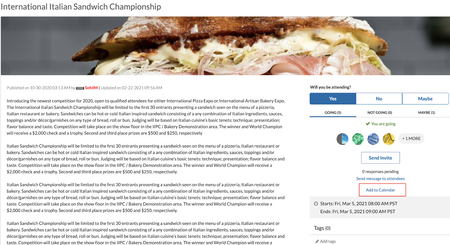
Community 21.4 delivers a new framework that provides downloadable logs to help developers debug and troubleshoot during development or customisation, download ICS files for upcoming events, and enhancements to some of the Community features and APIs. Content New Features APIs Bug Fixes New Features Internet Calendar Scheduling file support for Events New permission to hide/unhide videos in video gallery Sorted list of Badge Image Feature Logs Internet Calendar Scheduling (ICS) file support for Events With the option to download events as ICS files, you can now download and add community events with a calendar of your choice. This file download includes upcoming events only. Note: To use this feature you must upgrade Events to version 1.1. Go to Admin > Studio > Events and select Events 1.1 version. You now have the option to download ICS files for an event for all the upcoming events in an Events node from the Options menu: from the email notifications you receive for updates to events you are subscribed to: Learn more about Events New permission to hide or unhide videos in video gallery We've introduced the Hide or unhide own videos permission to hide or unhide videos in your video gallery from other members as and when you upload them. You can find this permission under Admin > Users > Videos. Members with this permission can hide or unhide the video in their video gallery from other members while uploading a video directly to their video gallery or a post as shown below. If the Hide in video gallery option is selected, other members can view the video only in the posts it is inserted in and cannot view it in the video gallery. However, Admins, moderators and members with the "Approve Reject, or Recall videos" permission can view all videos, both hidden and public, in the video gallery. If this option is not selected, all members can view the video from that member's video gallery. The option to Hide in video gallery is not available to members who do not have the Hide or unhide own videos permission. By default, the videos are hidden. Note: All members can view videos that are public. If you want to hide all the existing videos in your community from the video gallery, contact the support team. Please note that this request marks all the existing videos as hidden. Once all videos are hidden, we cannot roll back to the previous state. For example, if 20 videos were public and 30 hidden, and we hide all videos, we cannot roll back to the state with 20 public and 30 hidden videos. You can manually make the required videos public. Learn more about uploading videos Sorted list of Badge Images We have made changes to the order in which the list of filenames for the badge images listed under the Admin>Users>Badges>Create>Badge Image appears. They now appear in alphabetical order, with numbers and special characters taking precedence. Feature Logs With this release, we introduce the Feature Logs framework that can be used to generate feature specific logs in components and endpoints to help developers and administrators monitor and debug during Community customisation. Create a ticket with Khoros Support to enable Feature Logging in your community. After Support has enabled the feature, you can generate feature logs in the Community in Community Admin. Logs are accessible through Toolbox. Learn more about Feature Logging in the Developer Documentation Portal. API Changes We've added two new methods to the utils FreeMarker context object to support our Feature Logs externalLogs.name.{name}.error externalLogs.name.{name}.info You Found It. We Fixed It. We've fixed the issue where members other than Admins and moderators could edit the SEO fields while editing posts. To achieve this, you must: Turn off the Allow canonical URL for Idea posts to be overridden settings (under Community Admin > Discussion Styles >Ideas) to restrict members other than Admins and Moderators from editing SEO fields. By default, set the Manage ideas and comments permission (under Community Admin > Users >Ideas) to Deny for all users other than Admins and Moderators. This restricts edits to the SEO fields for other members. We have fixed the issue where the date and time of blogs display the revised date. Now, when you edit and publish a blog, the post time doesn't change. We've fixed the issue where there was no option to order TKBs within GroupHubs manually. Manual ordering for TKB articles is now available at the TKB sub-node level for GroupHubs. We have fixed the issue where there were discrepancies in the total number of community users returned by API v2.3.2KViewsSign in to react to this post39CommentsKhoros Communities 21.10 Release
Content New Features Bulk content archive (Early Access) Enhancements Granular permissions to edit published blog articles Allow Co-Authors to edit published Blogs and TKB articles Userid field added to Bulk Download Member Data report Security Announcement API Updates Bulk Data API v2.0 Bulk content archive (EA) Allow co-authors to edit published articles Contributor types accessible through LiQL Attachments in Private Message You Found It. We Fixed It. New Features Bulk content archive (Early Access) We are happy to announce that we’ve extended the Content Archive feature to include support for archiving content in bulk. With the initial Content Archive release, you could archive only one article at a time. With bulk archive, you can archive multiple articles at once, making it easier to keep your content organized and up-to-date. With bulk archive, you can: Specify criteria to search for specific community content. Review the matching content and select all matching results or select one or more specific articles from the list. Archive the selected posts in bulk. Enablement To be considered for the Early Access (EA) program, contact your CSM. If selected, your CSM will work with the Support team to enable the feature. Once enabled, you can turn on/off the feature from the Admin panel. Go to ADMIN > Mod Tools > Content Archive > Turn on content archive. Note: If the Bulk Content Archive has not been enabled for your instance and the admin setting Mod Tools > Content Archive> Turn on content archive is turned on, you can archive only one content at a time. You can only restore or unarchive posts one at a time from the Archives page. There is no option to unarchive posts in bulk. All bulk archived content is moved to your community’s Archive Page. Check out this video to get an overview of the Bulk Archive feature. The video shows how you can bulk archive content from a TKB board with articles created at least one month ago, with no more than two views and no replies in the past one month. Bulk content archive 1. Click the Archives link under the Community dashboard on your community home page 2. Hover the Options menu 3. Click Bulk Archive 4. You will land on the Bulk Archive tool page. Choose from where you want to archive content. 5. In this example we choose Hi-Fi Products 6. Select the type of posts you want to archive. 7. In this example we choose TKB 8. Select how old the posts that you want to archive are. 9. In our example, we select posts that were created at least 1 month ago. 10. Enter a valid number for Maximum Views for the posts that you want to archive. This will enable the In the Past dropdown. 11. In this example, we enter 2 12. Select a timeframe for the views. 13. In this example, we select 1 month, which means that the posts must have had a maximum of only two views in the past one month. 14. Select a timeframe for which the posts have not had any replies within the time frame selected in the Created At Least and In the Past dropdowns. 15. in this example, we select 1 month, which means that the posts have had no replies in the past 1 month. 16. In our example we leave the Author filter empty Click Search. 17. A row is added to the Job table as shown. The STATUS column shows that the job is currently searching the community for the filters submitted. 18. You must refresh the Bulk Archive page to check the STATUS change of the job. The STATUS changes to Ready to archive when the search completes and has fetched results. Click Ready to archive. 19. You will land on the Search Results page, which displays the posts retrieved for the job submitted. From here, you can either archive a few or all posts retrieved. 20. If you want to archive only a few posts, select only those posts. The number of posts you select are displayed. 21. Click Archive Selected. 22. Click Next. 23. Click Archive. 24. The selected post is queued for archival. 25. If you want to archive all posts in one go, click Archive All. 26. Click Next. 27. Click Archive. 28. All posts are queued for archival. 29. Scroll up and click Bulk Archive. 30. The STATUS column for this job now shows that all posts are archived to the community's Archive page. Here's an interactive tutorial Click the icon in the top right corner before you begin, for best experienced in Full Screen. Bulk Content Archive 1. On your community page, select the discussion board from where you want to bulk archive. In our example we select a TKB board. 2. You will land on the selected board page. 3. Hover over the Options menu. 4. Click Bulk Archive 5. Since you landed on this page from the TKB board, the values for Location and the Type of Post are pre-selected. However, you can always choose a different Location and Type of Post from here. 6. Select how old the posts that you want to archive are. 7. In our example, we select posts that were created at least 1 month ago. 8. Enter a valid number for Maximum Views for the posts that you want to archive. This will enable the In the Past dropdown. In this example, we enter 2 9. Select a timeframe for the views. 10. In this example, we select 1 month, which means that the posts must have had a maximum of only two views in the past one month. 11. Select a timeframe for which the posts have not had any replies for. 12. In this example, we select 1 month, which means that the posts have had no replies in the past 1 month. 13. In our example we leave the Author filter empty 14. Click Search 15. A row is added to the Job table as shown. The STATUS column shows that the job is currently searching the community for the filters submitted. 16. You must refresh the Bulk Archive page to check the STATUS change of the job. The STATUS changes to Ready to archive when the search completes and has fetched results. Click Ready to archive. 17. You will land on the Search Results page, which displays the posts retrieved for the job submitted. From here, you can either archive a few or all posts retrieved. 18. If you want to archive only a few posts, select only those posts. The number of posts you select are displayed. 19. Click Archive Selected 20. Optionally, enter the URL of the related content. When you attempt to view archived content (via a permalink or bookmark) you will be directed to this content. In our example, we will leave this field empty. Click Next 21. Click Archive 22. The selected post is queued for archival. 23. If you want to archive all posts in one go, click Archive All. 24. Click Next 25. Click Archive 26. All posts are queued for archival. 27. Scroll up and click Bulk Archive. 28. The STATUS column for this job now shows that all posts are archived to the community's Archive page. Here's an interactive tutorial https://www.iorad.com/player/1877100/Bulk-content-archive https://www.iorad.com/player/1868612/Bulk-content-archive Related articles: Learn more about the Bulk Content Archive feature Here’s an example of how the feature works Learn more about enabling the feature. Enhancements Granular permissions to edit published blog articles Prior to this release, there was no way to restrict members to only edit published blogs. Members had to be granted the “Manage own article” or “Manage all articles” permission to edit blogs after they are published. This enabled members with these permissions to perform other content actions (delete, move and so on). With this release, we introduce two new permissions that enable members to only edit published blogs, and then take them through the publishing workflow process. Edit my published blog posts: This permission is tied to the BlogAuthor role. Members with the BlogAuthor role can edit their published blogs and send the edited version for review. Edit all published blog posts: Members with this permission and the Start new articles permission can edit their blogs and those published by other members and send the edited version for review. Note: You must be on Blogs version 3.1 to use these new permissions. Go to Studio > Features and select 3.1 for the Blog version. Once you have updated to Blogs v3.1, you must deny Manage own articles permission in the BlogAuthor role. BlogAuthors will have Edit my published blog posts permission by default. Related articles: Learn more on blog permissions Learn more on Editing published blogs in Blogs v3 and above Allow Co-Authors to edit published Blogs and TKB articles Co-Authors of Blogs and TKB articles can now edit published articles. To do this, Co-Authors of blogs must have the Edit my published blog posts permission. Co-Authors of TKBs must have the Edit my published TKB posts permission. Note: For Blogs, you must be on Blogs version 3.1 to use these new permissions. Go to Studio > Features and select 3.1 for the Blog version. For TKBs, you must be on TKB version 4.1 to use these new permissions. Go to Studio > Features and select 4.1 for the TKB version. Userid field added to Bulk Download Member Data report With this release, we are adding the "Userid" field to the "Bulk Download Member Data" report. This field retrieves members' community userid and helps community managers identify the partially registered users who registered without a username. Learn more about community member metrics Security Announcement As part of our efforts to continuously improve the security of our applications, Khoros will be upgrading our Web Application Firewalls (WAFs) for all customers over the next few months. These advanced WAFs provide enhanced capabilities that will enable us to better prevent bad requests from hitting applications earlier in the process, thereby improving the stability, reliability, and security of your communities. While the rules and filters have been vetted and tested, due to the nature and customizability of the Community platform, there is a small risk that there could be some level of unexpected impact. Issues caused by the WAF could result in end-users receiving a 403 forbidden response to an operation. Contact Support if you see this behavior and provide as much detail as possible about the action you were taking and the timing of that action (including timezone information). The change will first be rolled out to all stage instances and after a few weeks, we will roll out changes to production instances in batches. API Updates Bulk Data API v2.0 We are happy to announce the launch of Bulk Data API v2.0 with this release. The Bulk Data API v2.0 brings more user-actions and associated fields along with the existing actions and fields. Note: This new version will be available on November 8, 2021. Bulk Data API now includes this information: Subscriptions Private messaging Idea status change Event discussion style Group hub interactions 'Me too' user action Product associations Search metric enhancements TKB helpfulness rating Archival action User Rank changes The earlier version, v1.0, is still available. We will announce the deprecation of v1.0 in a future Community Release Notes. There are schema changes associated with Bulk Data API v2.0, and fields have also undergone re-ordering. We recommend updating the data store according to the schema changes before querying Bulk Data API V 2.0. The new version supports exporting data belonging to past time ranges. Note that, these newly added action keys and associated fields will be fully available for date ranges post Nov 8, 2021. Which means that, when data for a past time range is pulled using Bulk Data API v2.0, all the currently available action keys and corresponding fields will be present. However, the newly added action keys and associated fields may not be fully available for past date ranges. For detailed information on Bulk Data API v2.0 action keys and fields, refer to the Bulk Data API v2. Bulk content archive (EA) With the introduction of the Bulk Content Archive feature, we also provide Bulk Content Archive APIs to archive content in bulk. Use these APIs to: Create bulk archive processes Retrieve details on currently running archiving processes Get the number of posts retrieved for the search filters applied Retrieve all results Delete and cancel a bulk archive process To learn more, see bulk content archive and the archive bulk content use case. Allow co-authors to edit published articles As mentioned earlier, Co-Authors of Blogs and TKB articles can now edit published articles. We also introduce APIs to achieve the same. All permissions and versions changes are applicable to use APIs, as mentioned in this section. To learn more about these APIs, see Edit blog and KB articles after publication Contributor types accessible through LiQL The current API to retrieve the contributors for TKBs and blogs returns both the co-authors and contributors together. With this release, we introduce a new constraint to list the co-authors and contributors separately. This new constraint, called messages_contributed.contributor_type, is added to the user object with two acceptable values: co-author contributor Learn more about the messages_contributed.contributor_type. Attachments in Private Message We have updated the threaded private message POST/notes_threads with the attachments field. You Found it. We Fixed it! General Fixes We have fixed the issue where the RSVP links to No and Maybe were missing for languages other than English in Events version 1.2. This issue has been fixed on both the main page of the event and in private messages. Earlier, comments or replies in Blogs v3 made via Khoros Care or API v1 did not appear on the community page. We have fixed this issue. We have fixed the issue where the search page displayed a misleading message saying “No search results found” even before entering a search keyword. Earlier, the thumbnails for all videos uploaded before the migration from Ooyala to Brightcove were missing. This issue is now fixed. All videos uploaded before the migration are accessible. The issue that the comment box for comment syndication did not load on the external website is now rectified. The issue that topics from the community were not automatically escalated to salesforce is resolved. In communities where the Search Subscription and Email Metrics is enabled, the “change and discontinue your search” link in the Search Subscription emails were redirected to an error page. This issue is now fixed. The issue that, when Admins changed the "Any edits & comments on knowledge bases articles I subscribe to" settings under the Admin > Users > Notification defaults, they were not updated, is now fixed. Earlier, in an SSO-enabled community that uses dual authentication where users can register using a non-SSO method or an SSO method, non-SSO users could register using an e-mail address associated with another account. Even though the system recognized that the e-mail was already associated with another profile, it still accepted registration. This issue is now fixed. Now, when non-SSO users register, they will continue to be informed that the e-mail they selected is already in use and registration is rejected. Earlier, when users with appropriate permissions tried to fetch a post or a reply to a post marked as spam using APIs, they received a "Permission Denied" error message, which was misleading. This is fixed. Now, when they fetch such posts and replies, they will see a success message without the content. Accessibility Fixes Earlier, the community pages that used the “BoardBrowserListTaplet” and “NodeListTaplet” components had a clickable icon and an adjacent message subject link next to it which both led to the same page. Some customers didn’t want two different UI elements that served the same purpose. We have addressed this issue by introducing a Studio parameter called "disableIconLink" to enable/disable links on the icons for the "BoardBrowserListTaplet" and "NodeListTaplet" components. By default, links on icons for these components are enabled. To disable the links on icons from Studio: 1. Go to Studio. 2. Choose the community page where you want to make these changes. 3.Click Switch to XML View on the top-right section. 4.Add the parameter disableIconLink="true" to the component with id="forums.widget.board-browser-list" for BoardBrowserListTaplet and id="nodes.widget.child-node-list" for NodeListTaplet component as below: <component id="nodes.widget.child-node-list" disableIconLink="true"/> <component id="forums.widget.board-browser-list" disableIconLink="true"/> The issue where the screen reader did not read out the information about the pagination controls when users entered, left, or navigated within a pagination component is now resolved. Previously, when community breadcrumb links were too long to fit on the page and the links were truncated with an ellipsis (for example, Community Name> TKB page name >name of the TKB arti…), the screen reader read out only the visible characters. This did not provide complete information to users. We have fixed this issue, and now the entire breadcrumb link is read. A NVDA-specific screen reader issue where it announced incomplete information for the search filter buttons on the search edit field for Private Messages is now fixed. On the Private Messenger page, the screen reader used to read out the "Inbox" and “Sent” buttons as "Show option button", which was misleading. This issue is now resolved. The screen reader now announces that they are drop-down menus with proper labels. We have fixed the issue where the focus moved to multiple non-interactive elements on the page while navigating with the keyboard Tab key. We have fixed the issue where the screen reader did not read out if the Additional Options or Teaser or SEO Options in the Post form were collapsed or expanded. The issue where the screen reader read out the name of the file instead of the alternate caption provided for an image is now fixed. Now, when you upload an image with an alternate caption, the screen reader reads out the alternate caption. Earlier, screen readers were unable to identify if a table on the community page was a “data” table or a “presentation” table. This was because the roles for both table types were set to "presentation". To fix this issue, we have introduced the “isTableRolePresentation” parameter that enables you to remove the role="presentation" attribute for the table from Studio. For example, on the “Move Messages Page”, for the “move-messages-form” component, pass isTableRolePresentation="false", to remove the role="presentation" attribute. This means that the role is “table” for this component. <component id="move-messages-form" isTableRolePresentation="false"/> Note: The default value of “isTableRolePresentation” is “true”. The default role is “presentation”. This parameter is available for these components: File Name Page Name Component Name AllDrafts.tml Blog Console Page BlogConsolePage RecentBlogArticlesTaplet.tml View Profile Page blogs.widget.recent-blog-articles MoveMessagesForm.tml Move Messages Page move-messages-form ThreadList.tml forums.widget.thread-list TaggedMessagesTaplet.tml Tag View Page tags.widget.leaderboard-messages tags.widget.leaderboard-messages-title tags.widget.leaderboard-messages-community-title tags.widget.my-recent-tagged-messages tags.widget.frequent-tagged-messages tags.widget.recently-tagged-messages ForumPage.tml Forum Page message-list MessageHistoryPage.tml Message History Page content MessageTrackerPage.tml Message Tracker Page MessageTrackerPage RecentPostsPage.tml Recent Posts Page post-list TagDetailPage.tml Tag Detail Page tag-list UnansweredTopicsPage.tml Unanswered Topic Page unanswered-list UnreadPostsPage.tml Unread Posts Page unread-list ForumsFilteredByLabelPage.tml Forum Filter by Label Page post-list GroupPage.tml (common) Group Page message-list TopMessagesLeaderBoard.tml Kudos Leaderboard Page tabs KudosUserPage.tml Kudos User Page KudosUserPage ProductMessageList.tml Product Page products.widget.product-message-list RecentQuestionsPage.tml Recent Questions Page question-list TkbHistoryViewList.tml TKB Article History Page history TkbPage.tml TKB Page message-list We have fixed the issue where the color contrast between the “Close” button and the background was insufficient for low-vision users to see the icon clearly. Now, the contrast between foreground and background colors meets the WCAG 2 AA contrast ratio thresholds.3.1KViewsSign in to react to this post30CommentsKhoros Communities 21.9 Release
This release brings a few enhancements on scheduling articles for publication and obtaining published URL when the articles are in draft state, and sending invites to community and non-community members via emails. We also have API updates around the same. With this release, you’re going to start seeing a new type of interactive documentation in our Release Notes and some knowledge base articles. To learn how to use and get the most out of this content, check out this quick 2-minute video attached with this blog. Content Enhancements Include time zone while scheduling knowledge base and blog articles for publication Send events invitations by email Preview published URL Announcement Deprecation of Transport Layer Security (TLS) 1.1 API Updates Include time zone while scheduling knowledge base and blog articles for publication Invite by email Events Bug fixes Enhancements Include time zone while scheduling knowledge base and blog articles for publication With this release, you can now set the time zone to use when scheduling Blog and KB articles for publication. Admins and members with authoring roles (author, editor, publisher) can see when and where a draft will be published. Note: To use this feature, you must be on feature versionsTKB v4.1 and Blogs v3.1. Go to Studio > Features and select 4.1 for TKB version and 3.1 for Blog version. 1. Open a new article or edit an existing one and click Schedule publication 2. Click the Calendar icon 3. Choose a date 4. Select Time zone 5. Choose a Time zone to schedule publication 6. Click Save 7. You can see the details of the schedule on the action bar. 8. To change this schedule, click the Update icon next to the schedule date time on the action bar. 9. Select Time zone 10. Choose a time zone 11. Click Schedule 12. The change is now updated. Here's an interactive tutorial https://www.iorad.com/player/1856850/Set-and-update-timezone Send events invitations by email Until now, you could send invitations to community members for events only via Private Messages. With this release, we’ve introduced the Invite by email feature for Events. You can now send invitations for events to non-community and community members via email. This also eliminates the limitation with communities that do not have the Private Messenger feature; such communities can send invitations for events via email. Note: To use this feature, Events must be on version 1.2. Go to Studio > Features and select 1.2 for Events version. Enablement To enable this feature, go to Admin> System > Invitations and select Email. About the feature Send invitations for public events: When you send invitations for public events using the Email option , you now see this pop-up window: In the Enter usernames field, add the username of community members In the Enter email addresses field, add email addresses of non-community and/or community members Members who have RSVP'd to the event do not receive an invitation. In both these cases, the invites are sent to the email addresses only. Send invitations for events in a private events: When you send invitations for events in a private Events board or a closed/hidden Group Hub using the Email option , you now see this pop-up window: In the Enter usernames field, add the username of members who belong to the private Events board or a closed/hidden Group Hub. The invites are sent to the email addresses only. Invitations for events in a private Events board or a closed/hidden Group Hub are sent only to members who have access to the board or are members of the Group Hub. Members who have RSVP'd to the event do not receive an invitation. Learn more on sending invites to non-community and community members via email Preview published URL Prior to this release, Blog and TKB authors could not know what the published URL for an article would be until they published it. With this release, authors can preview the published URL (the final URL when published) on the workflow page of the draft. You can share this URL with others, who might need to link to this article when it’s published. This example shows the preview of the URL when the article gets published. With this URL, you can proactively reference the article from anywhere in the community, but the link won’t work until the article is published. Note: To use this feature, you must be on feature versions TKB v4.1 and Blogs v3.1. Go to Studio > Features and select 4.1 for TKB version and 3.1 for Blog version. Announcement Deprecation of Transport Layer Security (TLS) 1.1 To improve our security and keep up with the latest security standards, Khoros will no longer allow TLS1.1 traffic to its communities. Moving to TLS1.2 (or higher) keeps communities secure and only allows the latest security protocols to be used while encrypting traffic between the end user and the community. End users will not notice any change to their experience. As long as no outdated connection protocols are being used, the transition is seamless. These changes are being rolled out during our regular maintenance windows and will take effect immediately. API Updates Include time zone while scheduling knowledge base and blog articles for publication We have updated the following TKB and Blog APIs: Create Message API to include the scheduled time zone Get Message API to display the schedule time zone details. Invite by email for Events We have updated the Events Invite API to include the invitees email addresses. When the Send invitations via permission is set to Email, you can send invitations via email. 1. Open a new article or edit an existing one and click Schedule publication 2. Click the Calendar icon 3. Choose a date 4. Select Time zone 5. Choose a Time zone to schedule publication 6. Click Save 7. You can see the details of the schedule on the action bar. 8. To change this schedule, click the Update icon next to the schedule date time on the action bar. 9. Select Time zone 10. Choose a time zone 11. Click Schedule 12. The change is now updated. Here's an interactive tutorial https://www.iorad.com/player/1856850/Set-and-update-timezone You found it! We fixed it! 1. Open a new article or edit an existing one and click Schedule publication 2. Click the Calendar icon 3. Choose a date 4. Select a Time zone 5. Choose a Time zone to schedule publication 6. Click Save 7. You can see the details of the schedule on the action bar. To change this schedule, click the Update icon next to the schedule date time on the action bar. 8. Select a Time zone 9. Choose a Time zone 10. Click Schedule 11. The change is now updated. Here's an interactive tutorial https://www.iorad.com/player/1854476/Schedule-publication-with-time-zone We have fixed the issue where members who did not have the ‘Create Event’ permission could not RSVP to events using API calls. With this release, members without this permission can RSVP for themselves using API calls. However, if they want to RSVP for another member, they must have this permission. We have fixed the issue where clicking the Knowledge Base Admin menu option from a forum topic page threw an error. The Community Page header icons were appearing in reverse order (User Profile, Private Messages, Notifications). We have fixed this display issue and now the icons display in the correct order (Notifications, Private Messages, User Profile). We have fixed the issue where selecting the checkbox for an emoji and then clicking on the Save option threw an error. With this release, when you choose emojis and save the changes, members can use them at the category level. We have fixed the issue where navigating to a tag page threw an exception error due to the page taking a longer than acceptable time to load. When members received an “Invalid HTML was found in the message body” error when submitting posts, they could not re-submit the post since they were blocked by flood controls. With this release, after the HTML errors are removed, members can re-submit posts successfully. There was an issue with archiving threaded posts. An error message displayed that the thread was archived but the thread still showed up in the community and was not archived . This issue is now fixed, and the thread successfully archives. Previously, when non-admin members clicked the link for an archived post that included a redirect URL, they were not directed to the alternate URL. This issue is now fixed. We have fixed the issue where archived posts were displayed in the kudos received and given for the posts components. Archived posts are no longer listed under these components. After communities upgraded to 21.8, there was an issue when attempting to access Community Analytics resulting in an error. This issue is now rectified. Earlier, if a forum thread with post kudos was archived before the post's author opened the kudo notification, an error message displayed the next time the author opened the notification feed. This issue is now fixed. The notification feed page loads as expected, and users can view the Kudo feed notification even if the post is archived. Earlier, a page break unexpected error was thrown while loading a board that was moved from one category to another, and the original category was deleted or had the ‘see categories’ permission set to deny. This was because the permissions and subscriptions related to the category were mismanaged. This issue is now fixed. The board/discussion style page loads as expected, respecting the permissions and subscriptions assigned to the user. Accessibility fixes There was an issue where the HTML image element for product mentions did not display an Alt image tag. This issue is now fixed. When the “Show Options” menu is open and users click the Escape key, the focus was not retained on the “Show Options” menu. This issue is now fixed. The screen reader read the toggle button for the list and calendar views on the Events page incorrectly. We have fixed this issue. The button now reads "List view of events" and "Calendar view of events", respectively. We have fixed the issue when pressing the Escape key on the invites dialog box that the focus moves to the top of the page and does not remain on the “Invite” button. We have fixed the issue with the JAWS screen reader reading out the “Star Message Subject” field instead of the “Message Subject” field when the focus is on the “Message Subject” field. When a community's TopLevelCategories is set to false and the language for the Value Analytics survey is set to a language other than English, the survey messages displayed in English. With this release, the survey messages display the language that the survey is set to under Community Admin > System > Value Analytics > Localization. We have removed the duplicate ID that was present in the Search results page Location drop-down menu. While replying to a message, the menu did not activate when the user focused on the “Show Options” menu inside the “Replying to:” section. This issue is now fixed. As the ‘Message List Component’ table is not defined in the source code, the screen readers did not readout the information for this control. This issue is now fixed.2.8KViewsSign in to react to this post30CommentsKhoros Communities 23.12 Release
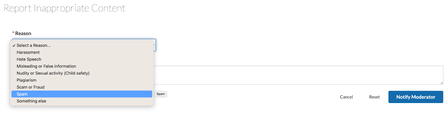
Enhancements Enhancement for reporting inappropriate content With this release, we’re improving the member experience around reporting inappropriate content to ensure compliance with the Digital Services Act (DSA). It is essential to maintain the cleanliness of the online communities and ensure a curated experience free from inappropriate content such as objectionable images, abusive language, spam, harassment, and more. We have enhanced the Inappropriate content reporting feature to align with DSA standards, empowering community members to report undesirable content. Now, they can report community posts (including comments and replies), Private Messages, and User Profiles. Anonymous reporting is available for both posts (including comments and replies) and User Profiles, ensuring a safer and more compliant online community experience. Note: To enable this feature, contact Support. Now, when members Report Inappropriate Content, a page to report on the content appears. They have the option to choose the specific Reason for which they want to report the content. The moderator is notified with a report that is created in the Abuse board. This report is configured under Admin > Mod tools > Abuse Notification > Settings > Board ID for abuse reports. Moderators can open the report to view the details Similarly, members can report: Private Messages User Profiles Note: To report inappropriate user profiles upgrade to user profile version 3.1 Report anonymously: When users report a post/user anonymously (without signing in), they'll be prompted to enter their Name and Email address. This feature comes with a reCAPTCHA protection, if enabled Note: Enable Require verification for anonymous users under Admin > SYSTEM > Authentication. Also provide the Site key and Secret key to invoke Google’s reCAPTCHA services in your community. If it's a registered email ID, they'll be asked to sign in before reporting; if not, they can proceed with reporting the content anonymously. API Enhancements Support to delete anonymous user data via the API To comply with GDPR, we have introduced a new endpoint to Community API v2. As of today, users can submit their PII data without signing in while commenting on blogs or while reporting content/users. With this new API, you can now delete the PII data submitted by users anonymously. See Delete anonymous user data for more information. Aurora Release Updates Curious about what's happening with Community Aurora releases? Check out and subscribe to the Aurora Release Notes area to see all the progress and new features being released each month. You Found it! We Fixed it! There was an issue wherein the Product Association hampered the visual appeal of the products shown under View Products section on the posts. To address this issue, we've introduced a setting called Product Expander. You can now disable the expander on the post page and display all the products associated by default. The issue of broken attached images caused by specific negative image coordinates has been resolved. The issue where the posts having products associated with them not showing in the product pages is resolved. The issue of hyperlinked text not being retained in Events when downloading the .ics file has been resolved. The issue where the product page's pagination was tied to posts or messages rather than the products themselves is fixed. The issue where the Community API v2 returned an exception error intermittently when querying a search snippet field is fixed.2.7KViewsSign in to react to this post38CommentsKhoros Communities 22.12 Release
Enhancements GDPR cookie banners We have updated our site cookies banner to reflect the expanded privacy considerations for community visitors. Visitors will be presented with a new Preferences button in addition to the Accept and Reject buttons on the cookies banner. Visitors who click Preferences are presented with more granular cookie privacy options to manage. After visitors confirm their selections, these preferences are saved in their browser and the banner disappears. Note: To enable this enhancement, you must update the Cookie Banner version (under Admin > Studio > Features) to v2. All strictly necessary cookies are selected by default for all visitors. After enabling cookie banner v2, only new community visitors or the visitors who have not accepted/rejected in the cookie banner v1 can view the cookie banner v2. Visitors' preferences for configurable cookies are saved for a period of 6 months by default. After 6 months, these cookies expire. If you want to change the default cookie expiration period, contact Support. Learn how to enable site-wide cookie usage notification banner You found it! We fixed it! General bug fixes In the 22.9 and 22.10 releases, the checkbox that indicates that users have read and accepted the Terms of Service no longer appeared on the SSO registration form. Additionally, communities that had customized the registration form and expected the checkbox to be present found that users were unable to complete registration. This issue is now fixed. Now, the Terms and Condition checkbox displays during the registration process and users can successfully register. Previously, when a non-Admin member with the Simple HTML Permission tried to post with empty lines in the beginning of the message, an error message saying Invalid HTML was displayed, and the empty spaces were automatically removed. This issue is fixed. Previously, when there were more than 250 Salesforce cases on the Case Portal, and you tried to download them, not all cases downloaded successfully. This issue is fixed. Previously, when members tried to archive community posts, and archival failed due to some reason, members were not able to archive the posts upon retrying. This issue is fixed. Now, posts are archived successfully upon retrying. Previously, when a bulk archive job was submitted with a value in the “Author” filter field and that author who submitted the bulk archive job was deleted from the community, the bulk archive page did not load properly. This issue is fixed. Now, the Bulk Archive page successfully loads the list of jobs even if one of the jobs has a deactivated member in the “Author” filter or if the member who ran a job has been removed from the community. We have fixed the issue where the "Marked as spam. Visit the spam quarantine to manage this message” notification did not display when you opened a knowledge base or blogs or QnA thread that was marked as spam. Previously, when you subscribed to a Forum board and set your notifications to be received in a digest, you received an error when you clicked the Unsubscribe option from the digest email. This issue is fixed. Previously, when Contests limited people to submitting only one entry per contest, the New entry button on the Entries tab was inactive. The button was enabled only after a page refresh. This issue is fixed. The issue that the cover images on community 22.10 displayed as broken images is now fixed. Earlier, when you tried to syndicate a message from the Message List tab under Admin> Content > Community Syndication, the Tags filter did not populate with the list of tags that the forum was already tagged with. This issue is fixed. Now, the result set will populate all the tags that the forum under consideration is tagged with. Previously, communities that supported uploading videos of a maximum of 10 GB failed to upload (timed-out) even if the size was less than 10GB. This issue is fixed. Now, you can successfully upload videos without being timed-out. Previously, when you searched for a product in the Associated Products field that had any special characters (other than numbers and alphabets) in its name, it did not return all the product names that matched the search keyword. For example, when you entered “reebok”, all the products association titles that matched with “reebok” showed up in the result set. But, when you searched for “reebok-”, the result set did not list the ones with the “-”. This issue is fixed. Previously, the API v2 refresh tokens were expiring unexpectedly. This issue is fixed. Now, the refresh tokens do not expire anymore and members can use them to refresh access tokens. Previously, in the API v2 LiQL queries, when you queried the banned field, the banned field was not returned in the response for all the users. This issue is fixed. Now, you can see the banned field in the response of the LiQL query for all the users. Previously, the Critical CSS service was not operating as expected in the production and staging environments of the community. This issue is fixed. Now, the Critical CSS operates in both production and staging environments. Previously, when members tried to attach a DTS (.dts), JMP DOE (.jmpdoe), or JMP Flow (.jmpflow) files to a draft post in the community, the files failed to upload and an error message was displayed indicating that the content type did not match its file extension and the file had been removed. This issue is fixed. Now, members can successfully attach these files while creating a new post or replying to a post in the community. Previously, in the API v2, when you try to update the state of a message to read-only by adding the true value and the read-only state of the message from the false to true value through a PUT request, the values are not updated in the response respectively. This issue is fixed. Now, you can update the state of the message to true and read-only state of the message from the false to true value. Previously, in a Forum topic, when members tried to edit a reply that was marked as a solution, the edit page of the original topic was opening instead of the reply editor. This led to difficulty for members to edit the reply. This issue is fixed. Now, members can edit the replies that are marked as solutions to the Forum topics. Previously, members with “Manage Own Articles” permission were able to move Blog posts of other members even if they did not have “Manage any article" permission. This issue is fixed. Now, members cannot move other Blog posts unless they have “Manage any article" permission. The issue where the prefix, “Re:” was included multiple times in the Subject of any replies instead of a single prefix is fixed. The issue where webinar attendees were unable to join a webinar through Khoros Events app due to recent zoom SDK upgrades is fixed. This fix is available from community v22.10 onwards. Accessibility bug fixes Previously, links on Broadcast and multicast messages in Private Messages v3 did not have discernible texts for images. This issue is fixed. The issue where the screen reader did not announce the control information in browse mode is fixed. Previously, the Group Hub node avatar link did not have accessible text for the screen reader to read. This issue is fixed.2.6KViewsSign in to react to this post30CommentsKhoros Communities 20.8 Release Notes
Community 20.8 delivers self-service for many Community page URL redirects, a sneak peek at improvements to Community in-app user guidance and help, as well as enhancements to several existing features and APIs. New Features API Updates Bug Fixes New Features and enhancement Coming Soon: Improved User Guidance and Help in Community URL redirect rules for Community pages Addition of new columns to Bulk Download of member data in Community Analytics Cookie Banner enhancements Coming Soon: Improved User Guidance and Help for Community In the coming months, we will be rolling out a new User Guidance/Help solution for Community and Community Analytics. First up will be in-app guides. These guides will provide you with a helpful information, including: New feature announcements Product alerts and notifications Tips to help you get the most out of community features Don’t be surprised if you start seeing guides like this in the coming weeks: And don’t worry, we won’t be spamming you with lots of pop-ups. These guides are intended to help you get the most out of the product and get out of your way fast. Next, we’ll be rolling out our new Resource Center, which you can open by clicking the question mark icon at the top-right corner of the application window. Use the Resource Center to get product help, access Release Notes, and learn about available Product Coaching sessions and community best practices. Note: Later this year, we plan to remove the existing Help drawer that appears at the bottom of the Admin and Studio apps. This feature-level help content will all be available within the Help section of the new Resource Center. Guides and Resource Center will be available in: Community Admin Studio App Creator Toolbox Moderation Community Analytics URL redirect rules for Community pages Over time, content on your community changes, moves, is deleted/archived, or replaced. When this happens, you want to make sure that Internet searches don’t show results that go to obsolete/missing pages. Or, sometimes, you might want to point people to newer or more relevant content. To help optimize these search results and make sure that people get to the right content, you can create redirects rules. Redirects enable you to keep page and link authority of your website when a website’s URL is redirected to another URL (for any reason). Basically, redirects help you keep the SEO of your website healthy and keep visitors engaged on your site. Properly defined redirects help keep your search rankings. The most common types of redirects are 301 (permanent) redirect and 302 (temporary) redirect. Previously, you needed to open a Support ticket to get these search redirect rules created. As of the 20.8 Release, you can create these search redirect rules yourself from Community Admin. Note: To create redirect rules other than 301 or 302 redirects, you must still open a Support ticket. The ability to create, edit, or delete redirect rules is granted through the Manager redirects permission, located under Admin > Users > Defaults > SEO Redirects. This permission is denied by default. We recommend enabling this permission for Admins or other trusted community members. Members with this permission have access to the Redirect Rules tab under Admin > System > SEO. Learn more about setting up members to create redirect rules and how to manage these rules from Community Admin . Addition of new columns to Bulk Download of member data in Community Analytics Bulk Download Members Data provides a snapshot of member activity and community influence. With the 20.8 release, this report will include Registration Start Date, Registration Completion Date, and Registration Status columns. Registration Start Date is the timestamp (UTC) when the member initiates the registration process. The Registration Completion Date is the timestamp (UTC) when the Registration Status changes from “Partially Registered” to “Registered". If the registration was completed more than two years ago, the Registration Date will be empty in the Bulk Download Members Data report. With the addition of these columns, you can now filter the list of members who completed their registration within the time frame selected for the report. Learn more on download community member metrics. Cookie Banner enhancements Currently, when users visit the community the cookie banner appears and prompts them for consent to use site cookies. The Click Here link opens the webpage that describes your cookie policy, but it does not dismiss the banner. As of today, clicking OK or continuing to use the site is considered as user consent to add or set all community cookies. With the 20.8 release, we have changed this behavior. Users must now click OK in the cookie banner and explicitly confirm their consent to activate the community cookies. Continuing to use the site will not be considered as a user consent anymore. If users do not provide their explicit consent, only the Type 1 cookies(“Strictly Necessary”) are set, and all other cookies are held back. With this release, we also re-classified the LithiumVisitor and VISITOR_BEACON cookies into Type 1. Learn more about cookies found in Khoros communities. API Updates api.mark_read view count update The Community API v2 api.mark_read query parameter now increments the view count for messages for anonymous as well as signed-in users. See Mark a message as 'read' for more information about the api.mark_read query parameter. Constrain message queries by messages posted or edited in the past n days We have added new fields, constraints, and sorts to enable you to constrain queries to the messages, reviews, and review_comments collections by posts that have been posted or edited in the past n days. In this context, the term posts refers to topics, replies, and comments for all conversation styles (forum, idea, TKB, QandA, group, blog, contest) including reviews and review comments. See Get messages posted or edited in a specified range of time for more information and examples. Developer Documentation improvements We've given our Community API v2 endpoint and LiQL documentation a refresh in order to improve usability and the search experience. See our announcement in the Community Blog. Here's a quick look. You'll now find the endpoint documentation in the API Reference section, organized by HTTP method type. You'll find LiQL reference information in the Guides section with our LiQL guides and examples. API v2 and LiQL reference now appear in Search results. Our legacy API v2 experience will remain in place for two weeks to ease the transition. We hope that you find these changes helpful. You Found It. We Fixed it We have fixed the issue where images that were uploaded when sending a private message from a mobile device were placed in the sender’s public image album instead of their hidden album. We have fixed the issue where users were not appearing in the @mentions pop-up menu, despite typing in their entire user name. Previously, when you sorted the list of Group Hubs by different criteria, the number of group hubs was returned each time. This display issue has been fixed. Previously, the Net Accepted Solutions metric key worked only in Studio and not the SDK. This issue has been fixed, and the key is now available via the SDK. We have fixed the issue where the Real-time Virus Scanner took a very long time to complete attachment scans or in some cases, never completed the scan.2.6KViewsSign in to react to this post26CommentsKhoros Communities 21.2 Release Notes
21.2 Release includes performance enhancements and a couple of new options for existing features. Announcement: Community release cadence change Features Enhancements to Search Subscription Notifications settings Addition of sort option for Comment Syndication Group Hubs feature updates Bug Fixes Announcement: Community release cadence changes In the spirit of ongoing iteration and improvement, Khoros is revising its release cadence for community releases. What is changing? Khoros Communities is moving away from the 6-week release cadence that we rolled out last year and is moving back to the monthly release upgrade model, but with a twist. Instead of monthly releases paired up with an every other release upgrade model (like we used to do before the current 6-week model), we are adopting a monthly release schedule with a 100% upgrade target for all customers for every major release. Starting with the 21.2 Release, community releases will toggle between minor and major releases: Major Release: Includes new and updated features and other significant updates to the community platform. Major releases will be rolled out to all customers. Minor Releases: Include bug fixes, minor customer-specific changes, or minor tweaks to existing features. No major features will be released in a minor release. Occasionally, a minor release might include Beta or EA features. Minor releases can be rolled out to selected customers as necessary. Major and minor releases are as follows: Major: 21.2, 21.4, 21.5, 21.7, 21.9, 21.10, 21.12 Minor: 21.3, 21.6, 21.8, 21.11 Release Documentation Product documentation (Release Notes, Knowledge Base articles, and Developer Documentation) will be published with every major release. We believe this new release model will improve quality and value in each release, increase the pace of innovation, and provide a better release upgrade experience for our customers. Thank you for being Khoros Community customers and for your willingness to adapt to these changes. Feedback and opinions are always welcome. You can engage here or with your TAM/CSM. We believe this will be a positive change and look forward to another year of building great customer experiences together. Features Enhancements to Search Subscription Notifications settings We’ve enhanced the Search Subscription Notifications experience. It notifies you if the search keyword that you set under Search Subscription appears in any posts or their comments/replies. In the notification setting, you can choose to be notified when your search keyword appears in: Posts only: heading or content of the post or Posts and Replies: heading/content/comments/replies of the post This provides more control over the search subscription notifications, and you can define the scope of emails you receive that are relevant to your search keyword. User Settings Admin settings Addition of sort option for Comment Syndication With this release, you can now set a default sorting option to syndicate comments according to your preferred order of appearance into your external website. The default sort order is Newest to Oldest. The code snippet that you generate to add to your external website has the sort-by parameter. This parameter accepts either of the two values - date-desc/ date-asc. If you do not pass this parameter, it takes the default sort order. Also, the maximum number of comments that you can view at a time on the external website is increased from 10 to 100. Learn more about comment syndication. Group Hubs feature updates We've made the following enhancements to group hubs: Default/configurable sort order My Group Hubs component HTML support and longer descriptions for Node Information component Sorting UI added to My Group Hubs page Default/configurable sort order My Group Hubs component The My Group Hubs component now sorts the list of group hubs in the component by last update activity by default. Actions considered an "update" are: a new message is posted to the group hub a message in the group hub is edited a message is moved to the group hub a message's moderation status is changed to approved The sort order is configurable in Studio by setting the sort parameter in the XML view for the component. Note that the sort order is not maintained when the user clicks the View All icon (>) and navigates to the Group Hub Listing Page (GroupHubsPage.quilt.xml). This example sets the sort order for the My Group Hubs component to the group hub’s creation date. <component id="grouphubs.widget.my-groups-panel-list" sort="creation_date"/> Set the value of sort to one of the following values: creation_date: Sort group hubs by the date the group hub was created. depth: Sort results by the depth of the group hub. (The level at which the group hub appears in the community structure). message_activity.core_property_change_time: Sort the results by the last update activity. Actions considered an "update" are: a new message is posted to the group hub a message in the group hub is edited a message is moved to the group hub a message's moderation status is changed to approved messages.count: Sort results by message count (topics and replies). position: Sort results by group hub position in the community hierarchy. topics.count: Sort results by the count of topics in the group hub. views: Sort results by the count of message views. HTML support and longer descriptions for Node Information component The Node Information Component and Group Hub card on the Group Hubs Listing page now properly renders HTML set in the node's Description field in Community Admin. In addition, the character limit of the Description field is now 10,000 characters. Sorting UI added to My Group Hubs page When a user selects the View All link (>) in the My Group Hubs component, the user navigates to the My Group Hubs page (GroupHubsPage.quilt.xml). We have added sort and filter options in the My Group Hubs page UI to help a user easily find specific group hubs, such as group hubs for whey they are Owners. The user can: search for a group hub by name. sort by date joined, latest activity, and member count filter by all, open, closed, and hidden group hubs filter by the owner or member roles You Found It. We Fixed It. We’ve fixed the issue where there is no specific order in which the featured topics appeared. With this fix, the featured topics will list in the order of the post creation date in the Admin console, irrespective of the category/board they belong to. We’ve fixed the issue where the Posted by and Classifier in the Spam Quarantine page are not clickable. You can now click these to view the user’s profile page. We’ve fixed the issue where the count shown with the notification bell icon took time to load. It affected the load time of the page where it is present. Now, this count will load immediately after the page and its contents completely load. We’ve fixed the issue where the blog moderation page took too long to load if there are many messages that required moderation. The messages are now paginated with a default value of 100 messages per page.2.5KViewsSign in to react to this post22Comments