
Aurora Product Coaching Session: Spam Management Best Practices
Khoros Communities platform offers several settings and features that allow you to mitigate Spam in your community. Join our Spam Management Best Practices coaching session to identify, filter and deal with spam effectively. Our coaching session will guide you through the practical tips and techniques to help combat spam and help maintain the hygiene of your community. Topics covered in the coaching session Overview of Aurora spam settings and functionality Manage Content dashboard related to spam management and its features Using roles and ranks to configure permissions to check spammers Content Filters Best practice tips Notes - Admin permissions are required to conduct the call. 👉Click here to Sign Up Related Resources Enable Spam Management Community Spam Management Review Posts Captured as Spam Khoros Academy: Communities Moderation Essentials Khoros Academy Instructor Led Training: Spam Management for Communities Aurora 1KViewsSign in to react to this post
 0Comments
Aurora Product Coaching Session: Introduction to Aurora
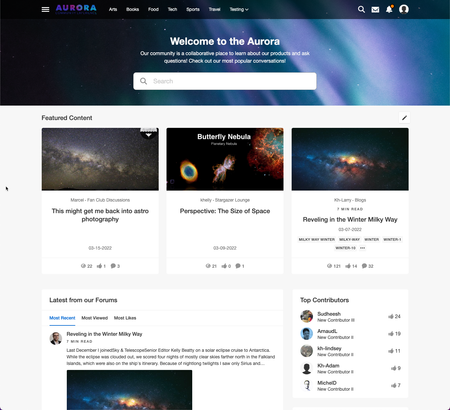
Introduction to Aurora Khoros's online Community software helps customers expand their reach by identifying, accessing, and engaging their most valuable customers. If you are new to Khoros Communities or have upgrade from Khoros Classic Communities, this hands-on coaching session will help you get acclimated with the basic functionality and terminology of the Khoros Community along with helping you feel more comfortable when navigating around your Community. What is covered in this coaching session? How to explore and make changes to yours and a users' settings Understand the different elements of a Profile Page Be familiar with basic Khoros Community terminology Navigate the Community landing page and the various Community Places and menus How to create a topic/post and a basic understanding of the Editor options 👉 Click Here to Sign Up Related Resources About Khoros Community: Aurora Glossary of common Community Aurora terms Take a tour of Aurora What's changed in Aurora from Community Classic600ViewsSign in to react to this post0CommentsAurora Product Coaching Session: Aurora Community Content Moderation
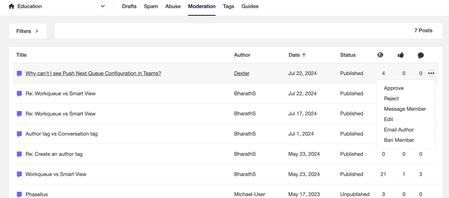
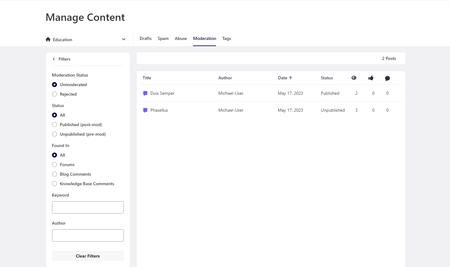
Aurora Community Content Moderation Are you new to Moderating a community, need a refresher, or have recently migrated from Khoros Classic Communities and need to know how the new tools work? This introductory, 1-on-1 coaching session will provide you with an overview of how to Moderate within Khoros Aurora Communities. When managing a Community, you need a way to handle posts that fall outside of your Community guidelines and the people who post them, in a quick and efficient manner. During a 1:1 coaching session, you'll work with a Product expert first walking through your current moderation workflow followed by some hands-on tips, tricks, and best-practices on areas where you can be more efficient, ultimately helping you to be more effective in your daily tasks. What is covered in this coaching session? Moderation workflow efficiencies A review of abuse and filter reports, spam quarantine, and moderation queue Taking action on offending content Moderation best practices 👉 Click Here to Sign Up Related Resources About Moderation About Abuse management About content filters About Khoros Communities spam management300ViewsSign in to react to this post0CommentsAurora Product Coaching Session: Aurora Community Designer Overview
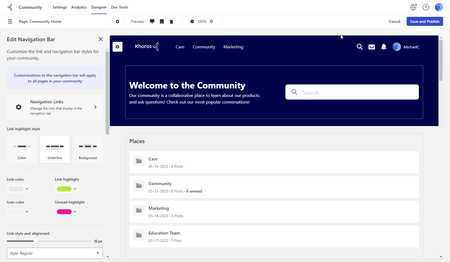
Aurora Community Designer Overview Are you new to using Community Designer, need a refresher or have recently been tasked with administrative duties for your Community? This introductory, 1-on-1 coaching session will provide you with a high level overview of how to navigate and use the Community Designer tool. The Community Designer is the platform tool that allows you to make design and UI focused changes to your community, where you can configure your community branding, color palates, text and widget styling, page layouts, navigation, and more. What is covered in this coaching session? Community Designer terminology Navigating the Community Designer Locate and edit visual elements Add/remove widgets Update the community navigation menu 👉 Click Here to Sign Up Related Resources Themes Page Templates *Please note that you will need Administrator permissions in your community in order to access the Community Settings.300ViewsSign in to react to this post0CommentsAurora Product Coaching Session: Aurora Community Analytics Overview
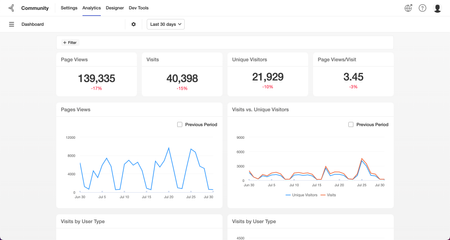
Aurora Community Analytics Overview Are you new to using Aurora Analytics or have recently taken on reporting duties for your Community? This introductory, one-on-one coaching session will help you feel more confident in the tool and reporting on the metrics that matter most! Community Analytics helps you measure and improve the performance of your social programs by gaining insights into your community's health. Providing community managers and executive stakeholders with deep insight into community health and performance, we capture data on billions of interactions each month and use algorithms to help you focus attention on the metrics that matter most. What is covered in this coaching session? Introduction to Community Analytics - what it is and how you can use it Taking actions to view the metrics that matter most to you How to apply filters and export data Navigating the Community Analytics Navigation Panel and the different Page Metrics 👉 Click Here to Sign Up Related Resources About Aurora Analytics Aurora Analytics Metric Definitions Aurora Analytics Dashboard use cases Aurora Analytics Reports246ViewsSign in to react to this post0CommentsAurora Product Coaching Session: Community Settings Overview
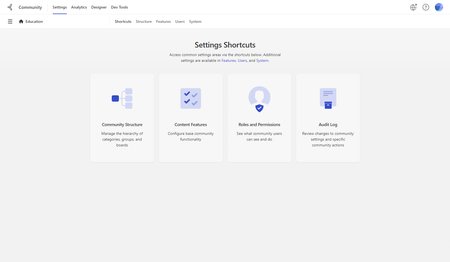
Are you new to using Community Settings, need a refresher or have recently been tasked with administrative duties for your Community? This introductory, 1-on-1 coaching session will provide you with a high level overview of how to navigate and use the Community Settings tool. The Community Settings is the platform tool that allows you to configure various community settings and features so you can optimize your members' community experience and utilize the community platform to its full potential. Building and editing your community structure, editing user roles and permissions, and configuring features are but a few of the items found in the Community Settings. What is covered in this coaching session? Community Settings terminology Navigating the Community Settings Overview of each Settings tab 👉 Click Here to Sign Up Related Resources Site Structure General Feature Settings Roles and Permissions Media Tags Audit Log *Please note that you will need Administrator permissions in your community in order to access the Community Settings.233ViewsSign in to react to this post0CommentsAurora Product Coaching Session: Roles & Permissions Deep Dive
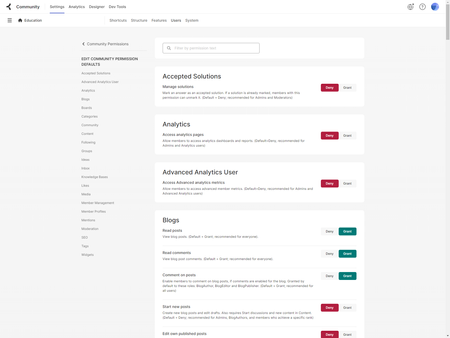
Aurora Roles & Permissions Deep Dive The Khoros Communities platform offers an assortment of permission that allow you to control what features and areas of your community your users have access to use. In this Product Coaching session we will walk you through these permissions, creating roles, and discuss best practices. What is covered in this coaching session? Overview of the Roles and Permissions tab in Community Settings How to set permissions How to create roles Discussion of Inheritance Roles & Permissions best practices 👉Click Here to Sign Up Related Resources About roles and permissions Permission descriptions Best practices: roles and permissions200ViewsSign in to react to this post0CommentsAurora Product Coaching Session: Q&A Product Coaching Sessions
Q&A Product Coaching Sessions Schedule a 1:1 personalized 20-minute Q&A Product Coaching session on a topic of your choice. In this interactive session, you’ll share your screen with a Product Coach for a unique learning experience. Select the desired product solution and time below. Don’t know where to start and just want to become a Khoros expert? Check out the Product Coaching sessions we’re currently offering on specific topics HERE. Have more direct questions about Khoros Communities that aren't covered in one of out overview Product Coaching session? Follow the link bellow to sign up for a Q&A Product Coaching session to learn how to manage your community with a Khoros Communities product expert. Sign up to ask questions about tips and tricks when moderating your community, analytics and reporting, help to refine or cleaning up your community roles and/or permissions, navigating features within the Community Settings or Designer, or how to encourage user participation through badges, likes, and more. 👉 Click Here to Sign Up Please Note: While our Product Coaches are experts on the Khoros Platform, there are some items that are considered to be out-of-scope and would be best addressed by other Khoros resources, including: Support or bug related issues — contact Khoros Support Khoros services, insights on social strategy, and best practices — reach out to your Khoros account manager API integrations, Dev Tools, coding and general developer Q&A, advice, or assistance — connect with our Khoros Developer Network Additional Resources Khoros Product Coaching Sessions154ViewsSign in to react to this post0Comments

You’ve seen all recent content