
liqlAdmin in khoros aurora graphql API
Hi Folks, I want to add roles to the users using graphQL API given below. const ADD_USER_ROLE_MUTATION = gql` mutation addUsersToRole($roleKey: RoleKeyInput!, $users: [UserIdInput!]!) { addUsersToRole(roleKey: $roleKey, users: $users) { result { id name } } } `; const [addUserRole] = useMutation(ADD_USER_ROLE_MUTATION); addUserRole({ variables: { roleKey: { roleName: "role" }, users: [{ id: userId }] } }); The issue I am facing is that when this mutation is executed by an Admin user, the role is successfully added to the target user. However, when the same mutation is executed by a normal user, it fails to add the role due to permission denied errors. Is there a parameter or keyword that can be used in this mutation to allow a normal user to update their own roles or self-related data? For example, in Khoros Classic, we can use the liqlAdmin keyword in REST API requests to bypass such permissions. Is there an equivalent for GraphQL in Khoros Aurora? Thanks in Advance.Solved 2.4KViewsSign in to react to this post
 13Comments
Aurora externalContext module issue
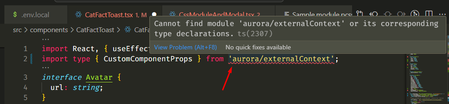
Hi All, I am working with a custom component in Aurora using React and TypeScript, but I am encountering a "module not found" error, as shown in the screenshot. Can anyone suggest where I might be going wrong? Additionally, I am unable to import the .pcss file for styling the component. Any help would be appreciated! I followed the Khoros Aurora documentation, where they provided the CatFactToast component. Below is my folder structure. When i am importing the CatFactToast.module.pcss file in CatFactToast.tsx then it is not showing the file in the relative path as shown in the screenshot below Thanks!Solved505ViewsSign in to react to this post2Comments MattV1 year agoKhoros Staff
First, make sure you have the latest SDK installed (24.8). You can update this in package.json, then run npm install.
If that doesn't resolve it, go into tsconfig.json and make sure your "include" line looks like
"include": ["next-env.d.ts", ".next/types/**/*.ts", "**/*.ts", "**/*.tsx", "types/**/*.ts"],After saving tsconfig.json, and that STILL doesn't fix it, in VSCode try the following:
- Type ctrl/cmd + shift + p to open the command pallette
- Search for "Typescript: Restart TS Server" and click on that
- Give VS Code a moment to restart the TS Server (check status bar at bottom) and it should resolve your TS errors
Sign in to react to this post

Tracking Complete Registrations in Google Analytics (via GTM)
Hi, Is there some sort of click listener or event that can be passed in the front end that can be picked up by Google Tag Manager when a user completes their registration (after successfully submitting their username)? Can we apply an event to the complete registration toast? If so, what is the best way to do this? Is there another way that we can track complete registrations in Google Analytics? Thanks!366ViewsSign in to react to this post0Comments
You’ve seen all recent content