Community release 17.9 provides:
Updates to Lithium Case Portal
Improvements to community private message flood controls
API Changes
You Found It. We Fixed It.
New Features
Updates to Lithium Case Portal
This release includes the following updates to the Lithium Case Portal:
Support for attachments when creating or commenting on cases
Support for the rich text format during case creation
Support for customization of knowledge articles
Support for attachments when creating or commenting on cases
You can now attach one or more files to a new case via the Case Portal or adding comments to an existing case. Simply click the Choose Files button located at the bottom of the New Case page and select the file you want to attach.
Note: The allowed file types are dictated by the settings in Admin > System > File Attachments and should correspond with the file types allowed by your Salesforce org. At this time, you cannot attach video files.
Support for the rich text format during case creation
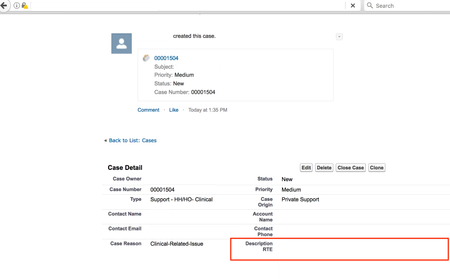
Previously, the text editor on the New Case page in the Case Portal supported rich text format during case creation, but the formatting was removed and replaced with plain text while the case was being viewed on the Case Details page in Salesforce and in your community. Now, the rich text format is retained and is displayed in the Description RTE field in the Salesforce Case page and the Case Details page in the community.
Support for customization of knowledge articles
You can now choose which Salesforce knowledge article fields are displayed when viewing the knowledge article in your community. Knowledge articles can now be customized to include any fields from the corresponding article type in Salesforce. To customize knowledge article pages in the community to include your custom fields, contact Lithium Services.
Improvements to community private message flood controls
With Lithium, you can control how often people are allowed to send private messages before triggering flood controls. Flood controls are in place to help combat potential spam. To modify the flood control settings for your community, open a Support ticket and provide the following information:
A user can't make more than 1 post in X seconds.
A user can't make more than 5 posts in X seconds
A user can't make more than 20 posts in X seconds
The default flood rate settings are:
A user can't make more than 1 post in 30 seconds.
A user can't make more than 5 posts in 600 seconds (10 minutes)
A user can't make more than 20 posts in 3600 seconds (1 hour)
Note: Admin and Moderators are exempt from flood controls; these thresholds only affect regular users. Learn more about combating spam.
API Changes
This release includes several updates to the Community API v2:
Return Featured Threads in the order defined in Community Admin
Community Plugin SDK node.js support
Access recipient data from the outbox_notes collection
LiQL pagination OFFSET no longer needs to be a multiple of LIMIT
Maximum value for LIMIT in LiQL queries
Return Featured Threads in the order defined in Community Admin
In 16.2 we added the ability to set a display order for Featured Threads in Community Admin (by kudo count, date, or a manually configured order). You can now order LiQL queries to the messages collection by the order set in Community Admin > Content > Featured Threads > Ordering.
Here is an example query that orders the results based on the Community Admin configuration:
SELECT topic.subject, kudos FROM messages WHERE
conversation.featured = true AND depth=0 Order By
conversation.featured ASC
Community Plugin SDK node.js support
The latest version of the Community Plugin SDK now supports node.js versions 4, 6, and 8 on Mac OSX and versions 4 and 6 on CentOS. See the Community Plugin SDK documentation for instructions for updating the SDK.
Access recipient data from the outbox_notes collection
In previous versions, LiQL queries like the following would return a recipients collection:
SELECT * FROM outbox_notes WHERE user.id = '186' LIMIT 1
However, trying to access 'recipients' data in a query (for example, SELECT recipients.user.avatar.message FROM outbox_notes) would return an error.
You can now access recipient data from the outbox_notes collection. LiQL queries like the following are now supported:
SELECT recipients FROM outbox_notes
SELECT recipients.user.avatar.message FROM outbox_notes
SELECT recipients FROM outbox_notes WHERE user.id = '3' limit 10
LiQL pagination OFFSET no longer needs to be a multiple of LIMIT
Previously the OFFSET in a LiQL query had to be a multiple of the LIMIT. For example, LIMIT 5 OFFSET 15 was allowed, but LIMIT 5 OFFSET 13 was not. With 17.9, LIMIT and OFFSET can be any combination. For example, SELECT * FROM users LIMIT 3 OFFSET 2 returns the 3rd, 4th, and 5th result returned by the query SELECT * FROM users.
Maximum value for LIMIT in LiQL queries
We have added a configuration which sets the maximum value allowed for LIMIT in LiQL queries to 1000. This is to help performance and protect against malicious attacks. If you need to raise this limit, contact Lithium Support.
You Found It. We Fixed It.
We have fixed the issue where the component messages.form.replyinline was causing a JS error when included on the ForumTopicPage quilt, which had the additional effect of breaking some other page components, such as Quick Reply and Add Tags.
We have fixed the issue where label subscriptions were not triggering an email notification to members who were subscribed to those labels.
Previously, tapping the Kudos button on a Mobile V1 community page did not increment the kudos counter until you refreshed the page. This issue has been fixed.
We have fixed the issue where draft blog articles were being returned in the list of published articles for the specified tag. Now, articles in a draft state do not appear in the article list.
We have fixed the issue where adding the Tabs component to the ContestEntriesTab or ContestHomeTab quilts causes the page to reload repeatedly, which in rare cases, could have caused the community to run out of memory.
We have fixed the issue where videos could not be uploaded or deleted from a user's profile.
Previously, if you tried to add additional spacing or line breaks in the HTML tab of the message editor when using the IE11 or Firefox browser, the extra spaces/line breaks were not being added. This issue has been fixed.
We have fixed the issue the "Answered" and "Unanswered" filters were not filtering topics in forum boards properly. Now, these filters are processed properly.
We have fixed the issue where sending a test email to yourself in Studio (under Text Editor > Email Text), did not work for some email templates. Now, sending test emails to yourself works for all email templates.
Previously, robot.txt changes were not getting pushed when publishing via Studio Publish. This issue has been resolved.
We have fixed the display issue where sending a group private message on a responsive community to enough users to make the username list flow to a second line in the Send To field resulted in the user name bleeding outside the boundaries of the send to margins.
Previously, inserting a long image caused the message editor view to always force the scroll bar down, making it impossible to get to the top of the post without using keyboard shortcuts (up and down arrow keys) or by expanding the editor size by dragging the edge. This issue has been fixed, and you can now scroll down within the message editor.


 16KViews
 10Comments