Community Classic 24.05
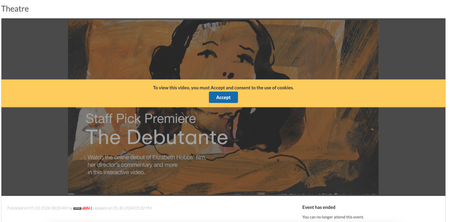
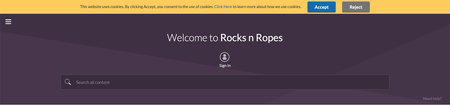
Member Experience Consent for third-party cookies usage in Events Removed limits on number of recipients for Private messages Member Experience Consent for third-party cookies usage in Events In Communities v23.10, we introduced an enhancement requiring users to explicitly consent for using cookies while uploading or viewing external videos in the posts. In this release, we have extended this enhancement to the Events. Now, members must explicitly consent to the usage of cookies when they use external videos to host Events on the Community. Below is an example of the consent banner on an events page: Removed limits on number of recipients for Private messages For communities in version 20.6 and later, messaging was limited to 10,000 users per message by default, with the option to configure this limit. With this release, we have removed these limitations altogether. You can now send messages to an unlimited number of users without any restrictions. 1.9KViewsSign in to react to this post
 8Comments
Khoros Communities 19.12 Release Notes
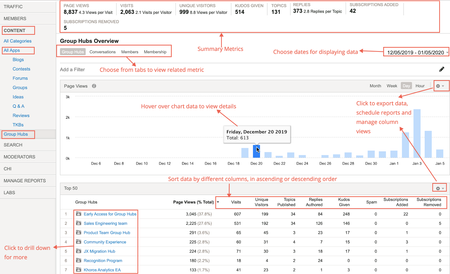
Khoros Communities 19.12 brings: New Features API Updates Bug Fixes New Features Group Hubs GA Private Messages v3 GA Enhancements to Search Subscriptions GA Group Hubs GA In the 19.8 Release Notes, we announced Early Access for our exciting new Group Hubs feature. Group Hubs is now in General Availability (GA). Group Hubs are our next generation to Groups. Therefore, we plan to sunset the legacy Groups feature late 2020. We believe you will find the extended capabilities and improvements to the user experience more than enough motivation to adopt this new way for your community users to interact. Group Hubs is enabled by default for all new Khoros Communities customers. Also, Group Hubs will be enabled by default for any customers who do not have Groups and are on Responsive. Any customers with Groups currently enabled must migrate to Group Hubs. Work closely with your Customer Success Manager (CSM) during the migration. See Group to Group Hubs migration for an overview of the migration path. Khoros will not initiate Group Hub enablement. After reading through the migration documentation, contact your CSM to begin the process. Group Hub membership types Every group hub has a membership type that controls access to the hub. A group hub can be: Open Closed Hidden In Open group hubs, all community users can browse and kudo all content, reply to posts, and comment on posts. Group hub members can create new content as well as browse, reply, and comment. Closed group hubs are visible to all users, but only members of the group hub can access content. Non-members do not have read or reply permissions for closed group hubs. Content in closed group hubs appears in the search results to group hub members only. Non-members who try to access a closed group hub are directed to a page explaining that the group hub is closed and that the user must request access. Members can create new content as well as browse and reply to existing content. Community users access Hidden group hubs either by invitation or by being added to the group hub directly in Community Admin. Hidden group hubs are hidden from non-members in the Community UI and cannot be searched. Non-members attempting to access the URL to a hidden group hub’s Group Hub Page or child nodes are directed to an error page. Requirements Group Hubs requires: Community version 19.12+ A Responsive skin Private Messages version 2+ Note: The Private Messages feature is required to send invitations to group hubs and to receive notifications that requests to join have been approved. In addition to Private Messages being enabled for the community, the community member receiving the invitation and receiving the approval notification must explicitly opt-in to receive private messages in My Settings > Preferences > Private Messenger. Important! Group Hubs provides new components. Two of these components, Group Hubs and My G…4.8KViewsSign in to react to this post76CommentsKhoros Communities 20.11 Release Notes
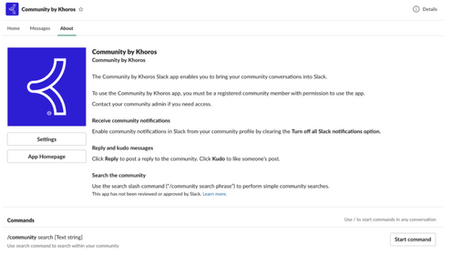
New Features Events (GA) Slack Integration (GA) Content Workflow and Approval improvements for Blogs and TKBs (EA) Email metrics (GA) Billing metrics (EA) Spam-related summary metrics in Community Analytics Filter for new posts in Community Analytics Multi-Factor Authentication (EA) Comments List Syndication (GA) API Updates Updated LiQL support to retrieve group hub members by membership role Create an abuse report for a private message Events (Occasions) API support Bug Fixes Events (GA) In the 20.10 Release Notes, we announced Early Access for our new discussion style, Events. We are excited to announce that Events is now in General Availability (GA). Note: Events is a paid feature but is included by default in certain community packages. To learn whether Events is included in your package or costs extra as well as request to have it enabled for your community, contact your Khoros Account Executive. Note: With the GA release, we provide API updates. While the front-end feature is called Events in the Community UI and feature documentation, the APIs and API documentation use the term occasions. Learn more about Events. Slack Integration (GA) In the 20.10 Release Notes, we announced Early Access for our Slack integration with the community. We are excited to announce that Slack integration is now in General Availability (GA) and enabled by default for all communities. Khoros Communities offers a Slack integration app that acts as a bridge between Slack and your community. Using the app, your employees can perform light-weight, common community tasks from within Slack. From the Community by Khoros Slack App, you can: Receive notifications Perform immediate actions (reply, kudo) Run simple community searches Learn more about setting up and using the Community by Khoros Slack app and participating in your community via Slack. Content Workflow and Approval improvements for Blogs and TKBs (EA) We are excited to announce the release of a new content workflow system to publish blogs and Tribal Knowledge Bases (TKBs). Blogs v3 and TKB v4 introduces a 3-step content-creation workflow that provides for authoring, editing and publishing. Note: You must open a support ticket to enable this feature. Content Workflow and Approval is the biggest change to the blogs and TKB discussion styles in several years and have been redesigned to focus on collaboration and usability. You now have more granular control over author, editor, and publisher permissions, enabling you to clearly define who can perform each task in the publishing workflow. Each blog or TKB article moves through different states and are assigned to members with specific roles. Thus, members always know what state an article is in, when it’s their turn to work on the content, and what they must do to move the article to the next step in the publishing workflow. This flowchart shows how an article m…2KViewsSign in to react to this post3CommentsKhoros Communities 21.4 Release Notes
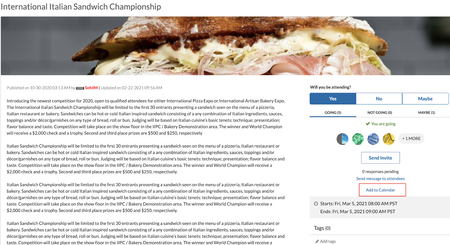
Community 21.4 delivers a new framework that provides downloadable logs to help developers debug and troubleshoot during development or customisation, download ICS files for upcoming events, and enhancements to some of the Community features and APIs. Content New Features APIs Bug Fixes New Features Internet Calendar Scheduling file support for Events New permission to hide/unhide videos in video gallery Sorted list of Badge Image Feature Logs Internet Calendar Scheduling (ICS) file support for Events With the option to download events as ICS files, you can now download and add community events with a calendar of your choice. This file download includes upcoming events only. Note: To use this feature you must upgrade Events to version 1.1. Go to Admin > Studio > Events and select Events 1.1 version. You now have the option to download ICS files for an event for all the upcoming events in an Events node from the Options menu: from the email notifications you receive for updates to events you are subscribed to: Learn more about Events New permission to hide or unhide videos in video gallery We've introduced the Hide or unhide own videos permission to hide or unhide videos in your video gallery from other members as and when you upload them. You can find this permission under Admin > Users > Videos. Members with this permission can hide or unhide the video in their video gallery from other members while uploading a video directly to their video gallery or a post as shown below. If the Hide in video gallery option is selected, other members can view the video only in the posts it is inserted in and cannot view it in the video gallery. However, Admins, moderators and members with the "Approve Reject, or Recall videos" permission can view all videos, both hidden and public, in the video gallery. If this option is not selected, all members can view the video from that member's video gallery. The option to Hide in video gallery is not available to members who do not have the Hide or unhide own videos permission. By default, the videos are hidden. Note: All members can view videos that are public. If you want to hide all the existing videos in your community from the video gallery, contact the support team. Please note that this request marks all the existing videos as hidden. Once all videos are hidden, we cannot roll back to the previous state. For example, if 20 videos were public and 30 hidden, and we hide all videos, we cannot roll back to the state with 20 public and 30 hidden videos. You can manually make the required videos public. Learn more about uploading videos Sorted list of Badge Images We have made changes to the order in which the list of filenames for the badge images listed under the Admin>Users>Badges>Create>Badge Image appears. They now appear in alphabetica…3.2KViewsSign in to react to this post39CommentsKhoros Communities 21.5 Release Notes
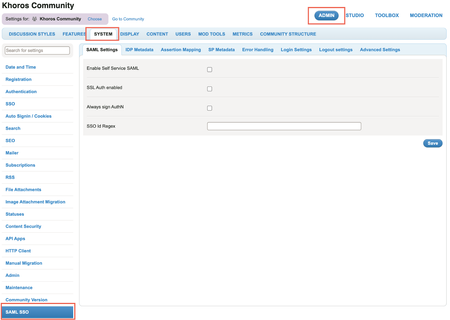
21.5 Release delivers self-serve SAML SSO as an out of the box core product feature, instead of a plugin-based approach. This release also includes enhancements around Events, Group Hubs and Community Analytics, and API updates. Content Features Self-serve SAML SSO Enhancements Remove the restriction on the number of Events node within a category Increase in the date range limit in Community Analytics reports Specify the default sort order for Group Hub List component Set the avatar size in a Group Hub card API Updates New FreeMarker sequence builder method Get node IDs of nodes displayed in the Group Hubs Listing Page You Found It. We Fixed It! Features Self-serve SAML SSO With this release, we’ve redesigned our existing SAML 2.0 integration to enable Community Admins to configure authentication for their Communities and integrate with their SAML IDP by themselves. SAML SSO is now available out of the box as a core product feature, instead of a plugin-based approach used earlier. This simplifies setting up SAML SSO in Communities and helps reduce the total cost of ownership. The key features in Self- serve SAML SSO include: Dynamic metadata: Supports up to three identity providers. Admins can integrate a maximum of three IDPs (that are XML strings) in the Admin panel instead of maintaining it in a config file. Dynamic entity identification: Admins can add the attribute name for the SSOID for their community. If this value changes, Admins can change the value and save it without restarting the Community. Dynamic assertion mapping: Admins can add all the attribute names in the SAML assertion in the Assertion Mapping tab in the Community Admin panel. This eliminates the need for maintaining a config file for Assertion mapping. Note: Communities launching post Community version 21.5 can opt to configure Self-serve SAML SSO while launching. Existing customers who want to switch to using self-serve SAML SSO must contact their Customer Success Manager or Account Executive. This process involves Professional Services (PS) engagement for user/SSO ID migration and may need to address other customisations such as user authentication workflows, custom user profile fields, and other customisations or integrations relying on user data. You can find the settings for Self-serve SAML SSO under Community Admin > Admin > SYSTEM > SAML SSO. Learn more about SAML SSO Learn more on how you can configure SAML SSO from the Admin panel Learn more about the SAML SSO tabs and settings in the Admin panel In the 21.4 release, we introduced the Feature Logs framework. This framework helps generate and view feature specific logs in components and endpoints. Developers and administrators can use these logs to monitor and debug during Community customisation. We are happy to announce that we are now explicitly providing you with…2.3KViewsSign in to react to this post13CommentsKhoros Communities 21.6 Release
21.6 is a minor release. As communicated earlier, minor releases contain defect fixes and minor enhancements. Minor releases are not made available in production by default. To request an on-demand upgrade, contact Support. Content Enhancements Changes to the community cookie banner Bulk Download Member Data metrics to consider Events discussion style API Updates Moving events between boards using the Move API You found it. We fixed it! Enhancements Changes to the community cookie banner The community cookie banner now shows Accept instead of OK and includes a Reject button. The banner is displayed on your community site for each visitor until that visitor clicks the Accept or Reject button. Clicking the Learn more link opens the webpage that describes your cookie policy but does not dismiss the banner. Users must click Accept in the cookie banner and explicitly confirm their consent to activate the community cookies. Once accepted, the cookie banner will not appear in subsequent logins. If users click Reject, only the Type 1 cookies (“Strictly Necessary”) are set, and all other cookies are held back. Once rejected, the cookie banner will not appear in subsequent signins. If users do not Accept or Reject and browse the community, only the Type 1 cookies (“Strictly Necessary”) are set, and all other cookies are held back. The banner will continue to show in the subsequent signins. The table below shows the expected combinations when cookies need to be dropped Cookie Banner LithiumCookieAccepted Value User Action Drop Type 2/3/4 Cookies Disabled 0 N/A Yes Enabled 0 No action taken No Enabled 1 Click "Accept" Yes Enabled 2 Click "Reject" No Learn more on how to enable site-wide cookie notification banner. Bulk Download Member Data metrics to consider Events discussion style The metrics in the Bulk Download Member Data report will now consider Events discussion style along with the existing discussion styles. Henceforth, when you request the Bulk Download Member Data report for a particular time period(for example, March 2021), the Events discussion style will also be considered for computing the metrics. This enhancement is already available to all communities using Events and hence a support ticket is not needed. Learn more about metrics in Bulk Download Member Data. API Updates Moving events between boards using the Move API We have enhanced the existing Move API to now support the moving of events. You may want to move an event from one Events board to another when you find it more relevant to another Events board. With this release, using the Community v1 Move API, you can move an event along with its comments, RSVP information and invite data to another board. After a successful move, the destination board's permissions govern the event's access. Note: You can move only the event (which eq…1.7KViewsSign in to react to this post20CommentsKhoros Communities 21.7 Release
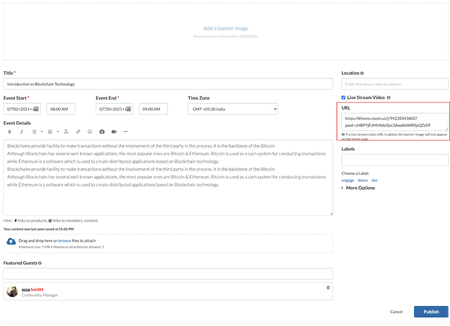
Features Integrate Zoom with Community Events API Updates RSVP API You found it. We fixed it! Features Integrate Zoom with Community Events Today, more and more meetings are moving to virtual spaces. Khoros Community Events now supports full integration with Zoom Meetings and Webinars. Integrating Events with Zoom enables community members to join the Zoom meetings and webinars directly from the community. With this integration you can: Create events to host Zoom meetings and webinars! All you have to do is paste in the Zoom URL. Now you can ask questions, discuss, and share follow ups to increase overall engagement in the threaded discussion. Host Zoom Meetings from a community event while providing full access to the Zoom options and features Host Zoom Webinars from a community event while providing full access to the Zoom options and features More info Learn more about the prerequisites required to host Zoom meetings and webinars from your community. Learn more about hosting a Zoom meeting and Zoom webinar on your community. Learn about mobile view for events with Zoom meetings and webinars. API Updates RSVP API We have updated the Events RSVP API to enable a member to add or remove the RSVP response on behalf of another member. Members with the “Create Events” permission now gain this ability. Learn more about move events API You Found It. We Fixed It. Earlier, the Internet Calendar Scheduling(ICS) files for community events uploaded incorrect schedule information in the Outlook calendar. This issue is now fixed, and all community events are now added to external calendar programs with correct information. We have fixed the issue where your editing position jumped to the beginning of a post while formatting any text at the bottom of a lengthy post. The issue with the preview of attachments to posts throwing misleading error messages is now resolved. You can now preview all attachments successfully. We have fixed the issue where some HTML characters in the case related fields in the Case Portal were encoded while sending information to Salesforce. Now, these HTML tags are no longer encoded. We have fixed the issue where the Top Tagged Posts widget displayed archived content. We have fixed the issue where the post count for a particular label on the Labels page did not decrease when posts with this label were archived. With this release, the post count for labels associated with archived posts will decrease as the post is archived. The Forum Topic Pages in Forums v5 with the Inline Editor enabled took more time than expected to load. We have improved the load time with this release, and all the inline reply controls load faster. We have fixed the performance issues with the load time when users with a larg…2.2KViewsSign in to react to this post18CommentsKhoros Communities 21.8 Release
21.8 is a minor release. As communicated earlier, minor releases contain defect fixes and minor enhancements. Minor releases are not made available in production by default. To request an on-demand upgrade, contact Support. General fixes There was an issue on communities with Knowledge Bases that had the default user setting Start new articles and edit drafts set to grant and Use full HTML in posts and signatures and Allow user to use advanced HTML in posts and signatures set to deny. When members with no special permissions or roles tried to preview their post in the “Questions and Answers” or “Solutions” templates, they received an error. This issue is fixed and members can successfully preview or submit the article without receiving an error. We have fixed the issue where archived posts were not viewable or searchable from the Content Archives page. We now enable content filters to support characters that require four or more bytes in UTF-8. With this change, the maximum character limit for a content filter is now 190 characters. We have fixed the issue when the message size of an email notification was too large, causing a memory issue that resulted in the email notification taking too long to send out. In 21.5 and later releases, any case that was not created from the Case Portal displayed NULL in the Description field when the case was viewed in Case Portal. This issue is now fixed. In 21.7 and later releases, pages that displayed featured topics threw an error after topics were un-featured. This issue is now fixed. Accessibility fixes Previously, the Options menu did not close automatically when changing focus from the menu to another UI element. Now, the Options menu closes automatically when you change focus using the Tab key. We have fixed the issue where the keyboard focus moves to the top of the page after pressing the Escape key from the Group Hub Invite dialog box. Now, the focus remains on the Invite button after pressing the Escape key. When you opened the Options menu in the "Reply to a message" page, the focus was not on the menu and was not navigable using keyboard keys. Now the Options menu can be closed with the ESC key and is navigable through arrow keys. The issue where screen readers did not announce “Notify moderator of inappropriate content” in the Edit Report field has been fixed. API changes A query to the Community API v2 labels collection now returns the label text in the id field. Previously, the id field showed the unique numerical ID. The datatype of the id field remains unchanged (String). We made this change to support labels on draft revisions in the future and also enables the id of a label to remain consistent across community environments.754ViewsSign in to react to this post2CommentsKhoros Communities 21.9 Release
This release brings a few enhancements on scheduling articles for publication and obtaining published URL when the articles are in draft state, and sending invites to community and non-community members via emails. We also have API updates around the same. With this release, you’re going to start seeing a new type of interactive documentation in our Release Notes and some knowledge base articles. To learn how to use and get the most out of this content, check out this quick 2-minute video attached with this blog. Content Enhancements Include time zone while scheduling knowledge base and blog articles for publication Send events invitations by email Preview published URL Announcement Deprecation of Transport Layer Security (TLS) 1.1 API Updates Include time zone while scheduling knowledge base and blog articles for publication Invite by email Events Bug fixes Enhancements Include time zone while scheduling knowledge base and blog articles for publication With this release, you can now set the time zone to use when scheduling Blog and KB articles for publication. Admins and members with authoring roles (author, editor, publisher) can see when and where a draft will be published. Note: To use this feature, you must be on feature versionsTKB v4.1 and Blogs v3.1. Go to Studio > Features and select 4.1 for TKB version and 3.1 for Blog version. 1. Open a new article or edit an existing one and click Schedule publication 2. Click the Calendar icon 3. Choose a date 4. Select Time zone 5. Choose a Time zone to schedule publication 6. Click Save 7. You can see the details of the schedule on the action bar. 8. To change this schedule, click the Update icon next to the schedule date time on the action bar. 9. Select Time zone 10. Choose a time zone 11. Click Schedule 12. The change is now updated. Here's an interactive tutorial https://www.iorad.com/player/1856850/Set-and-update-timezone Send events invitations by email Until now, you could send invitations to community members for events only via Private Messages. With this release, we’ve introduced the Invite by email feature for Events. You can now send invitations for events to non-community and community members via email. This also eliminates the limitation with communities that do not have the Private Messenger feature; such communities can send invitations for events via email. Note: To use this feature, Events must be on version 1.2. Go to Studio > Features and select 1.2 for Events version. Enablement To enable this feature, go to Admin> System > Invitations and select Email. About the feature Send invitations for public events: When you send invitations for public events using the E…2.8KViewsSign in to react to this post30CommentsKhoros Communities 21.10 Release
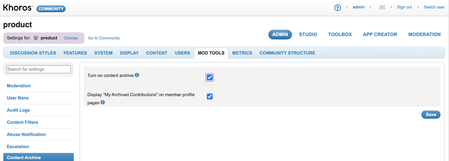
Content New Features Bulk content archive (Early Access) Enhancements Granular permissions to edit published blog articles Allow Co-Authors to edit published Blogs and TKB articles Userid field added to Bulk Download Member Data report Security Announcement API Updates Bulk Data API v2.0 Bulk content archive (EA) Allow co-authors to edit published articles Contributor types accessible through LiQL Attachments in Private Message You Found It. We Fixed It. New Features Bulk content archive (Early Access) We are happy to announce that we’ve extended the Content Archive feature to include support for archiving content in bulk. With the initial Content Archive release, you could archive only one article at a time. With bulk archive, you can archive multiple articles at once, making it easier to keep your content organized and up-to-date. With bulk archive, you can: Specify criteria to search for specific community content. Review the matching content and select all matching results or select one or more specific articles from the list. Archive the selected posts in bulk. Enablement To be considered for the Early Access (EA) program, contact your CSM. If selected, your CSM will work with the Support team to enable the feature. Once enabled, you can turn on/off the feature from the Admin panel. Go to ADMIN > Mod Tools > Content Archive > Turn on content archive. Note: If the Bulk Content Archive has not been enabled for your instance and the admin setting Mod Tools > Content Archive> Turn on content archive is turned on, you can archive only one content at a time. You can only restore or unarchive posts one at a time from the Archives page. There is no option to unarchive posts in bulk. All bulk archived content is moved to your community’s Archive Page. Check out this video to get an overview of the Bulk Archive feature. The video shows how you can bulk archive content from a TKB board with articles created at least one month ago, with no more than two views and no replies in the past one month. Bulk content archive 1. Click the Archives link under the Community dashboard on your community home page 2. Hover the Options menu 3. Click Bulk Archive 4. You will land on the Bulk Archive tool page. Choose from where you want to archive content. 5. In this example we choose Hi-Fi Products 6. Select the type of posts you want to archive. 7. In this example we choose TKB 8. Select how old the posts that you want to archive are. 9. In our example, we select posts that were created at least 1 month ago. 10. Enter a valid number for Maximum Views for the posts that you want to archive. This will enable the In the Past dropdown. 11. In this example, we e…3.1KViewsSign in to react to this post30Comments