Lab / Idea / Unconference Meetup?
I have a couple things on my community backlog that probably require some level of customization - I tend to be looking for stuff in Atlas that already has some traction or headway AND I see lots of "under consideration" ideas AND I see lots of "Did anybody make an XYZ widget in their community..." questions BUT what I haven't yet found (beyond this forum itself) is an available time and place for Devs to get together on their own and either attack a specific common problem OR talk together through a top of mind issue. It could be anything from a KhorosLed affair or even just an Unconference we put on ourselves. Would be REALLY great if there was a vanilla lab stood up to do actual live-action work that participants could then try to leverage in their own environments later. Am I just not finding this yet? Do we need to bootstrap something? BlakeH - has this come up before? 3.3KViewsSign in to react to this post
 26Comments
Highlight topic starter
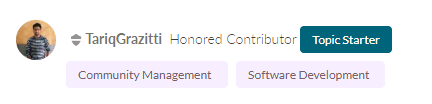
Just wanted to share a small code snipped I created to highlight the topic starter with a small badge next to the author information in each reply but not the first message in a thread: <#if (env.context.message.parent??) && (page.context.thread.topicMessage.author.id == env.context.message.author.id)> <div>Topic Starter</div> </#if> Just drop the above code in a custom component and add it to the "ForumMessage" page layout next to the author information like avatar, name and rank. How does it look With a pill shape styling similar to that of labels it can look like this: Alternatively you could @override the author avatar component and use above condition to wrap it into a topic starter class container and then add some styling to the avatar like a ring: Or do both at the same time. Have fun with it.374ViewsSign in to react to this post1CommentRemove sensitive roles from inactive users
Saw this idea and couldn't remember if I shared this already. Basically an endpoint that gets called every day and Loops through a list of roles Finds users with those roles Checks that they're not special accounts, e.g. API user accounts Removes the sensitive roles Per affected user it lists the roles that were removed and the roles that remain Optionally sends a PM to the user to notify them Comments inline. I use Google Apps Script to schedule a daily run, but of course there are other options. Disclaimer: I'm not a trained programmer <#-- Automatically remove roles with permissions from users who haven't logged in for a while --> <#assign user_limit = http.request.parameters.name.get("user_limit", "100")?string /> <#-- How many days must the user have been inactive --> <#assign days_staff = http.request.parameters.name.get("", "50")?number /> <#assign days_mod = http.request.parameters.name.get("", "30")?number /> <#assign send_pm = http.request.parameters.name.get("pm", "false")?boolean /> <#-- Roles to remove from the users we find --> <#assign user_roles_remove = [ "Administrator", "LSI", "Level Two Moderator", "Lithium", "Moderator" ]/> <#-- Some users, like API accounts should be skipped, these are their IDs --> <#assign staff_exceptions = [ 123, 456, 789 ]/> </#if> <#assign users_pm_ids = []/> <#-- Spinning up a sequnce to store the IDs of users we may want to PM about their removed access --> <#assign today_long = .now?date?long/> <#assign prev_long_staff = today_long - days_staff * 1000 * 60 * 60 * 24/> <#assign prev_long_mod = today_long - days_mod * 1000 * 60 * 60 * 24/> <#-- convert the user's last visit date string to the long format for calculation --> <#function fnLVD(lvd)> <#assign lvd_show = lvd?datetime?string["yyyy-MM-dd"]/> <#assign lvd_long = lvd?datetime?long/> <#return lvd_long/> </#function> <xml> <users> <#-- Mods --> <#assign query_mod = restadmin("2.0","/search?q=" + "SELECT id,login,last_visit_time FROM users WHERE roles.name IN('Moderator','Level Two Moderator') LIMIT ${user_limit}"?url)/> <#list query_mod.data.items?sort_by("last_visit_time") as u> <#assign lvd_long = fnLVD(u.last_visit_time)/> <#if (lvd_long < prev_long_mod)> <#assign user_id = u.id/> <#assign user_login = u.login/> <#assign query_user_roles = restadmin("2.0","/search?q=" + "SELECT name FROM roles WHERE users.id = '${user_id}' LIMIT 500"?url)/> <#assign user_roles_before = []/> <#list query_user_roles.data.items as r> <#assign role_name = r.name/> <#assign user_roles_before = user_roles_before + [role_name]/> </#list> <#list user_roles_remove as r> <#if (user_roles_before?seq_index_of(r) …878ViewsSign in to react to this post0CommentsCommunity Metrics Keys (List)
Originally posted in https://community.khoros.com/t5/Admin-Metrics/About-Community-Admin-Metrics-and-Definitions/tac-p/745216#M76 but most likely people in need of such a list are not gonna find this directly, so I make it a separate post that hopefully can be found more easily. As it has been difficult (like forever) to find a comprehensive list of all available metric keys for a variety of use cases like building ranking formulas, badge rules, API queries etc. I have parsed various resources and compiled the following JSON list of metric keys. As I mentioned in the original post, this is a programmatically extracted and compiled list, there might be errors (please let me know if you find any, and also if you know of other sources I've missed with keys that are not present in the list or information about keys that should be added, as description for example) and these keys have not been tested if they work for various features (like not all metrics can be used for badge rules for example). { "abandoned_registrations": { "source": [ "admin/metrics/advanced", "pdf/2017" ], "title": "Abandoned Registrations", "desc": "The number of new users registered, who abandoned during the process. Viewing Account Report Metrics The Lithium reports on a variety of metrics that are of interest in to those who are monitoring account activity for a community. The Account Reports metrics section lets you run reports on these metrics for users, roles, or for any node in the community (the community as a whole, categories, forums, or chats). You can also set the granularity of these reports (hourly, daily, weekly, or monthly) and select a start and end date. You can report on a single metric, or select up to five metrics to be included in a report." }, "abandons": { "title": "Abandoned Turns", "desc": "The number of times a user left a waiting queue voluntarily before reaching the chatting list. A user can leave the waiting queue multiple times during a single session. Incremental Abandonment", "source": [ "pdf/2017" ] }, "accepted_solutions": { "source": [ "admin/metrics/advanced", "api/v1/users/metrics", "pdf/2017" ], "title": "Accepted Solutions*", "desc": "The number of times messages were accepted as solutions. This metric counts solutions written and accepted as a solution by anyone in the community." }, "accepted_solutions_to_threads_ratio": { "source": [ "admin/metrics/advanced", "api/v1/users/metrics", "pdf/2017" ], "title": "Topics Ratio", "desc": "The number of Net Accepted Solutionsdivided by the number of Net Forum Topics. This metric gives an indication of the percent of topics that are being solved in the community, category, or forum. Topics Posted to Solution Accepted" }, "action_requests": { "source": [ "admin/metrics/advanced", "pdf/2017" ], "title": "Action Requests", "desc": "The total number of server requests that occur when a user post…650ViewsSign in to react to this post0CommentsFloat replies that aren't a solution, but are important, within a topic
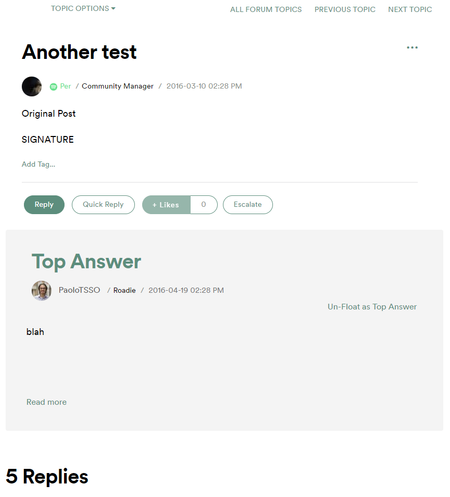
Saw a Product Idea for this, so I thought I'd share my custom solution. Perhaps not for the faint of heart, but when you get it working it'll be fun :) This adds an option to all the replies in a topic, which lets you float them to the top. Like Solutions, but not marked as such. Sometimes you want to float a reply to make it easier to find and stand out, without implying that it's a solution. Looks like this: You will need three things for this: Component that shows the floated reply Option in the reply's message options to float it Endpoint to make the magic work And they are these: One: (I removed my CSS, but just reply here if you'd like to have it and I'll send it over. It'd just take a lot of space here). <#assign topic_id = page.context.message.uniqueId/> <#-- insert your preferred method of testing a user's role here --> if user has role: <#assign usercanUnfloat = true/> else <#assign usercanUnfloat = false/> /if <#-- ask Lithium to add a metadata field for messages --> <#assign float_ids = restadmin("/messages/id/${topic_id}/metadata/key/spotify.floated_replies").value/> <#if float_ids != ""> <#-- if this topic has floated replies --> <#list float_ids?split(",") as msg_id> <#if msg_id != ""> <#assign query_msg = restadmin("2.0","/search?q=" + "SELECT view_href,author.id,author.login,current_revision.last_edit_time,search_snippet,body FROM messages WHERE id = '${msg_id}'"?url) /> <#list query_msg.data.items as q> <#assign author_id = q.author.id/> <#assign author_login = q.author.login/> <#assign msg_url = q.view_href/> <#assign msg_post_time_date = q.current_revision.last_edit_time?number_to_datetime?datetime?string[cust_user_date_format]/> <#assign msg_post_time_time = q.current_revision.last_edit_time?number_to_datetime?datetime?string[cust_user_time_format]/> <#attempt> <#assign msg_body = q.search_snippet/> <#recover> <#assign msg_body = q.body/> </#attempt> <#assign query_author = restadmin("2.0","/search?q=" + "SELECT view_href,rank,avatar.message FROM users WHERE id = '${author_id}'"?url) /> <#list query_author.data.items as a> <#assign author_url = a.view_href/> <#assign author_avatar = a.avatar.message/> <#assign author_rank_name = a.rank.name/> <#if a.rank.bold == true> <#assign author_rank_bold = "bold"/> <#else> <#assign author_rank_bold = "normal"/> </#if> <#assign author_rank_color = a.rank.color/> <#attempt> <#assign author_rank_icon_url = a.rank.icon_left/> <#assign show_icon = true/> <#recover> <#assign show_icon = false/> </#attempt> <div class="cust-floater-container"> <…575ViewsSign in to react to this post3CommentsTwo Community Virtual Developer Training Sessions are Open for Enrollment
The December 2021 and February 2022 Community Virtual Developer Training sessions are open for enrollment to all qualified developers. The training event page offers more details on the training format, topics covered, prerequisites, and fees.234ViewsSign in to react to this post0CommentsBroadcast private message with API not being sent to all users
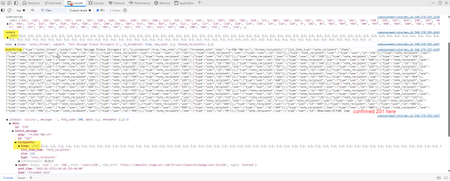
Hi Everyone, Seeing something a little strange that I can't figure out. Working on a custom component that sends a broadcast message to all the voters on an idea. Testing on stage I see only around half of the messages are sent no matter how many I send (sometimes over sometimes under). So, for example, a message that was supposed to have 200 recipients might only send to 120. You can see below there were 201 voters in this case. The large console log that says bodyString is the body of my API call and I copied it and double checked. All 201 users were present in the body. But the response from the call shows only 122 recipients. And it is not a consistent limit. If I send to 800 users, it goes to 339. However, if I send to 800 users from the out of the box private message page all 800 go through. I am only able to test this on stage with large numbers so I'm not sure if it could just be an issue on stage. I don't want to spam hundreds of real users to test on production 😀 Has anyone else got any experience with this? Thanks402ViewsSign in to react to this post1CommentCan someone walk me through authenticating and using Postman with Aurora?
I'm a bit of a newbie when it comes to GraphQL and Postman and I'm struggling to work through the dev docs when it comes to authenticating and setting up the basics in Postman for testing in API calls in Aurora. We're looking ahead to migration and want to start getting familiar with basic API calls. Has anyone successfully got Postman and Aurora working? Is anyone willing to walk me through the bare minimum basics of getting this set up to authenticate into our Aurora instance and run a basic GraphQL call? I'm finding the dev docs pretty lacking currently so I'm turning to the expertise of the developer community here hoping someone has already figured this out. Or, if Khoros is reading this, can we have another Developer Webinar where we can walk through this? Or is this something you can offer through training or update the docs with more details? We've reached out to our CSM to see if we can get some 1:1 training but so far it doesn't look like that's an option right now.Solved2.6KViewsSign in to react to this post13Comments MattV2 years agoKhoros Staff
You have 4 authentication options when using Postman to authenticate with the API
- Session Key (local account username and password)
- Bearer token using SDK Key
- Access Token using pre-shared key (Dev Tools API apps)
- OAuth Grant Flow (Community SSO)
Option #1 is the easiest/best option, and what I use most commonly. This means you would login with an account created locally on the community (not using SSO). In the latest version of Aurora (24.08), you can create such as user through Admin > Users > Manage Users.
Setting up Postman
- Create a new collection
- Create a new Environment to use with this collection (to hold variables).
- sessionKey (secret) - leave blank
- hostname (default) - set to your communities hostname (URL without https://)
- username (default) - set to user created in community admin (or your username if local user)
- password (secret) - the users community password
- tapestry (default) - set to t5 (except for some special circumstances)
- sessionStartTime (default) - leave blank
- sessionLastUsed (default) - leave blank
- ht_username (default) - set if you need to login to the community with basic auth credentials (the browser login popup)
- ht_password (secret) - set if you need to login to the community with basic auth credentials (the browser login popup)
- In the collection pre-request script, add the pre-request script (included below)
- Create a new request in your collection
- Set the path to be POST https://{{hostname}}/{{tapestry}}/s/api/2.1/graphql
- Update headers:
Key: li-api-session-key
Value: {{sessionKey}}
- In the request body, add your GraphQL
- Execute Query
- Save your Query (and collection)
Collection Pre-Request Script
var sessionKey = pm.environment.get("sessionKey");
var hostname = pm.environment.get("hostname");
var tapesty = pm.environment.get("tapestry");
var ht_username = pm.environment.get("ht_username");
var ht_password = pm.environment.get("ht_password")
var username = pm.environment.get("username");
var password = pm.environment.get("password");
var sessionStartTime = pm.environment.get("sessionStartTime","");
var sessionLastUsed = pm.environment.get("sessionLastUsed","");

const thirtyMinsAgo = Date.now() - (1000 * 60 * 30);
const twoHoursAgo = Date.now() - (1000 * 60 * 60 * 2);

if (sessionLastUsed == "" || sessionStartTime == "" || sessionLastUsed < thirtyMinsAgo || sessionStartTime < twoHoursAgo || sessionKey == "") {
    console.log("authenticating");
    authenticate();
} else {
    pm.environment.set("sessionLastUsed", Date.now());
}

function authenticate(){

    const request = {
        url: `https://${hostname}/${tapesty}/s/restapi/vc/authentication/sessions/login?user.login=${username}&user.password=${password}&restapi.response_format=json`,
        method: 'POST',
        header: {
            'Authorization': 'Basic '+btoa(`${ht_username}:${ht_password}`)
        },
    };
    pm.sendRequest(request, function (err, response) {
        if (err) {
            console.error(err);
            pm.execution.skipRequest();
            return;
        }
        const data = response.json();
        if (typeof (data.response.error) !== 'undefined' && typeof (data.response.error.message) !== 'undefined') {
            console.error(data.response.error.message);
            pm.execution.skipRequest();
            throw new Error("Authentication failed (see console)");
        } else {
            console.log("key", data.response.value.$)
            pm.environment.set("sessionKey", data.response.value.$);
            pm.environment.set("sessionStartTime", Date.now());
            pm.environment.set("sessionLastUsed", Date.now());
        }
    });
}
Optional Post-Response script
if (pm.response.code == 401){ console.warn("Got unauthenticated response. Clearing variables."); pm.environment.set("sessionKey",""); pm.environment.set("sessionLastUsed",""); pm.environment.set("sessionStartTime",""); }Sign in to react to this post
Handling the upcoming LIMIT and OFFSET changes
You might be aware of the upcoming changes to LIMIT and OFFSET having a maximum value of 1000 in 23.12. Obviously this is likely to cause a problem to any custom components that loop through data such as messages. Cursor will work fine in some scenarios, but any kind of custom pagination will need UI/UX work to access records greater than 2000! Using cursor we'd only be able to move forward and not skip to page 1000 for example. Any other thoughts on how this could be achieved with CURSOR?!1.6KViewsSign in to react to this post11CommentsCan You Get the Move History of a Post With the API?
Some of our moderators would like an easy way to see who moved a post (sometimes they have questions about why a post was removed for example). I can find that info with the audit log but was hoping I could put together something more user friendly for the moderators. I added something to show who marked a solution for example. This is only visible to moderators and admins. I was hoping to do something similar, but I can't find a way to get that kind of info about a post. Anything I'm missing or is this just not possible? Thanks.380ViewsSign in to react to this post2Comments