liqlAdmin in khoros aurora graphql API
Hi Folks, I want to add roles to the users using graphQL API given below. const ADD_USER_ROLE_MUTATION = gql` mutation addUsersToRole($roleKey: RoleKeyInput!, $users: [UserIdInput!]!) { addUsersToRole(roleKey: $roleKey, users: $users) { result { id name } } } `; const [addUserRole] = useMutation(ADD_USER_ROLE_MUTATION); addUserRole({ variables: { roleKey: { roleName: "role" }, users: [{ id: userId }] } }); The issue I am facing is that when this mutation is executed by an Admin user, the role is successfully added to the target user. However, when the same mutation is executed by a normal user, it fails to add the role due to permission denied errors. Is there a parameter or keyword that can be used in this mutation to allow a normal user to update their own roles or self-related data? For example, in Khoros Classic, we can use the liqlAdmin keyword in REST API requests to bypass such permissions. Is there an equivalent for GraphQL in Khoros Aurora? Thanks in Advance.Solved 2.6KViewsSign in to react to this post
 13Comments
How to do session key authentication with GraphQL
Hi Khoros Team, We saw the note regarding the move from REST to GraphQL: Khoros Communities: Aurora 25.04 Release Notes | Atlas How would we accomplish session key authentication with GraphQL? Thanks!Solved1.2KViewsSign in to react to this post4Comments MattV1 year agoKhoros Staff
For now, authentication is still done with the APIv1 authentication mechanisms.
Sign in to react to this post
Experience Survey GraphQL
in the graphQL for pulling the experience survey its says the graphQL is: query MyQuery { valueSurveyResponses { csv } } this implies this pulls all survey responses ever, I am wondering if there are constraints or pagination because this could very quickly become a massive dayaset.718ViewsSign in to react to this post4Comments
Dashboard Data Not Matching Reports — Need Help
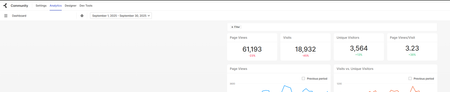
Hi everyone, I’m trying to pull dashboard data, pageViews, visits, uniqueVisitors, etc. but the numbers I’m getting aren’t matching. I’m really new to this and trying to get the data for reporting, and I’ve been stuck for a few months. I tried the Bulk API, but the numbers came out really low. So I decided to download the report from Analytics instead. Dashboard Report Can anyone explain why the dashboard numbers don’t match the report? Is anyone using a different method to get this data? I’m trying to bring everything into Power BI. Can I get this data using Aurora GraphQL API? Thanks!1.3KViewsSign in to react to this post2CommentsContraint conversationlastpostime in Api graphql getmessages does not work
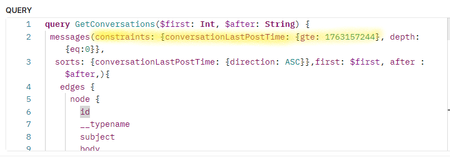
Hi everyone, Has anyone here ever tried using the messages API with the conversationLastPostTime constraint? In my case, the constraint is completely ignored — it doesn’t seem to have any effect at all. What I’d like to do is retrieve only the conversations starting from a certain date limit. But no matter what value I pass to conversationLastPostTime.gte, the results I get are not filtered by date. Has anyone else faced this issue, and did you find a workaround or a proper way to make this constraint work? Here’s the GraphQL body I’m using: Thanks a lot for your help482ViewsSign in to react to this post0Comments
HTML support for GraphQL API
Hi Khoros, I've been roadmapping usage for the GraphQL API that allows for the creation of a Knowledge Base Article: https://developer.khoros.com/khorosauroradevdocs/docs/create-a-knowledge-base-article#create-a-knowledge-base-article When it comes to populating the GraphQL, I noticed some fields that we can use to populate an article, like "subject", "body", "introduction". However, when it comes to creating a Knowledge Base Article, I'm curious if there is support for some things I can do with the GraphQL API that we can already do with the UI version of creating a Knowledge Base Article. For example, in the UI, I can open the Source Code field in the editor of the article (please see attached screenshot). What this allows me to do is to essentially author the article in HTML, rather than in plaintext. So, as seen in the screenshot, I can set the Source Code for the new Knowledge Base Article. My question is this: with the GraphQL API, can I submit the body content as straight HTML just like I can in the UI > SourceCode? If the answer is no, my question we then be, is there a way we can set the HTML of a new Knowledge Base Article using the GraphQL API in any way (Source Code or otherwise)? Thanks, Edson996ViewsSign in to react to this post1Comment
Handlebars custom component not executing GraphQL query
I have been following along with the directions on this page to try to create a custom Handlebars component that executes a graphQL query and displays the results in simple HTML. My .hbs file references the query like this: {{#gql "privateUserStats" variables=(hash id=user.id)}} ... {{/gql}} I also have a .graphql query defined in queries/privateUserStats.query.graphql: query privateUserStats($id: ID!) { user(id: $id) { id login email firstName lastName email ... } topicsStarted: messages(constraints: {authorId: {eq: $id}, depth: {eq: 0}}) { totalCount }... } and I reference it in my component.json under the "graphql" block: "graphql": { "privateUserStats": "./queries/privateUserStats.query.graphql" } Despite this setup: The Handlebars rendered correctly user.id was available But the GraphQL query never fired — no network activity, no data returned, and no console errors Can someone help? I'm all out of ideas.1.5KViewsSign in to react to this post6CommentsDownload graphql schema?
Would like to build tools that I can validate queries against without having to manually reference online gated documentation. Is a downloadable format available somewhere?Solved1.4KViewsSign in to react to this post2Comments- MattV1 year agoKhoros Staff
You have two options.
Some API Tools (e.g. Altair) will let you download the SDL once it's able to complete its introspection query.
Alternatively, if you install the SDK, the query schema files are all located in node_modules/khoros-aurora-sdk/graphql
Sign in to react to this post
Aurora Email Templates
Hi everyone, I am new to GraphQL, so please forgive any silly questions here. I've successfully set myself up in Postman, and can retrieve email templates. I understand the documentation here about the process of updating a template, but I am hung up on viewing the HTML within each template so that I might edit that. My end goal, hopefully, is to be able to glean the variable for a post title within say, the Mentions template, and put that into the Subject of the email. So instead of "{User} mentioned you on {Community Title}" I would ideally have a subject that says "{User} mentioned you in the thread {Post Title}" I would also like to edit other pieces of other emails, but looking to cut my teeth on this one. Has anyone had success making a change like this on Aurora, and might be able to point me in the right direction? Thank you!1.9KViewsSign in to react to this post5CommentsDisallowed Dependencies Issue in Khoros Aurora Build
Hi Folks, Facing an issue with Disallowed Dependencies (as shown in the screenshot) while creating a build on GitHub. Could anyone please help me to understand why dependencies like Apollo/client etc. SS: https://prnt.sc/oyWMeJHVsmmW Thanks in Advance!Solved1.2KViewsSign in to react to this post2Comments- JeanineS1 year agoKhoros Alumni (Retired)
Hi yogeshdixit , it looks like 25.02 had an update that now requires the dependencies to be reviewed and approved via a support ticket. https://developer.khoros.com/khorosauroradevdocs/docs/allowed-dependencies-for-custom-react-components
Sign in to react to this post