Lithium Community 18.12 Release Notes
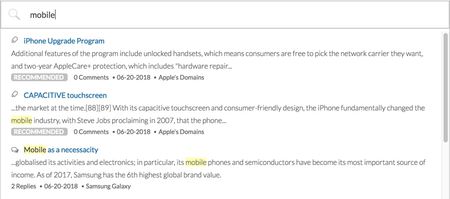
New Features Promoted Search Places included in search results SEO improvement: Rich Google search results for forum pages Updates to the message editor Real-time virus scanner for file attachments Content mentions @Mention notification email template name change Me Too metrics provided in LSI Improved REST API call reporting in Toolbox In-app reference documentation for email template context objects Improved badge assignment performance Update to the Vitality quilt Studio endpoint authentication error handling API changes Promoted Search From time to time, you might want specific community content to display at the top of the search results list when users search for specific keywords or phrases. With Promoted Search, you can now associate specific searches to specific community URLs to “boost” specific pieces of content to the top of the search results list. Here’s how promoted search results mapped to the keyword “mobile” might display: Let's look at a few scenarios where Promoted Search might be useful. A community admin can use Promoted search to point end-users to official company information, such as the GDPR policy or some specific product documentation. An admin could also use Promoted Search to create awareness about company announcements, event campaigns, news items, or certain products. Consider an instance where one of your products is experiencing a service outage. You might create an article that describes the issue and possible workarounds. During the outage, you could promote this article to the top of search when a customer searches for the keyword outage. After the outage is resolved, you could delete the promoted search rule. Note: To use Promoted Search, you must be on Search version 3.0 and or above. Learn more about Feature Versions. Create Promoted Search rules To create a Promoted Search rule: Sign in to the Community as an admin or a user who has permission to create promoted search rules. Go to Content > Promoted Search. By default, all promoted search results display with the “Recommended” label in front of it. For example: To change the default label open the Promoted Search Indicator drop-down menu and choose the label you want. Or, select None. Click Add a Rule. Note: After you start adding rules, the Add a Rule button displays at the bottom of the rules list. Enter the keyword(s) or phrase and the content link (full URL) of the community content you want to promote. Note: Separate multiple keywords/phrases with commas. Multi-word phrases require an exact match. Click Add. Optionally, you can set the priority order of the rules you create. Sometimes, you might want to create multiple rules for the same keywords/phrases. Use the priority field to indicate the order in which content that maps to the same keywords appears in the search results list. Note: For any given search, a maximum of two promoted search results will be shown. To edit or remove existing rules: Go to Content > Promoted Search. Find the rule in the list you want to edit. Click Edit. Edit the Priority, Keywords, and Content Link, as needed. Click Save. To delete a Promoted Search rule, click Remove next to the rule. Turn Promoted Search rules on and off From time to time you might want to temporarily turn off Promoted Search rules. For example, you might want to turn rules off while you add new rules, change existing rules, or change the ranking order of rules. Or, maybe the rules you’ve created promote certain content during specific times or a temporary event on your community. Rather than deleting the rules or turning off Promoted Search, you can temporarily turn off the processing of these rules, effectively turning off Promoted Search. Just click Enabled or Disabled above the rules list. This way, you don’t lose all the rules you’ve built when the feature is disabled. You can continue to manage the rules (add/edit/delete) in the disabled state. Grant users permission to create promoted search rules To create and edit promoted search rules, users must have the Create promoted search rules permission. To grant someone the ability to create promoted search rules: Sign in to community as an Admin. Go to Users > Permissions. Click Edit Users tab and search for the user to whom you want to grant this permission. (Alternatively, you can go to the Roles tab and Edit the permissions for all users with a specific role.) Scroll down to the Search permissions and Grant the Create promoted search rules permission. Click Save. Places included in search results In addition to showing specific content in search results, search results now return community “places”. Places are boards, categories, or groups that include the search term in their name or description. For example, if you searched for “iWatch”, boards and categories with “iWatch” in their name or description will display in the Places search results area. Up to 3 places are displayed in the Places search results area. Note: To include places in search results, you must be on Search version 3.2. Places is enabled by default when you upgrade Search to version 3.2. If you want to disable the Places feature, you must file a ticket with Lithium Support. Learn more about Feature Versions. In addition to Places being returned in the auto-suggest results, the Search Page now includes a Places view: If you see the Places tab, but the listing of Places does not appear, check to see whether your Search Page quilt includes the search.widget.node-search component: Open Studio > Pages. Click Change and select the Search > Search Page to open the Search Page quilt. Click Switch to XML View. Add <component id="search.widget.node-search" useTabVisibility="true" /> to the main-content section: <add to="main-content"> <component id="search.widget.message-search" useTabVisibility="true"/> <component id="search.widget.user-search" useTabVisibility="true"/> <component id="search.widget.note-search" useTabVisibility="true"/> <component id="search.widget.node-search" useTabVisibility="true" /> </add> Click Save. SEO improvement: Rich Google search results for forum pages Starting with the 18.12 Release, the markup for all community forum pages has been updated to support the latest Google Q&A Structured Data guidelines, described here. Now, when someone searches on Google and a forum page from your community appears in the Google search results, a rich preview displays similar to this: Note: Google will not start showing this rich preview for forum topics from your community immediately. The new markup will increase the likelihood that Google will use a rich search results format. Read more about Google's structured data policies here. The search result listing highlights the solved answer (if it exists) and other answers in carousel format with the number of votes/kudos each has received. Updates to the message editor With the 18.12 release, we have updated to the 4.7.13 version of the TinyMCE message editor, which includes a number of fixed issues, listed on the TinyMCE site. Note: We previously announced the availability of the updated message editor in the 18.9 release, but we put the upgrade on hold to investigate some potential issues with the upgrade. These issues have been addressed in the 18.12 Release. All Community customers will be upgraded to TinyMCE 4.7.13 when they are upgraded to 18.12. We strongly recommend testing your message editor and TinyMCE features thoroughly on your stage environment after the state environment is upgraded before your production environment is upgraded to 18.12. Real-time virus scanner for file attachments Lithium’s real-time virus scanner service checks for viruses in files attached to posts to protect your community from becoming a distribution point for malicious software. Basically, this service: Scans all attachments while they are being uploaded and removed any malicious attachments before getting posted to the community. Keeps the service’s virus definitions up to date. Periodically scans previously uploaded files to catch any malicious files based on latest virus definitions and updates. (Infected files are automatically removed, any references to the file are removed.) By default, this service is disabled. To have it enabled, open a Support ticket. As an Admin, you can define who should receive the Virus Scan results email, which is delivered as a daily digest. You can also set the time of day that the email is sent out the recipients. Note: In addition to the daily digest email, real-time notifications are also displayed. If malicious attachments are found, a CSV file is attached to the daily digest email that provides the following information for each attachment: Community User ID of the person who attached the file URL of the post to which the file was attached Date when the attachment was added File name of the attachment To set the Virus Scan daily digest email distribution options: Sign in to Community as as Admin. Go to System > File Attachments. In the Send virus scan daily digest email to field, enter the email addresses (separated by commas) of the people who should receive the email. In the Run the virus scan daily digest at this time field, enter the time of day (PST) that the virus scan email should be sent out. Note: For the real-time virus scanner feature to work properly, you must enter values for both the Send virus scan daily digest email to and Run the virus scan daily digest at this time settings. Click Save. Now, when an error is detected with an attachment, the file is removed and an error is displayed: ed.jpg Email templates and notifications for virus detection emails The Virus Scanner Service includes a new email template (Virus Scanner Digest Report), which is sent to the predefined list of people to report the results of the daily virus detection scan. You can view the content of the Virus Scanner Digest Report in by going to Studio > Text Editor > Email Text and selecting the template from the email template drop-down list. Like all community email templates, you can edit their content to meet your specific needs or company voice. Learn more about editing content of email templates. Content mentions We are announcing the Early Access release of a new feature called Content Mentions. Content Mentions enable users to call out specific posts within the body of a message. It's a way to quickly embed a link to other content in the community. To get started with this new feature: Open a ticket with Lithium Support to enable content mentions. Requirement: Content mentions is supported only on Responsive communities. Set the Mentions feature to version 2 in Studio > Features. (You will not see the Mentions feature in Studio > Feature tab until Support has enabled it for you.) Grant users the Mention content in posts permission in Community Admin. Note: The Early Access release does not support email notifications when a user's message is mentioned in a post, and content keyword search supports only full word searches. Email notifications and prefix search will be included in the GA release. You will see the new email template in Studio, but you will not able to set notification preferences at this time. Content mentions are supported in all conversation styles in both topics and replies/comments. Here’s how it works Let’s say you're responding to a forum topic and you want to link to another post that includes some helpful information. Using the Rich Text editor, type the @ symbol. A default list of suggestions appears in a pop-up. Note: When User Mentions are enabled on the community, users appear at the top of the suggestion list. Type a few letters of a keyword in the subject or body of the message you want to link to. As you type, search results with messages matching that keyword organized by conversation style appear in the pop-up. You may enter multiple words in the mentions pop-up. When multiple words are entered, all words must be present in the subject and/or body. When you select an item in the list, Community adds the subject of the post with a hyperlink in the body of your message. Note: The content mention link does not currently work in Preview Mode. Mentions UI update Mentions v2 updates the look of the mention search pop-up UI. This same change will also affect the look of the Product Mentions search pop-up UI when Mentions v2 is enabled. With Mentions v1, the mention search looks like this: With Mentions v2, the mention search looks like this: Content Mentions documentation To learn more about Content Mentions, see: About @Mentions Enable @Mentions Set @Mentions permissions @Mention notification email template name change We have changed the name of the @Mention notification email template in Community Admin to @Mention user notification to differentiate it from the new @Mention content notification email template. This change does not affect your code and customers will be unaware of the update. The @Mention user notification email template file name (email_content.template.mentions.text) is unchanged. Me Too metrics provided in LSI Me too is a community feature provided in our Forum and Q&A discussion styles that enable users to indicate that they are experiencing the same issue or agree with another user’s comment. Prior to 18.12, this metric was reported only in Admin metrics; now this metric is included in LSI. The Me Too metric helps community moderators understand what the most important topics/issues are. To view Me Too metrics in LSI: Sign in to LSI. Go to Content. Click Forums or Q&A. In the Top # table, open the Settings menu and click Manage Columns. Select Me Too. Click Save. The Me Too metrics are displayed: Improved REST API call reporting in Toolbox We have improved the REST Usage tab in Toolbox to display the LiQL queries used in the page. LiQL queries are used with the Community API v2 /search endpoint. Previously, we simply showed the /search endpoint in the REST Usage table. When more than one LiQL query was made in a component, it was difficult to tell which query applied to the /search entry in the list. Now we show the LiQL query in the table instead of the /search endpoint to help you better identify heavy LiQL queries. In-app reference documentation for email template context objects We have moved email template context object documentation into the Studio > Text Editor > Email Text tab. Because context objects are often specific to the template in which they are used, you will now find the definition of Velocity context objects and methods used in an email template below the email template editor a new Email Template API Reference section. The Email Template API Reference section includes two subsections. The Variables Used in the Template subsection lists the context objects used in the template along with their definitions. Note: Variables used in logic like for loops do not appear in this list. This is because those variables are used specifically within that logic and are not able to be extracted programmatically. If you are familiar with the Velocity template language, the variables in these cases will be easy to decode. The Email Template Context API subsection is for advanced users and developers customizing email templates. This section provides API reference documentation for the top-level, nested, and enum objects available for use in the template. Improved badge assignment performance We have made performance improvements to the Badges feature. Awarding badges to 2 million users now takes less than 2 minutes. Previously awarding badges to 100,000 users would take approximately nine minutes. Update to the Vitality quilt The out-of-the-box Vitality quilt (vitality.quilt.xml) used on the default Community Page includes the Community Metrics component (community.widget.metrics-display) to show the count of registered users. The Community Metrics component currently has the li-metric-name parameter value, which dictates the metrics displayed by the component, set to completed_registrations. This metric includes fully-registered, partially-registered, and in some cases, deleted users. We have updated the out-of-the-box Vitality quilt to use a new li-metric-name value (completed_registrations_computed) which displays the count of fully-registered users only. To see this change, you must update the Community Home feature version to 3.1 in Studio > Features. If you have customized the Vitality quilt If you have customized the Vitality quilt and you want to use the new completed_registrations_computed metric in the Community Metrics component, you must make the following changes in your custom quilt. In the quilt XML, change: <component id="community.widget.metrics-display" li-metric-name="completed_registrations"/> to <component id="community.widget.metrics-display" li-metric-name="completed_registrations_computed"/> Change the CSS class used by the quilt from: lia-vitality-metrics-display-completed-registrations to lia-vitality-metrics-display-completed-registrations-computed Update the text key used by the Community Metrics component. Take the value of the text key: li.community.metrics-display.completed and apply it to this text key: li.community.metrics-display.completed-registrations-computed Studio endpoint authentication error handling We currently allow customers to authenticate Studio Endpoints using a Session Key. Starting in 18.12, Community will throw a 403, Forbidden HTTP response code along with an error response if the session key used has expired. The error response differs depending on the content type. The following table outlines the error response format if the restapi.session_key is an invalid (i.e. expired) token. content type error response text/html 5.6KViewsSign in to react to this post
 79Comments
Khoros Communities 25.9 - Release Notes
The Khoros Communities 25.9 release includes performance improvements, stability enhancements, and bug fixes across search, caching, authentication, and moderation features. Classic Fixed inbox search not returning results for partial word matches. Fixed an issue where the private notes page would error when performing an empty search. Fixed image URLs not being indexable by search engines due to incorrect robot headers. Fixed an issue where Salesforce user ranks were not updating after the initial sync. Fixed archive dashboard totals showing incorrect counts due to deleted boards being included. Fixed delete confirmation errors preventing content deletion. Fixed event pages showing errors after creating and publishing new events with optional livestream details. Aurora Fixed an issue where Salesforce user ranks were not updating after the initial sync. Fixed archive dashboard totals showing incorrect counts due to deleted boards being included. Fixed an error that occurred when viewing analytics for occasion reply messages. Fixed unread and view counts not updating without a page refresh. Fixed inbox search not returning results for partial word matches. Fixed an issue where the private notes page would error when performing an empty search. Fixed image URLs not being indexable by search engines due to incorrect robot headers. Fixed an authentication issue where cookies were not being properly echoed during login/logout flows. Fixed an issue where session cookies were being incorrectly cached for anonymous users. Improved page caching performance by moving from memory-based to filesystem-based storage. Fixed a page caching issue that was reusing parent frame IDs across different users. Fixed the 3-dot action menu not working properly in text key mode within Manage Content. Fixed the 3-dot action menu not appearing for reported private messages in Manage Abuse. Fixed message action menus not responding consistently across different content types. Fixed message preview pages reloading endlessly and preventing user actions. Fixed duplicate replies being created when responding to messages at deeper thread levels. Fixed pagination issues with archived messages where the cursor was not advancing properly. Fixed a null pointer exception occurring when deleting articles via API. Fixed an issue where followers were not consistently receiving edit notifications according to their preferences. Fixed subscribers receiving unnecessary emails for non-publish workflow actions. Fixed an infinite initialization loop occurring in SDK preview for custom components. Fixed an issue where component assets were not loading correctly when switching branches. Fixed database errors caused by custom field metadata keys exceeding the allowed size limit. Fixed an issue where pasted email addresses were being replaced with suggested users when pressing Enter in group/event invites. Fixed delete confirmation errors preventing content deletion. Fixed event pages showing errors after creating and publishing new events with optional livestream details. Staging and Pre-Prod rollout: September 15 Production rollout: September 29 The rollout will follow the standard maintenance windows4.7KViewsSign in to react to this post45CommentsKhoros Communities 19.12 Release Notes
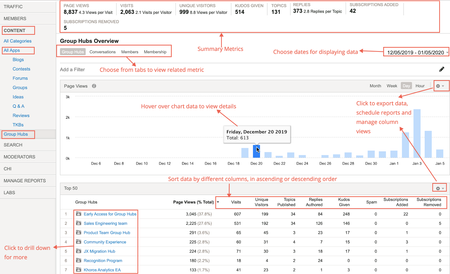
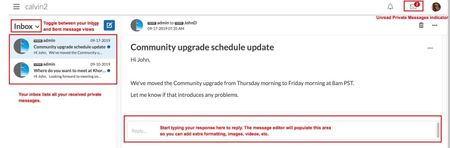
Khoros Communities 19.12 brings: New Features API Updates Bug Fixes New Features Group Hubs GA Private Messages v3 GA Enhancements to Search Subscriptions GA Group Hubs GA In the 19.8 Release Notes, we announced Early Access for our exciting new Group Hubs feature. Group Hubs is now in General Availability (GA). Group Hubs are our next generation to Groups. Therefore, we plan to sunset the legacy Groups feature late 2020. We believe you will find the extended capabilities and improvements to the user experience more than enough motivation to adopt this new way for your community users to interact. Group Hubs is enabled by default for all new Khoros Communities customers. Also, Group Hubs will be enabled by default for any customers who do not have Groups and are on Responsive. Any customers with Groups currently enabled must migrate to Group Hubs. Work closely with your Customer Success Manager (CSM) during the migration. See Group to Group Hubs migration for an overview of the migration path. Khoros will not initiate Group Hub enablement. After reading through the migration documentation, contact your CSM to begin the process. Group Hub membership types Every group hub has a membership type that controls access to the hub. A group hub can be: Open Closed Hidden In Open group hubs, all community users can browse and kudo all content, reply to posts, and comment on posts. Group hub members can create new content as well as browse, reply, and comment. Closed group hubs are visible to all users, but only members of the group hub can access content. Non-members do not have read or reply permissions for closed group hubs. Content in closed group hubs appears in the search results to group hub members only. Non-members who try to access a closed group hub are directed to a page explaining that the group hub is closed and that the user must request access. Members can create new content as well as browse and reply to existing content. Community users access Hidden group hubs either by invitation or by being added to the group hub directly in Community Admin. Hidden group hubs are hidden from non-members in the Community UI and cannot be searched. Non-members attempting to access the URL to a hidden group hub’s Group Hub Page or child nodes are directed to an error page. Requirements Group Hubs requires: Community version 19.12+ A Responsive skin Private Messages version 2+ Note: The Private Messages feature is required to send invitations to group hubs and to receive notifications that requests to join have been approved. In addition to Private Messages being enabled for the community, the community member receiving the invitation and receiving the approval notification must explicitly opt-in to receive private messages in My Settings > Preferences > Private Messenger. Important! Group Hubs provides new components. Two of these components, Group Hubs and My Group Hubs are not included on any pages by default. We recommend adding the Group Hubs component to the Community Page and/or the Category Page. We recommend placing the My Group Hubs page on the View Profile Page and/or the Community Page. See Group hub components to learn more about how these components work. See to learn how to add a component to a page. Group Hub Analytics With this release, Group Hub analytics are available in Community Analytics (formerly Lithium Social Intelligence). You can view metrics related to Group Hub activities on your Community using Group Hub analytics. The Community Analytics page now displays all the board types aligned under the All Apps tab. A new tab called Group Hubs is listed under the CONTENT tab. The metrics provided here are similar to the existing ones in Community Analytics. Additionally, information related to membership details like subscriptions added and removed to group hubs, number of members joined or left the group hub, invites sent and accepted are provided. Group Hub APIs Community API v2 supports Read actions via LiQL queries to the Grouphubs and Memberships collections. Create, Update, and Delete actions will be supported in the upcoming Community release 20.1. Update: The Memberships collection has deprecated with release 20.1. We recommend against creating any customizations using the Memberships collection. See the 20.1 Khoros Communities release notes for the new membership APIs. We are so sorry. We are making updates to the Membership API once again. Please wait until 20.3 when we will release the final updates. Group Hub integration with Khoros Care Group Hubs content flowing into Khoros Care will be supported in the upcoming Community 20.1. Group Hubs documentation Find Group Hubs documentation in the Group Hubs knowledge base. We recommend the following articles for an overview: About Group Hubs Group hub discovery and engagement Group Hubs API support Group Hubs best practices Group to Group Hubs migration Private Messages v3 GA In the 19.12 Release, we're announcing the GA of Private Messages v3. With the GA Release, we have added these features: Changes in Mobile View Option to copy/paste a comma-separated username list in the Send To field Search within private messages Upload files as attachments API support for threaded private messages Note: With the release of Group Hubs, when a group hub name is added to the Send To field, all the members having membership with the group hub are added. Changes in Mobile View We have introduced a new design for Private Messages UI in Mobile View. All functionalities remain the same. Messages grouped by conversation in threaded format Expanded view of a conversation Option to copy/paste comma-separated username list in the Send To field With this release, you can now paste a list of comma-separated usernames. This feature is useful when you have a list of users whom you want to send messages on a regular basis. You can copy/paste the list of user names in the Send to field and the usernames are automatically derived. Any invalid Usernames are removed from the list and the rest are added. An error message is displayed stating which Username was removed. Search within Private Messages To help you find messages in a crowded inbox, we have introduced search functionality. This is available in both desktop and mobile views. Just type the text you are looking for in the search bar. You can also choose from where you want to pull the message to narrow down your search. Click the Close (X) icon to navigate back to the Inbox. Note: Searches are not case sensitive and search for the exact match. Upload files as attachments You can now upload files as attachments to your private messages. Members must have the Upload file attachments to Private Messages permission to add attachments to private messages. You can find this permission under Admin > Users > Permissions. With these permissions set, you can also drag-and-drop/upload file attachments when composing private messages: API support for threaded private messages In the 19.12 release, we have added API support for Private Messages feature version 3. Threaded private messages (Private Messages v3) uses new Community API v2 objects: notes_thread - represents a private message thread threaded_note - represents a message in a private message thread private_messages_view - represents the view of the private message mailbox: inbox or outbox The Private Messages v3 APIs are independent of the inbox_note and outbox_note objects. Customizations that include inbox_note and outbox_note should continue to work after upgrading to Private Messages v3, but inbox_note and outbox_note do not support the threaded message UI. The Community API v2 enables you to: Create a threaded message between one sender and one recipient Create a new note in an existing thread Create a threaded message to multiple users (non-broadcast) Create a threaded message (broadcast) Reply to a private message (single recipient) Reply to a private message (multiple recipients) Retrieve private messages on a private message thread Retrieve private notes threads for a user Mark private message threads as read or unread Delete private message threads See the following guides in the Developer Documentation Portal for more information: Private Messages APIs and feature versions Threaded private message API support Enhancements to Search Subscriptions (GA) Search Subscriptions trigger notifications when a post containing a set of keywords created primarily by the community admin or moderator is posted to the community. Some communities use top-level categories to partition their community by some criteria (for example, different languages). The current Search Subscription feature sends notifications to members regardless of the top-level category. That is, the member is notified even if the subscribed keyword is posted in a different top-level category. This is also the case when the top-level categories are of different languages. To reduce the notification noise, this enhancement restricts the scope of notifications to the top-level category that the member most recently saved the search subscription. In the below example, the member belongs to Portugal top-level category, but logged into Argentina top-level category. If he/she hits SAVE, he/she moves from Portugal top-level category to Argentina. The member is notified only when apples, oranges are posted in Argentina top-level category and not when posted in Portugal. A message is displayed as highlighted below. Email notifications contain the post text and the link to the post, so that you know why you are notified. The notification also has the option to reply via email and have it posted to the thread. Even if the post contains the search text appearing multiple times, only one notification is sent. If the text appears in the Subject of a reply to a post, then notification is not sent. Note: To enable this feature, open a Support ticket. Learn more about Search Subscriptions. API Updates Community API v1 Get the count of unread messages in a board or category To deliver on this idea from kandulmadhu, we have added the following endpoints to Community API v1 to retrieve the count of unread messages in a board or category for the current user: /boards/id/[id]/messages/unread/count /categories/id/[id]/messages/unread/count Pass the ID of the board or the category in the endpoint path. cURL examples (Session Key authentication) curl -X GET \ 'https://[COMMUNITY DOMAIN]/restapi/vc/boards/id/[BOARD ID]/messages/unread/count?restapi.response_format=json' \ -H 'li-api-session-key: [SESSION KEY]' curl -X GET \ 'https://[COMMUNITY DOMAIN]/restapi/vc/categories/id/[CATEGORY ID]/messages/unread/count?restapi.response_format=json' \ -H 'li-api-session-key: [SESSION KEY]' Note: If using OAuth, pass Authorization and client-id in the header as described in the The Community API v1 call. Response example { "response": { "status": "success", "value": { "type": "int", "$": 14 } } } Community API v2 Private Message API (threaded private messages) We've added the notes_thread and threaded_note objects and CRUD support for Private Messages feature version 3. See Threaded private message API support in the Developer Documentation Portal for full details. See Return promoted topics first in a LiQL response We've added the is_promoted field and the include_promoted constraint to support returning Promoted topics at the top of LiQL responses. When is_promoted is true in a response from the messages collection, the topic has been promoted in search results in Community Admin > Content > Promoted Search. The is_promoted field can be used in a SELECT statement. When include_promoted is set to true in the WHERE clause of a query to the messages collection, any topics defined in Community Admin > Content > Promoted Search appear first in the result set followed by the organic search results (search results regardless of promoted items). For any given search, a maximum of two promoted topics are returned in the response. Promoted topics are included in the response in addition to the number of items specified by LIMIT in your query. For example, if you set LIMIT to 5 and two promoted items exist, the results set will include 7 items. This matches the experience of the Community UI, which includes promoted items at the top of search results and also again in the response. The ORDER BY clause defines the order of the organic search results, whereas the Priority of promoted search items (set in in Community Admin) dictates the order of the promoted results. See About Promoted Search and Create Promoted Search rules to learn more about the Promoted Search feature. Example query SELECT subject, id, author, view href FROM messages WHERE subject MATCHES 'dogs' AND include_promoted = true ORDER BY post_time DESC LIMIT 5 You Found It. We Fixed It. We have improved the performance when returning badge counts. We have improved security against Cross-Site Scripting (XSS) when submitting an attachment as part of a topic or reply. We have fixed an issue where customers were seeing JavaScript errors like the following when landing on Forum Page or loading the Message Editor: TypeError: aa is undefinedlia-scripts-body-min.js:formatted:42636. Issues with customers experiencing a Cloudfront timeout error for requests taking longer than 60 seconds have been resolved. Subscription notifications are now being sent properly after Blog and TKB articles are published after being saved multiple times as a draft. We have fixed an issue where the @mention drop-down list was not showing the correct results even when the exact username was entered in the UI. @mentions is now working as expected. TinyMCE with Editor v2 no longer adds an unwanted "http://" to the URL when creating an anchor within the same page. Performance issues with label-based searches when hierarchical labels is enabled have been resolved. We have fixed a bug with Alt-Text on images where the Alt-Text was set to the image file name if no Alt-Text was specifically set on an image using the alt attribute of the <li-image> element, even if the image had a caption. Now, the image caption is set as the Alt-Text unless a user manually overrides the alt attribute in the HTML tab in the Editor. If no caption is set, and there is no alt attribute defined, the Alt-Text will default to the image file name. Community error pages now include CSP or X-Frame-Options headers. Due to inconsistencies with Search subscription notifications, we no longer allow customers to create search subscriptions with search terms entered on multiple lines. For example, a user can no longer enter: Peaches Apples Pears This fix helps ensure that the Community app recognizes and interprets the subscription correctly and that customers receive Search subscription notifications as intended. The notification after the successful nomination now says "Success! This topic was nominated as an article to the <board title>. View Dashboard." instead of "Success! This topic was nominated as an article to the <board ID>. View Dashboard." Customers reported losing the ability to copy/paste images into the Editor from the clipboard with Community release 19.9. We have fixed this issue. We have resolved "Resource not found" errors encountered when inserting an image with the Image Uploader and then editing the uploaded image. Relative dates are now translated into Russian correctly. Image links to images uploaded to Community and rejected via moderation now correctly show an 'unavailable' image instead of the rejected image. Selecting Options > Print in a TKB comment now takes you to the Print Page as expected. Floated topics that were unfloated and then floated again at a later date now appear at the top of the message list as expected, instead of retaining its original float timestamp.4.4KViewsSign in to react to this post76CommentsKhoros Communities 19.9 Release Notes
New Features Improved Private Messages (EA) New inline link editing options from message editor Discussion Style icons for content mentions New permission to access member bulk export Drop-down menus for Rank and Role filters in Community Analytics Khoros CRM Connector Salesforce Files Support (EA) New node components Reminder: Sunset of API Proxy for Community API Updates to Khoros email system requiring changes to your SPF records API updates Improved Private Messages (EA) We are excited to announce Early Access release of Private Messenger v3. Private Messenger v3 has been completely overhauled to increase your efficiency and productivity with new features, a more modern UI, and improved private message workflows. In this initial release of Private Messenger v3, private messages are presented in a “threaded” view and a streamlined inbox experience: With Private Messenger v3, your 1-to-1 private message conversations display as threaded: Additionally, you can create broadcast (1-to-many) private messages, each of which will create their own 1-to-1 threaded conversation in your Inbox when each recipient replies: Between now and the GA Release of Private Messenger v3, we plan to provide additional features, including: Multi-user Private Messages (group private messaging) Support for attachments (including drag-and-drop) Full API support To request access to the Private Messenger v3 EA Release, open a Support ticket. New inline link editing options from message editor We’ve added several inline link editing options for when you are using the messaging editor. Now, when you click on a link or use the arrow keys to move the cursor over a link in your post, the inline link pop-up menu displays: From the inline link pop-up menu, you can click: Edit Link: Opens the link editing window where you can change the existing link. Unlink: Removes the link associated with this text. Bare URL: Displays the actual URL of the link instead of the website title. (If the Bare URL is active, this button is disabled and greyed out.) Auto Title: Displays the title of the linked webpage for the link text. (If the Auto Title is active, this button is disabled and greyed out.) Open Link: Opens the linked URL in a new browser tab. Note: Inline link editing requires Editor v2.2. Learn more about feature versions. Discussion Style icons for content mentions Mentions v2 introduced the ability to mention specific pieces of content, similar to the way you can mention other community members. We have enhanced content mentions to add an icon before the content mention that indicates the type of content being mentioned (forum, blog, TKB, etc.). With this additional visual indicator, users know what type of content they are choosing to view when they click these mention links. For example, a content for a TKB article might look like: The icons used for each content mention type is as follows: Note: You must be on Mentions v2.1 to use this feature. Learn about feature versions. New permission to access member bulk export Up to now, Khoros Communities included two user permissions for regular or admin access to Community Analytics (formerly called LSI). Both of these permissions provided full access to the metrics in the Members tab. With the recent addition of the Members bulk download feature introduced in 19.8, we have added a new “advanced analytics” permission for Community Analytics called Export Member metrics in bulk from Community Analytics. Since the member bulk download report includes PII data for community members, Community managers might not want all Community Analytics users to have access to this sensitive data. To restrict access to this information, we recommend granting this new permission to specific, trusted members. Only community members with the Export Member metrics in bulk from Community Analytics permission can download the bulk member report, from the Members tab: To grant this elevated Community Analytics permission: Sign in to the Community as an Admin. Go you Community Admin > Users > Permissions. Edit the role or member to whom you want to grant this permission. Scroll down to the Community Analytics permissions section and Grant the Export Member metrics in bulk from Community Analytics permission. Click Save. Additionally, we have added a new, default Community role (AdvancedAnalyticsUser) to that grants this permission: Members granted this role are also able to download the member export. Note: The normal Analytics role no longer grants the ability to download this report. The Admin role includes this role/permission by default. Drop-down menus for Rank and Role filters in Community Analytics Community Analytics enables you to apply various filters to reports to view the exact information you want. Up to now, when filtering for specific ranks or roles, you needed to manually enter the rank/role name when building the filter. Now, both the Rank and Role filter options provide a drop-down menu so you can view all the available options and choose the rank/role you want from a list. Rank Filter chooser: Role Filter chooser: Learn more about applying filters to Community Analytics reports. Khoros CRM Connector Salesforce Files Support (EA) The Khoros Salesforce Connector 4.2 now takes advantage of the Salesforce Files feature. When attaching files to Khoros Case Portal records (creation, updates, or comments) or via the community post-escalation workflow, these file attachments are stored as Salesforce Files objects, rather than as attachment objects. Note: To request the Salesforce Files support be enabled for your community, open a Support ticket. No further action is required by you to implement or use this feature. All workflows remain the same on your community. Note: Files previously uploaded as attachments will not be migrated to the Salesforce Files section. New node components In Community release 19.9, we added several, new node-level components: Child Node Summary Node Information Node Avatar Node Message List (Preview) We added these components to a new section of the Components list in Studio > Page called Nodes. We also moved the following existing node-level components previously located under Page Elements into the new Nodes section. Node Detailed Description Node Details Node Icon Node Title and Description Child Node Summary The Child Node Summary component displays the direct child boards within a Community, Category, or Group Hub node along with the count of topics in each board. The component does not include container nodes (subcategories/group hubs) in the summary list. The component displays the Short Title of each board as defined in Community Admin, or the Title of the board if a Short Title is not set. Node Avatar Component ID: nodes.widget.avatar Note: To enable Node Avatars open a Support ticket. The Node Avatar displays the avatar set for the node in Community Admin > Community Structure when creating or editing a node. Child nodes inherit the node avatar from their parent node, unless a node avatar is set at the child node-level. Use this component on the Category Page, Group Hub Page, and any board-level page (e.g., Forum Page, Blog Page) except the Group Page. If you are working with a Group Hub, you can also set the node avatar in the Community UI Group Hub Create and Group Hub Edit forms. Community Admin Community UI This is an example of the Node Avatar component. It is often used as a subcomponent within another component. (See Node Information as an example.) Node Information Component ID: nodes.widget.node-info The Node Information component displays the node avatar, title, description. For group hub nodes, the component also displays the membership count and date created (in the date format defined for the community in Community Admin). Use this component on the Category Page, Group Hub Page, or any board-level page (e.g., Forum Page, Blog Page) except for the Group Page. Node Message List (Preview) Component ID: nodes.widget.activity The Node Message List (Preview) component displays a list of topics within the node and its subnodes. Each topic listing includes a preview containing the subject, author details, a text snippet, up to 2 images, and an indicator of any unread items since last visit. This component works best on the Category Page, Group Hub page, or Community Page. Reminder: Sunset of API Proxy for Community API We will be sunsetting the API Proxy when used to authenticate calls to the Community API over HTTP with OAuth 2.0 authorization grant flow with the Community 19.10 release (October 2019). This change will primarily affect customers who have used OAuth 2.0 to authenticate calls to the Community API. We will also be deprecating the GET /validate/oauth endpoint used to validate the OAuth access token and replacing it with the new GET /validateToken endpoint. Instead of going through the API Proxy service, all Community API calls will be routed directly to Community servers. Because we will no longer be going through the API Proxy, calls authenticated with OAuth 2.0 will no longer use the API Proxy URL structure. Customers who do not currently use OAuth 2.0 for API authentication but who choose to use it with 19.4 release or later must use the updated API URL structure described in our latest OAuth 2.0 authorization grant flow guide. (We have also updated our API v1 and API v2 guides that describe the Community API URL format and our guide for obtaining API keys.) Customers who have made Community REST API calls authenticated with OAuth since 19 April 2019 should begin migrating calls that use the API Proxy URL to use the new URL structure. There is a grace period of six months where the API Proxy URL will continue to work without interruption. Khoros Support will reach out to customers who fall into this category before Stage sites are upgraded. See full details and an FAQ in this blog post. New API URL for Community API v1 The Community API v1 call URL for all calls to the Community API now looks like this: https:/[COMMUNITY DOMAIN]/restapi/vc/[OBJECT PATH][METHOD PATH] where COMMUNITY DOMAIN is the host URL of the community OBJECT PATH is the path to the object you want to work with METHOD PATH is the method to call Example https://community.khoros.com/restapi/vc/boards/id/productIdeas/threads/latest New API URL for Community API v2 The Community API v2 call URL for all calls to the Community API now looks like this: https://[COMMUNITY DOMAIN]/api/[VERSION]/[RESOURCE] Where: COMMUNITY DOMAIN is the host URL of the community VERSION is the version of the Community API: Always 2.0 RESOURCE is the API v2 resource to work with Example This is the API URL structure for an API call to the Khoros Community: https://community.khoros.com/api/2.0/[RESOURCE] Updates to Khoros email system requiring changes to your SPF records We are making some improvements to our mail system to make it more resilient and easier to manage. Additionally, we are taking this opportunity to change our default outgoing email address to align with our company name change. As part of this, you might need to make some changes on your side. To determine whether you need to make changes, go to Community Admin > System > Mailer and review the Mailer Email Address field. If you are using [email protected]: No action needed on your part, but we will be changing the domain communities send email from to [email protected] or [email protected] (depending on hosting location) by the end of November. If you are using a custom mailer: For us to be able to continue to send authorized email on your behalf, you must change the SPF record of the domain configured in your community. For community email to function properly, you must make these changes by November 30, 2019. See SPF Instructions for details on how to set up your SPF record properly. Alternatively, you can append this string to the end of your community URL: /t5/bizapps/bizappspage/tab/community%3Aadmin%3Asystem%3Amail-sender%3Asettings?setting=mail.sender_email_address Note: We are still reviewing to discover if extra work is needed for DKIM, but currently we do not believe any further changes are needed outside of updating your SPF record. API Updates This release, we’re announcing changes to the ORDER BY block in a LiQL query and we’ve released a more efficient option for pagination with Community API v2. Default sort orders for LiQL queries coming in 19.10 Cursors support for pagination with Community API v2 Default sort orders for LiQL queries coming in 19.10 To improve performance on LiQL queries that return large datasets (over 10,000 records), we will begin applying default sort orders in the ORDER BY block of queries to the following collections when no sort order is defined: Messages Users Nodes Boards Categories Group_Hubs (currently in EA) Sort order defaults Collection Default Sort Order The default sort order for queries to the messages collection that returns both topic messages and/or replies ORDER BY post_time DESC, id DESC Default sort order for a query to the users collection ORDER BY registration_data.registration_time DESC, id DESC Default sort order for queries to: nodes boards categories group_hubs ORDER BY depth ASC, position ASC How will this affect me? Existing queries to the collections mentioned above will not be affected if the queries already use the ORDER BY block. Existing queries to the collections above that do not include ORDER BY will likely see a change in the order of the result set. Let’s look at this example LiQL query: SELECT id, post_time, subject FROM messages WHERE depth=0 LIMIT 3 Without a default sort order, the result set will look something like this: { "status" : "success", "message" : "", "http_code" : 200, "data" : { "type" : "messages", "list_item_type" : "message", "size" : 3, "items" : [ { "type" : "message", "id" : "1124", "subject" : "test script", "post_time" : "2019-08-28T14:59:21.617-07:00" }, { "type" : "message", "id" : "1122", "subject" : "scriptTestEditorV1", "post_time" : "2019-08-28T14:42:29.426-07:00" }, { "type" : "message", "id" : "1123", "subject" : "scriptTestEditorV2", "post_time" : "2019-08-28T14:50:40.857-07:00" } ] }, "metadata" : { } } With the default sort order for queries to the messages collection constrained by depth=0 (ORDER BY post_time DESC, id DESC), the result set will be ordered like this: { "status" : "success", "message" : "", "http_code" : 200, "data" : { "type" : "messages", "list_item_type" : "message", "size" : 3, "items" : [ { "type" : "message", "id" : "1129", "subject" : "Love the trail running shoes", "post_time" : "2019-09-03T12:13:07.786-07:00" }, { "type" : "message", "id" : "1145", "subject" : "Get started with Group Hubs Early Access", "post_time" : "2019-09-06T10:08:50.684-07:00" }, { "type" : "message", "id" : "1144", "subject" : "Which blog will this post to?", "post_time" : "2019-09-05T08:53:32.506-07:00" } ], "next_cursor" : "AAAADFrdm-DNsB_cx5NKGC5SBXA1JZaP2znRivVtK7-mnd89kvitmuEQZbEyrTh76WcqekJRx9osNvISp-_QmhIHepgWrA" }, "metadata" : { } } What actions should I take? Noting at the moment. Once your stage environment is updated to 19.10, however, review components and other customizations in your stage environment to verify whether the order of messages, users, boards, categories, and group hubs are listed in the order you want. Can I get the default sort order enabled before 19.10? You can. You can open a Support ticket once your community is upgraded to 19.9 and request that “default sort order” be enabled for your community. Early enable is suggested only for customers who have experienced performance problems related to using large OFFSET values in LiQL queries. Pro tip: Check out our new cursor support for pagination as a better-performing alternative to LIMIT/OFFSET in Community API v2 customizations. Cursors support for pagination with Community API v2 Update: We have uncovered a bug that causes issues with pagination when using cursors with the nodes, categories, boards, and grouphubs collections. Using cursors for pagination with these collectsion is not supported at this time. We expect to release a fix for this issue with the 19.12 release. We have added cursor support for pagination to Community API v2 LiQL queries. Using cursors is a more efficient alternative to OFFSET, especially when paging through large result sets (e.g., over 10,000 records). We recommend using cursors for pagination in all future customizations using Community API v2. LIMIT/OFFSET will continue to be supported, and it is still an acceptable paging method in testing and for small result sets. Once your community is upgraded to 19.9, all LiQL queries to Community API v2 will include a next_cursor field in the response. Cursors in general, especially when combined with a sort order defined in the ORDER BY clause, provide better performance and decrease the chance of duplicates in the results of LiQL queries. In your LiQL query, use LIMIT to define the number of records to return in the result set. Example SELECT id, login, registration_data.registration_time FROM users WHERE registration_data.registration_time < 2019-03-29T22:18:20.259-07:00 ORDER BY registration_data.registration_time DESC, id DESC LIMIT 20 The response will return up to the LIMIT of records along with a cursor. { "status" : "success", "message" : "", "http_code" : 200, "data" : { "type" : "users", "list_item_type" : "user", "size" : 20, ... } }], "next_cursor" "AAAADLKxMmu6G2Ufv1ZgKrpHkPfTbiLOIWI3T76kPr6QZ4cb4a2wIu7MUWCNM8EjIfaFwAS73p3P/Z9pRREikj/R7oNA+giYVw" }, To get the next set of results, pass the cursor returned in the next_cursor field as the value of the CURSOR key in your next LiQL query. SELECT id, login, registration_data.registration_time FROM users WHERE registration_data.registration_time < 2019-03-29T22:18:20.259-07:00 ORDER BY registration_data.registration_time DESC, id DESC LIMIT 20 CURSOR 'AAAADLKxMmu6G2Ufv1ZgKrpHkPfTbiLOIWI3T76kPr6QZ4cb4a2wIu7MUWCNM8EjIfaFwAS73p3P/Z9pRREikj/R7oNA+giYVw' You Found It. We Fixed It. We have fixed the issue where double-byte and special characters were not displaying properly in Community Analytics (formerly called LSI) reports. We have fixed the issue where historical user post counts were getting mistakenly capped at 2000. Previously, there was an intermittent issue when working in multiple Studio tabs on Google Chrome, where changes in one quilt would be silently applied to the quilt open in the other Studio tab. We have fixed this issue. However, we still recommend avoiding having multiple Studio tabs open in the same session or use a different browser to avoid any future, possible edge cases where quilt contents could get overwritten accidentally. We have fixed the issue where time-out errors were being thrown in Community Analytics when trying to export very large reports that took much longer to process. Previously, the rank.id object in Community API v2 returned rank IDs with the same or similar names, despite the fact that they had different IDs in the system. This issue has been fixed. Previously, when opening the navigation (“hamburger”) menu on a Category or Board page nested in a Category on a community using top-level categories, the menu was mistakenly scoped to the Community node, showed the Back button to get to the Community node, and showed child boards at the Community level. We have fixed this issue, and now when on a Category or Board page nested in a Category, the navigation menu is properly scoped to the top-level category, does not show a Back button to get to the Community node, and does not show child boards at the Community level. We have fixed the issue where the “View solution in original post” was not getting displayed on threads marked as Accepted Solutions when this feature was enabled. We have fixed the issue where on some communities using ElasticSearch, boards names were duplicated on the “All Boards” page. Now, board names appear only once in the list. Previously, when using the Insert/Edit Code option in Editor v2, certain combinations of characters resulted in the code sample being blank. This display issue had been fixed. When using Editor v2 and having the Features > Images > Strip exif orientation metadata setting enabled, users on iPads or iPhones could not upload images from their device and instead received an HTML permission error. This issue has been fixed and now users with the appropriate permissions can upload images without error. Previously, the /users/id/<user id>/posts and /users/id/<user id>/posts/count REST API v1 calls were returning inconsistent results. This inconsistency has been fixed. For example, now if the /users/id/10124/posts/count API call returns 3, calling the /users/id/10124/posts would return 3 posts.4.4KViewsSign in to react to this post61CommentsKhoros Communities 25.12 Release Notes
The Khoros Communities 25.12 release delivers extensive accessibility improvements across both Classic and Aurora platforms, critical security fixes, significant search and analytics enhancements, and numerous stability improvements for content management, rich text editing, and API functionality. Classic Applied input sanitization for survey form submissions to ensure data integrity and security. Fixed slide-out navigation menu accessibility violations including improper button element nesting and focus management issues affecting screen readers. Fixed spoiler tags scrolling to page top instead of expanding content on first visit due to script loading latency. Fixed Q&A structured data linking accepted answer URLs to author profiles instead of actual solution posts, improving SEO accuracy. Fixed LiQL query operator "!=" to correctly apply multiple exclusion conditions, allowing users to exclude multiple nodes in a single query. Fixed code snippet syntax highlighting disappearing when editing posts containing li-code elements. Fixed post counter incorrectly decreasing when deleting product idea status updates. Enhanced V2 API error messages to specify which field and content caused validation failures, providing actionable feedback to API consumers. Fixed post approval failures in moderation manager showing false success messages when approving spam in archived threads. Fixed kudos leaderboard displaying empty slots when deleted users were included in rankings. Fixed API errors when querying subscriptions for label objects. Enabled text key scoping for TKB template selection page to support template-specific customization. Fixed API errors when retrieving posts containing malformed CSS classes in HTML content. Optimized settings editor to reduce search reindex latency from 20-90 seconds to under 3 seconds when updating large custom settings. Added comprehensive accessibility improvements including: proper combobox roles for all search and autocomplete fields; ARIA expanded/collapsed states for image upload controls; corrected button roles for file upload and avatar controls; keyboard focus management in settings tabs; screen reader announcements for file upload status messages; and notification settings sections defined as proper headings for navigation. Aurora Fixed critical authorization vulnerability in GraphQL endpoints to properly enforce permission checks for privileged operations. Implemented multi-select functionality for idea status filter in ideas widget, providing filtering parity with Classic Community. Implemented SEO improvements for tag pages including lowercase URLs, updated robots meta tags, and dynamic meta descriptions. Enabled notifications and email alerts for followed tags, resolving "No activity yet" displays despite active content. Fixed image lightbox not opening when clicking images in post replies. Fixed spotlight search bar disappearing for anonymous users when typing specific search terms. Fixed date calculations showing incorrect year values in user profiles due to improper rounding of negative numbers. Updated tooltip text from deprecated "Kudos received" to "Likes received" throughout Aurora. Fixed cookie banner reappearing on page refresh despite user accepting or declining consent. Fixed pixelated thumbnail image display across community pages on high-DPI displays. Fixed date preference not applying to profile page elements when set to absolute format. Fixed internal links not opening in new window when using Cmd-click on Mac or Ctrl-click on Windows. Fixed ZIP file attachment failures on Windows systems due to MIME type mismatch. Fixed GraphQL ancestorId constraint returning zero results for boards queries. Fixed timestamp mouseover displaying incorrect timezone after user login/logout cycles. Fixed idea status updates displaying status ID instead of custom status name in user profiles. Enabled bold formatting for hyperlinked text in rich text editor regardless of formatting order. Fixed roles filter in analytics to display all community roles instead of only 25. Fixed LithiumVisitor cookie being reset on every asset request, causing inflated visitor counts in analytics. Fixed graphqlAdmin permission elevation for addUsersToRole mutation in endpoints. Removed "Category:" prefix from browser tab titles on category homepages used as localized entry points. Fixed search filters being cleared when performing consecutive searches. Fixed quote button being hidden by browser context menu on touch devices by repositioning below selected text. Fixed card view image quality on high-DPR displays by increasing thumbnail dimensions. Removed inappropriate content filters from OAuth SSO token validation and abuse content moderation workflows. Fixed place filter in ideas analytics report to correctly scope data to selected category. Fixed missing user names in reply notification emails. Fixed featured badge display to show highest earned badge level instead of first earned. Fixed featured content widget briefly displaying restricted content to anonymous users during page load. Fixed image upload order and caption issues when uploading multiple images simultaneously. Fixed publication scheduler being obscured by footer UI elements. Fixed oversized image warning notification persisting across page navigation. Fixed "Show More" button resetting page scroll position to top on large threads. Fixed duplicate author attribution display in TKB contributor lists. Fixed locked indicator not displaying on threads with zero comments. Fixed date display formatting issue causing text wrapping in published article tables. Fixed analytics report table displaying incorrect numbers for values above 10 million. Fixed inconsistent auto-hyperlink conversion when pasting URLs and quickly pressing Enter. Fixed text pasting issue when replacing highlighted text from Notepad or VSCode. Whitelisted @fluentui/react package for custom component development. Added permission check to prevent image paste operations when user lacks image posting permissions. Fixed missing UI error message when group names exceed 40 character limit. Fixed images uploaded in HTML widgets displaying as broken due to malformed URLs. Fixed closed private messages in inbox failing to load when messages referenced deleted users. Fixed Annual Total Visits mismatch and incorrect contract period display in Community Analytics billing dashboard. Fixed missing GroupHub "Invite Sent" events in Firehose when invitations were sent via email. Fixed blank member registration graph in analytics caused by Elasticsearch circuit breaker exceptions. Fixed day-of-week misalignment in analytics "Match day of the week" year-over-year comparisons. Added comprehensive accessibility improvements including: text color control swipe accessibility on mobile; alt text for like icons and profile images; descriptive labels for form fields in private messaging; proper combobox announcements for all autocomplete fields; ARIA states for menu selections, sort controls, and expandable elements; improved button labels for skin tone picker, logo links, and context-specific actions; corrected button roles for rich text editor toolbar controls; and screen reader support for tooltips on mobile devices. Pre-Prod Rollout: December 15-16. Testing window open from December 16 through January 4. Production Rollout: January 6-7 The rollout will follow the standard maintenance windows4.1KViewsSign in to react to this post21CommentsKhoros Communities 20.3 Release Notes
Hello from Khoros! We hope that you, your co-workers, and your loved ones are safe and well. We're still here, so continue to reach out to us on Atlas and other channels. As always, your success is important to us. Community 20.3 brings General Availability (GA) for Community Syndication Message List and Content Archive, as well as improvements to search, analytics, the Salesforce Connector, and the Community API. Read on to learn more. New Features API Updates Bug Fixes New Features Community Syndication - Message List GA Content Archive GA Search enhancements Product Associations Analytics Khoros Salesforce Connector 4.2 In-line replies and threading EA Updates to the Custom Tags UI in Community Admin Migration of videos from Ooyala to Brightcove Community Syndication - Message List GA Syndication Message List component. We're happy to announce that the Message List component is now in General Availability (GA). See About Message List Syndication for more information and instructions for implementation and launch. See this blog post to learn about how we added Message List syndication to developer.khoros.com. To recap, Message List enables you to create a read-only list of publicly accessible posts from your Community and display it on an external website. For example, you could create a list of messages from forums within a category that have a particular label applied. You could highlight blog articles that reference a specific product and put that on a product page. Mix and match from the following to define your unique message list: Location in the community structure Discussion style type, optionally filtered by attributes such as accepted solutions, featured articles, and idea status Label Product name Username or Rank During the EA period, we received some very helpful EA customer feedback that led to some improvements from our initial version of this feature. (Thank you, @BekaD12!) Read on to learn more. Feature requirements Message List is enabled by default when you upgrade to Community 20.3. You'll find the configuration options in Community Admin > Content > Community Syndication. As with other Community Syndication and ActiveCast components, you must enable Content Security Policy and whitelist all domains where you embed ActiveCast components, or the ActiveCast components will not render. See Enable Content Security Policy (CPS) for ActiveCast for instructions. Dedicated skin for the Message List component We created a new parent skin called Community Syndication. You'll find this skin in Studio > Community Style > Properties with our other parent skins. While Community Syndication is based on Responsive Skin, it is much leaner than Responsive (we’ve reduced the overall CSS file size by ~95%, from 2.3 MB to 118KB) and using it with the Message List component dramatically improves performance and load times. You can use our default Community Syndication skin or you can create your own customized version using the Community Syndication skin as a base. We are planning to make improvements so that we can use this skin with the Community Syndication Q&A component and any future syndication components (not legacy ActiveCast). Warning: Do not use the Community Syndication skin or a skin with Community Syndication as its parent as the skin for your entire community. Additional filtering support for discussion styles When you filter by the Forum, Q&A, Idea, or TKB discussion style, you can choose a Style Attribute to further filter the list of messages. Style Attributes are allowed when filtering by a single discussion style. For example, you can only select messages from forums or only from knowledge bases. (You can still use the Labels, Product, Tags, and Authors filters though.) These are the Style Attribute options for each discussion style: Forum - Accepted Solutions Only Q&A - Accepted Solutions Only Ideas One of the core idea statuses. Custom idea statuses are not currently supported as a filter. Knowledge Base - Featured Articles Only Content Archive GA In the 19.10 Release Notes, we announced Early Access for the Content Archive feature. This feature is now available for GA. You can enable the Content Archive feature from Admin > Mod Tools > Content Archive. With Content Archive: Community Managers can archive a topic/article directly from the Options menu for a Forum topic, TKB, or Blog article. You can view all your archived contributions. You can Unarchive an article from the Content Archive. You can delete archived contents. The count of user stats such as # kudos, # replies etc., will remain the same post-archival of a content. You can provide a link to an updated/related content while archiving. Though this is optional, it is best practice to provide a related link to relevant content while archiving. For instance, if a google search result suggests content that was archived in your community and the user clicks on that link, he will be automatically redirected to the related content in your community instead. As the redirection occurs for several users, the google crawlers understand that the old link is replaced, and boost up the new link's ranking instead of the old link. Note: The suggested URL must be a URL within your community. Learn more about Content Archive. Search Enhancements With this release, we have improved the search functionality with exact phrase search and by removing “stop words” while populating the recommendation widget. Each of these are explained below. Exact phrase search You can now use double quotes around search terms to get search results that exactly match the phrase within the quotes. The system searches and displays results found in the message body, subject, labels, and attachments. To activate this feature: Go to Admin > System > Search. Disable the Include punctuation while searching setting. Click Save. Below example shows how the exact phrase search works: Search for brick house (no quotes): Say you click on Homes from the results listed. You can see that the words brick and house are searched for, but not as a single phrase or in that order. Let’s see how exact phrase search fetches results for “brick house”: You can see that the content Stories for Kids is listed because, it contains the phrase brick house: Note: Exact phrase searches do not: support special characters (for example, "Apple&Orange" searches for "apple orange") display in autosuggest results return tags in the results support nested quotes (for example, “Product number “12345””) support multiple phrases with quotes (for example, “brick house” “sheep skin”) Removal of common words from Recommendation Widget results We’ve improved overall search performance by excluding commonly used words (also called “stop words”) while populating the recommendation widget. Common stop words include a, an, the, in, on. For example, let’s say someone searches for wolf and then clicks the result Wolf in sheep’s skin: The Recommendation Widget on the right pane suggests contents that match the words from the title, in this case Wolf, sheep’s and skin, but excludes the word in. Hence, search is only on the primary keywords (excluding stop words) and relevant results are fetched. Product Associations Analytics With this release, we introduce Product Associations Analytics to measure the usage of products in your community. Product Associations is an important Community feature as it links a brand’s e-commerce website to the Community content and vice-versa. You can improve its adoption by analyzing related metrics such as: The number of times a specific product is tagged to any community post The number of times a specific product is mentioned (using # followed by product name)in any community post The number of times a product is viewed on the brand domain from the product page or from a product mention The number of product page views when the associated product in the community page is clicked and viewed The number of accepted solutions in any type of community post that has a specific product association in the first post or any of the replies A new tab called Products is listed under the CONTENT tab as shown below. Learn more on Product-Association Analytics. Khoros Salesforce Connector 4.2 We have addressed the open issues with Salesforce Connector 4.2. All documents and package details for Salesforce Connector 4.2 are updated. In-line Replies and Threading EA We had announced the EA release for In-line replies and threading in the 20.1 release. This feature is still available for EA. To participate, you must open a Support ticket and request access. Updates to the Custom Tags UI in Community Admin We made some minor changes to the Edit List Tag and Edit Attribute Tag modals in Community Admin. These modals appear when you click the Edit Tag button in Community Admin > Mod Tools > Custom Tags > Edit Tags. We have updated tooltips and field names in the modal and we added the ability to view example LiQL calls. The updates do not change the functionality of custom tags. Instead, we made the updates to help developers and Community Administrators understand which custom tag data to use when retrieving custom tags and filtering messages by custom tags using the Community API. These updates coincide with improvements to the Custom Tags API described in the API Updates section of these release notes. Migration of videos from Ooyala to Brightcove This announcement is for communities using Ooyala Integration (Video). Community videos uploaded after upgrading to 20.3 will be supported by BrightCove. All videos uploaded prior to 20.3 will also be migrated to BrightCove. This backend integration change is necessitated by Brightcove’s acquisition of Ooyala. Note that there will not be any change required by community admins for this migration. Also, there will not be any change in the video uploading experience for the community members. Support for Ooyala videos will be discontinued from June1, 2020 and if your community is not on 20.3 or above, you will not be able to use videos. For any further clarifications, reach out to Support. API Updates Group Hub API changes We have added support for setting and editing a group hub avatar via the API. Note that this changes your POST and PUT request format to the /grouphubs endpoint. Note the change from Content-Type from application/json to application/x-www-form-urlencoded. Note: Customers who have created customizations using POST and PUT requests to the /grouphubs endpoint are advised to update their code to use the new Content-Type in the header and the new request body format. Create a group hub with an avatar To set or edit a group hub avatar,include the following Headers and Body Parameters in a POST (to create) or a PUT (to edit) request to the following endpoints, respectively: /grouphubs /grouphubs/<group hub id> Headers li-api-session-key [SESSION KEY] If using Session Key authentication Authorization Bearer [TOKEN] If using OAuth authentication client-id [CLIENT ID] If using OAuth authentication Content-Type application/x-www-form-urlencoded Body Parameters avatar The full path to the avatar image api.request A grouphub JSON object definition Create a new group hub with an avatar Include the avatar parameter in the POST request body. Here is an example grouphub object for a new group hub. Place it in the api.request body parameter. { "grouphub":{ "id":"<internal grouphub ID>, "title":"<display title>", "membership_type":"<open, closed, or closed_hidden>", "conversation_styles":[ "<string array of discussion styles included in the group hub>" ], "parent_category":{ "id":"<optional internal ID of the parent category>" }, "description":"<optional description of the group hub>" } } cURL example (Session Key) curl -L -X POST 'https://[COMMUNITY DOMAIN]/api/2.0/grouphubs/' \ -H 'li-api-session-key: [SESSION KEY]' \ ] -H 'Content-Type: application/x-www-form-urlencoded' \ -F 'avatar=@/PATH/TO/AVATAR/avatar.jpg' \ -F 'api.request={ "grouphub": { "id": "shutterbugs", "title": "Sutterbugs", "membership_type": "closed_hidden", "conversation_styles": [ "forum", "blog", "tkb", "idea", "qanda", "contest" ], "parent_category": { "id": "groupHubs"} } }' cURL example (OAuth) curl -L -X POST 'https://[COMMUNITY DOMAIN]/api/2.0/grouphubs/' \ -H 'Authorization: Bearer [TOKEN]' \ -H 'client-id: [CLIENT ID]' \ -H 'Content-Type: application/x-www-form-urlencoded' \ -F 'avatar=@/PATH/TO/AVATAR/avatar.jpg' \ -F 'api.request={ "grouphub": { "id": "shutterbugs", "title": "Sutterbugs", "membership_type": "closed_hidden", "conversation_styles": [ "forum", "blog", "tkb", "idea", "qanda", "contest" ], "parent_category": { "id": "groupHubs" } } }' Updated group hub developer guides: Group Hubs API support Create a group hub Edit group hub properties and child boards Edit group hub details including the avatar Include the avatar parameter in the PUT request body. Here is an example grouphub object for an existing group hub. Place it in the api.request body parameter. { "grouphub":{ "title":"<display title>", "membership_type":"<open, closed, or closed_hidden>", "conversation_styles":[ "<string array of discussion styles included in the group hub>" ], "parent_category":{ "id":"<optional: internal ID of the parent category>" }, "description":"<optional description of the group hub>" } } Add or edit only the avatar on an existing group hub Include the avatar parameter in the PUT request body. Here is an example grouphub object for an existing group hub. Place it in the api.request body parameter. { "type": "grouphub" } Membership API updates As a result of customer feedback, we have finalized the Community API v2 Membership APIs with some changes. (Thank you for your patience.) Membership API Developer Guides: Membership API support Send and accept invitations to a membership node Send, retrieve, approve, and deny a request to join a node Membership API LiQL support We have removed the members and membership_nodes collections. These collections are no longer supported. Membership is now handled using the nodes, users, and roles collections, and the invites and membership_requests subcollections on nodes to manage Invitations to and requests to join membership nodes. Note: At this time, group hubs are the only nodes that support membership. Use these endpoints on the nodes collection for the following tasks: Endpoint Task Added POST /nodes/<node.type>:<node.id>/membership_requests Send a request to join a membership node 20.1 PUT /nodes/<node.type>:<node.id>/membership_requests Approve or deny a request to join a membership node 20.1 POST /nodes/<node.type>:<node.id>/invites Send invitations to a membership node 20.1 PUT /nodes/<node.type>:<node.id>/invites Accept an invitation to a membership node 20.3 Membership API LiQL support To retrieve data around memberships, membership nodes, and membership roles, you'll use LiQL queries to the users, roles, nodes and membership_requests collections. To access the data, use a GET request to the /search endpoint or use one of the FreeMarker methods that enable you to make calls to the Community API. With LiQL you can get: A list of members in a membership node (i.e., a group hub) User details (such as join_date) for the members of a node User details for users with a specified membership role assigned (such as Member, Owner, or a custom membership role) A list of membership roles available on a node Data about membership roles applied to a user on a node A list of membership nodes to which a user belongs A list of pending requests to join a membership node Note: The join_date field is not returned from a query to the users collection unless node.id is included in the WHERE clause. If the user is not a member of the node or if the node is not a membership node, the query will return null. Note: To retrieve membership role data from a LiQL query to the roles collection, you must include node.id in the WHERE clause. Note: A query to the nodes collection is made based on the permissions of the user making the request unless the query is constrained by user.id in the WHERE clause. When constrained by user.id, the query is made based on the permissions assigned to that user. Note: Remember that the results of a LiQL query are dependent on the permissions of the user making the request. In other words, if a user is not allowed to see roles, roles details are not returned. Users collection queries Retrieve a list of members of a specified membership node SELECT id,login FROM users WHERE node.id = '<node.type>:<node.id>' Retrieve user details from a membership node SELECT login, id, join_date FROM users WHERE node.id = '<node.type>:<node.id>' Retrieve user details for users with a specific role SELECT * FROM users WHERE roles.id ='<role prefix:node id:role title>' Example group hub role ID: g:developerNetwork:Member Roles collection queries Retrieve a list of membership roles available on a membership node Note: If the node in the WHERE clause is not a membership node (i.e., a group hub), then the query will return the core roles on the node. SELECT * FROM roles WHERE node.id = '<node.type>:<node.id>' Retrieve data about a membership role applied to a user SELECT * FROM roles WHERE users.id = '<user.id>' and node.id = '<node.type>:<node.id>' Nodes collection queries Retrieve the list of membership nodes to which a user belongs SELECT join_date, title FROM nodes WHERE user.id = '32' Retrieve node details for nodes of a specified type (e.g., all group hubs) for a specific user Note: If user.id is not specified in the WHERE clause, then the query is made with the permissions applied to the user making the request. SELECT title,join_date FROM nodes WHERE user.id='17' AND node_type='grouphub' Membership_Requests collection queries Retrieve pending requests to join a membership node SELECT * FROM membership_requests WHERE node.id = '<node.type>:<node.id>' Improved custom tag API support We have improved our API v2 custom tag API support so that you can now retrieve and set both attribute and list type custom tags. Read on to learn about the new fields and constraints to the Message and Custom_Tag objects. The improvements enable you to: Get messages filtered by custom tags and custom tag values Get custom tags filtered by message ID Get messages filtered by custom tags and custom tag values Get messages filtered by a custom tag with a LiQL query to the messages collection. New fields on the messages collection custom_tag_scope - A custom tag key and value set on the message. This field appears in the response only when it is explicitly included in the SELECT statement and when the custom_tags.id constraint is included in the WHERE clause. New constraints on the messages collection custom_tags.id - The key for the custom tag you want to filter by. When this constraint is used, custom_tag_scope is included in the response. custom_tags.value - Used only when filtering by a List custom tag. The value key of the List custom tag you want to filter by (e.g., messages with the Color custom tag set to Red). Can be used only when custom_tags.id is also included in the WHERE clause, and is used only when filtering the response by a list type custom tag. Use the equals operator to filter to a single value (custom_tags.value='red') or IN() to filter to multiple values (custom_tags.value IN ('red', 'blue')). Use custom_tag_scope in the SELECT statement of a LiQL query to the Messages collection specifying the custom tag key as the value of custom_tags.id in the WHERE clause. To filter further to messages with a specific value of the tag, also include custom_tags.value in the WHERE clause. Examples SELECT id, custom_tag_scope FROM messages WHERE custom_tags.id = 'color' SELECT id, custom_tag_scope FROM messages WHERE custom_tags.id = 'color' AND custom_tags.value = 'red' SELECT id, custom_tag_scope FROM messages WHERE custom_tags.id = 'color' AND custom_tags.value IN ('red', 'blue') The response includes a custom_tag_scope field (a custom_tag_message_scope object) that includes the value and the display text of the custom tag assigned to the message. custom_tag_scope for a list custom tag "custom_tag_scope" : { "type" : "custom_tag_message_scope", "value" : "green", "text" : "Green" } custom_tag_scope for an attribute custom tag "custom_tag_scope" : { "type" : "custom_tag_message_scope", "value" : "true", "text" : "true" } Get custom tags filtered by message ID Get custom tags for a specific message with a LiQL query to the custom_tags collection. New field on the custom_tags collection message_scope - The custom tag value and display text for a custom tag applied to the specified message. You must explicitly include message_scope in the SELECT statement and the messages.id constraint in the WHERE clause of a LiQL query to include message_scope in the response. possible_values - The possible values for a List custom tag. Not used with Attribute custom tags. This field is not returned by default. You must specifically include it in the SELECT statement. Example SELECT id, text, message_scope FROM custom_tags WHERE messages.id = '1267' message_scope for a list custom tag "message_scope" : { "type" : "custom_tag_message_scope", "value" : "white", "text" : "White" } message_scope for an attribute custom tag "message_scope" : { "type" : "custom_tag_message_scope", "value" : "true", "text" : "true" } New Custom Tag Developer Guides See these new guides in the Developer Doc Portal: Custom Tag API support Return whether any posts have specific custom tag Get messages with a given custom tag applied Get custom tags on a given message Set or update a custom tag on a message You Found It. We Fixed It. We have fixed the issue where customers could not delete an attachment when editing a message. We have fixed the issue where images in Boards, Blogs, and TKBs were being mistakenly converted to data-lia-image tag when certain custom plug-ins were used in the message editor. This transformation no longer occurs and the images render properly. We have fixed the issue where users could download but not preview images in forums, blogs, and TKBs. Previously, unexpected errors were being thrown on the Community Analytics Members > Value Analytics page. This issue has been fixed. We have fixed the issue where search produced intermittent, unexpected errors when search pagination was enabled. Previously, the common.widget.slide-out-nav-menu sporadically showed different nodes for authenticated members. Now, the slide-out menu consistently displays the nodes you have permission to access. Previously, when posting multiple replies to forum posts at the same time, file attachments were added to the wrong post if the replies were autosaved. This issue has been fixed. Previously, when a user sorted topics by the newest to oldest (newest posts are listed first) and attempted to access page 1 of a group topic either by clicking page 1 or by viewing the group itself and clicking on the topic title, they were redirected to the last page in the topic list. As a result, the most recent X number of posts could be inaccessible depending on how the UI is configured. This behavior has been fixed and users can now access page 1 of the sorted topic list and see the most recent posts in the thread. We have fixed the issue on AWS-hosted communities where any request taking longer than 60 seconds displayed a Cloudfront timeout error. Previously, creating an anchor to a specific part of the page using the Link/Unlink button in the message editor added an additional "http://" to the URL rendering the link useless. This issue has been fixed and now anchor tags are coded properly and work as expected. When exporting large Community Analytics reports against AWS-hosted communities, sometimes 504 gateway errors were thrown and the report process was cancelled. This issue had been fixed and reports now export fine. Previously, if a message has been edited, further edits done to that same message using API V2 would not be successful in specific scenarios. This issue has been fixed. In API V2, the query SELECT * FROM users WHERE online_status = 'online' was producing duplicate results. This issue has been fixed and now each online user is returned only once. We have fixed the issue where users were not able to schedule Page View reports from Community Analytics. Additionally, we have fixed other problems related to the creation, management, and delivery of scheduled reports. We have fixed various issues relating to user data not getting properly synced with their corresponding Salesforce records. Previously, there was a link to the Group Hub names under the membership tab. Now, they are not clickable. Previously, you could view the membership tab when you drill down to group hubs. Now, we have replaced it with the member tab.3.8KViewsSign in to react to this post38CommentsKhoros Communities 25.10 - Release Notes
Due to unforseen circumstances, the rollout has been delayed. The updated dates are reflected below. The Khoros Communities 25.10 release includes accessibility improvements, localization enhancements, performance optimizations, and bug fixes across search, messaging, and community management features. Classic Fixed a memory leak affecting system stability by improving object deduplication in integration point processing. Enhanced image upload security validation to prevent potential issues with malformed or malicious image files. Fixed global and embedded search not returning results when using Traditional Chinese characters. Upgraded Image Service to Node.js 22 for improved security, stability, and long-term compatibility. Aurora Fixed recurring 503 Service Unavailable errors affecting community pages by implementing automated service stability improvements. Added full localization support for Turkish (tr-TR). Added full localization support for Indonesian (id-ID). Added full localization support for Vietnamese (vi-VN). Corrected French translations for "Board" and "Post" across UI and email templates. Fixed private messages in the inbox not loading for users with large recipient lists. Fixed an issue preventing users from joining hidden groups via email invitations. Fixed global and embedded search not returning results when using Traditional Chinese characters. Fixed an error preventing administrators from accessing Localized Categories Settings due to duplicate key entries. Upgraded to official undici library release for improved long-term maintainability and security updates. Upgraded Image Service to Node.js 22 for improved security, stability, and long-term compatibility. Enhanced image upload security validation to prevent potential issues with malformed or malicious image files. Fixed intermittent HTTP/2 connection timeout issues by implementing client-side TTL management for pooled connections. Improved accessibility across the platform including: correcting heading structures in Tags modal, editor, and Notifications; properly grouping radio buttons with fieldset and legend elements; updating placeholder text contrast to meet WCAG standards; enhancing tooltips with hover persistence and ARIA labels; grouping related form controls; correcting labeling for filters in Manage Content; adding proper scope attributes to table headers in Manage Members; fixing invalid ARIA attributes in Inbox; and ensuring form error messages are properly announced by screen readers. Pre-Prod Rollout: October 25-26. Testing window open from Oct 27 through Nov 8. Production Rollout: November 10-11 The rollout will follow the standard maintenance windows.3.7KViewsSign in to react to this post11CommentsKhoros Communities 22.4 Release
Content Enhancements Send Group Hub invitations by email Use external URL while archiving content API Updates External URL while archiving content Invite by Email for Group Hubs Contributor Type accessible through LiQL LiQL Updates Bug Fixes General Fixes Accessibility Fixes Enhancements Send Group Hub invitations by email Until now, you could send invitations to community members to join Group Hubs only via Private Messages. With this release, we’ve introduced the Invite by Email feature for Group Hubs. You can now send invitations for Group Hubs to non-community and community members via email. This also eliminates the limitation with communities that do not have the Private Messenger feature; such communities can send invitations via email. You also can track the invitations sent from the Member Management board. Enablement Contact the Support team to enable this feature. After the Support team enables the feature, go to Admin> System > Invitations and choose Email for Select Invitation via option. Send invitations When you send invitations for Group Hubs using the Email option, this window now opens: In the Enter usernames field, add the username of community members. In the Enter email addresses field, add email addresses of non-community and/or community members. In both the above cases, the invitations are sent to the email addresses only. Members who have already joined the Group Hub do not receive an invitation. You can send a maximum of 10,000 invitations at a time. You can copy/paste a list with a maximum of 10,000 email addresses. If you copy/paste a list of email addresses, all the invalid email addresses are ignored and the invitation is sent to the remaining valid email addresses. Track Email Invitations for open, closed, or hidden Group Hubs On the Member Management page, click the PENDING EMAIL INVITES tab. This lists the pending email invitations sent to community and non-community members. Learn more about inviting users to join Group Hubs via Private messengers and email Use external URL while archiving content Earlier, while archiving community content, you could redirect users only to pages within your community. With this release, while archiving content, you can add an external URL to redirect users. To use this feature, your community must Be on version 22.4 or later Have the Turn on content archive option turned on Have the Allow external alternate URLs option turned on While archiving content on communities that have this feature enabled and required settings turned on, you will now see the following popup: Learn more on archiving community content API Updates External URL while archiving content We have updated the Archive Messages and Edit a Suggested URL endpoints to support the external URL when the Allow external alternate URLs and Turn on content archive permissions are selected in Admin > MOD TOOLS > Content Archive. Invite by Email for Group Hubs We have updated the POST/Invite user to join node endpoint to create email invitations for both the community and non-community members to join the Group Hubs. Note: You must set the Send Invitation via permission to Email in Admin > System > Invitations. Contributor Type accessible through LiQL The current API to retrieve the contributors for TKBs and blogs returns both the co-authors and contributors together. With this release, we introduce a new constraint to list the co-authors and contributors of the published and unpublished blogs and TKBs separately. This new constraint, called contributor_type, is added to the messages object with two acceptable values: co-author contributor Note: The contributor_type constraint must be used in conjunction with the contributor.id constraint in the LiQL query. Learn more about contributor_type. LiQL Updates As first mentioned in the 22.3 Release Notes, we have updated the messages collection to honor the Hide messages in this board from the List option for a particular board. If you have enabled this option for a particular board, the messages will not appear in the response of a LiQL query. See messages collection. Note: This change could impact any customizations created in partnership with our services team that leverage hidden fields, so you should review these areas. We have removed the mandatory board.id constraint from the contributor.id constraint in the messages collection. We have added the new invite_type and external_user_email constraint in the invites collection to retrieve all the grouphubs invitations of the community and non-community members. You found it! We fixed it! General Fixes The issue where blog editors on communities with Blog v3 and v3.1 were unable to edit Post published articles in Awaiting review status is fixed. The issue where you could not successfully submit inline replies to posts on communities that use Products v1 and Forums v5 is fixed. Earlier, when regular users with permissions to comment submitted a comment on a topic, an error displayed indicating that they do not have sufficient privileges to perform this action. This issue is fixed. Earlier, in communities on 21.12, when you ran the query for occasion_data.live_stream_url, an error returned that indicated the object doesn't exist. This issue is fixed. The issue where some past events were not displayed in the calendar view is fixed. Earlier, when you tried to access the spam quarantine on communities v22.2 or later with enable.Products set to false, you received an error. This issue is fixed. Now, the spam quarantine page loads successfully, and you can review posts marked as spam. Earlier, on communities v21.7 and above, the board options menu intermittently toggled between Subscribe and Unsubscribe, even though you already subscribed to the board. This issue is fixed. Now, after you subscribe to a board, you receive notifications, and the board options menu displays Unsubscribe and vice-versa. Earlier, users with any of the required roles (MODERATOR,LithiumInternalApiUse, or KHOROS) granted to them by cloning the roles, and with the "Manage roles" permission set ALLOW GRANT, were unable to grant these roles to other users. This issue is fixed. Now, when you have any of these roles assigned to you, you will be able to grant other users these roles, provided you have the "Manage roles" permission set ALLOW GRANT. Earlier, you were not successfully signed out if you had enabled the Keep me signed in option and tried to sign out of the community using the /signout API. This issue is fixed. Earlier, when you subscribed to a label, the label was listed under User Profile > My Subscriptions. But after some time, when you visited this page, the label subscription was not listed. This issue is fixed. Now, under User Profile > My Subscriptions, you can see the labels that you subscribe to. The issue that returned an error when you tried to fetch the body of the post using LiQL in the API browser is fixed. Now, LiQL returns the body of the post. Earlier, the API to fetch user settings did not return correct value in the response since the cache had outdated the user object. This issue is fixed by populating the cache with updated user objects. Accessibility Fixes Earlier, the screen reader did not read the label name of the email address link on the user's profile page. This issue is fixed. Now, the screen reader announces the name of the label followed by its link as "Email null link." The issue that keyboard focus is lost after giving kudo to a post, is now fixed. The issue where Jaws does not announce the action you can perform on the kudos button, is now fixed.3.6KViewsSign in to react to this post40CommentsKhoros Communities 25.8 - Release Notes
The Khoros Communities 25.8 release includes several important security improvements and bug fixes. [Classic] Fixed a cross-site scripting (XSS) vulnerability affecting embedded YouTube videos on community pages. [Aurora] Certain specific custom access permissions was blocking user registration, due to attempting to verify permissions before the user was registered. This has been addressed so that permissions are checked in the correct sequence. [Aurora] Fixed an issue where users were unable to join Zoom meetings when registration was set to "required"; users would instead see an error message. [Aurora] Fixed an issue with headers and footers appearing multiple times on some community pages. [Aurora] Addressed an Aurora GraphQL API issue where certain custom fields were omitted from responses. These values now appear correctly. [Aurora] Resolved an issue where the "CurrentUser" endpoint returned information about the anonymous user, not the actual current user, when using the Authorization header method of authentication. Release Date: August 20, 20253.5KViewsSign in to react to this post26CommentsKhoros Communities 22.10 Release
Enhancements Changed forum discussion subjects rendered properly in replies and community widgets Prior to this release, when the subject (or title) of a forum discussion was modified, any new replies inherited the modified subject. However, all the older replies continued to refer to the old subject. All widgets or places such as breadcrumbs, Permalinks, View History, Move Message flow, Spam Quarantine, My Contribution, Mentions, and Search results for replies showed the older title of replies. Now, all replies (new and existing replies) under a root discussion reflect the most current subject (or title). Also, the most recent subject displays wherever this discussion renders in the community. Note: To enable this enhancement on your community, contact Support. The config is not enabled by default in the community and you cannot turn off the config after it is enabled. Move Blog or Knowledge Base drafts to a different community location From time to time, you might want to move a blog or knowledge base draft to a more appropriate board. Or, you might want to move drafts out of a KB or Blog, or remove them from the community structure, but want to maintain the drafts. In these cases, you can now move these drafts to a different location. With this release, you can now move drafts to different boards. Just open the Options menu of the draft you want to move and click Move Article. Note: To use this feature, you must be on feature versions TKB v4 or later and Blogs v3 or later. Go to Studio > Features and select the appropriate versions for TKBs and Blogs. Permission Requirements To move a draft of a blog post, you must have the Manage any article permission. To move a draft of a KB article, you must have the Create, edit, publish, and manage articles permission. To move your own Blog drafts, you must have the Start New Article and Manage Own Article permission. Learn more about moving KB articles to a different knowledge base moving blogs post to another node. Remove EXIF data from images based on allowed listed tags With this release, when members upload the images such as Inline, Gallery, and Profile images to the community, community removes EXIF metadata that is not in the allowed list from the images. While removing this data, the community retains the allowed list of tags. This change is applicable only for the Inline, Gallery, and Profile images and for the ‘Download Images’ flow. Announcements EOL: Email a Friend and Invite a Friend capabilities With the 22.10 release, we have turned off and removed the Email a Friend and Invite a Friend capabilities for all communities, including releases prior to 22.10. The decision to turn-off these features is two-fold: minimal use of the features and the potential for email abuse of these features given the current throttling restrictions. There are already a wide variety of ways for people to easily share links across the web, including using their personal email. In the future, we will be looking at simple ways for people to share links with each other within the community via private messages and notifications. If you have questions about this change, contact your Khoros account manager. Redirects: HTTP-to-HTTPS for CloudFront backed communities With this release, we no longer allow HTTP traffic for all the CloudFront backed communities. All HTTP traffic to these communities is automatically redirected to HTTPS. This change is irrespective of the community version. API Updates Move Blog and Knowledge Base article drafts We have enhanced the existing Move API to enable you to move blog and knowledge base drafts. With this release, using the Community v1 Move API, you can move a blog or knowledge base drafts along with its comments and information to another blog or knowledge base board respectively. Note: To use this feature, you must be on feature versions TKB v4 or later and Blogs v3 or later. Go to Studio > Features and select the appropriate versions for TKBs and Blogs. Support for Message Archive and Unarchive Event Subscription In this release, we have updated the Community v1 Event Subscription API to support the MessageArchive and MessageUnarchive event subscriptions. Learn more about the Message Archive and Unarchive Event Subscription. You found it! We fixed it! General bug fixes Previously, when you ran the Kudo REST API in REST API v1 and v2 to give multiple kudos in quick succession to a member, the “Kudos given” count for that member was incorrect. This impacted Kudos Metrics in Community Analytics. This issue is now fixed. Now, when you run this API in quick succession, the Kudos metrics (net_kudos_events_received and net_kudos_weight_received count) increases only by 1 kudo per post. Earlier, when images were attached on a community page, some of the images displayed in their native resolution and others resized to a much lower resolution. This issue is now fixed. Now, when you attach images on any community page, they display close to the same size. Earlier, when you clicked any of the buttons on the Value Analytics Survey dialog box, the page focus scrolled to the bottom of the page. This issue is now fixed. Now, the page does not focus to the bottom of the page, but redirects according to the option you choose. Earlier, when you searched for labels in messages, the search returned only those labels with an exact match. It did not return those labels where the keyword matched with either the prefix or suffix. For example, assume that “Best Practices” and “Practices” are labels on your community. When you searched for “Practices” in the label section, the “Best Practices” label was not returned. Instead, only the “Practices ” label was returned. This issue is now fixed. Previously, when you tried to post an event with a Live Stream URL with emoticons in its title, you received an error message. This issue is fixed. Previously, when you uploaded a .SWRD file to a Case Portal, the upload failed. This issue is now fixed. Previously, when you added an emoji to any post on the community, the emojis appeared as broken images for a few seconds before the actual image displayed. This issue is now fixed. Previously, when members viewed notifications, the notifications count remained uncleared in the notification feed and received incorrect counts from the cache. This issue is now fixed. Now, when members view notifications, the notification feed clears the count and returns a valid count. Previously, in the Bulk Archive page, when members tried to re-submit the same search criteria after canceling the existing search, members were not able to perform the search and an error message was displayed indicating that the job already exists for the search criteria. This issue is now fixed. Now, members can perform the search by re-submitting the same search criteria after canceling the existing search. Previously, when non-SSO users tried to change their email addresses using dual authentication in the community, the email addresses were not updated but the user received a success message indicating that the email address had been updated. This issue is fixed. Now, non-SSO users can change their email addresses using dual authentication in the community. Previously, when members used API calls to get the user settings such as user signature on Studio, the API calls did not return value on the NotificationFeedPage. This issue is now fixed. We have updated the code to refresh the user cache before returning the settings for a user when loading the NotificationFeedPage. Previously, in the community, when members tried to access the archived posts of the deleted boards, an error message was displayed indicating that the specified parameters were invalid. This issue is fixed. Now, when members access archived posts of the deleted boards, they are redirected to the related URLs of the posts or indicated that the content has been archived. Previously, when members added a video URL or mentioned other members in their posts, the videos and mentions did not appear in the RSS feed reader as they did not render as valid HTML links in RSS feed. This issue is fixed. Now, videos and mentions added in posts appear in the RSS feed reader. Previously, when members tried to access any node or posts within the node and the URI path of the node contains asset or RSS keywords, the loaded page indicated that the members were not authenticated even if they were logged in to the community because of certain URI patterns. This issue is fixed. Now, the page successfully loads when members access the nodes which have asset or rss keywords in the URI paths. Previously, when community admins or moderators added a comment to a post, a Moderator flag was added to the post. This issue is fixed. Now, comments from admins and moderators do not display the Moderator flag. Previously, when members created content filter by enabling Ignore inline HTML and do not post option and inserted non-breaking spaces ( ) and HTML span tags (<span>) to any post through browser’s developer console, the content filter did not flag non-breaking spaces ( ) and HTML span tags (<span>) as spam and members were able to post the content in the community. This led to difficulty in identifying spam messages. This issue is fixed. Now, content filters flag non-breaking spaces and HTML span tags added in the posts through browser's developer console. Previously, when community members signed in to the community for the first time and their SSO IDs contained spaces at the beginning or end of their ID, the spaces added were stripped from SSO IDs. This led to authentication issues, which resulted in members signing in to the wrong account. This issue is fixed. Now, the spaces added in the beginning or end of the SSO IDs are not stripped, and these accounts are considered unique and valid. Previously, when community admins or moderators tried to update the SSO ID of a member account by adding space at the beginning or end of the same SSO ID, a new profile was created and the original profile was updated to the same SSO ID of the new profile as the space added was stripped from the SSO ID. This created duplicate profiles with the same SSO ID, which resulted in members logging in to the wrong account. Now, when community admins or moderators update the SSO ID of a member account by adding space at the beginning or end of the same SSO ID, a new profile is created that has a different SSO ID from the original profile. The issue where the Bulk Archive page displayed incorrect results when the specific bulk archive filters were applied is fixed. Previously, members with Manage own articles permissions were unable to move or delete their own blog posts to other nodes on the community. This issue is fixed. Now, for members to move or delete their own blog posts, they must have both the Start new article and Manage own article permissions and Manage own article permission on the destination node. For members to move or delete other member’s blog posts, they must have both the Start new article and Manage own article permissions and Manage any article permission on the destination node. Accessibility fixes Previously, there was no heading defined for the Managed Friends and Ignored pop-up window. Since screen readers had no information to read out, people using screen readers did not understand the purpose of the page. This issue is now fixed. The issue where the screen reader did not announce the state as ‘disabled’ for the disabled items in the Options menu on the Gallery page is fixed. Previously, the descriptive labels were not available for various fields (drop-down menus, search fields, and so on). Since screen readers had no information to read out, people using screen readers did not understand the purpose of these fields. This issue is now fixed. Previously, the links that are disabled (.lia-link-disabled) within the application due to user permissions did not meet the color contrast specifications for accessibility. This issue is fixed. Previously, the form elements on Community pages did not have labels. Users who depend on the screen readers found it difficult to navigate through the pages. This issue is fixed. We have ensured that every form element has a label.3.2KViewsSign in to react to this post33Comments