Lab / Idea / Unconference Meetup?
I have a couple things on my community backlog that probably require some level of customization - I tend to be looking for stuff in Atlas that already has some traction or headway AND I see lots of "under consideration" ideas AND I see lots of "Did anybody make an XYZ widget in their community..." questions BUT what I haven't yet found (beyond this forum itself) is an available time and place for Devs to get together on their own and either attack a specific common problem OR talk together through a top of mind issue. It could be anything from a KhorosLed affair or even just an Unconference we put on ourselves. Would be REALLY great if there was a vanilla lab stood up to do actual live-action work that participants could then try to leverage in their own environments later. Am I just not finding this yet? Do we need to bootstrap something? BlakeH - has this come up before? 3.3KViewsSign in to react to this post
 26Comments
Subscriptions to a label?
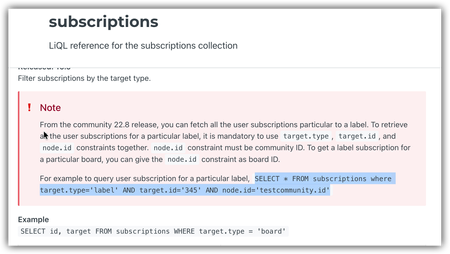
Hi all, I'm attempting to get the list of people who have subscribed to a label, but am struggling. The documentation is a bit confusing: It says both that you have to use a community ID as the node.id constraint but also that you can give the node.id constraint as a board id? Seems conflicting. And, regardless of the documentation, I get an error when I try to use a board ID (such as node.id='board:wireless-lan' where wireless-lan is the id of the board) My user has full admin permissions. Any ideas? I am not really a developer (as is probably evident!), just trying to pull a few bits of data for a stakeholder. Thanks!Solved2.7KViewsSign in to react to this post9CommentsI have been playing around for half an hour now and also only get subscriptions for the current user :( The target.id param seems to be always causing an error and therefor going against how it's documented even though it is returned in the resultset.
Sign in to react to this post
Can someone walk me through authenticating and using Postman with Aurora?
I'm a bit of a newbie when it comes to GraphQL and Postman and I'm struggling to work through the dev docs when it comes to authenticating and setting up the basics in Postman for testing in API calls in Aurora. We're looking ahead to migration and want to start getting familiar with basic API calls. Has anyone successfully got Postman and Aurora working? Is anyone willing to walk me through the bare minimum basics of getting this set up to authenticate into our Aurora instance and run a basic GraphQL call? I'm finding the dev docs pretty lacking currently so I'm turning to the expertise of the developer community here hoping someone has already figured this out. Or, if Khoros is reading this, can we have another Developer Webinar where we can walk through this? Or is this something you can offer through training or update the docs with more details? We've reached out to our CSM to see if we can get some 1:1 training but so far it doesn't look like that's an option right now.Solved2.6KViewsSign in to react to this post13Comments MattV2 years agoKhoros Staff
You have 4 authentication options when using Postman to authenticate with the API
- Session Key (local account username and password)
- Bearer token using SDK Key
- Access Token using pre-shared key (Dev Tools API apps)
- OAuth Grant Flow (Community SSO)
Option #1 is the easiest/best option, and what I use most commonly. This means you would login with an account created locally on the community (not using SSO). In the latest version of Aurora (24.08), you can create such as user through Admin > Users > Manage Users.
Setting up Postman
- Create a new collection
- Create a new Environment to use with this collection (to hold variables).
- sessionKey (secret) - leave blank
- hostname (default) - set to your communities hostname (URL without https://)
- username (default) - set to user created in community admin (or your username if local user)
- password (secret) - the users community password
- tapestry (default) - set to t5 (except for some special circumstances)
- sessionStartTime (default) - leave blank
- sessionLastUsed (default) - leave blank
- ht_username (default) - set if you need to login to the community with basic auth credentials (the browser login popup)
- ht_password (secret) - set if you need to login to the community with basic auth credentials (the browser login popup)
- In the collection pre-request script, add the pre-request script (included below)
- Create a new request in your collection
- Set the path to be POST https://{{hostname}}/{{tapestry}}/s/api/2.1/graphql
- Update headers:
Key: li-api-session-key
Value: {{sessionKey}}
- In the request body, add your GraphQL
- Execute Query
- Save your Query (and collection)
Collection Pre-Request Script
var sessionKey = pm.environment.get("sessionKey");
var hostname = pm.environment.get("hostname");
var tapesty = pm.environment.get("tapestry");
var ht_username = pm.environment.get("ht_username");
var ht_password = pm.environment.get("ht_password")
var username = pm.environment.get("username");
var password = pm.environment.get("password");
var sessionStartTime = pm.environment.get("sessionStartTime","");
var sessionLastUsed = pm.environment.get("sessionLastUsed","");

const thirtyMinsAgo = Date.now() - (1000 * 60 * 30);
const twoHoursAgo = Date.now() - (1000 * 60 * 60 * 2);

if (sessionLastUsed == "" || sessionStartTime == "" || sessionLastUsed < thirtyMinsAgo || sessionStartTime < twoHoursAgo || sessionKey == "") {
    console.log("authenticating");
    authenticate();
} else {
    pm.environment.set("sessionLastUsed", Date.now());
}

function authenticate(){

    const request = {
        url: `https://${hostname}/${tapesty}/s/restapi/vc/authentication/sessions/login?user.login=${username}&user.password=${password}&restapi.response_format=json`,
        method: 'POST',
        header: {
            'Authorization': 'Basic '+btoa(`${ht_username}:${ht_password}`)
        },
    };
    pm.sendRequest(request, function (err, response) {
        if (err) {
            console.error(err);
            pm.execution.skipRequest();
            return;
        }
        const data = response.json();
        if (typeof (data.response.error) !== 'undefined' && typeof (data.response.error.message) !== 'undefined') {
            console.error(data.response.error.message);
            pm.execution.skipRequest();
            throw new Error("Authentication failed (see console)");
        } else {
            console.log("key", data.response.value.$)
            pm.environment.set("sessionKey", data.response.value.$);
            pm.environment.set("sessionStartTime", Date.now());
            pm.environment.set("sessionLastUsed", Date.now());
        }
    });
}
Optional Post-Response script
if (pm.response.code == 401){ console.warn("Got unauthenticated response. Clearing variables."); pm.environment.set("sessionKey",""); pm.environment.set("sessionLastUsed",""); pm.environment.set("sessionStartTime",""); }Sign in to react to this post
Any cons of NOT using LITHIUM.jQuery when calling an endpoint from a component?
Hi folks, I was wondering if using LITHIUM.jQuery when calling endpoints is the only preferred way of doing it: <@liaAddScript> ;(function ($) { $(document).ready(function () { function callLithiumEndpoint() { $.ajax({ url: '${endpointUrl}', }) } callLithiumEndpoint(); }); })(LITHIUM.jQuery); </@liaAddScript> Can it be done with vanilla JavaScript inside a <script> tag as well, for example using fetch? I noticed that endpoints can be triggered from a browser or a postman via their path https://<community-name>/pjakv59666/plugins/custom/<some-path-to-endpoint>/<component-name> Can it be treated as a simple url, passing there parameters and parsing it?Solved2.1KViewsSign in to react to this post2Comments- MattV5 years agoKhoros Staff
There are no specific issues with using vanilla javascript to call endpoints.
Using LITHIUM.jQuery is recommended if you intended to use jQuery.
Also, using liaAddScript is recommended if you need the code to be executed near the bottom of the page after OOB javascript has executed (It may also do some minification/obfuscation).
If none of those situations apply or are of concern, feel free to use plain JS in <script> tags. I would just encourage you to be mindful of code organization so the JS makes sense where it is placed, isn't repeated by multiple component includes, etc....
Sign in to react to this post

How to create API accessible user account with Community
I am new to Khoros platform and want to crawl data from community. For that I did signup process with one lithium community and got my username and password. I am trying to authenticate myself with via retrieve-the-session-key but api response says curl --location --request \ POST 'https://community.alteryx.com/restapi/vc/authentication/sessions/login' \ --form 'user.login=dshrm' \ --form 'user.password=****' <response status="error"> <error code="302"> <message> User authentication failed. </message> </error> </response> I am trying to get user details via LiQl basic query `select * from users limit 1` What exactly process do I need to follow to authenticate myself ?1.8KViewsSign in to react to this post11Comments
Issues with batched queries
Hi, I'm trying to create a batch request fetching the latest posts in a users favorite areas, the number of unread messages and the number of notifications. I have had some partial success so far but I've run into two issues: I can't find any documentation on how to do ordering in a json query. I can't constrain the query for notification_feed to a specific user in api/v2 as I could in api/v1. Is there any other good solutions for getting the notification count for a user [ { "query":{ "messages": { "fields": [ "id", "subject", "teaser", "body", "view_href", "post_time", "conversation.featured", "conversation.style", "conversation.last_post_time", "conversation.last_post_time_friendly", "author.id", "author.href", "author.view_href", "author.login", "author.avatar.message", "board.id", "board.title", "board.parent_category.title", "metrics", "kudos.sum(weight)" ], "constraints": [ {"category.id": {"in": ["<<category1>>", <<category2>>"]}}, {"depth": {"=": 0}} ], "limit": 5 } } }, { "query":{ "inbox_notes": { "fields": ["id", "is_read"], "constraints": [ {"user.id": {"=" : "<<id>>"}}, {"unread_only": {"=": true}}] } } }, { "query":{ "notification_feeds": { "fields": ["id"] } } } ]Solved1.8KViewsSign in to react to this post4Comments- SuzieH5 years agoKhoros Alumni (Retired)
Peter_Taraldsen I suspect that you're right about the notification counts being returned only for the user making the call. I wonder if there is something you can do by making the call with a session key for a different user. We have an example of this in Create subscriptions for another user.
This might be too heavy to do within the /batch endpoint tho -- if even possible... Keep performance in mind. AdamN TysonN thoughts?
Requirements
- You must have access to a user account with Switch to another user permission.
- You must make your request using Session Key Authentication.
Basic Steps- Create a session key for yourself using a Community account with the Switch to another user permission.
- Create a second session key for the subscriber using your retrieved session key.
- Make your query using the second session key.
Sign in to react to this post
Handling the upcoming LIMIT and OFFSET changes
You might be aware of the upcoming changes to LIMIT and OFFSET having a maximum value of 1000 in 23.12. Obviously this is likely to cause a problem to any custom components that loop through data such as messages. Cursor will work fine in some scenarios, but any kind of custom pagination will need UI/UX work to access records greater than 2000! Using cursor we'd only be able to move forward and not skip to page 1000 for example. Any other thoughts on how this could be achieved with CURSOR?!1.5KViewsSign in to react to this post11CommentsAPI v2 Search doesn't work
Reading this page, I quote: "In v2, perform a one-or-more term search with a comma-separated list of terms wrapped in parentheses. Use this when you want to return messages that have at least one of these terms in the defined fields. WHERE subject MATCHES ('apples', 'bananas', 'cherries')" This query returns 2 results: select subject,body from messages where subject matches 'attachment' This query returns 0 results. select subject,body from messages where subject matches ('attachment','android') According to the documentation I should be getting results. Fair to say that it's not WAI?1.5KViewsSign in to react to this post9CommentsSelect labels along with messages in one query
I query messages with SELECT id, subject, search_snippet, body, cover_image.view_href, teaser, view_href, author, conversation.last_post_time, replies.count(*), metrics.views FROM messages WHERE category.id = 'DE' AND conversation.style = 'tkb' AND body MATCHES 'mykeyword' AND depth = 0 ORDER BY post_time DESC LIMIT 10 To get the labels of each message i currently do an additional labels query for each message. Is there a way to get the labels along with the messages in one query?Solved1.4KViewsSign in to react to this post8Comments- Akenefick4 years agoGenius
I found this:
IN() Operator Syntax
"fieldname": { "in": [ "value1", "value2", "value3" ] }Example:
"board.id":{ "in":[ "stereos", "televisions" ] }So I think yours would look like this:
"labels.text":{ "in":[ "Text1", "Text2" ] }Sign in to react to this post
How to get only Messages where some specific custom field have value?
Hi Team, I have a custom field added by Khoros in the messages object, I want to get only Messages where that specific custom field has value. Sample query: select c_abcd from messages where c_abcd!="" I don't want to get all messages and then in the loop filter the messages which don't have any value. Is there any direct API or solution to get the messages where the c_abcd custom field has some value? Any related replies would be appreciated. Regards Aman1.4KViewsSign in to react to this post11Comments