Khoros Flow v25.01.1 Release Notes
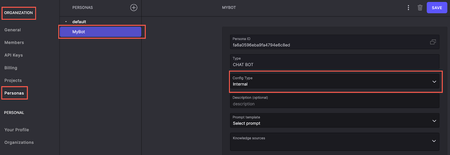
Enhancements Updates for changing persona in UI Previously, you could select only from the pre-defined prompt templates in Flow to set up Personas for your Bot or Agent Assist. With this release, we’ve introduced the ability to use an external source for Bot and Agent Assist Personas. By leveraging external sources, you can now align Personas more closely with your brand voice, business requirements, or specialized use cases, offering an improved and more personalized customer experience. To enable this functionality, use the new field called Config Type under ORGANIZATIONS > Personas. By default, Config Type is set to Internal. You can select one of the prompt templates from the Prompt template drop-down menu. To use an external Persona source, select External from the Config Type drop-down menu and enter the URL containing the Persona details into the Url field. Learn more about Persona UI. Support triggering events in other languages from Code Actions Previously, you could trigger events in other languages using Event Replies. With this release, you can now achieve the same functionality using Code Actions. Add the following to your code in Code Actions: trigger("Change language", { language: "language preferred” }) If no language is specified, the conversations are continued in English. You found it! We fixed it! Excel sheets now import successfully into Knowledge projects. When you sync languages, event triggers with a specific language selected retain their language setting instead of being reset to Current Language. When you switch to the secondary language, all events related to the language load successfully in the Events drop-down menu. 861ViewsSign in to react to this post
 0Comments
Khoros K1, Care, Marketing, Flow Release notes - December 15th 2025
Here is a list of the released features and bugfixes over the last two weeks: Marketing (Spredfast) Enhanced Analytics Data Processing: Fixed critical data processing workflows to ensure analytics reports display accurate metrics and insights without delays Improved Platform Reliability: Addressed stability issues that affected content publishing and analytics workflows during peak usage periods Flow Configurable Search Precision: You can now customize how many documents are analyzed when using AI search reranking, allowing you to balance between search speed and result accuracy based on your needs Faster AI Training Completion: Training jobs now complete significantly faster by running at higher priority, reducing wait times when setting up new AI capabilities Multi-Language Agent Handover: Fixed chatbot prompts that were always in English - the "connect with an agent" suggestion now appears in the same language as the customer's conversation Improved System Responsiveness: Optimized background processes to reduce latency and improve overall platform performance during high-traffic periods Care Instagram: Accurate Ad Content Attribution: Fixed an issue where Instagram ads from other accounts were incorrectly appearing under your brand - ads now correctly filter to show only content owned by your configured Instagram account Instagram:Better Multi-Brand Response Handling: When managing multiple Instagram brand accounts mentioned in a single conversation, the system now correctly identifies and uses all relevant brand tokens for responses, preventing missed reply opportunities TikTok: Correct Response Attribution: TikTok replies are now properly labeled as your brand responses instead of being marked as "External Response" - improving conversation tracking and reporting accuracy LinkedIn: Reliable Comment Deletion: LinkedIn comment deletion now includes verification and automatic retry logic to ensure comments are successfully removed, with clear logging of success or failure status Facebook Messenger: Clean Secure Chat Invitations: Secure chat invitation links sent via Facebook Messenger now display cleanly without showing raw URLs or incorrect "Post edited" labels in the agent timeline Fixed Moderation Column Updates: Posts now automatically disappear from Community Moderation columns after being moderated, instead of remaining visible with a spinning indicator indefinitely Support for Authors Without Profile Pictures: Fixed a critical issue preventing Community posts from authors without profile pictures from appearing in Care - these posts now process correctly and reach your agents Prevent Duplicate Cases: Eliminated race condition that created multiple cases when customers sent rapid messages - now ensures only one case is created per customer conversation, even during high-traffic periods Clearer Integration Connection Errors: Integration connection failures now display helpful error messages explaining what went wrong, instead of generic errors Validation for Account Switching: Prevents accidental integration misconfiguration by blocking attempts to reconnect an integration with a different account than originally configured, with clear error messaging Dark Mode Toggle Visibility: Dark mode toggle now only appears in applications that support it, removing confusion in apps like Khoros One where it wasn't functional Automatic Tag Accuracy: Fixed incorrect "Emojis Only" tagging being applied to conversations containing only @mentions - tags now accurately reflect actual emoji presence Enhanced Chat Widget Stability: Improved chat widget reliability and performance for end-user interactions Platform-Wide Security Critical Security Patches Addressed Remote Code Execution Vulnerabilities: Patched multiple critical CVEs (CVE-2019-14540, CVE-2019-14379, CVE-2019-16335, CVE-2019-16942, CVE-2017-7657, CVE-2020-9546, CVE-2020-9547, CVE-2020-9548) with CVSS scores of 9.8 related to deserialization exploits and HTTP smuggling attacks Updated Security Libraries: Upgraded jackson-databind, Jetty WebSocket, Netty codec-http, and commons-collections to latest secure versions across multiple platform components Enhanced Application Security: Applied comprehensive security patches across Care, Marketing, and Analytics components to protect against known vulnerabilities828ViewsSign in to react to this post0CommentsKhoros K1, Care, Marketing, Flow Release notes - December 1st 2025
Khoros Care Customer Experience Improvements TikTok Response Labeling Enhancement: Agent responses to TikTok conversations are now correctly identified in the conversation timeline, eliminating incorrect "External response" labels that caused confusion for agents Trustpilot Data Recovery: Backfilled missing Trustpilot reviews that failed to process during authentication issues, restoring complete customer review data Community User Avatar Handling: Fixed issue where Community users without profile pictures caused processing failures, ensuring all Community posts are properly delivered to Care Brand Messenger Chat Reliability: Resolved bot response delivery issues in Brand Messenger widget, ensuring consistent message arrival and improved error logging for customer interactions Social Media Authentication & Message Processing: Resolved authentication issues and improved message processing reliability for social media channels, ensuring consistent delivery of customer messages Message Processing Reliability: Improved retry mechanism for failed message processing, reducing message delivery failures Performance & Scalability European Region Performance: Increased capacity in EU region to handle higher load during business hours, improving response times and system stability Proactive System Monitoring: Deployed comprehensive monitoring across US, EU, and APAC regions to validate core platform functionality including agent conversation handling, queue management, agent assist widgets, and dashboard access Admin Console Change Log Navigation: Change Log has been released from Beta and is generally available. User Management Enhancements: Improved batch user processing and cache synchronization to prevent data loss during user management operations Security & Platform Updates Security Enhancements: Deployed security fixes across multiple Care components: Analytics Dashboard: Critical security vulnerability patches Case Management Interface AI/ML Processing System Brand Messenger Chat Backend Publishing Interface: Latest security patches Messaging Authentication Khoros Marketing Platform Improvements Instance Management: Fixed server error that was preventing Marketing instance deprovisioning, improving platform lifecycle management User Moderation: Resolved issue preventing users from being banned in Marketing Inbox, restoring full moderation capabilities Stream Collections: Fixed deletion functionality for stream collections Infrastructure & Performance Social Gateway Updates: Deployed infrastructure improvements for enhanced reliability and performance Advertising Metrics Processing: Improved reliability of advertising metrics data collection by introducing safeguards to prevent processing failures Notification System: Improved stability of the notification system Enhanced Security Protocols: Strengthened database security protocols as part of ongoing security compliance efforts Khoros Flow AI & Platform Upgrades Claude 4.5 AI Upgrade: Upgraded AI model from Claude Sonnet 3.5 to Claude Sonnet 4.5 in Flow, providing enhanced AI capabilities for improved customer interactions and automated responses Integration Improvements WhatsApp Integration Upgrade: Updated WhatsApp channel integration to latest API version, improving message delivery reliability and media handling capabilities Care System Integration: Enhanced integration with Khoros Care to provide better tracking and visibility of customer cases across systems, enabling more seamless workflows between Flow and Care Security & Stability Security Vulnerability Remediation: Addressed known security vulnerabilities across Flow platform including CVE-2019-10744 (lodash), CVE-2020-7610 (bson), CVE-2021-26707 (merge-deep), and others by upgrading to latest secure versions of system dependencies Message Processing Improvements: Increased message processing capacity to handle larger messages and attachments, improving reliability for customers sending rich media content System Connection Resilience: Improved system resilience to prevent service interruptions during network connectivity issues, ensuring consistent message processing Monitoring & Operations Proactive Feature Monitoring: Implemented comprehensive monitoring for dashboard performance and bot response times with automated alerting Data Pipeline Optimization: Optimized data processing pipeline, significantly improving performance and reducing processing delays Platform-Wide Updates Security Comprehensive Security Fixes: Applied critical security updates across all Khoros products, including user interfaces and backend services System Reliability Enhanced Error Handling: Improved system resilience with better error recovery mechanisms Deployment Process: Streamlined release processes for faster, more reliable updates699ViewsSign in to react to this post0CommentsKhoros K1, Marketing, Care and Flow release cadence
As part of our ongoing commitment to reliability and transparency, we have adopted a continuous delivery model for Khoros K1, Care, Spredfast Marketing and Flow. This means improvements, fixes, and enhancements are deployed to production incrementally rather than through large, infrequent releases. This approach minimizes operational risk, accelerates value delivery, and ensures that your environment benefits from the most stable and secure version of our product at all times. We recognize that visibility into product evolution is essential for planning and governance. To provide this transparency, we are introducing a regular changelog where you can review all functional, performance, and stability updates that have been deployed. Each entry will briefly describe what has changed and when, serving as a single source of truth for product updates. Our initial plan is to publish changelog updates on a regular cadence (approximately bi-weekly) on the release notes space, ensuring timely and consolidated communication without excessive notifications. As the product continues to evolve, we may adjust this frequency to align with customer needs and product maturity—always maintaining consistency and clarity in how updates are communicated.658ViewsSign in to react to this post0CommentsKhoros Flow v24.12.1 Release Notes
Enhancements Enhanced URL Validation Previously, only URLs starting with https:// were allowed, limiting flexibility for specific customer needs. With this release, we have expanded the types of URLs accepted during validation to support a broader range of use cases, including those involving custom protocols. Supported URL formats now include: Standard web URLs (https://, http://) Custom protocols (sms:, tel:, mailto:, etc.) This update ensures greater compatibility with diverse customer use cases, such as those requiring custom protocol links. Expanded Language Support for Named Entity Classification Earlier, support for Named Entity was available only for Chinese. With this release, we’ve expanded language support to include the following: Catalan Chinese Croatian Danish Dutch English Finnish French German Greek Italian Japanese Korean Lithuanian Macedonian Norwegian Polish Portuguese Romanian Russian Slovenian Spanish Swedish Ukrainian Multi-language (for unsupported languages) You Found It. We Fixed It. Timers, Delays, and Event triggers Fields for Timers, Delays, and Event triggers are now locked in the production environment to prevent modifications. This ensures the stability and integrity of live flows. Priority reply type visibility The Priority reply type visibility logic has been updated to ensure consistency, making it visible only for channels integrated through Button actions payload All button actions now generate the appropriate payload, with the payload structure updated to include necessary fields like trigger type and name, and integration compatibility between Brand Messenger and Flow verified across environments.455ViewsSign in to react to this post0CommentsKhoros Flow v25.03.2 Release Notes
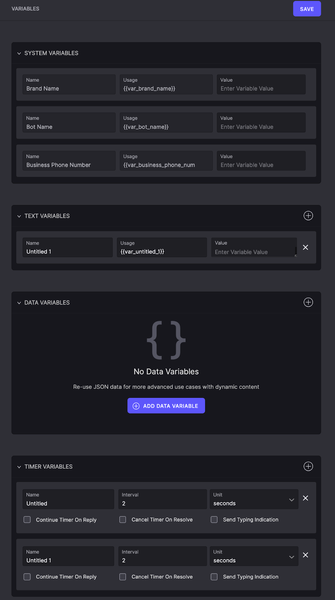
Enhancements Variables rev2 In this release, we have introduced the ability to reuse data variables and system variables, along with UI improvements for managing variables. Managing variables helps developers to reuse data across their bot architecture without hardcoding it in code actions. Additionally, it ensures that text variants ingested into Gen AI personas remain consistent, reducing the risk of errors caused by accidental edits. These enhancements provide a more seamless and reliable experience when working with variables in bots. The following screenshot shows the changes in Configurations > Variables: Improved visual appearance: Reduces clutter by distinctly separating variable types. Separated entities: Variables are displayed as distinct entities, allowing future possible enhancements like project-based selection. Resizable text area: Text variables now auto-resize, making it easier to view and edit long entries. New data variable type: Supports JSON input, enabling users to store and manipulate structured data without creating multiple individual variables. Following is an example of how you can now use them in your flow: When you select EDIT for the TRIGGER ACTION, the code action opens and you can add the data variables you want. The below screenshot shows the “var_vehicle” variable used in the code action. Here, the variable is used to create a carousel. You can view the values in the array from the LOGS tab on the left pane. The following is a screenshot showing how the carousel renders during user-bot interaction. The code action pulls in all vehicle data to create the carousel in real time. Terminology Knowledge In this release, we introduce a way to add knowledge sources that allows businesses to define and manage their specific terms and acronyms. By defining terms and acronyms, AI-driven assistants interpret terms accurately within the right context, reducing misinterpretations and improving response quality. By providing a structured way to handle terminology, this feature enhances workflow efficiency and minimizes user frustration. With Terminology Knowledge you can: Create new terminology. Create a new segment or multiple segments under the same terminology. Move terminology within sub-segments or into different segments. terminology from one source to another. terminology from a parent segment to a child segment of the same source. Import and export terminology. Delete a parent terminology along with its child segments. Automation Rules Logs In this release, we introduce dedicated automation logs, similar to bot logs, to enhance the troubleshooting and debugging process for automation rules. These logs feature distinct visual cues for "WHEN," "IF/OR," and rule execution activities, making it easier to track rule behavior. On your flow project, select Logs to view the automated logs.369ViewsSign in to react to this post0CommentsKhoros Flow Release Notes, 15th February 2022
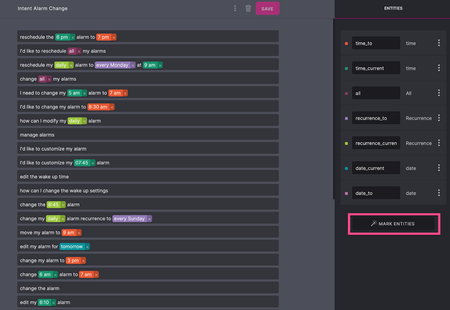
New Feature Updates Entity Annotation Enhancements In this release, we are introducing Mark Entities. With Mark Entities, you can automatically annotate all the entities in a group of selected intents instead of selecting individual entities for each training example. Only the words in the training examples that match the keywords and synonyms of the entities in the Entity Type tab are annotated. This reduces the time and effort needed to annotate several entity keywords and synonyms manually. The examples for Mark Entities implemented in the Intents are displayed in the below screenshot: To annotate the list of entities, go to the Intent tab and click MARK ENTITIES. As you can translate the entities in other regional languages, translation auto-triggers the Mark Entities option to annotate existing entities for the selected language. For more information, see Mark entities in the training examples. Monitoring Bots Monitoring bots are used to monitor the conservations from various channels, such as social media messages and community posts. The collected data are then fed to Natural Language Processing (NLP) analytics to build a tightly bound, deep learning model to improve overall bot performance. You can use monitoring bots to understand customer sentiments from the tone of the conversation and gain insights about your product and its consumers. You can also use the following tags for the monitoring bots: Community: Route the conversation to the applicable queue in Khoros Care. Notes: Provide context about the inbound inquiries to the agents. Priority: Escalate the inbound inquiries as per the criticality. For more information, see Monitoring Bots. Training assistance for unknown suggestions Intents help to classify a user's utterance. Whenever a user utterance matches the confidence threshold of an existing intent, it triggers that intent. However, if the user utterance does not match with any of the existing intent with the required confidence, it triggers the Unknown. When matched to Unknown, the user’s statement is added to the suggested training examples for intents that are similar to it. Flow designers can add additional training examples to each intent. You can choose to add or remove training data to the intent. These training examples further help to improve the NLP and overall bot performance. To initiate the data collection, go to the Languages tab and select Enable Training Assistance. For more information, see Training Assistance for Unknown Suggestions. New Flow Messaging Support Instagram Flow now extends Instagram-specific messaging support to broaden the scope of customer solutions for the users reaching out to you using the Instagram messaging services. Flow supports several Instagram replies Story, @mention, text, emoji, image, file, video, audio, button, location, card, and carousel. For more information, see Instagram messaging capabilities. Google Business Messages Google Business Messages have rich asynchronous messaging services that help establish effective business communication. You can now integrate Google Business Messages with Flow to automate customer solutions. If the resolutions cannot be provided through the chatbots, you can easily switch over to the Khoros Care Agents with a stipulated response time by routing the conversation using the Community tag. Flow supports several types of Google Business Message replies: Text, emoji, image, card, carousel, and button. For more information, see Google Business Messages capabilities. Apple Business Chats For the customers using Apple products, Apple Business Chat is an effective business communication channel. You can now integrate Apple Business Chat with Flow to automate the response. Flow supports several types of Apple Business Chats replies Text, emoji, image, file, video, audio, location, card, carousel, list, and button. For more information, see Apple Business Chat capabilities.332ViewsSign in to react to this post0CommentsKhoros Flow v25.02.1 Release Notes
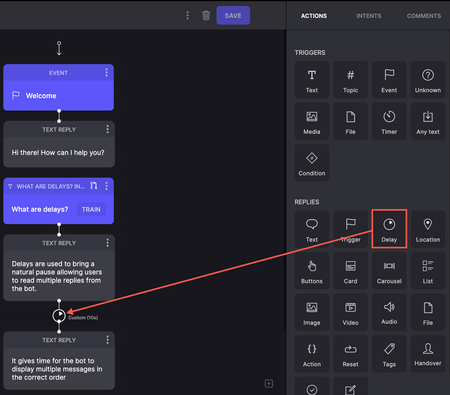
Enhancements Add delays to conversations In this release, we've introduced a Delay option in Replies in Dialogflow projects. When the bot sends multiple replies, you can add short pauses between messages to create a more natural conversational flow and enhance the user experience. These delays help ensure messages are processed and displayed in the correct order. In flows where the bot sends multiple text replies, a delay in delivering each message gives users enough time to read them. The following screenshot shows an example of multiple long messages that the bot sends. A delay added between the 2 messages allows users to take time to read the message as it appears. Read more on Delays.316ViewsSign in to react to this post0CommentsKhoros Flow v24.11.1 Release Notes
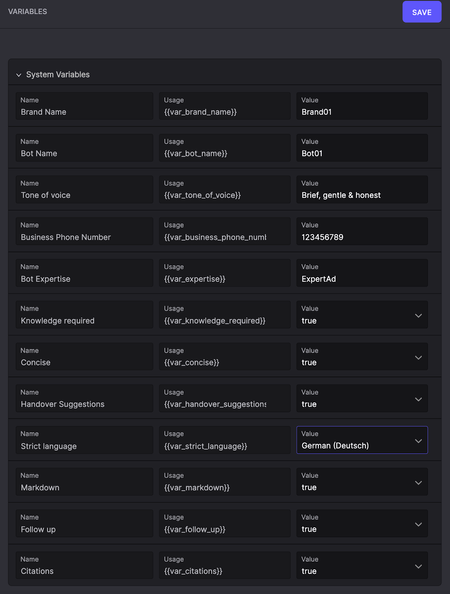
Table of Contents New Features System Variables in UI Timer support in Dialogflow You Found It. We Fixed It. New Features System Variables in UI We have introduced new UI support to add system variables in the configuration settings. These variables are added to the Gen AI Personas. This enhancement enables brands to control certain parts of the prompt. See System Variables for more information. Timer support in Dialogflow We have added timer support in Dialogflow projects, which helps route on handover and build resolve after timeout flows. See Dialogflow CX Integration for more information. You Found It. We Fixed It. Entities and Intent When you mark entities on a page in Intent, the entities are now available for selection in the drop-down menu as expected. Code Action Arguments When original language arguments are translated to another language, the arguments are no longer lost in the translated language. Projects When you scroll through projects, the project list now scrolls successfully instead of automatically scrolling to the top of the list. NLP Model When you import and promote a project from a Draft to a Dev version, the NLP model is also copied. Routing to Care Flow projects now properly apply tags to Care and route them to the correct work queues even when the author name contains UTF-8 characters.301ViewsSign in to react to this post0CommentsKhoros Flow v25.03.1 Release Notes
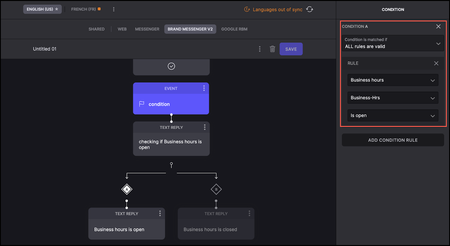
Enhancements Add conditions to conversations With this release, you can add Condition (enables branching based on user input) reply blocks directly in your flows for Google Dialogflow projects. This enhancement offers greater flexibility, improving automation and user experience without extra coding and building for more dynamic and responsive chatbot interactions within Flow. The following is an example of a Dialogflow project where there is a condition to check if a shop is currently open. The below screenshot shows the Condition block added to check if they are open: The following screenshot shows the Condition block added to check if they are closed: The below screenshot shows the preset Business hours: The below screenshot shows how Dialogflow interacts with the user in real time.300ViewsSign in to react to this post0Comments