Atlas Community Guidelines
Welcome to the Khoros Community, Atlas! The mission of this online community is to provide a peer-to-peer and direct support channel for people cultivating enterprise communities on the Khoros platform. It is a central for education and thought leadership on best practices, where we also ideate with customers directly on how to improve and extend the product platform. Please remember that you may not share your registered account with any other individual, entity, or organization. Enterprise communities are created by business organizations for their customers, partners or other enthusiasts. While our community is aimed at Khoros customers and users, we welcome everyone with an interest in enterprise communities, as long as you observe these community rules: 1. Be respectful. Respect people's time and attention by asking well-thought-out questions and sharing what you've learned so far in your experimentation or prior research. Respect people as individuals by keeping your tone positive and your comments constructive. 2. Be relevant. Make sure your contributions are relevant to the mission of the community, to the specific discussion style and topic where you post. Please do not post duplicate messages in different areas of the community to avoid fragmenting discussion. If you have a new question, start a new thread rather than interrupting a conversation. Solicitations are rarely relevant. If you have something you want members to join, participate in, or buy, ask us first. 3. Keep your word. Don't post anything that would violate any contractual agreements (copyright, trade secret, or otherwise) or nondisclosure agreements to which you are a party. 4. Protect privacy - yours and others'. Don't share anything about yourself or your organization that you would not want to see on a road-side billboard. Share your business email address if you wish, but don't post personal information-your own or anyone else's (including contact information or any), or content that you receive in one-to-one communications, without the author's consent. 5. Remember, this is user-generated content. You'll find plenty of good advice here, but remember that your situation, configuration, or implementation may vary from that of the individual sharing a solution. Some advice you find here may even be wrong. Apply the same good judgment here that you would apply to information anywhere on the Internet. By using these forums you agree to follow these rules as well as the full Terms of Service for the Khoros Community. We thank you, and your fellow community members thank you. The Khoros Logo and Khoros Employees You will notice that some community members have a Khoros logo next to their names, this means they are Khoros employees. Like you, they are members of the community around Khoros products, and we encourage them to share their knowledge and opinions here. Feedback & Ideas We want this to be the best community it can possibly be - so let us know what you think, or how we can help improve your experience on the Khoros Community by visiting our suggestions forum. We know you have tons of ideas for improving the Khoros platform, products, and services; If you are a customer or partner, be sure to contact your CSM or Account Executive to submit new feature enhancements requests. If you have questions for Khoros that cannot be discussed in the community, please do the following: contact your CSM or Account Executive (if you are a Khoros customer) contact a Sales Representative by requesting a demo (if you're not) email us at [email protected] We will be happy to help! Flag inappropriate content for review If you recognize any violation of these guidelines, please notify us within the community by choosing "Report Inappropriate Content" from the message's Options menu and let us know why you feel the content is inappropriate. If you have any questions about our guidelines, terms, or policies, let us know. 15KViewsSign in to react to this post
 1Comment
Aurora Upgrade Playbook
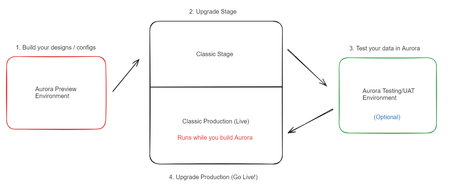
Getting Started What is Aurora? "Aurora is a game-changing update to the industry-leading Khoros Communities solution, with a set of transformative capabilities that make it easier to deliver an exceptional member experience." Aurora is the major upgrade for Khoros Communities (Classic). First released officially on July 31st, 2023, Aurora is a total transformation of our top-notch community platform. We've completely revamped it, utilizing cutting-edge technologies and adopting a modern headless architecture. We have intentionally bolstered Aurora with powerful APIs that provide flexibility and robustness. From the very beginning, we've focused on creating an exceptional user experience, designing it with mobile-friendliness, performance, SEO, and accessibility in mind. It's a fresh start with a foundation built for the future of online communities. Jump to Features. Discovery: Am I ready for Aurora? The first step is to determine your readiness for upgrading to Aurora. There is no rush to move from Classic as of 2024, so it is essential to review where you stand and what you need in order to upgrade successfully. Secondly, it's good to remember that any change to your community presents an opportunity to revisit what success means and how your community experience supports success today and in the future. With this in mind, we encourage you to challenge yourself at each step of planning and ask, "How does this align to and support our business goals?" Getting started Understand Your Goals: While Aurora improves drastically upon the day-to-day community design, admin configuration, moderation, and end-user experience, in evaluating your readiness to upgrade to Aurora, ask yourself: What are your plans for the community in the coming year? How do they align with your business goals & strategy? Do you require certain features or integrations to support your community strategy and day-to-day management? How do you use them? Do you use SSO authentication? How does the authentication process work? (You may need to gather this information from the team that manages SSO at your organization.) How long will it take to gather resources to help you in the upgrade to Aurora? Evaluate Customizations: As a best practice, customizations should be limited to those where there is a clear business value and no alternative feature. With this in mind, we recommend you evaluate existing customizations in line with your community goals, and as part of your upgrade plan, consider your path to sunset any customizations you use today that do not provide measurable value to the community experience and its success. You may have custom features today (like widgets, special pages, etc.)—many of these can now be replaced with Aurora's built-in features. Where you can, we recommend switching to Aurora's features. It will not only save you the cost and effort to rewrite those components using new Aurora development tools but also help maintain your technical debt to that which is absolutely required. You can refer to the feature table on available features in Aurora. If you need help in this step, reach out to your development team, development partner, and/or your Khoros account team for assistance. Scope Customizations: If upon completing evaluation of your existing customizations you identify key customizations you need to maintain when moving from Classic to Aurora, send a request to your Khoros account team to start the process on scoping the Aurora upgrade work and cost for updating your customizations. Structure Changes: The community structure informs the user path through community and supports their ability to find content relevant to their need. As best practice it should be reviewed annually or whenever a change occurs in community or the business (e.g., redesign, product/service changes, etc.) Simply upgrading to Aurora takes your community structure, content, and members as is. As part of your upgrade planning, we recommend that you review the effectiveness of your structure in its current form, identify opportunities to improve, and plan to implement those changes. Structure changes can be made in advance of an upgrade. In fact, we highly recommend that you identify any opportunities to make these changes ahead of time—it can only positively impact the existing experience. If you would like structure changes to be included as part of your Aurora upgrade, this requires a migration to be added to your upgrade scope, which is an additional cost. Please review this need and communicate to your Khoros account team. Consider Previewing Aurora: If you think you might be ready to upgrade to Aurora in the next few months, you can request a temporary Aurora Preview instance with your CSM. Read on for more info on Aurora Preview instance set up. Engage with Khoros: If you have questions, please ask in this forum: Community Aurora Discussions Aurora Upgrade Tasks Overview & Recommended Actions When a community is upgraded to Aurora, automated tasks run in the background to ensure the data from Classic is now supported in Aurora. Here is a run-down on how that works: Upgrade Task What happens in the upgrade? Required Actions for Khoros Customer Tags and Labels Tags and Labels both merge into "Tags" in Aurora. Similar to Labels in Classic, you can set pre-defined and freeform tags. Root-level labels and tags are carried forward as is, but reply-level tags are not. Pre-defined labels are carried forward and set in the Aurora admin as "pre-defined tags." If a particular Tag and Label have names identical to each other in Classic, these will merge into one collective tag in Aurora. Before Aurora upgrade, it is recommended (but optional) to clean up tags and labels as they will come over to Aurora as is when you upgrade your community. If you decide to clean up tags after the Aurora upgrade, you will still have the options to replace and remove tags. URL Redirects URLs to pages in Classic have 301 redirects automatically set to the corresponding pages in Aurora. None Images & Videos Images and videos are now associated with content in Aurora. Images and videos contained within galleries (and not attributed to content) will not be moved to Aurora, but all images and videos within content will be moved forward. User avatars are kept on the upgrade to Aurora. Any custom avatars collections in Assets within Studio are not moved forward into Aurora. If you plan to move forward your custom user avatars, save these assets. Once your stage community has upgraded to Aurora, upload your custom user avatars in Designer. Roles & Permissions All existing roles and permissions configurations will be moved forward to Aurora. None Community Settings (Nodes, Content, Users) All applicable community settings in Classic will be applied in Aurora automatically. Certain settings are not available in Aurora, so expect discrepancies between Classic and Aurora. None Ranks All ranks and existing criteria will be moved forward. The icons will not be moved forward, you will need to add icons back in Aurora. There are new options for visual styles in ranks for the customer to choose. Review ranks and set the new visual style for the ranks that you'd like after the upgrade. Badges All "live" badges and existing criteria and badge icons will be moved forward. Badges in the "Create" tab in Classic will not be moved forward. Badges will be unorganized and placed in a single set right after the upgrade. Badges can now be organized into "sets." Review badges and organize badges into newly created sets after the upgrade. Idea Statuses All predefined idea statuses are carried forward. Statuses will be unorganized and placed in a single set. Idea statuses can now be organized into "sets." Review idea statuses and organize them into newly created sets after the upgrade. Upgrade Process Overview During an Aurora upgrade project, you can expect these steps: Customer Preparation: Use your temporary Aurora Preview environment to configure and design your community. You can request that Khoros import your existing stage admin settings (Structure, Roles/Permissions, and Ranks are supported) to this environment. Upgrade Stage to Aurora: Once you kick off your project, your Stage environment is upgraded first, and Khoros moves your configurations over from your Aurora Preview environment. In this step, configure Stage with structure, ranks, designs, customizations, etc. Test and validate everything on this instance primarily. In this step, you no longer have access to your Aurora Preview instance. Important Note: You are no longer able to use Studio Self-Publish after Stage is upgraded. Testing Your Data in Aurora (optional): Khoros Services team sets up a special temporary environment for you to test your Aurora configurations & designs with a scrubbed (no PII) copy of your production data (with content & members). This step may not be available if you upgrade on your own or with a partner. Final Validation and Launch: After testing and approvals, your Classic Production environment is upgraded to Aurora. Upgrade tasks are run in the background to make your data compatible with Aurora. In this step, you perform final validation and testing for go-live. Completion and Cleanup: Once the upgrade is complete and validated, you have successfully upgraded to Aurora! Aurora Preview Environments Once you have an Aurora Preview instance set up, you can collaborate with your Khoros account team on steps you can take before your Aurora upgrade. We recommend starting to complete these tasks when you first gain access to your preview environment: Explore Aurora features and capabilities. Collect assets, style guide, and taxonomy from your brand. Once you have an admin account, begin to customize the look and feel using the Theme editor (colors, fonts, design). Set up the community structure and create test content as needed. Add badges & ranks, and adjust designs if necessary. Review and validate preset tags. Customize pages using the Page Templates builder (page layouts, widgets, text). Review roles and permissions, and test user access levels. Fine-tune miscellaneous settings such as Robots.txt and Content Settings. We are confident that you will become comfortable with using Admin and Designer tools as you progress through this list, but feel free to leverage the Aurora educational material in Atlas: Getting Started in Aurora. Features Feature Description Accessibility WCAG 2.1 AA VPAT (in progress) Admin & Permissions Content Features, Audit Logs, Roles & Permissions Analytics Dashboards, Reports, Bulk Data API, Analytics APIs Authentication Registration, Sign-In, MFA**, SSO (SAML, OAuth), Multi-Auth (multiple SSOs) Blogs Blog Posts, Content Workflow and Approval, Co-authoring & Contributors, Version History Developer Experience GraphQL APIs, SDK, GitHub, Metadata, Custom Components (Handlebars & React**), Endpoints, Custom Pages, Forms Events Events, Zoom Integration Follows & Notifications Follows, Notifications, Email Templates Forums, Threading & Comments Forums, Solutions, Replies, Comments, Likes, Deep Linking Gamification Ranks, Badges, Top Members Privacy Cookie Banner, Terms of Service, GDPR/CCPA Ideas Ideas, Statuses, Filtering, Reporting Inbox & Private Messaging Inbox, Private Messages, Broadcast KBs Articles, Content Workflow and Approval, Co-authoring & Contributors, Version History Localization** Localized Text, User/Node Settings, Navigation, Text Overrides, Localized Community Rich Media & Video Images, Videos Embed, Video Hosting/Streaming Message Editing & Posting RTE, Attachments, emojis, Embedly, Autosave Content Moderation Abuse/Content Reports, Spam Management, User Bans, Content Filters, Flood Controls, Moderation, DSA Site Structure & Navigation Community Structure, Header, Footer, Breadcrumbs, Hover Cards, Navigation Links, Featured Places & Content, Recent Top Content, Custom Text/HTML Designer Page Templates, Widgets, Theme Editor, Custom Fonts, Avatars, Design Language Elements Search Spotlight, Embedded Search, Auto-Suggest, Related Content SEO Page level SEO, Sitemap, Robots.txt Groups Groups (Open, Closed, Hidden), Group Membership SFDC Integration User Sync, Case Portal, Escalations Tags Preset, Freeform, Management of Tags, Tags Widgets User Profile & Settings User profile, settings **In development The improvements to community in Aurora help community managers easily manage the day-to-day community with low hassle, are more intuitive for building customizations in the community, and allow for greater extensibility to bring outside platforms closer to your Khoros community via integrations. To discover more, check out the following resources: Aurora 2024 Roadmap (Now, Next & Future) Getting Started in Aurora Aurora Release Notes Developer Documentation Frequently Asked Questions Am I able to migrate data into or within my community during an upgrade? In the scenario where you need to migrate another community into your community, it is an option to engage with Khoros Services for migration during your Aurora upgrade project. Consult with your account team to discuss further and define your requirements. Can I update my structure or do a re-structuring during my upgrade to Aurora? When you upgrade your community to Aurora, it will upgrade it 1 to 1. There is no need for a migration map as the upgrade process is not a migration. All content, members, structure, and settings remain in place as your community is upgraded. This means that if you need to move content around in your structure or do a re-structuring during an Aurora upgrade, it is recommended that you do this prior to the Aurora upgrade. If your restructuring is extensive, it may require a migration, which will require scoping with Khoros and additional cost. Will I retain access to Classic Community Analytics (also known as LSI - Lithium Social Intelligence)? After you upgrade to Aurora, you will have access only to Aurora Analytics (metrics definitions can be found here). Though you will no longer have access to Classic Community Analytics dashboards, up to 2 years of historical data will be available in the Aurora Analytics Dashboard. Also, Bulk Data API v3 is available in Aurora, so you will be able to continue usage of the API for your own internal analytics needs.4.1KViewsSign in to react to this post10CommentsWhat's changed in Aurora from Community Classic
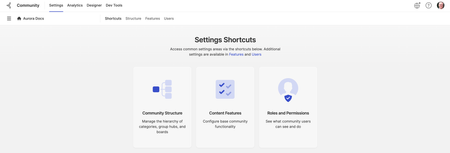
This article captures some of the high-level changes (terminology, features, and concepts) that have changed (or will be changing) in Aurora from Community Classic. Terminology changes For Aurora, we have updated several terms that were previously used in Community Classic. Kudos are now called Likes. Subscriptions are now called Follows. Discussion Styles are now called Content Types. Content Types is the collective term used to describe the different types of boards community supports (forums, knowledge bases, blogs, etc.). Group Hubs are now called Groups. Tags and labels have been combined are now just all called Tags. There are two types of tags (preset and freeform). Tool changes and enhancements The site-building tool Studio has been replaced with Designer and Dev Tools. In Aurora Designer, you can edit your site’s Theme and manage Page Templates. In a future release, you'll also use this area to manage Email Templates and text strings. In the Dev Tools, you will find the tools needed to develop and customize your site. The Content Editor has been enhanced with several new features and meets accessibility requirements. Auto-save is enabled by default for all content types. Members have access to full version history of content with the ability to Delete, Edit, Compare, and Restore versions. Integration with Unsplash image libraries for Blog cover images and Page Template sections. Community Analytics is no longer a separate tool and now is built into the Community application. Where did it go? Not sure where something moved to? Here’s a list of some of the bigger things that have moved to a new place in Aurora: Admin Settings: Several of the settings pages have been simplified (or removed) and grouped differently. Settings pages that used to be in the “Community Admin” or “Admin” area are now available under Settings. Each card (tab) groups related settings into a new page. As we continue to build out more Aurora features, more cards/tabs will be added to the Settings area. Content Management Areas: Most content-related management tasks (find and edit drafts, review and manage reported abusive content, Spam Quarantine, and Moderation) are now performed from the Manage Content space: Developer Experience Aurora is built on the philosophy that internal and external developers should have access to the same development tools, empowering everyone involved with your community's user experience while providing a seamless, simple, and powerful SDK to help you get the most our of Khoros Communities. Why React? We chose React to power the web layer of our technology stack because of its ubiquitous nature and powerful built-in toolset. React, coupled with React Bootstrap, offers developers the ability to create powerful customizations to the user interface without losing out on the popular Bootstrap DLS that has been a part of the success of Khoros Communities over the years. Add the powerful Apollo Client state management library makes takes the communication between your React components and your community's data to the next level. It provides GraphQL call management, a catchable data store that monitors and responds to data updates. This update gives developers a better toolkit without taking away some of the most popular time-saving capabilities our developer community has come to appreciate. Why GraphQL? GraphQL is the query language for all of Aurora's APIs. This solution is consistent across our entire user interface, giving external developers the same backend experience we use to create Aurora's built-in features. REST API served us well in Khoros Communities for many years, but in Aurora, we wanted to give developers access to a more precise, flexible, and capable API to make data more accessible across the board. Where communities once relied on custom REST endpoints or multiple individual calls to retrieve necessary data, GraphQL can handle multiple operations at one time, and return only the data you need when you need it.3.5KViewsSign in to react to this post8CommentsHow to Register for Atlas
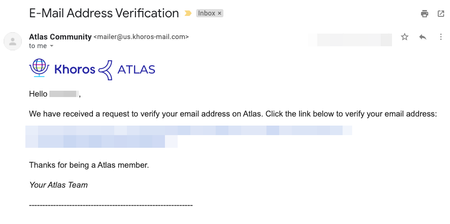
If you haven't already registered for Atlas, the Khoros community, this tutorial will show you how. All you need is a username, password, and a valid company email address. After you register, you can post to the community, receive email notifications, and lots more. It's quick and it's free! Option 1. Marketing Customers Registration Click on Register at the top right of the community, then the Khoros One SSO option. Learn more about logging in via SSO here. Option 2. Manual Registration Registering for Atlas Verifying your email Requesting Customer Access (if applicable) Requesting Case Portal Access (if applicable) 1.) Visit community.khoros.com. 2.) Click Register at the top-right corner. 3.) Click Register Now. 4.) Fill out the form and read and accept the Terms of Service. 5.) After you register, you must verify your email. Check your inbox and look for an email from the Atlas Community ([email protected]) and click the link to verify your email. If you don’t see the email after a few minutes, check your spam and promotional folders. If you still don't see the email, please contact us at [email protected]. 6.) If you are NOT a Khoros customer or partner, your registration is now complete. Welcome to Atlas! 7.) Customers and partners, once you have registered, please email [email protected] to request elevated access to Atlas. Without customer/partner access, you’re missing out on exclusive forums, customer ideas, the knowledge base articles, and much more! So don't hesitate to reach out, we'll get you sorted. 8.) If you also need access to Khoros Support Case Portal, please sign up here. Further instructions on signing up for Khoros Support here. SSO is used in the Atlas community and will not work in the Khoros Support Case Portal. You will need to make an account. Once you’re registered, visit the About Our Community area for more resources. Do you have any questions? Email us at [email protected]!29KViewsSign in to react to this post0CommentsAurora recommended font and image file types and sizes
Throughout the Aurora community, you’ll find many different features that support images, such as page templates, ranks, and badges. Below, you'll find required and/or recommended sizes and file types for various features. Avatars Admins: SVG, JPG, or PNG format Square image required Minimum recommended dimensions: 300px square Badges PNG or SVG format Note: SVG images might not currently load properly in email notifications. Minimum recommended dimensions: 240 px square Custom fonts TTF, WOFF, or WOFF2 format Browser icon (favicon) PNG format Minimum dimensions: 512 px square Hero banner image JPG or PNG format Maximum recommended size: 2000 x 600 px or a similar ratio An image without text or logos is best; the hero area is designed responsively and the visible area may change based on viewport. Logo PNG or SVG format Size is flexible; you can update Logo Height within Designer > Page Templates > Header & Footer. Content images Blog banner images Otherwise, use a large, quality image and it will be resized for you. JPG or PNG Recommended dimensions: 800 x 500px Post images JPG or PNG Member has a choice on size; image will be resized on upload. Place avatars SVG format 400px square Ranks PNG or SVG format Uploaded images are converted to 16 pixels in height and up to 100 pixels in width wherever they appear in the community (square images will be 16 px by 16 px). Note: Your image will be scaled to fit the supported dimensions, so we don’t recommend using a really tall image as it will be difficult to see when it’s scaled to 16 pixels high.1.5KViewsSign in to react to this post9CommentsTake a tour of Aurora
Welcome to Aurora. We've put together this video training course to help you get familiar with key features and concepts about Khoros' re-imagined Community Experience. This 12-video series is grouped by four community roles: Managers Moderators Developers Members The entire course takes about 1 hour to complete. Note: We will be updating these videos and adding new ones as we continue to roll out new Aurora features. Subscribe to this article to be notified when new videos are available. Community Managers Community Overview Building your community structure Designing your site Configuring feature settings Roles and permissions Gamification Measuring success Community overview (3:49) Building your community structure (6:03) Designing your site (7:54) Configuring feature settings (4:52) Roles and permissions (4:51) Gamification (4:23) Measuring success (3:08) Community Moderators Moderating your community (9:14) Community Developers Getting Started as a Developer Getting Started with Handlebars Creating Handlebars GraphQL API Getting Started as a Developer (4:58) Getting Started with Handlebars (6:56) Creating Handlebars (4:20) GraphQL API (3:54) Community Members Personalize your community experience Getting around and finding the content you want Contributing to the community Using your inbox Personalize your community experience (3:45) Getting around and finding the content you want (1:54) Contributing to the community (4:55) Using your inbox (2:46) What to read next: Getting Started as an Administrator Getting Started as a Community Manager Getting Started as a Site Designer4.4KViewsSign in to react to this post0CommentsAbout Khoros Community: Aurora
Aurora is Khoros’ re-imagined Community experience that leverages more than 20 years of experience and learnings in the digital community space. Aurora delivers a sleek, modern, high-performance UX framework that adheres to community best practices while still giving brands complete flexibility to make changes or updates to address their specific needs. While built on the same platform as Khoros Community Classic, Aurora includes significant changes in the new framework: New member experience: Aurora delivers both better performance (load times, mobile-friendly pages) and design (modern UX, beautiful layouts, and pre-configured community best practices). Aurora also provides more personalization, integration with other digital properties through syndication, and an overall better experience so that communities can more easily become the heart of any brand’s digital experience. New community manager experience: Aurora enables community managers and designers to build and customize pages easier with a visual Page Template designer and control the look and feel of the community with pre-defined and customizable themes to ensure that your community reflects the visual message and tone of your brand. Moreover, you no longer need to know how to code to build these pages. New developer experience: Aurora improves the developer experience so your developers can more easily find, use, test, and extend any integrations, custom objects, or data calls (in and out of the community) to extend the capabilities of your community to do something new and provide your members with a more customized experience. Backend and Platform changes: Aurora uses new front-end technologies like React and Storybook and leverages tools like Jest and Typescript for rapid iteration and robust design. On the data side, Aurora uses GraphQL (replacing LiQL) as the way to program API interactions and get data out of the platform. Finally, the entire architecture is completely built on modern cloud services from AWS and Docker. When you’re ready to dive in, we recommend starting with one of our Getting Started Guides: Getting Started as a Community Manager Getting Started as a Community Administrator Getting Started as a Site Designer New to communities? Check out our Community Basics and take a tour of Aurora in this 1-hour video training course, which will help you familiarize yourself with key Aurora features and concepts. Moving to Aurora Since Aurora is built on the same backend data architecture as Community Classic, existing customers do not need to do a full-scale migration to move to Aurora. However, most Community Classic customers do have some customization on the front end and UI. For these customers, some additional work is required to move to Aurora. Review the Aurora Upgrade Playbook and reach out to your account manager to learn more about what to expect when migrating to Aurora. Related topics What's changed in Aurora from Community Classic Glossary of common Community Aurora terms4.7KViewsSign in to react to this post0CommentsGuide to Atlas Ranks
Welcome to Atlas, your home for learning how to build the best customer experience possible. As a member of our community, you’ll be able to join discussions, ask questions, search for answers, and learn from resources - all of which will help you maximize your knowledge of the Khoros platform While you use the site, you may receive notifications about your Atlas rank increasing. This page describes what ranks are, how they tie into your community contributions, and where to view your rank progress. What are ranks? How do I increase my rank? How can I view my rank and badge progress? Frequently Asked Questions Bonus: How do I implement ranks in my own community? What are Atlas ranks? Your Atlas rank helps you understand how helpful your community contributions are relative to others Each rank on Atlas appears next to a user’s name and signifies their contributions to the community You can view these on a user’s profile page (including your own), as well as next to their name in any of their community contributions - like posts, replies, blogs, and so on Passive Ranks These ranks are available to members who participate passively via giving kudos or adding tags to content Member New members who have not yet made any contributions Visitor Users who have engaged at least once with posts via kudos or adding tags Watcher Users who have engaged a few times with posts via kudos or adding tags Observer Users who have engaged several times with posts via kudos or adding tags Learner Users who have engaged many times with posts via kudos or adding tags Surveyor Users who have engaged a whole lot with posts via kudos or adding tags Active Ranks These ranks are reserved for users who have posted helpful contributions, organized from least to greatest Beginner Tier Users who have created a post or reply at least once on Atlas Ranks: Contributor Strategist Tier Fairly knowledgeable and helpful, they have made many community contributions Ranks: Helper > Adept > Guide > Ace > Mentor > Expert (highest) Consultant Tier Known names on Atlas, they have a long history of helping out different users Ranks: Advisor > Maven > Leader > Genius (highest) Luminary Tier The most well-known and long-standing members, with numerous invaluable community contributions - other members aspire to be more like them Ranks: Director > Champion > Executive > Boss (highest) How do I increase my rank? Simply put, your rank increases as you help others. This can be achieved in two ways: 1) You contribute helpful content to the platform - for example: If you have a question for the community, you create a post asking for help or ideas Alternatively, if another user asks a question and you reply with an insightful answer If you respond to a user troubleshooting a problem, and your answer is marked as a Solution 2) You recognize the contributions others have made - for example: When you ask for help troubleshooting, you mark other posts as Solutions When you give other helpful posts Kudos, or when others give your post Kudos Along with Titans, higher rank Atlas users may also earn the ability to create rich content on Atlas, for example: After solving a tough issue in your work, you write a blog showcasing how you solved it You create a rich community resource in the form of a knowledge base article How can I view my rank and badge progress? To view how you’re progressing on your ranks and badges, visit your Atlas profile page To get there, click on your profile image, which is visible at the top right of the navigation bar on any page of the community Beneath your user name, you’ll see your current rank, as well as any contributions you’ve made You can also view the most recent badges you’ve earned on the right side of your profile Clicking “View all” will show you all of your earned badges Frequently Asked Questions How can I increase my rank more quickly? Many different activities increase your rank However, activities that are more difficult to achieve, like earning an Accepted Solution from another user, or creating rich media (at higher ranks) like blogs or knowledge base articles, award greater progress than activities which are easier, like giving a post a Kudo Does my rank go down if I don’t contribute regularly? No, all of your contributions over time will add to your rank. As long as you have a currently active account (i.e. the account has not been deactivated) and continue to make contributions, you will continue to accumulate progress toward your next rank. I’ve posted a lot lately, so why haven’t I ranked up? Ranking up is easy at first, but higher ranks require an increasing number of contributions Remember: just because you haven’t ranked up lately, doesn’t mean you won’t soon! Additionally, ranks involve a mix of contributing to the community, and acknowledging others If you’ve gone a long time without ranking up in spite of creating lots of content, you may want to spend more time letting others know you appreciate their content via giving helpful posts kudos, or by marking helpful replies as Solutions Similarly, if you’ve spent a lot of time letting others know you appreciate their content, you may want to contribute some of your own by asking good questions of others members in a forum post, or creating other types of helpful content like blog posts Bonus: How do I implement ranks in my own community? You may want to get started by learning about ranks We also recommend learning about badges, and the difference between these and ranks in the Community product Finally, we recommend reviewing our previous rank update blog to understand how we went about updating Atlas ranks, as it may give you ideas that could help as you build or rebuild your own For further guidance on badges and ranks, as well as community gamification systems, we recommend signing up for one of our Product Coaching sessions8.1KViewsSign in to react to this post0CommentsAurora Accessibility Support
Accessibility is a critical component for communities that want to ensure their web content is accessible to people with disabilities. Aurora strives for a WCAG AA level of compliance for all the major community features. To ensure that we meet these standards, we have rigorous internal testing (automated and manual) that are part of the standard Aurora development process. Each release, we test keyboard navigation, heading levels, field labels, and interactive page elements to make sure that content is accessible and being read out correctly by screen readers. We also use a third-party vendor to manually assess the user flows, identifying and resolving accessibility violations. As part of the Aurora site-creation experience, we have also added several accessibility features. Alt Text for Images Members can add alt text while uploading images to the content on the community. Screen-reader friendly headings Admins can add headings for widgets that are visible only to screen readers. Color Contrast Verification The Theme editor's contrast-checker ensures that there is sufficient contrast between the background colors and foreground colors you choose. Skip to Content link on navigation bar From the navigation bar, you have the option to skip past repetitive content and go directly to the main content. When you navigate with the keyboard, a control appears that enables you to navigate beyond the repeated content.817ViewsSign in to react to this post4Comments
Aurora Product Coaching Session: Spam Management Best Practices
Khoros Communities platform offers several settings and features that allow you to mitigate Spam in your community. Join our Spam Management Best Practices coaching session to identify, filter and deal with spam effectively. Our coaching session will guide you through the practical tips and techniques to help combat spam and help maintain the hygiene of your community. Topics covered in the coaching session Overview of Aurora spam settings and functionality Manage Content dashboard related to spam management and its features Using roles and ranks to configure permissions to check spammers Content Filters Best practice tips Notes - Admin permissions are required to conduct the call. 👉Click here to Sign Up Related Resources Enable Spam Management Community Spam Management Review Posts Captured as Spam Khoros Academy: Communities Moderation Essentials Khoros Academy Instructor Led Training: Spam Management for Communities Aurora1.1KViewsSign in to react to this post0Comments