Aurora: Getting Started as a Site Designer
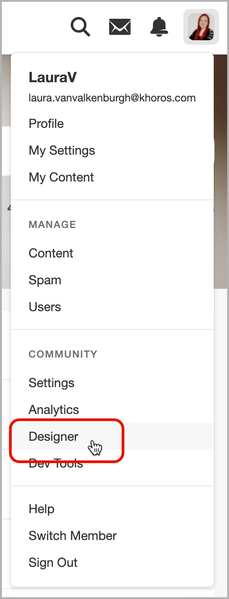
Welcome to Aurora! Aurora is Khoros’ re-imagined Community experience that leverages more than 20 years of experience and learnings in the digital community space. This introduction guides you through the most commonly used page template and theming tasks and provides links to the best articles for these tasks. Tip: Take a tour of Aurora in this 1-hour video training course, which will help you familiarize yourself with key Aurora features and concepts. Tip: Complete self-paced training that includes information about community design in the Khoros Academy Build Khoros Communities course. Let's get started! As a Site Designer, your primary responsibilities include: Creating and editing the theme of your site Designing the page templates used across your site Designing the templates used in email notifications (coming soon) As a Site Designer, you’ll spend much of your time in the Designer area. Note: To access the Designer area in the Khoros Community platform, you must have the Admin role (specifically, the Edit community settings permission grants access, but this permission also grants access to editing all parts of the community). Learn more about Roles and Permissions. Designer The Designer area is where you’ll perform most of your tasks. Go to Account Menu > Designer: In this area, you have access to: Theme Page Templates With these two areas, you’ll have the opportunity to design the look and feel of your entire community. Build your community’s theme The theme of your community encompasses your logo, the fonts, the colors, button and link formatting, avatars, and other UI elements across the site. Learn more about the Aurora Theme Editor. Design your community’s page templates There are many different page templates across the community that can be configured to create the desired look and feel that matches your brand. Page templates offer many different options for customization, such as navigation bar options, widgets, section organization, and more. To get started in designing your page templates, learn: about Page Templates how to use Page Templates how to create and arrange page sections on a Page Template how to configure the global Header & Footer about widgets 1.3KViewsSign in to react to this post
 2Comments
Aurora: Getting Started as a Community Administrator
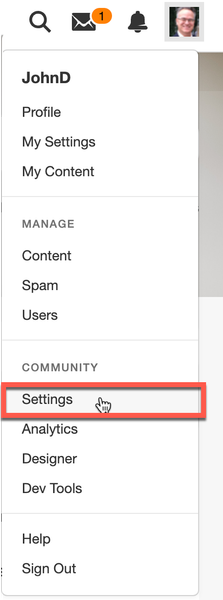
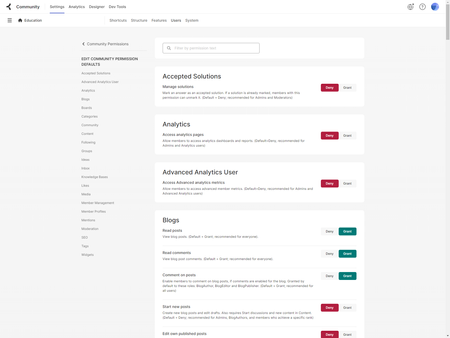
Welcome to Aurora! Aurora is Khoros’ re-imagined Community experience that leverages more than 20 years of experience and learnings in the digital community space. This introduction guides you through the most commonly used community features and administration tasks and provides links to the best articles for these tasks. Tip: Take a tour of Aurora in this 1-hour video training course, which will help you familiarize yourself with key Aurora features and concepts. Tip: Complete self-paced training in the Khoros Academy Build Khoros Communities course. Note: Please check out the training video for new Admins, available within the Community Setting area below. Let's get started! As a Community Admin, your primary responsibilities include: Configuring and maintaining your community’s site structure Administering and managing feature areas of the community Maintaining member accounts and community content per your company's values and goals Upgrading the community to take advantage of new capabilities Before you begin, be sure to work with the Community Manager to have a thorough understanding of your community’s audience and goals. As a community admin, you’ll spend much of your time in the Community Settings area. Note: As Admin in the Khoros Community platform, you must have the Admin role. Learn more about Roles and Permissions. Community Settings The Community Settings area is where you’ll perform most of your administrative tasks. To open the settings area, go to Account Menu > Settings: Community Settings are grouped into themed areas: Structure Features Users The Settings Shortcuts page provides shortcuts to the most commonly used community settings pages. Click around and explore all the settings in these areas. Below, we’ve captured some of the most common tasks you’ll need to perform. (Depending on how roles on your team are distributed, you may not need to do all these tasks.) Build out the structure of your community Configure general and feature-specific settings Manage roles and permissions Set up, enable, and manage features that drive more community engagement Please watch the training video which guides new Admins through the most commonly used features within settings to help accomplish community administration tasks. Build out the structure of your community In the Community Structure area, you can build out and organize the topography of your site. You can decide the best way to group related content into categories and boards and which content types to provide in each area. Learn more about Community Site Structure and best practices when creating your site. Configure general and feature-specific settings From the Features area, you can configure general site settings as well as feature-specific settings that determine how things behave in your community. Manage user roles and permissions In the Users area, you c…1.4KViewsSign in to react to this post0CommentsAurora Upgrade Playbook
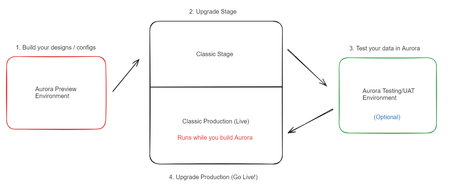
Getting Started What is Aurora? "Aurora is a game-changing update to the industry-leading Khoros Communities solution, with a set of transformative capabilities that make it easier to deliver an exceptional member experience." Aurora is the major upgrade for Khoros Communities (Classic). First released officially on July 31st, 2023, Aurora is a total transformation of our top-notch community platform. We've completely revamped it, utilizing cutting-edge technologies and adopting a modern headless architecture. We have intentionally bolstered Aurora with powerful APIs that provide flexibility and robustness. From the very beginning, we've focused on creating an exceptional user experience, designing it with mobile-friendliness, performance, SEO, and accessibility in mind. It's a fresh start with a foundation built for the future of online communities. Jump to Features. Discovery: Am I ready for Aurora? The first step is to determine your readiness for upgrading to Aurora. There is no rush to move from Classic as of 2024, so it is essential to review where you stand and what you need in order to upgrade successfully. Secondly, it's good to remember that any change to your community presents an opportunity to revisit what success means and how your community experience supports success today and in the future. With this in mind, we encourage you to challenge yourself at each step of planning and ask, "How does this align to and support our business goals?" Getting started Understand Your Goals: While Aurora improves drastically upon the day-to-day community design, admin configuration, moderation, and end-user experience, in evaluating your readiness to upgrade to Aurora, ask yourself: What are your plans for the community in the coming year? How do they align with your business goals & strategy? Do you require certain features or integrations to support your community strategy and day-to-day management? How do you use them? Do you use SSO authentication? How does the authentication process work? (You may need to gather this information from the team that manages SSO at your organization.) How long will it take to gather resources to help you in the upgrade to Aurora? Evaluate Customizations: As a best practice, customizations should be limited to those where there is a clear business value and no alternative feature. With this in mind, we recommend you evaluate existing customizations in line with your community goals, and as part of your upgrade plan, consider your path to sunset any customizations you use today that do not provide measurable value to the community experience and its success. You may have custom features today (like widgets, special pages, etc.)—many of these can now be replaced with Aurora's built-in features. Where you can, we recommend switching to Aurora's features. It will not only save you the cost and effort to rewrite those components …4.1KViewsSign in to react to this post10CommentsFlood controls for Aurora communities
With Khoros, there are limits on how often people are allowed to post, upload images, videos, and attachments, tag content, send private messages, and other community actions before triggering activity limits. Activity limits are in place to help combat potential spam. Note: Those with the Administrator and Moderator role are exempt from activity limit restrictions; these thresholds affect only regular members. The following table lists the default activity rate settings for various actions performed by the member within a specified period of time. Actions Activity Limits Post content A member can't post more than: 5 posts in 30 seconds 15 posts in 10 minutes 50 posts in an hour Send Private Messages A member can't send more than: 5 private message in 30 seconds 15 private messages in 10 minutes 50 private messages in an hour Upload Images A member can't upload more than: 100 images at a time 5000 images per day 5000 images in the community Upload Videos A member can’t upload more than 500 videos in the community. Upload Attachments Members can’t upload more than 100 attachments per post per day. Like content A member can't give more than: 50 likes per minute 500 likes per hour 5000 likes per day Tag content A member can’t add more than: 50 tags per minute 500 tags per hour 5000 tags per day Mention people A member can’t mention more than 50 members in single post. Related topics: Activity limits1.2KViewsSign in to react to this post5Comments
Aurora Product Coaching Session: Spam Management Best Practices
Khoros Communities platform offers several settings and features that allow you to mitigate Spam in your community. Join our Spam Management Best Practices coaching session to identify, filter and deal with spam effectively. Our coaching session will guide you through the practical tips and techniques to help combat spam and help maintain the hygiene of your community. Topics covered in the coaching session Overview of Aurora spam settings and functionality Manage Content dashboard related to spam management and its features Using roles and ranks to configure permissions to check spammers Content Filters Best practice tips Notes - Admin permissions are required to conduct the call. 👉Click here to Sign Up Related Resources Enable Spam Management Community Spam Management Review Posts Captured as Spam Khoros Academy: Communities Moderation Essentials Khoros Academy Instructor Led Training: Spam Management for Communities Aurora1.1KViewsSign in to react to this post0CommentsAurora recommended font and image file types and sizes
Throughout the Aurora community, you’ll find many different features that support images, such as page templates, ranks, and badges. Below, you'll find required and/or recommended sizes and file types for various features. Avatars Admins: SVG, JPG, or PNG format Square image required Minimum recommended dimensions: 300px square Badges PNG or SVG format Note: SVG images might not currently load properly in email notifications. Minimum recommended dimensions: 240 px square Custom fonts TTF, WOFF, or WOFF2 format Browser icon (favicon) PNG format Minimum dimensions: 512 px square Hero banner image JPG or PNG format Maximum recommended size: 2000 x 600 px or a similar ratio An image without text or logos is best; the hero area is designed responsively and the visible area may change based on viewport. Logo PNG or SVG format Size is flexible; you can update Logo Height within Designer > Page Templates > Header & Footer. Content images Blog banner images Otherwise, use a large, quality image and it will be resized for you. JPG or PNG Recommended dimensions: 800 x 500px Post images JPG or PNG Member has a choice on size; image will be resized on upload. Place avatars SVG format 400px square Ranks PNG or SVG format Uploaded images are converted to 16 pixels in height and up to 100 pixels in width wherever they appear in the community (square images will be 16 px by 16 px). Note: Your image will be scaled to fit the supported dimensions, so we don’t recommend using a really tall image as it will be difficult to see when it’s scaled to 16 pixels high.1.5KViewsSign in to react to this post9CommentsAurora Product Coaching Session: Q&A Product Coaching Sessions
Q&A Product Coaching Sessions Schedule a 1:1 personalized 20-minute Q&A Product Coaching session on a topic of your choice. In this interactive session, you’ll share your screen with a Product Coach for a unique learning experience. Select the desired product solution and time below. Don’t know where to start and just want to become a Khoros expert? Check out the Product Coaching sessions we’re currently offering on specific topics HERE. Have more direct questions about Khoros Communities that aren't covered in one of out overview Product Coaching session? Follow the link bellow to sign up for a Q&A Product Coaching session to learn how to manage your community with a Khoros Communities product expert. Sign up to ask questions about tips and tricks when moderating your community, analytics and reporting, help to refine or cleaning up your community roles and/or permissions, navigating features within the Community Settings or Designer, or how to encourage user participation through badges, likes, and more. 👉 Click Here to Sign Up Please Note: While our Product Coaches are experts on the Khoros Platform, there are some items that are considered to be out-of-scope and would be best addressed by other Khoros resources, including: Support or bug related issues — contact Khoros Support Khoros services, insights on social strategy, and best practices — reach out to your Khoros account manager API integrations, Dev Tools, coding and general developer Q&A, advice, or assistance — connect with our Khoros Developer Network Additional Resources Khoros Product Coaching Sessions169ViewsSign in to react to this post0CommentsAurora Product Coaching Session: Roles & Permissions Deep Dive
Aurora Roles & Permissions Deep Dive The Khoros Communities platform offers an assortment of permission that allow you to control what features and areas of your community your users have access to use. In this Product Coaching session we will walk you through these permissions, creating roles, and discuss best practices. What is covered in this coaching session? Overview of the Roles and Permissions tab in Community Settings How to set permissions How to create roles Discussion of Inheritance Roles & Permissions best practices 👉Click Here to Sign Up Related Resources About roles and permissions Permission descriptions Best practices: roles and permissions273ViewsSign in to react to this post0CommentsAurora Product Coaching Session: Aurora Community Content Moderation
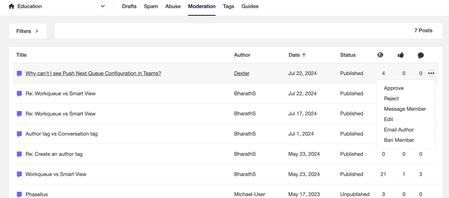
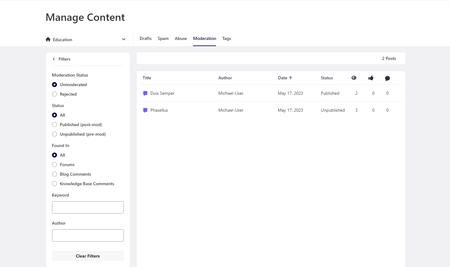
Aurora Community Content Moderation Are you new to Moderating a community, need a refresher, or have recently migrated from Khoros Classic Communities and need to know how the new tools work? This introductory, 1-on-1 coaching session will provide you with an overview of how to Moderate within Khoros Aurora Communities. When managing a Community, you need a way to handle posts that fall outside of your Community guidelines and the people who post them, in a quick and efficient manner. During a 1:1 coaching session, you'll work with a Product expert first walking through your current moderation workflow followed by some hands-on tips, tricks, and best-practices on areas where you can be more efficient, ultimately helping you to be more effective in your daily tasks. What is covered in this coaching session? Moderation workflow efficiencies A review of abuse and filter reports, spam quarantine, and moderation queue Taking action on offending content Moderation best practices 👉 Click Here to Sign Up Related Resources About Moderation About Abuse management About content filters About Khoros Communities spam management327ViewsSign in to react to this post0CommentsAurora Product Coaching Session: Aurora Community Analytics Overview
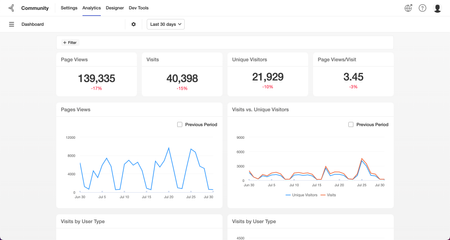
Aurora Community Analytics Overview Are you new to using Aurora Analytics or have recently taken on reporting duties for your Community? This introductory, one-on-one coaching session will help you feel more confident in the tool and reporting on the metrics that matter most! Community Analytics helps you measure and improve the performance of your social programs by gaining insights into your community's health. Providing community managers and executive stakeholders with deep insight into community health and performance, we capture data on billions of interactions each month and use algorithms to help you focus attention on the metrics that matter most. What is covered in this coaching session? Introduction to Community Analytics - what it is and how you can use it Taking actions to view the metrics that matter most to you How to apply filters and export data Navigating the Community Analytics Navigation Panel and the different Page Metrics 👉 Click Here to Sign Up Related Resources About Aurora Analytics Aurora Analytics Metric Definitions Aurora Analytics Dashboard use cases Aurora Analytics Reports310ViewsSign in to react to this post0Comments