Khoros Communities 26.6 Release Notes
26.6 introduces Contests, a new way to spark participation, peer collaboration and recognition in your community, and delivers our largest accessibility release to date, a major step in our WCAG 2.2 AA work. It also builds on Orchestrator Scheduled Rules with more precise audiences, and brings improvements to federated search, carousels and the social feed. Email delivery gets a round of fixes, and other fixes address scheduled publishing, moderation actions, mention and follower emails, and private image access. Try everything shipped so far on Staging The Aurora features released from 26.2 through 26.5, which were introduced as Early Access, are now available on client Staging environments so you can explore and test them with your own content and configuration. Features available to try on Staging AI Moderation and Appeals, Community Language Model / Answer Assist, Community Orchestrator Customizable Email Templates with Orchestrator integration, Proactive Clarification Questions, Polls, Metric Explorer and Search Analytics, Expert Report, multi-select search filters and Author Search, Zoom event registration Cross-Board Posting, Interactive Social Feed (reactions, save and follow), Admin Review Mode for Answer Assist, Answer Requests opt-out, reaction email notifications Federated Search, Carousels (featured content banners), Orchestrator Scheduled Rules and Run Logs Please note that Production is not changed. Nothing is enabled in production without your testing and an explicit request. To enable a feature in production, tell your Customer Success Manager which features you have tested and want live New Features (Aurora) Contests: recognize and reward your members Contests give your members a fun, structured way to take part, collaborate with their peers and be recognized. Invite members to share their best work, work together in teams, vote for each other and earn rewards such as prizes, badges and ranks. Admins set everything up from a guided wizard, with no developer involvement. Rewards that recognize. For each contest, define reward tiers (for example first place, runners-up and a special mention). Each tier has a name, a description, an optional image and an optional badge, and you decide how many winners each tier has. Rewards are shown clearly on the contest page so members know what they are working toward. Badges are awarded automatically when results are announced. Three types of contest to fit your goals: Submission contest: members submit an entry (a photo, an idea, a story, a how-to) and winners are chosen by community vote or by judges. Best for user-generated content and ideas. Activity Challenge: no entries needed. Members qualify for reward tiers through what they do in your community during a set time window: posts, replies, kudos. Best for lifting everyday participation and welcoming new members. Hackathon: teams build and submit a project, and a judging panel scores it against a rubric. Best for product ideas, builds and showcases. Voting or judges. Choose how winners are decided: Community voting: members vote on entries, a live leaderboard shows how the contest is going, and winners are ranked by votes with clear tie-break rules. Judges: appoint judges who score entries from 0 to 10 in half-point steps. Winners are ranked by judge score. Contest boards. Submission contests and Hackathons collect entries, so they run on a Contest board, a new board style. Create a board with the Contest style under Community structure and choose it as the contest's venue. Entries are posted to the board as part of the contest, and members don't start regular posts there. Activity Challenges can be attached to any board type, so they can count posts and replies on your existing boards. Run it your way. Team entries with open or restricted enrollment, and a discussion thread on each contest. Contest widgets for the home page and boards (active contests, my contests, progress, leaderboard) and dedicated contest pages. Contest emails and notifications for entries, results and winners. Admin dashboards for participation, entries and results, with winner review and correction. Availability: Contests are an Early Access feature, behind a feature flag, and are off by default. Contact your Customer Success Manager to begin; once enabled, contests are fully configurable from the admin panel. While contests are off, members see no contest content in navigation, search, board lists or email-template lists. Coming next: My contests on the member profile, a judging queue for large contests, contest cards in the feed, and micro-games: quick, lightweight games (such as trivia, this-or-that, predictions and word guess) for everyday engagement. [confirm roadmap wording] Accessibility (WCAG 2.2 AA) 26.6 is our largest accessibility release so far, with fixes across keyboard use, screen readers, focus, labels and visual design in the member experience. Our WCAG 2.2 AA work continues in upcoming releases. Keyboard and focus Visible focus indicators restored across Aurora, including in Windows High Contrast (forced-colors) mode. Focus returns to the trigger when dialogs close, Tab stays inside open dialogs, and every dialog has a proper initial-focus target. The rich-text editor toolbar is reachable by Tab; Escape in editor popups no longer closes the whole modal. Fixed the hover-card keyboard trap; hover cards no longer open on focus alone and Escape closes only the card. Pickers and All Filters move focus in when opened and back when closed; focus moves to the first revealed reply. Preview images, badges and tooltips are keyboard-operable. Names, labels and structure One main landmark per page, named navigation landmarks, and headings on pages that lacked one. Accessible names include the visible label (inbox folders, timestamps, logo link, account menu, sort controls). Dialog titles are real headings; radio groups, tag groups and table captions are exposed correctly. Tag links announce each tag once, with post counts; decorative icons are hidden from screen readers. Autocomplete tokens corrected on form fields. Status messages (WCAG 4.1.3) When something changes on the page without moving focus, screen readers now announce it, so people who can't see the screen aren't left guessing. For example: how many results a search or filter found, or that it found none, and when a search fails; how many suggestions are in a picker; the unread reply count on a feed post, a post's moderation status, and reply and view counts. Visual 24px minimum target size for kudos and vote counts. Contrast fixes for badges, closed polls, rank badges and radio focus rings. No horizontal overflow at 320px; date picker and cover image text-spacing fixed. Missing translations filled in across 15 text bundles, so non-English interfaces no longer show English fragments. Enhancements (Aurora) Email New members now receive their registration email in the language they were viewing the community in; the viewed language is saved as their profile language before the email is sent. {subject} resolves to the post title in workflow emails. Community URL globals and the unsubscribe link now work in scheduled-rule and digest emails. The optional message in invitation emails is shown as plain text. Insert Link in the email editor no longer adds http:// in front of rule variables. Email templates that cannot work yet are hidden from the template list. Orchestrator: Scheduled Rules enhancements Scheduled Rules, introduced in 26.5, let community managers run automations daily, weekly or monthly to reach the right members for re-engagement, win-back and recognition campaigns. 26.6 makes them more precise and more dependable: New "Last Visit (days ago)" audience condition: enter a number of days (for example 30) to reach members who last visited more than, or less than, that many days ago. The number is counted from the moment each run starts, so a weekly rule always targets a moving window instead of a fixed calendar date. The existing "Last Visit" date condition remains for fixed dates. Audiences no longer come up empty: on communities where empty searches are turned off, a scheduled rule could find zero members for every audience condition and still report a successful run. Audiences now resolve to the members who match. Safer editing: editing a scheduled rule can no longer silently widen its audience. Clearer audiences and dates: audience notes and dates are shown in community time, and the schedule frequency control no longer overlaps Save and Cancel. Rules triggered by features that aren't enabled in your community are no longer offered. Federated Search For members The source filter a member chooses is now remembered. Previously it was cleared when the page loaded. The first search on a community with federated sources shows a loading state instead of a blank results area. Clicking an external result now gives immediate feedback while its content loads, instead of looking like nothing happened. YouTube and Vimeo results play in the in-community reader. External results are shown only to members who have accepted cookies, and this is now verified on the server from the member's own consent. For admins Role restrictions can now be created and updated on a source. Previously saving one failed with an error. Unsaved edits are no longer lost when two admins change the same source; you can choose to keep your own edits. Rotating a source credential no longer discards the new key. Failed connection checks are now shown instead of hidden, and saving a board reorder can no longer overlap with another save. Carousels New media alignment control for the Split Media variant, and a "Default" gradient swatch with a working custom gradient editor. Slide Count shows the true count and "+" no longer adds two slides on the first click. A single-slide carousel now renders as a static banner; empty slides no longer publish placeholder text. Auto-advance behaves correctly with one slide; Designer carousel keyboard navigation restored. The carousel warning banner meets AA contrast for any theme. AI Settings and Clarification Questions The Clarification settings page can no longer lock you out when the kill switch is off: the re-enable toggle now always appears, and the kill switch defaults to off. AI Settings no longer shows errors on first load, flickering, or raw text keys flashing. Other Enhancements Language rendering was fixed and the language toggle improved. The community guidelines link is now an admin setting. Timezone labels show standard and daylight GMT offsets. Bug Fixes Posts, replies and the social feed Social feed cards: counts no longer split mid-number in the card footer, reactions no longer overlap the reply count, and cards now show 4, 3 or 2 columns depending on screen width. Show More on long posts: a long post that is cut off with "Show More" can now be collapsed again with "Show Less" (previously it could only expand). If loading the full post fails, the post stays collapsed with a message and you can retry. Long AI replies are no longer cut through the middle of their citations. Comments turned off: the "Comments/Replies have been turned off for this post" banner used to show to everyone, including admins who could still reply. Each person now sees only what applies to them, so members see the reply button, or why they can't reply. @mention emails: a member mentioned in a draft blog or knowledge base article used to be emailed when the draft was saved and again when it was published. They are now emailed once, when it is published. Notify Followers on edits: edits to published blog and knowledge base articles notify all followers only when the author ticks "Notify Followers". Other edits follow each member's own subscription settings. Polls on profiles: the Polls tab on a member's profile now lists only their polls; it previously listed all of their topics. Accept as Solution is no longer offered on rejected or in-review replies. A post whose image was rejected or purged can be edited again; previously every save failed. Editing a scheduled knowledge base article without touching its schedule (for example adding a tag) no longer cancels the scheduled publication. Code samples keep their line breaks when a post is reopened from an autosave, and an Name typed inside a code sample stays as text instead of becoming a mention. Images found through Unsplash search in the cover image picker can be added to a post. Signed-out visitors no longer hit an error on pages with featured sections when anonymous access is off. Moderation and administration Moderation actions: Mark as Spam, Mark as Not Spam and Ban Member sometimes did nothing because their confirmation dialogs disappeared. They now work, and actions that aren't available are shown greyed out with the reason instead of being hidden. Unarchiving a topic that was archived while unmoderated no longer fails. Page Designer: Page Templates no longer crashes the whole page when a template's page is missing, and the sidebar no longer steals focus from the canvas. Moderation audit-trail reads are bounded so very large communities do not run out of memory. Admin List Users no longer crashes on a negative role count. Report actions require a verified email. Pages, sorting and time A board sort choice is now kept for the member across servers; previously it could revert to the default. A board or post under a category the member can't read now redirects to the community home instead of showing an error page. Timezone dropdowns show both standard and daylight GMT offsets, and wrong all-year offsets are corrected. Images and files Private and legacy-group images now display correctly for group members, signed-out readers and API sessions. Images whose parent content has been deleted now return "not found" instead of an error. Responsive image sizes are served for private albums when responsive images are enabled. Reliability and security The Aurora app now recovers from Cloudflare challenges automatically. Hardened image handling, file downloads and shared caching, credential logging, and sign-in token handling. Upgraded Aurora's web framework to address reported vulnerabilities. Requests with a missing body, non-owner image requests and similar cases now return the correct response (400, 403, 404) instead of a server error. Classic Enhancements and fixes in this release that apply to Classic communities, including those shared with Aurora. Email New members now receive their registration email in the language they were viewing the community in; the viewed language is saved as their profile language before the email is sent. {subject} resolves to the post title in workflow emails. Community URL globals and the unsubscribe link now work in scheduled-rule and digest emails. The optional message in invitation emails is shown as plain text. A member mentioned in a draft blog or knowledge base article is now emailed once, when it is published, instead of when the draft is saved and again on publication. Edits to published blog and knowledge base articles notify all followers only when the author ticks "Notify Followers". Other edits follow each member's own subscription settings. Scheduled Rules Editing a scheduled rule can no longer silently widen its audience. Rules triggered by features that aren't enabled in your community are no longer offered. Single sign-on Signing out of a community that uses single sign-on with Frontend Logout now reliably ends the identity provider session too, so the next person on a shared device is not silently signed back in as the previous user. Turning on Feature Logging no longer breaks OIDC sign-in: a failed sign-in shows the normal error page, and the diagnostic log is complete and readable. Sign-on secrets and tokens are no longer written to logs, at any log verbosity level. Posts, articles and images Community-hosted videos are no longer removed from a post when it is edited and saved. Images found through Unsplash search can be uploaded again; previously every upload failed. A category or board picture can be set from a web address, and any remaining failure shows a clear message instead of a generic error. The Edit option is available on a published knowledge base article while a scheduled update to it is pending. Editing a scheduled knowledge base article without touching its schedule (for example adding a tag) no longer cancels the scheduled publication. Older inline images in published articles that showed a broken-image placeholder, even though the image was intact, display again once the restore is enabled for your community. Reviewers can see an author's embedded images while a blog post is awaiting review. Inline images in open Group Hub forum posts display for signed-out visitors. Responsive image sizes are served for private albums when responsive images are enabled. Malformed tag page addresses return "not found" instead of a server error. Moderation and administration Unarchiving a topic that was archived while unmoderated no longer fails. Moderation audit-trail reads are bounded so messages with very large histories do not run out of memory. Admin List Users no longer crashes on a negative role count. The page-level Options menu on a forum reply page now reads "Delete Topic", matching what the action does; it was previously labelled "Delete Reply". Private message deletions are recorded correctly in community analytics instead of producing repeated processing errors. Pages, sorting and time A board sort choice is now kept for the member across servers; previously it could revert to the default. Timezone dropdowns show both standard and daylight GMT offsets, and wrong all-year offsets are corrected. Reliability and security Hardened image handling, file downloads and shared caching: image processing fails closed when the image service is degraded, the image-metadata library was upgraded, Unsplash downloads reach only Unsplash's own servers, and shared caches no longer store private file downloads. Requests with a missing body and non-owner image requests now return the correct response (400, 403) instead of a server error. Rollout Schedule Stage Rollout: October 19-20, 2026 Testing window: October 21 through November 1, 2026 Production Rollout: November 3-4, 2026 The rollout will follow the standard maintenance windows. 72ViewsSign in to react to this post
 0Comments
Khoros Communities 26.4 Release Notes
26.4 brings the Aurora homepage to life. Members can now react, reply inline, and save content directly from the feed without navigating away, while cross-board posting lets anyone start a discussion from any page in the community. Managers get a safe mode to evaluate Answer Assist quality before enabling it for members. Across Classic and Aurora, the release also delivers security patches, search fixes, and broad editor and stability improvements. New Features Aurora - Early Access Features The features in this section are available in Early Access for Aurora communities. They are behind feature flags and must be manually enabled — contact your Customer Success Manager to begin. Once enabled, all features are fully configurable from the admin panel. Note: Classic users can migrate to Aurora at no cost in 2026. Contact your CSM for detail Cross-Board Posting: Members can now start a post from the homepage or any category or landing page — no more navigating deep into the community structure to find the right board. Start a Discussion CTA — Admins enable a posting button on any page template via the Designer Tool. Button text is configurable (default: "Start a Discussion"). Permission-aware board picker — A searchable flat list showing only boards the user has permission to post on. Private group boards are hidden from non-members. All content types supported — discussions, blog articles, KB articles, ideas, and events. If clicked from within a specific board, that board is pre-selected in the picker. Anonymous users see the button but are redirected to sign-in on click Interactive Social Feed: Aurora's homepage Feed section transforms from a static list of post titles into a living, social feed where members can participate without breaking their browsing flow. Inline comment expansion — Click "See details" on any post to expand and read the latest comments directly in the feed. New/unread comments are surfaced first with clear visual highlighting. Inline replies — Reply to any discussion directly from the homepage feed using the same rich editor and community settings as the full thread view. Full post view — Expand the complete post body within the feed context; navigate to the full thread only when you need deeper engagement. Infinite scroll — The feed auto-loads additional posts as you scroll, with admin-configurable batch sizes and load limits. Admin controls: Enable or disable the interactive feed globally or per board from Admin → Settings → Content Features → Homepage Social Feed. Configure comment display count, infinite scroll batch size, and pilot specific boards before rolling out community-wide. One-click emergency disable option if issues arise Multi-Semantic Reactions: Move beyond a single "Like" and let members express nuanced sentiment. Reaction types include: Need This, Helpful, Insightful, Celebrate, and more — configurable per community. Reaction picker appears inline on posts and comments in the feed and full thread views. Members who react with "I Need This" automatically follow the thread and receive notifications when a solution is posted. Reaction counts display in real time; notification messages explain why members are receiving updates. Save & Follow — Inline Feed Actions: Members can now manage their personal content queue directly from the feed. Save/Bookmark — Save any post to "My Stuff" with a single click. Add private bookmark notes. Follow/Unfollow — Follow threads for notifications; unfollow directly from the feed at any time. Bulk unfollow — Manage followed content at scale. Auto-follow — Members who react with "I Need This" are automatically subscribed to solution notifications. Admin Review Mode for AI Answer Assist: Community managers can now safely test Answer Assist quality on live production data without any impact on member experience. Review Mode toggle — Enable per board in Answer Assist settings. The toggle label dynamically reflects the current state: "Enable Review Mode" when off, "Enable Live Mode" when on. Shadow processing — Answer Assist generates answers normally but routes them to the Answer Queue for admin review instead of posting to members. Zero member impact — No answers posted, no expert notifications triggered, no AA UI rendered for members in review mode. Answer Queue — Review mode entries are labeled "REVIEW MODE" and include the generated answer content and identified expert names. Answer Requests Opt-Out: Experts can now opt out of automatic question routing when they don't want routed questions. (feature flagged with Answer Assist) Likes & Reactions Email Notifications: Notify users by email when their posts receive likes or reactions (feature-flagged with the social feed). Classic Newest Sort for Knowledge Base Tags: Sort knowledge base Tag Results by newest post date. Classic and Aurora Custom Embed Extension Point: Add custom embed integrations to the rich text editor toolbar in a supported, generic way. Classic Security Fixed private message images being viewable without logging in. (Classic and Aurora) Fixed an attachment upload issue that could let a file be served with an unsafe content type. Fixed SAML SSO not enforcing the required-signature setting on assertions. Fixed anonymous API access that could expose private, moderation-held message data. Fixed the kudos revoke API returning a business error instead of an authentication error for unauthenticated requests. Added autocomplete hints to the registration form to prevent incorrect credential autofill. Fixed OAuth callbacks double-encoding the state parameter, which strict clients could reject. Accessibility Fixed flat heading levels on Classic profile and widget pages for screen readers. Exposed the rich text editor body as a labeled multiline textbox for screen readers. Fixed keyboard focus getting stuck in the rich text editor toolbar at high zoom levels. Fixed keyboard tab order so the Labels field is reachable before Post and Cancel on the compose page. Added a visible required-field indicator and aria-required to the compose message Subject field. Exposed the rich text editor list and text-color controls as split buttons to screen readers. Added a visible tooltip when keyboard focus lands on a rich text editor toolbar control. Rendered Help FAQ procedural step labels as proper headings for screen readers. Search Fixed an exact-title search match not appearing in results. Fixed the search auto-suggest dropdown not appearing on some communities. Fixed board search returning stale category results after a board was moved. Fixed product and managed-tag search returning no results for certain multi-part terms. Fixed full-text search not preserving compound terms joined by hyphens or slashes. (Classic and Aurora) Fixed search dropping trailing terms in some multi-term queries. (Classic and Aurora) Improved REST API search response times for large result sets. Analytics Restored Community Analytics traffic tracking (Page Views, Visits, Unique Visitors). (Classic and Aurora) Fixed inflated "Members Online" counts caused by automated traffic. Fixed Community Analytics failing to launch on sites that disable tickets on GET requests. Fixed Topic Posted, Topic Updated, and Topic Deleted analytics events firing twice. Editor & Content Restored fullscreen playback for external videos inserted via Insert Video from the web. Fixed the rich text editor body expanding uncontrollably and blocking posting on some environments. Fixed image captions not displaying for knowledge base authors and readers. Fixed Vimeo embeds showing a [video] placeholder after publishing. Fixed image and custom-width slider issues in the editor. Fixed a moved root Blog post redirecting to a restricted board instead of showing the moved-content placeholder. Fixed the Draft filter on Knowledge Base and Blog dashboards showing published articles. Notifications & Email Fixed missing workflow notification emails for blog articles awaiting review. Fixed subscribers not being notified when a subscribed message was moved to a new topic. Fixed edit notifications not respecting the Notify Followers setting in some cases. Fixed a missing notification-tracking record for a subscribed reply. Fixed inconsistent Notification Feed counts depending on which server served the request. Fixed button alignment not being honored in rendered email HTML. Fixed several bugs in Email Template Management. Made the email Template Card scrollable and preserved its filter selection. Moderation Restored report-board notifications for Content Filter deny events. Fixed private message content-filter notifications not posting to the report board. Fixed a server error after hiding a message from Spam Quarantine. Fixed Moderation Manager reusing a stale Spam reject reason. Restored dismissing the spam and moderation preview modal with Escape or an outside click. API Fixed REST API v2 Search not consistently enforcing result-size limits on expanded data. Fixed REST API v1 metadata pagination duplicating results past a large offset. Fixed the user-creation API response missing the rank field. Fixed the messages API ignoring the "sort by kudos received" option. Fixed predefined labels losing their configured letter case in the API. Fixed anonymous search requests omitting a user's registration date when access was enabled. Fixed missing user profile fields on parent-message-author activity log entries. Fixed the Images API returning a server error when querying a deleted board. Fixed the Images API's upload-time range query omitting valid images. Core Fixes Fixed a server error when following the Article Contributions link after logging in. Fixed abuse reports submitted by anonymous users not being recorded. Fixed Private Messages content being clipped at high browser zoom levels. Fixed server errors on kudos button links on certain pages. Fixed an error when moving an individual Events comment to another Events board. Fixed board sort order not honoring the latest-activity timestamp. Fixed a server error when opening an archived thread with a soft-deleted nested message. Fixed duplicate or inconsistent reply state caused by orphaned data rows. Fixed unanswered-thread auto-escalation stalling behind a single failed topic. Fixed the Top Solution Authors widget rendering empty on the board page. Restored location autocomplete suggestions in event location fields. Fixed the tag cloud size setting not limiting the number of tags shown on posts. Fixed sub-category and date fields not updating correctly. Fixed SSO registration setting visibility and improved its admin configuration. Fixed Product Catalog Sync deleting products that were present in the uploaded file. Fixed a consecutive-login badge not being awarded due to undercounted login streaks. Fixed Q&A structured data pointing the accepted-answer link to the author's profile instead of the answer. Fixed Japanese short-month names rendering incorrectly on some servers. Performance & Stability Fixed a memory leak that could cause periodic Classic server downtime. Fixed a memory leak from deleted boards that caused gradual slowdowns. Fixed a session-handling race condition that caused intermittent server errors. Fixed a backlog of stale video records delaying new video uploads. Fixed a search indexing issue where malformed data could stall indexing. Fixed a homepage error that could occur after moving a threaded reply. Improved tag-cloud widget performance to avoid slow scans. Improved loading performance of the message and topics view. (Classic and Aurora) Improved performance of previous/next image navigation, especially in large galleries. (Classic and Aurora) Fixed a memory leak when processing animated GIF images. (Classic and Aurora) Improved reliability of video integrations when the provider rate-limits requests. (Classic and Aurora) Fixed large GDPR content export downloads timing out. (Classic and Aurora) Aurora Enhancements AI Answer Assist Expert Opt-Out for Answer Requests — Community members identified as experts can now opt out of receiving Answer Request notifications globally or per topic. Admins can remove specific users from the expert pool. The routing algorithm respects opt-out status before selecting experts, gracefully falling back to the next available expert. Simplified Answer Confidence Threshold — Reduced to three plain-language options — Moderate (Recommended), High, and Extreme — with percentage values removed. "Moderate" is now the default for new and unconfigured communities, applied in both the main AI Settings page and the per-board settings modal. Hide Post Relevancy Threshold — The post relevancy threshold input has been removed from the AI Settings UI. It defaults to 50 and can be overridden via config key for communities that need tuning. "Expert Report" Rename — "Experts Leaderboard" is renamed to "Expert Report" throughout the Aurora admin UI. Email Templates Template Version Lifecycle Management — Community managers can now mark templates and individual versions as active or inactive, preventing inactive versions from triggering unintended automation. Clone, rename, and delete versions directly from the template manager. Digest Notification Emails — Digest notification emails are now supported within the Email Templates system with their own default templates and configurable variables. Previously handled outside the template system due to complexity. Reactions Email Template — Communities with the Social Feed enabled now have a dedicated email template for reaction notifications, replacing the legacy Kudos email when Social Feed is active. Includes post byline, title, and styled reaction chips — customizable via a new Reactions content block in the email editor. Communities not using Social Feed see no change to existing Kudos emails. "Post Templates" Rename — "Workflow Templates" has been renamed to "Post Templates" throughout the email templates interface for clarity. AI Moderation Poll AI Moderation — Quick Poll content is now submitted to the AI moderation pipeline. Poll question text, answer options, image alt text, captions, and image URLs are all inspected. Polls are durably requeued for moderation after creation; poll voteability is blocked until creation-time moderation completes. Quick Poll Content Checked by Akismet — For communities using Akismet without AI moderation enabled, Quick Poll content is now submitted to Akismet as part of the poll creation flow. A rejected poll-bearing post keeps the poll non-voteable. Moderation Queue AI Filters — "AI Flagged" and confidence threshold filters in the moderation queue now correctly narrow results. aiVerdict and aiConfidence are now indexed on the message search index. Clarification Questions Clarification Answer Moderation Unified with Standard AI Flow — Clarification question answers are now processed through the same AI moderation pipeline used for regular posts and replies, ensuring consistent pre-moderation, post-moderation, bypass, and moderation-off behavior across all content types. Rejecting a clarification answer hides that answer only; the parent post is unaffected. Others WebP Image Uploads: Upload images in WebP format without the upload being rejected. Bug Fixes Answer Assist Fixed raw HTML markup appearing inside Answer Assist citation snippets shown to members. Fixed extra blank lines appearing in AI-generated answers. Fixed Answer Assist generating duplicate AI replies when a post is edited mid-response. Fixed Answer Assist running on boards not selected in Target Sources, incorrectly surfacing "expert notified" notifications. Fixed filtered-out citations appearing in the citations list. Fixed Answer Assist using citations not present in the current CLM build. Fixed Answer Assist using low-relevance citations in answer generation. Fixed expert suggestions remaining visible after an AI answer succeeded on retry. Fixed missing Answer Assist translations in the enduser app for several locales. Fixed retry failures around Answer Assist reply creation. Fixed ai_auto_reply.metadata_write_enabled defaulting to FALSE; now correctly defaults to TRUE. Fixed Answer Assist not recognizing Khoros Managed Key configuration, resolving "API key is not configured" errors for communities using Khoros-provided keys. Fixed Expert Notification event not firing when an AI answer is generated on a board with a timer delay. Improved reliability of AI answer generation during brief service slowdowns. Clarification Questions Fixed Clarification Questions not generating on boards where only the primary LLM is configured with no fallback. Fixed Clarification answers failing to save when an admin used "Switch Member" to act as another user. Fixed Clarification Review admin pages failing on communities without Lithium Studio enabled. Fixed Clarification classifier mis-parsing LLM output and treating nearly every post as a question. Fixed multiple Clarification defects: board settings accuracy, bulk enable/disable, reminder behaviour, abandonment handling, and lost answer submissions. Fixed Clarification Questions not coordinating with Answer Assist when board answer delay is set to 0. Fixed Clarification Questions surfacing about details already stated in the original post. Fixed Clarification Questions not generating on boards where Answer Assist is disabled but Clarification Questions are independently enabled. Fixed Clarification UI appearing on admin home page; now gated to message pages only. Fixed category-level clarification settings not reflected in board-level display, showing a misleading "disabled" state when settings were inherited from the parent. Fixed CM Guidance Examples allowing duplicate entries with no validation. Fixed clarification state and questions not visible to admins on post detail pages; now accessible directly without navigating to the Clarification Review console. Short clarification answers — yes, no, n/a, or a single number — are now accepted. AI Moderation Fixed moderation status incorrectly showing "AI: Pending" for content on boards where AI moderation is disabled or skipped; now correctly shows "AI: Disabled" or "AI: Skipped". Fixed Spam and Other reject reason options missing from the reject dropdown for replies in threaded view. Hardened AI moderation background sweeper against stuck-row failures. Fixed wrong info message shown when content is rejected as Abuse by a Moderator. Fixed AI moderation global kill switch taking 15–60 seconds to take effect due to missing cache invalidation; now takes effect immediately. Created an extension point for message-attached components to participate in the AI moderation pipeline. Updated AI moderation "under review" banner copy. Fixed AI Settings toggles breaking when configuration failed to load or returned an empty response. Events Fixed registration cancellations in Aurora not syncing to Zoom, leaving registrant counts incorrect. Fixed registrations by partially registered users not being pushed to Zoom. Fixed anonymous users getting an "Error Rendering Component" crash when opening event pages. Fixed Zoom event date and time not being auto-fetched when linking a meeting to a community event. Fixed missing validation for Zoom vs. community event time, type, and meeting ownership mismatches. Email Templates Fixed email template editor showing a success confirmation without actually saving; errors now surface correctly. Fixed not being redirected back to the template list after deleting the last template. Fixed four Digest email editor issues: layout rendering, preview display, variable substitution, and save/publish behaviour. Fixed Undo action incorrectly clearing original text when reverting a block duplication or close action. Fixed unsubscribe URL in email templates not resolving correctly, ensuring opt-out links in community emails function as expected. Fixed the Send Email Orchestrator action firing for triggers not configured to the Immediately cadence. Fixed button alignment issues; added support for placing two buttons on the same line; fixed image alignment discrepancies between edit mode and preview. Orchestrator Fixed rule description having no character limit, causing lag and "Error updating fields" on save. Fixed duplicate condition validation, webhook header banner, THEN blocks warning, cancel confirmation dialog, and HTML rendering in email preview. Polls Fixed adding a poll image to a post incorrectly stripping the main post's featured image on publish. Fixed Polls appearing as questions in the AI Answer Assist log. Designer Fixed icons and user avatars appearing stretched and distorted in Designer → Page Templates device preview mode. SSO & Registration Fixed SSO registration field configuration showing "Private Notes Consent" instead of "Privacy Policy"; field is now hidden when no Privacy Policy is configured. Search Fixed searching for a board by its exact name returning no results. Fixed Manage Content search dropping trailing terms when combining subject text with an author filter. Platform Added quill-resize-image to Aurora allowed dependencies, unblocking image resize capability in the rich text editor. Fixed a page crash on certain pages following a framework upgrade. Fixed navbar theme styling not applying consistently across pages. Fixed the Cancel button showing a raw translation key in a report modal. Fixed the API returning null instead of an empty connection for non-null connection queries. Security Stripped EXIF metadata, including GPS and device information, from image attachments on upload. Fixed an untranslated technical label on the SAML sign-in page. Accessibility Improved keyboard focus visibility on tags in High Contrast mode. Added a visible keyboard-focus indicator in the inline message view (WCAG 2.4.7). Added visible keyboard-focus indicators to the emoji picker toolbar controls. Added a forced-colors (high-contrast) fallback for overlay button styling (WCAG 1.4.11). Added meaningful alt text to the community brand logo based on the community title (WCAG 1.1.1). Added a contextual accessible label to the Solved badge for screen readers. Moderation & Appeals Restored Spam and Other reject reasons for replies in threaded view. Fixed Approve and Reject actions being hidden in the moderation overflow menu. Made the Review Mode toggle state easier to see at a glance. Fixed Review Mode board-override count and selection cascade behavior. Fixed stale reason codes appearing in the abuse-report banner. Fixed the Ban Member action appearing for users who are already banned. Added full citation details to Admin Review Mode. Fixed the appeal decision button being hidden from non-admin message authors. Hid the "Appeal Again" button once a user reaches the appeal limit. Hid an AI-only appeals setting when AI moderation is disabled. Fixed the Appeals tab crashing on refresh and a redirect issue. Fixed the Appeals tab label not being translated in the account menu. Changed the "In Review" Banner so it will not longer display with "selective moderation" and will only show when you have the "Required" moderation style enabled. Search Fixed a crash when paging through more board search results. Fixed searching for a board by its exact name returning no results. Fixed "Newest" search sorting by last-edited date instead of original post date. Fixed a potential crash in search-term handling. Analytics & Metrics Fixed indefinite loading on the Active Users and Members Traffic detail modals. Fixed the DAU/MAU Ratio detail modal flickering against its previous-period value. Renamed Metrics Explorer's "Group Hub" label to "Group". Renamed the Compare modal's "Select All" option to reflect its 10-metric limit. Clarified that the "Survey Helpful Yes Then" metric reports a count. Included categories and group hubs in the Analytics dashboard place-picker search. Fixed the analytics popup not closing after a request-to-join action. Re-enabled Aurora survey analytics events. Added view tracking for the split-view inline reading pane. Fixed missing Aurora node links in the CIC API for non-board nodes. Editor & Content Fixed extra empty paragraphs appearing when pasting plain text into the editor. Fixed Source View corrupting code blocks containing angle brackets or here-doc syntax. Restored the anchor-link icon on Blog and Knowledge Base article headings. Enabled the image-resize plugin in the rich text editor for Aurora. Prevented saving a knowledge base article before attachments finish uploading. Fixed draft Knowledge Base articles losing tags when custom fields were edited. Unified the edit and preview canvas for a more consistent editing experience. Email & Notifications Fixed several issues in the digest email editor. (Classic and Aurora) Required a fallback message before saving or publishing a digest email. (Classic and Aurora) Fixed a broken destination after deleting the last version of an email template. (Classic and Aurora) Routed the unsubscribe link through notification settings and removed the external-URL option. (Classic and Aurora) Migrated digest emails onto the email template system. Preserved entered text when undoing a duplicate or close in the email template editor. Surfaced an error instead of a false success when saving an email template with an empty subject. Fixed the Send Email action firing for triggers not set to the Immediately cadence. Renamed the "Workflow" email-template category to "Post". Fixed the notification bell not updating on Recent Posts. Fixed broken reply links in plain-text subscription emails when the title contains a curly apostrophe. Registration & SSO Fixed Group Hub email invites failing for new SSO users mid-registration. Fixed the Register control intermittently showing the local sign-up form instead of external SSO. Made SSO-managed name fields read-only instead of hidden and excluded them from submission. Fixed the password-reset page failing when anonymous API access is disabled. Gated the SSO Private Notes Consent field on the Direct Message consent setting. Polls Fixed adding a poll image removing the main post's image on publish. Fixed additional poll bugs and removed the sign-in requirement to vote. API Fixed REST v2 API queries selecting the same field at multiple nesting levels. Fixed the API returning null instead of an empty result for non-null connection queries. Fixed the API returning null for a valid user's private statistics. Fixed the user API role-exclusion filter returning users it should exclude. Core Fixes Fixed an error when moving a reply to a different board. Fixed signed-in users getting an error page when browsing tag pages. Fixed signed-out users landing on a broken create-content page across boards. Fixed a page crash affecting some pages after a framework upgrade. Fixed the Page Builder editor crashing when selecting a custom Text/HTML widget. Fixed a crash when an optimistically-rendered reply has no moderation data yet. (Classic and Aurora) Fixed a crash when hovering over an anonymous blog author's profile link. Fixed a server error that broke Featured Content and Related Content widgets. Fixed the Inbox stopping after about 45 conversations. Fixed the "Show More" link on Idea boards not loading additional results. Fixed the @-mention suggestion dropdown closing itself in the reply editor. Fixed the @-mention autosuggest not appearing on Android mobile browsers. Fixed Related Content links not following external redirects when clicked in-app. Fixed hidden-board content still appearing on an author's public profile and activity pages. Fixed the Cancel button showing a raw translation key in a report modal. Fixed a duplicated reaction tooltip and added one-click liking. Fixed navbar theme styling not applying consistently. Fixed several issues in the cross-board posting destination picker. Fixed a cross-board call-to-action, a reaction label, and a bulk-unfollow refresh issue. Fixed the image picker in My Stuff replies and a stale-reply refresh issue. Added inline validation to block duplicate configuration examples. Completed the Occasions-to-Events and TKB-to-Knowledge Base terminology rename. Persisted custom survey question and answer wording through text-override settings. Made survey submission atomic and per-user on the server side. Improved cache reliability under heavy load, reducing intermittent errors. Improved spam processing reliability by preventing a retry backlog buildup. Fixed an Aurora SDK dependency conflict blocking clean installs. Pre-Prod Rollout: August 3-4. Testing window open from August 4 through August 16. Production Rollout: August 18-19.919ViewsSign in to react to this post8Comments
One year in, straight from us.
It has been a year since IgniteTech acquired Khoros, and I want to talk to you directly. There has been a lot of secondhand talk going around, none of it coming from us, and most of it from people who stand to gain from the telling. Enough of that. If you want to know something about Khoros, come to Khoros. Ask us. We will give it to you straight. Here is where we are. We did not buy Khoros to dress it up and sell it. That is the private equity playbook, and it is not ours. We are privately held, we keep what we acquire, and we run it for the decades, not the quarter. Khoros was losing millions. We made it profitable so it would not go dark. That took painful decisions, and I know some of them affected you. I am not going to gloss over that. It is also why Khoros is still here, on solid ground and able to invest in what comes next. And we have invested. We rebuilt the platform and shipped two AI-native products in under a year. Aurora AI reimagines community for the AI-answer-engine era and closes roughly 30% of community questions that never get a good answer. The brand-new Iris® AI replaces Care and Social Media Management, two products that ran separately for 15 years and never fully integrated. It brings social engagement and brand care into one platform, with publishing, moderating, engaging and analyzing all in one place. No other company offers enterprise community alongside enterprise social and brand care, and large enterprises are switching to us because of it. Everyone else still makes you choose. We have been the gold standard in customer community since Lithium (Khoros’ predecessor) pioneered the category in 2001, and then built the bridge to social when Lithium and Spredfast became one company, because community and social were never meant to live apart. That foundation has powered more than 4,000 community deployments since 2001 and draws 1.8 billion site visits a year. This first year post-acquisition was about putting the house in order. This next stretch is about innovation, building on the platform you count on. We are strengthening the online infrastructure and improving uptime, with faster, sharper incident response when something does go wrong. When we fix something now, we fix the cause, not the symptom. As part of that investment, we are turning on Community Guard for you, free for the next 60 days. It is a new protective layer for an internet that is not just people anymore. Communities like yours get crawled, scraped and hit by bots and automated agents that distort your analytics, consume capacity and put avoidable pressure on the experience. Community Guard catches that traffic before it reaches your community, while keeping the door open for real users and the discovery channels you actually want. The result is a cleaner, steadier community with real protection against bot abuse and traffic spikes. We are turning it on now because it is the right thing to do for our customers. Here is what all of this means: Stronger reliability and faster incident response as we harden the platform. Community Guard will be enabled and free for the next 60 days, screening bots and automated traffic before it reaches your community. Free migration from Community Classic to Aurora AI through the end of 2026. We are as visible as ever in this market, on our own terms. We have redeployed our presence to where our customers actually are, the independent events and conversations that are open to everyone. We were a key sponsor of Toronto Community Week 2025 and London Community Week 2025, and this year we are the headline sponsor of London Community Week 2026, which takes place July 7-9 in London, UK. Come find our product/engineering and commercial teams there as we lay out the real future of Khoros. The full story of the turnaround is at khoros.ai/transformation, and if you want to see Aurora AI, Iris AI or Community Guard in action, let us know and we’ll set it up. Year one was the save. Year two is what we saved it for. Eric Vaughan, Chief Executive Officer P.S. If anything you have heard about Khoros does not match this post, that is exactly my point. For the real story you can make proper investment decisions on, just ask us.452ViewsSign in to react to this post0Comments
Meta Threads is now available within Khoros Care
Khoros is pleased to announce that Meta Threads is now supported as an integrated channel within Khoros Care. The integration allows brands to respond and engage with their followers on brand posts, allowing them to provide top-notch social care and advocacy at scale. Using a social care and engagement platform like Khoros allows brands to respond faster across many different social platforms, with enterprise security and scale. “With the emergence and now solid footing of Threads in the social media marketplace, our customers are spending much more time there, building their communities and engaging with key audiences. Our platform integration with this channel creates a seamless opportunity to expand focus here.” – Josh Greenberg, General Manager Strategic Services at Khoros. All Khoros Care customers will have access to the Meta Threads integration at no additional cost. Meta Threads was developed to enable users to post updates with text, photos, and videos to allow for engagement in public conversations. With this integration, company admins can now authenticate their Threads brand accounts within Khoros Care and route, tag, and respond using the Care agent desktop. Agent experience The integration with Threads enables ingestion and response on brand posts, from agents. Care ingests videos, images, and carousel posts. Due to an API limitation, GIFs are not supported for ingestion or response at this time. Agents can: Read and respond to ingested content with text, @mentions, emojis, and 1 hashtag per response Confirm which user they are responding to via a “Replying To” note in the user interface Hide and unhide incoming content (Note: Only top-level posts can be hidden. When you hide a post, its children are also hidden.) Tag, route, and report on content Note: The ability to use only a single hashtag per response is due to an API limitation. If you add more than one hashtag, the additional hashtags are not clickable in the native application. Admin experience The Threads integration enables self-service authentication of brand-owned accounts. The integration is user-based, meaning that it is not related to a business account. The Threads integration is added in the same way as other Khoros channel integrations. For specific instructions on setting up the integration, refer to user documentation on how to Integrate Care with Meta Threads. The following options are available for the integration: Preferences: All comments as a single conversation Detect conversations within the comments (recommended) Who can respond with this account: Owner All Specific work queues Social Profile: Enable agent signatures (on/off) Moderator Actions: Allow agents to hide/unhide comments and replies (Note: Deleting comments is not available due to an API limitation.) For more information on Meta Threads integration or related topics, please visit the Khoros Care documentation.1.1KViewsSign in to react to this post1CommentCommunity Experience Surveys Are Now Available in Aurora
Overview Community Experience Surveys enable you to gather responses directly from members through short in-product prompts. You control who sees the survey, when it appears, how often it's shown, and which standardized questions are asked. Once responses start coming in, you can export the results for review or analysis. These surveys allow you to easily quantify the impact and performance of your community, arming you with the data needed to make decisions and take action. This feature is particularly useful for checking in with members after key interactions or tracking trends in satisfaction over time. Key Features When setting up a survey, there are a few main areas to consider: Branding: Set the name, upload a logo, and choose colors to keep the survey consistent with your community’s design. Behavior: Decide which members will see the survey, under what conditions, and how frequently it should appear. Questions: Choose from a list of standardized questions to shape the kind of feedback you want to collect. Activation: Once everything is configured, you can turn the survey on (or off) with a single toggle. These options give you flexibility without requiring a complicated setup. How to Use It To configure a survey: Go to Settings > Content Features > Community Experience Surveys Follow the steps in the Create community experience surveys documentation To export results: Go to Content Features > Community Experience Surveys > Questions and Answers Click Export To help you get started, we've put together a few best practices and common FAQs for reference here. We are looking forward to seeing your usage of this survey, and would love to hear your feedback on new Community Experience Survey-related enhancements that you'd like to see in the future.745ViewsSign in to react to this post3CommentsKhoros Flow v25.02.1 Release Notes
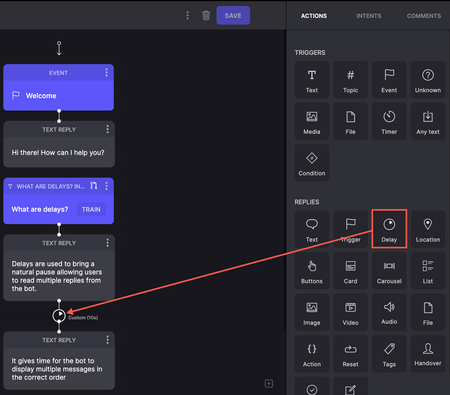
Enhancements Add delays to conversations In this release, we've introduced a Delay option in Replies in Dialogflow projects. When the bot sends multiple replies, you can add short pauses between messages to create a more natural conversational flow and enhance the user experience. These delays help ensure messages are processed and displayed in the correct order. In flows where the bot sends multiple text replies, a delay in delivering each message gives users enough time to read them. The following screenshot shows an example of multiple long messages that the bot sends. A delay added between the 2 messages allows users to take time to read the message as it appears. Read more on Delays.331ViewsSign in to react to this post0CommentsCommunity Classic 24.05
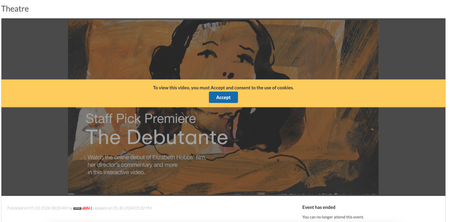
Member Experience Consent for third-party cookies usage in Events Removed limits on number of recipients for Private messages Member Experience Consent for third-party cookies usage in Events In Communities v23.10, we introduced an enhancement requiring users to explicitly consent for using cookies while uploading or viewing external videos in the posts. In this release, we have extended this enhancement to the Events. Now, members must explicitly consent to the usage of cookies when they use external videos to host Events on the Community. Below is an example of the consent banner on an events page: Removed limits on number of recipients for Private messages For communities in version 20.6 and later, messaging was limited to 10,000 users per message by default, with the option to configure this limit. With this release, we have removed these limitations altogether. You can now send messages to an unlimited number of users without any restrictions.1.9KViewsSign in to react to this post8CommentsKhoros Communities 19.12 Release Notes
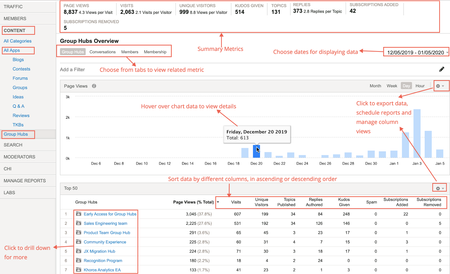
Khoros Communities 19.12 brings: New Features API Updates Bug Fixes New Features Group Hubs GA Private Messages v3 GA Enhancements to Search Subscriptions GA Group Hubs GA In the 19.8 Release Notes, we announced Early Access for our exciting new Group Hubs feature. Group Hubs is now in General Availability (GA). Group Hubs are our next generation to Groups. Therefore, we plan to sunset the legacy Groups feature late 2020. We believe you will find the extended capabilities and improvements to the user experience more than enough motivation to adopt this new way for your community users to interact. Group Hubs is enabled by default for all new Khoros Communities customers. Also, Group Hubs will be enabled by default for any customers who do not have Groups and are on Responsive. Any customers with Groups currently enabled must migrate to Group Hubs. Work closely with your Customer Success Manager (CSM) during the migration. See Group to Group Hubs migration for an overview of the migration path. Khoros will not initiate Group Hub enablement. After reading through the migration documentation, contact your CSM to begin the process. Group Hub membership types Every group hub has a membership type that controls access to the hub. A group hub can be: Open Closed Hidden In Open group hubs, all community users can browse and kudo all content, reply to posts, and comment on posts. Group hub members can create new content as well as browse, reply, and comment. Closed group hubs are visible to all users, but only members of the group hub can access content. Non-members do not have read or reply permissions for closed group hubs. Content in closed group hubs appears in the search results to group hub members only. Non-members who try to access a closed group hub are directed to a page explaining that the group hub is closed and that the user must request access. Members can create new content as well as browse and reply to existing content. Community users access Hidden group hubs either by invitation or by being added to the group hub directly in Community Admin. Hidden group hubs are hidden from non-members in the Community UI and cannot be searched. Non-members attempting to access the URL to a hidden group hub’s Group Hub Page or child nodes are directed to an error page. Requirements Group Hubs requires: Community version 19.12+ A Responsive skin Private Messages version 2+ Note: The Private Messages feature is required to send invitations to group hubs and to receive notifications that requests to join have been approved. In addition to Private Messages being enabled for the community, the community member receiving the invitation and receiving the approval notification must explicitly opt-in to receive private messages in My Settings > Preferences > Private Messenger. Important! Group Hubs provides new components. Two of these components, Group Hubs and My Group Hubs are not included on any pages by default. We recommend adding the Group Hubs component to the Community Page and/or the Category Page. We recommend placing the My Group Hubs page on the View Profile Page and/or the Community Page. See Group hub components to learn more about how these components work. See to learn how to add a component to a page. Group Hub Analytics With this release, Group Hub analytics are available in Community Analytics (formerly Lithium Social Intelligence). You can view metrics related to Group Hub activities on your Community using Group Hub analytics. The Community Analytics page now displays all the board types aligned under the All Apps tab. A new tab called Group Hubs is listed under the CONTENT tab. The metrics provided here are similar to the existing ones in Community Analytics. Additionally, information related to membership details like subscriptions added and removed to group hubs, number of members joined or left the group hub, invites sent and accepted are provided. Group Hub APIs Community API v2 supports Read actions via LiQL queries to the Grouphubs and Memberships collections. Create, Update, and Delete actions will be supported in the upcoming Community release 20.1. Update: The Memberships collection has deprecated with release 20.1. We recommend against creating any customizations using the Memberships collection. See the 20.1 Khoros Communities release notes for the new membership APIs. We are so sorry. We are making updates to the Membership API once again. Please wait until 20.3 when we will release the final updates. Group Hub integration with Khoros Care Group Hubs content flowing into Khoros Care will be supported in the upcoming Community 20.1. Group Hubs documentation Find Group Hubs documentation in the Group Hubs knowledge base. We recommend the following articles for an overview: About Group Hubs Group hub discovery and engagement Group Hubs API support Group Hubs best practices Group to Group Hubs migration Private Messages v3 GA In the 19.12 Release, we're announcing the GA of Private Messages v3. With the GA Release, we have added these features: Changes in Mobile View Option to copy/paste a comma-separated username list in the Send To field Search within private messages Upload files as attachments API support for threaded private messages Note: With the release of Group Hubs, when a group hub name is added to the Send To field, all the members having membership with the group hub are added. Changes in Mobile View We have introduced a new design for Private Messages UI in Mobile View. All functionalities remain the same. Messages grouped by conversation in threaded format Expanded view of a conversation Option to copy/paste comma-separated username list in the Send To field With this release, you can now paste a list of comma-separated usernames. This feature is useful when you have a list of users whom you want to send messages on a regular basis. You can copy/paste the list of user names in the Send to field and the usernames are automatically derived. Any invalid Usernames are removed from the list and the rest are added. An error message is displayed stating which Username was removed. Search within Private Messages To help you find messages in a crowded inbox, we have introduced search functionality. This is available in both desktop and mobile views. Just type the text you are looking for in the search bar. You can also choose from where you want to pull the message to narrow down your search. Click the Close (X) icon to navigate back to the Inbox. Note: Searches are not case sensitive and search for the exact match. Upload files as attachments You can now upload files as attachments to your private messages. Members must have the Upload file attachments to Private Messages permission to add attachments to private messages. You can find this permission under Admin > Users > Permissions. With these permissions set, you can also drag-and-drop/upload file attachments when composing private messages: API support for threaded private messages In the 19.12 release, we have added API support for Private Messages feature version 3. Threaded private messages (Private Messages v3) uses new Community API v2 objects: notes_thread - represents a private message thread threaded_note - represents a message in a private message thread private_messages_view - represents the view of the private message mailbox: inbox or outbox The Private Messages v3 APIs are independent of the inbox_note and outbox_note objects. Customizations that include inbox_note and outbox_note should continue to work after upgrading to Private Messages v3, but inbox_note and outbox_note do not support the threaded message UI. The Community API v2 enables you to: Create a threaded message between one sender and one recipient Create a new note in an existing thread Create a threaded message to multiple users (non-broadcast) Create a threaded message (broadcast) Reply to a private message (single recipient) Reply to a private message (multiple recipients) Retrieve private messages on a private message thread Retrieve private notes threads for a user Mark private message threads as read or unread Delete private message threads See the following guides in the Developer Documentation Portal for more information: Private Messages APIs and feature versions Threaded private message API support Enhancements to Search Subscriptions (GA) Search Subscriptions trigger notifications when a post containing a set of keywords created primarily by the community admin or moderator is posted to the community. Some communities use top-level categories to partition their community by some criteria (for example, different languages). The current Search Subscription feature sends notifications to members regardless of the top-level category. That is, the member is notified even if the subscribed keyword is posted in a different top-level category. This is also the case when the top-level categories are of different languages. To reduce the notification noise, this enhancement restricts the scope of notifications to the top-level category that the member most recently saved the search subscription. In the below example, the member belongs to Portugal top-level category, but logged into Argentina top-level category. If he/she hits SAVE, he/she moves from Portugal top-level category to Argentina. The member is notified only when apples, oranges are posted in Argentina top-level category and not when posted in Portugal. A message is displayed as highlighted below. Email notifications contain the post text and the link to the post, so that you know why you are notified. The notification also has the option to reply via email and have it posted to the thread. Even if the post contains the search text appearing multiple times, only one notification is sent. If the text appears in the Subject of a reply to a post, then notification is not sent. Note: To enable this feature, open a Support ticket. Learn more about Search Subscriptions. API Updates Community API v1 Get the count of unread messages in a board or category To deliver on this idea from kandulmadhu, we have added the following endpoints to Community API v1 to retrieve the count of unread messages in a board or category for the current user: /boards/id/[id]/messages/unread/count /categories/id/[id]/messages/unread/count Pass the ID of the board or the category in the endpoint path. cURL examples (Session Key authentication) curl -X GET \ 'https://[COMMUNITY DOMAIN]/restapi/vc/boards/id/[BOARD ID]/messages/unread/count?restapi.response_format=json' \ -H 'li-api-session-key: [SESSION KEY]' curl -X GET \ 'https://[COMMUNITY DOMAIN]/restapi/vc/categories/id/[CATEGORY ID]/messages/unread/count?restapi.response_format=json' \ -H 'li-api-session-key: [SESSION KEY]' Note: If using OAuth, pass Authorization and client-id in the header as described in the The Community API v1 call. Response example { "response": { "status": "success", "value": { "type": "int", "$": 14 } } } Community API v2 Private Message API (threaded private messages) We've added the notes_thread and threaded_note objects and CRUD support for Private Messages feature version 3. See Threaded private message API support in the Developer Documentation Portal for full details. See Return promoted topics first in a LiQL response We've added the is_promoted field and the include_promoted constraint to support returning Promoted topics at the top of LiQL responses. When is_promoted is true in a response from the messages collection, the topic has been promoted in search results in Community Admin > Content > Promoted Search. The is_promoted field can be used in a SELECT statement. When include_promoted is set to true in the WHERE clause of a query to the messages collection, any topics defined in Community Admin > Content > Promoted Search appear first in the result set followed by the organic search results (search results regardless of promoted items). For any given search, a maximum of two promoted topics are returned in the response. Promoted topics are included in the response in addition to the number of items specified by LIMIT in your query. For example, if you set LIMIT to 5 and two promoted items exist, the results set will include 7 items. This matches the experience of the Community UI, which includes promoted items at the top of search results and also again in the response. The ORDER BY clause defines the order of the organic search results, whereas the Priority of promoted search items (set in in Community Admin) dictates the order of the promoted results. See About Promoted Search and Create Promoted Search rules to learn more about the Promoted Search feature. Example query SELECT subject, id, author, view href FROM messages WHERE subject MATCHES 'dogs' AND include_promoted = true ORDER BY post_time DESC LIMIT 5 You Found It. We Fixed It. We have improved the performance when returning badge counts. We have improved security against Cross-Site Scripting (XSS) when submitting an attachment as part of a topic or reply. We have fixed an issue where customers were seeing JavaScript errors like the following when landing on Forum Page or loading the Message Editor: TypeError: aa is undefinedlia-scripts-body-min.js:formatted:42636. Issues with customers experiencing a Cloudfront timeout error for requests taking longer than 60 seconds have been resolved. Subscription notifications are now being sent properly after Blog and TKB articles are published after being saved multiple times as a draft. We have fixed an issue where the @mention drop-down list was not showing the correct results even when the exact username was entered in the UI. @mentions is now working as expected. TinyMCE with Editor v2 no longer adds an unwanted "http://" to the URL when creating an anchor within the same page. Performance issues with label-based searches when hierarchical labels is enabled have been resolved. We have fixed a bug with Alt-Text on images where the Alt-Text was set to the image file name if no Alt-Text was specifically set on an image using the alt attribute of the <li-image> element, even if the image had a caption. Now, the image caption is set as the Alt-Text unless a user manually overrides the alt attribute in the HTML tab in the Editor. If no caption is set, and there is no alt attribute defined, the Alt-Text will default to the image file name. Community error pages now include CSP or X-Frame-Options headers. Due to inconsistencies with Search subscription notifications, we no longer allow customers to create search subscriptions with search terms entered on multiple lines. For example, a user can no longer enter: Peaches Apples Pears This fix helps ensure that the Community app recognizes and interprets the subscription correctly and that customers receive Search subscription notifications as intended. The notification after the successful nomination now says "Success! This topic was nominated as an article to the <board title>. View Dashboard." instead of "Success! This topic was nominated as an article to the <board ID>. View Dashboard." Customers reported losing the ability to copy/paste images into the Editor from the clipboard with Community release 19.9. We have fixed this issue. We have resolved "Resource not found" errors encountered when inserting an image with the Image Uploader and then editing the uploaded image. Relative dates are now translated into Russian correctly. Image links to images uploaded to Community and rejected via moderation now correctly show an 'unavailable' image instead of the rejected image. Selecting Options > Print in a TKB comment now takes you to the Print Page as expected. Floated topics that were unfloated and then floated again at a later date now appear at the top of the message list as expected, instead of retaining its original float timestamp.4.9KViewsSign in to react to this post76CommentsKhoros Communities 20.8 Release Notes
Community 20.8 delivers self-service for many Community page URL redirects, a sneak peek at improvements to Community in-app user guidance and help, as well as enhancements to several existing features and APIs. New Features API Updates Bug Fixes New Features and enhancement Coming Soon: Improved User Guidance and Help in Community URL redirect rules for Community pages Addition of new columns to Bulk Download of member data in Community Analytics Cookie Banner enhancements Coming Soon: Improved User Guidance and Help for Community In the coming months, we will be rolling out a new User Guidance/Help solution for Community and Community Analytics. First up will be in-app guides. These guides will provide you with a helpful information, including: New feature announcements Product alerts and notifications Tips to help you get the most out of community features Don’t be surprised if you start seeing guides like this in the coming weeks: And don’t worry, we won’t be spamming you with lots of pop-ups. These guides are intended to help you get the most out of the product and get out of your way fast. Next, we’ll be rolling out our new Resource Center, which you can open by clicking the question mark icon at the top-right corner of the application window. Use the Resource Center to get product help, access Release Notes, and learn about available Product Coaching sessions and community best practices. Note: Later this year, we plan to remove the existing Help drawer that appears at the bottom of the Admin and Studio apps. This feature-level help content will all be available within the Help section of the new Resource Center. Guides and Resource Center will be available in: Community Admin Studio App Creator Toolbox Moderation Community Analytics URL redirect rules for Community pages Over time, content on your community changes, moves, is deleted/archived, or replaced. When this happens, you want to make sure that Internet searches don’t show results that go to obsolete/missing pages. Or, sometimes, you might want to point people to newer or more relevant content. To help optimize these search results and make sure that people get to the right content, you can create redirects rules. Redirects enable you to keep page and link authority of your website when a website’s URL is redirected to another URL (for any reason). Basically, redirects help you keep the SEO of your website healthy and keep visitors engaged on your site. Properly defined redirects help keep your search rankings. The most common types of redirects are 301 (permanent) redirect and 302 (temporary) redirect. Previously, you needed to open a Support ticket to get these search redirect rules created. As of the 20.8 Release, you can create these search redirect rules yourself from Community Admin. Note: To create redirect rules other than 301 or 302 redirects, you must still open a Support ticket. The ability to create, edit, or delete redirect rules is granted through the Manager redirects permission, located under Admin > Users > Defaults > SEO Redirects. This permission is denied by default. We recommend enabling this permission for Admins or other trusted community members. Members with this permission have access to the Redirect Rules tab under Admin > System > SEO. Learn more about setting up members to create redirect rules and how to manage these rules from Community Admin . Addition of new columns to Bulk Download of member data in Community Analytics Bulk Download Members Data provides a snapshot of member activity and community influence. With the 20.8 release, this report will include Registration Start Date, Registration Completion Date, and Registration Status columns. Registration Start Date is the timestamp (UTC) when the member initiates the registration process. The Registration Completion Date is the timestamp (UTC) when the Registration Status changes from “Partially Registered” to “Registered". If the registration was completed more than two years ago, the Registration Date will be empty in the Bulk Download Members Data report. With the addition of these columns, you can now filter the list of members who completed their registration within the time frame selected for the report. Learn more on download community member metrics. Cookie Banner enhancements Currently, when users visit the community the cookie banner appears and prompts them for consent to use site cookies. The Click Here link opens the webpage that describes your cookie policy, but it does not dismiss the banner. As of today, clicking OK or continuing to use the site is considered as user consent to add or set all community cookies. With the 20.8 release, we have changed this behavior. Users must now click OK in the cookie banner and explicitly confirm their consent to activate the community cookies. Continuing to use the site will not be considered as a user consent anymore. If users do not provide their explicit consent, only the Type 1 cookies(“Strictly Necessary”) are set, and all other cookies are held back. With this release, we also re-classified the LithiumVisitor and VISITOR_BEACON cookies into Type 1. Learn more about cookies found in Khoros communities. API Updates api.mark_read view count update The Community API v2 api.mark_read query parameter now increments the view count for messages for anonymous as well as signed-in users. See Mark a message as 'read' for more information about the api.mark_read query parameter. Constrain message queries by messages posted or edited in the past n days We have added new fields, constraints, and sorts to enable you to constrain queries to the messages, reviews, and review_comments collections by posts that have been posted or edited in the past n days. In this context, the term posts refers to topics, replies, and comments for all conversation styles (forum, idea, TKB, QandA, group, blog, contest) including reviews and review comments. See Get messages posted or edited in a specified range of time for more information and examples. Developer Documentation improvements We've given our Community API v2 endpoint and LiQL documentation a refresh in order to improve usability and the search experience. See our announcement in the Community Blog. Here's a quick look. You'll now find the endpoint documentation in the API Reference section, organized by HTTP method type. You'll find LiQL reference information in the Guides section with our LiQL guides and examples. API v2 and LiQL reference now appear in Search results. Our legacy API v2 experience will remain in place for two weeks to ease the transition. We hope that you find these changes helpful. You Found It. We Fixed it We have fixed the issue where images that were uploaded when sending a private message from a mobile device were placed in the sender’s public image album instead of their hidden album. We have fixed the issue where users were not appearing in the @mentions pop-up menu, despite typing in their entire user name. Previously, when you sorted the list of Group Hubs by different criteria, the number of group hubs was returned each time. This display issue has been fixed. Previously, the Net Accepted Solutions metric key worked only in Studio and not the SDK. This issue has been fixed, and the key is now available via the SDK. We have fixed the issue where the Real-time Virus Scanner took a very long time to complete attachment scans or in some cases, never completed the scan.2.7KViewsSign in to react to this post26CommentsKhoros Communities 20.11 Release Notes
New Features Events (GA) Slack Integration (GA) Content Workflow and Approval improvements for Blogs and TKBs (EA) Email metrics (GA) Billing metrics (EA) Spam-related summary metrics in Community Analytics Filter for new posts in Community Analytics Multi-Factor Authentication (EA) Comments List Syndication (GA) API Updates Updated LiQL support to retrieve group hub members by membership role Create an abuse report for a private message Events (Occasions) API support Bug Fixes Events (GA) In the 20.10 Release Notes, we announced Early Access for our new discussion style, Events. We are excited to announce that Events is now in General Availability (GA). Note: Events is a paid feature but is included by default in certain community packages. To learn whether Events is included in your package or costs extra as well as request to have it enabled for your community, contact your Khoros Account Executive. Note: With the GA release, we provide API updates. While the front-end feature is called Events in the Community UI and feature documentation, the APIs and API documentation use the term occasions. Learn more about Events. Slack Integration (GA) In the 20.10 Release Notes, we announced Early Access for our Slack integration with the community. We are excited to announce that Slack integration is now in General Availability (GA) and enabled by default for all communities. Khoros Communities offers a Slack integration app that acts as a bridge between Slack and your community. Using the app, your employees can perform light-weight, common community tasks from within Slack. From the Community by Khoros Slack App, you can: Receive notifications Perform immediate actions (reply, kudo) Run simple community searches Learn more about setting up and using the Community by Khoros Slack app and participating in your community via Slack. Content Workflow and Approval improvements for Blogs and TKBs (EA) We are excited to announce the release of a new content workflow system to publish blogs and Tribal Knowledge Bases (TKBs). Blogs v3 and TKB v4 introduces a 3-step content-creation workflow that provides for authoring, editing and publishing. Note: You must open a support ticket to enable this feature. Content Workflow and Approval is the biggest change to the blogs and TKB discussion styles in several years and have been redesigned to focus on collaboration and usability. You now have more granular control over author, editor, and publisher permissions, enabling you to clearly define who can perform each task in the publishing workflow. Each blog or TKB article moves through different states and are assigned to members with specific roles. Thus, members always know what state an article is in, when it’s their turn to work on the content, and what they must do to move the article to the next step in the publishing workflow. This flowchart shows how an article moves through the publishing workflow and the tasks members with specific roles can perform. Content workflow and approval provides these blog and TKB enhancements: Granular Permissions: More robust permission structure to support different content roles Author, Editor, Publisher for different purposes create, review and publish respectively. Dashboard improvements: Improved article dashboard to track an article’s journey in the publishing workflow and make it easier to take relevant actions. Draft History view: A new component to track every action performed on an article until it is published. This records what action was done by whom and at what date and time. Compare two versions of a draft or published articles: Compare any two versions when the article is in the workflow process or after the article is published. The highlights show the differences between two versions of a draft or article. Internal comments: Provision to add internal notes for the article between the members collaborating on the draft. Notifications: Email Notifications to relevant community members at every stage in the Workflow. Learn more about Content Workflow and Approval improvements for Blogs and TKB. Email Metrics (GA) We now include the Email metrics feature in Community Analytics provides a set of key metrics that track the journey of an email from the moment it gets triggered in the community to the recipient opening and clicking on a community link in the email. Community Managers can measure the effectiveness of email notifications and take appropriate action to get the most of these triggered emails. To benefit from this feature, your community must: be on AWS use SendGrid as the email platform (Learn more about Khoros mail options) be on Community Release version 20.8 or above Learn more about Email metrics. Billing Metrics (EA) We are happy to announce the early access to Billing Metrics which provides more transparency to the metrics related to the billing of your community contract. By making Billing Metrics available in Community Analytics, you can easily access how your billing-related metrics trend against the contractual tier of your Community. Note: Reach out to your CSM to join the EA program. The Billing metrics shows the current usage against the contractual tier limits for the metrics subscribed to in the contract as per Salesforce data. Metrics also show the timeline view of usage of all the metrics subscribed to in the contract. Learn more about Billing Metrics. Spam-related summary metrics in Community Analytics The Summary view will now have the Spam metrics. In the Summary view you can view these two measures as SPAM TOPICS and MARKED NOT SPAM TOPICS. Filter for new posts in Community Analytics A filter for new Topics is now available in Community Analytics. This new filter (New Topics) considers only Topics created within the time period you select to compute the metrics and also to generate the CSV export. Note: This filter is available only for the Topics discussion style. Multi-Factor Authentication (EA) Khoros now provides support for Multi-Factor Authentication (MFA) to secure community access for users with privileged access rights (usually Admins). Enforcing an additional layer of security helps prevent unauthorized account access. After MFA is enabled for a community, the system mandates all privileged users (identified on the basis of certain elevated user permissions) to have this additional level of authentication to access the community. These users must: complete a one-time MFA setup for their account and add their account in an authenticator app provide a verification code generated by the authenticator app, in addition to the username and password for signing into the community. Note: As of now, MFA support is available only for non-SSO communities. To enable MFA for your community, open a Support ticket. Learn more about MFA. Comments List Syndication (GA) In 20.10, we announced EA of Comments List Syndication, our latest Community Syndication component. Comments List Syndication is released as GA as of Community release 20.11 and will be enabled for all customers by default. This syndication component supports simple SSO authentication flows (LithiumSSO and SAML). Authentication flows including additional levels of authentication, like multifactorial authentication, are not supported. Learn more in About Comments List Syndication. The GA release includes support of a new Comments List Syndication skin, based on our Responsive Skin. The Comments List Syndication skin is much leaner than the Responsive skin. We recommend basing your custom Comments List styling on the Comments List Syndication skin to improve load time performance of the component. A Comments List component uses the Comments List Syndication skin. You can create a custom version of this skin in Studio in order to match the look and feel of your Comments List to your brand's guidelines. See Comments List development and testing for more information. Also, see our new Comments List FAQ. API Updates We've updated LiQL support to retrieve owners and members from membership nodes, as well as introduced a new Occasions API to support the Events feature. Updated LiQL support to retrieve group hub members by membership role We have updated how to retrieve members from membership nodes by their membership role. (At this time, group hubs are the only node type that supports memberships. Group hub membership roles include: Member, Curator, Inviter, Owner) We added the grouphub.id constraint to the users collection as a simpler, more reliable way to retrieve users from group hubs. We recommend using these new constraints to retrieve owners and members. To get members of a group hub: SELECT id, login from users where grouphub.id = <groupHubId> To get members of a group hub by their role in the group hub: SELECT id,login FROM users WHERE grouphub.id = <groupHubId> and roles.name = 'Owner' Note: Prior to 20.11, you would use queries like these to get members and owners: SELECT id,login FROM users WHERE node.id = <nodeType>:<nodeId> SELECT id,login FROM users WHERE node.id = <nodeType>:<nodeId> AND roles.name = 'Owner' These legacy queries are still supported. Create an abuse report for a private message You can now create an abuse report with Community API v2 using a POST request to /api/2.0/threaded_notes/{threaded_note_id}/abuse_reports. This equivalent to selecting Report as Inappropriate from the Options menu in the Community UI. The request triggers an abuse report notification message that will appear in the Board ID set in the Board ID for private message abuse reports setting in Community Admin > Mod Tools > Abuse Notification. Note that the abuse report created cannot be queried with the /search endpoint or retrieved by ID. This API is supported with Private Messages v3 only. Learn more about Private Messages feature versions. Events (Occasions) API support Khoros is introducing API support for creating and managing Event messages through the Occasions API. As "events" is a common development term, we've decided to brand Event Messages as Occasions on the back end. From a functional and data standpoint, Events and Occasions are the same thing. The only difference is how you are interacting with them at the time, either through the front end (Events) or API (Occasions). The API allows for parity with the Communities Events feature which enables the creation and management of Events, invitations, RSVPs, etc. New API Endpoints: Create an Invitation to an Occasion Create an RSVP to an Occasion Update an RSVP Retrieve an Invitation Delete an RSVP Updates to Existing API Endpoints: Create a board Create a message Retrieve a message Update a message Delete a message Delete a board In addition to support through our API, we have added several new LiQL collections enabling you to retrieve information about Occasions, guests, and more. occasion_datas rsvps occasion_invites You Found It. We Fixed It. We have fixed the display issue where the "Change Node" modal window (Community Admin > "choose") was not usable if the community included a very large number of nodes.. We have fixed an issue in the page initialization script that caused some redirect loops in the 20.8 release. When using Forums v5, members who enabled the Automatically subscribe me to all topics or reviews I participate in setting under Profile settings > Notification Settings were not being auto-subscribed to those discussions and as a result did not receive any email notifications unless they manually selected the Email me when someone replies option for the thread. This issue has been fixed and members are now auto-subscribed when this setting is selected. We have fixed the issue where the Group Hubs Activity Feed was not being populated for 20.8 communities. Previously in Chrome or Firefox, you could not resize the Endpoints or Macros text boxes in Studio. This issue had been fixed, and you can resize these text boxes like you can in other areas of the application. To meet accessibility requirements, we have made changes to ensure that <iframe> and <frame> page elements are not empty and include unique title attributes.2KViewsSign in to react to this post3Comments