Khoros Communities 26.6 Release Notes
26.6 introduces Contests, a new way to spark participation, peer collaboration and recognition in your community, and delivers our largest accessibility release to date, a major step in our WCAG 2.2 AA work. It also builds on Orchestrator Scheduled Rules with more precise audiences, and brings improvements to federated search, carousels and the social feed. Email delivery gets a round of fixes, and other fixes address scheduled publishing, moderation actions, mention and follower emails, and private image access. Try everything shipped so far on Staging The Aurora features released from 26.2 through 26.5, which were introduced as Early Access, are now available on client Staging environments so you can explore and test them with your own content and configuration. Features available to try on Staging AI Moderation and Appeals, Community Language Model / Answer Assist, Community Orchestrator Customizable Email Templates with Orchestrator integration, Proactive Clarification Questions, Polls, Metric Explorer and Search Analytics, Expert Report, multi-select search filters and Author Search, Zoom event registration Cross-Board Posting, Interactive Social Feed (reactions, save and follow), Admin Review Mode for Answer Assist, Answer Requests opt-out, reaction email notifications Federated Search, Carousels (featured content banners), Orchestrator Scheduled Rules and Run Logs Please note that Production is not changed. Nothing is enabled in production without your testing and an explicit request. To enable a feature in production, tell your Customer Success Manager which features you have tested and want live New Features (Aurora) Contests: recognize and reward your members Contests give your members a fun, structured way to take part, collaborate with their peers and be recognized. Invite members to share their best work, work together in teams, vote for each other and earn rewards such as prizes, badges and ranks. Admins set everything up from a guided wizard, with no developer involvement. Rewards that recognize. For each contest, define reward tiers (for example first place, runners-up and a special mention). Each tier has a name, a description, an optional image and an optional badge, and you decide how many winners each tier has. Rewards are shown clearly on the contest page so members know what they are working toward. Badges are awarded automatically when results are announced. Three types of contest to fit your goals: Submission contest: members submit an entry (a photo, an idea, a story, a how-to) and winners are chosen by community vote or by judges. Best for user-generated content and ideas. Activity Challenge: no entries needed. Members qualify for reward tiers through what they do in your community during a set time window: posts, replies, kudos. Best for lifting everyday participation and welcoming new members. Hackathon: teams build and submit a project, and a judging panel scores it agai… 72ViewsSign in to react to this post
 0Comments
Khoros Communities 26.4 Release Notes
26.4 brings the Aurora homepage to life. Members can now react, reply inline, and save content directly from the feed without navigating away, while cross-board posting lets anyone start a discussion from any page in the community. Managers get a safe mode to evaluate Answer Assist quality before enabling it for members. Across Classic and Aurora, the release also delivers security patches, search fixes, and broad editor and stability improvements. New Features Aurora - Early Access Features The features in this section are available in Early Access for Aurora communities. They are behind feature flags and must be manually enabled — contact your Customer Success Manager to begin. Once enabled, all features are fully configurable from the admin panel. Note: Classic users can migrate to Aurora at no cost in 2026. Contact your CSM for detail Cross-Board Posting: Members can now start a post from the homepage or any category or landing page — no more navigating deep into the community structure to find the right board. Start a Discussion CTA — Admins enable a posting button on any page template via the Designer Tool. Button text is configurable (default: "Start a Discussion"). Permission-aware board picker — A searchable flat list showing only boards the user has permission to post on. Private group boards are hidden from non-members. All content types supported — discussions, blog articles, KB articles, ideas, and events. If clicked from within a specific board, that board is pre-selected in the picker. Anonymous users see the button but are redirected to sign-in on click Interactive Social Feed: Aurora's homepage Feed section transforms from a static list of post titles into a living, social feed where members can participate without breaking their browsing flow. Inline comment expansion — Click "See details" on any post to expand and read the latest comments directly in the feed. New/unread comments are surfaced first with clear visual highlighting. Inline replies — Reply to any discussion directly from the homepage feed using the same rich editor and community settings as the full thread view. Full post view — Expand the complete post body within the feed context; navigate to the full thread only when you need deeper engagement. Infinite scroll — The feed auto-loads additional posts as you scroll, with admin-configurable batch sizes and load limits. Admin controls: Enable or disable the interactive feed globally or per board from Admin → Settings → Content Features → Homepage Social Feed. Configure comment display count, infinite scroll batch size, and pilot specific boards before rolling out community-wide. One-click emergency disable option if issues arise Multi-Semantic Reactions: Move beyond a single "Like" and let members express nuanced sentiment. Reaction types include: Need This, Helpful, Insightful, Celebrate, and more — configurable per community. Reaction picker a…919ViewsSign in to react to this post8Comments
One year in, straight from us.
It has been a year since IgniteTech acquired Khoros, and I want to talk to you directly. There has been a lot of secondhand talk going around, none of it coming from us, and most of it from people who stand to gain from the telling. Enough of that. If you want to know something about Khoros, come to Khoros. Ask us. We will give it to you straight. Here is where we are. We did not buy Khoros to dress it up and sell it. That is the private equity playbook, and it is not ours. We are privately held, we keep what we acquire, and we run it for the decades, not the quarter. Khoros was losing millions. We made it profitable so it would not go dark. That took painful decisions, and I know some of them affected you. I am not going to gloss over that. It is also why Khoros is still here, on solid ground and able to invest in what comes next. And we have invested. We rebuilt the platform and shipped two AI-native products in under a year. Aurora AI reimagines community for the AI-answer-engine era and closes roughly 30% of community questions that never get a good answer. The brand-new Iris® AI replaces Care and Social Media Management, two products that ran separately for 15 years and never fully integrated. It brings social engagement and brand care into one platform, with publishing, moderating, engaging and analyzing all in one place. No other company offers enterprise community alongside enterprise social and brand care, and large enterprises are switching to us because of it. Everyone else still makes you choose. We have been the gold standard in customer community since Lithium (Khoros’ predecessor) pioneered the category in 2001, and then built the bridge to social when Lithium and Spredfast became one company, because community and social were never meant to live apart. That foundation has powered more than 4,000 community deployments since 2001 and draws 1.8 billion site visits a year. This first year post-acquisition was about putting the house in order. This next stretch is about innovation, building on the platform you count on. We are strengthening the online infrastructure and improving uptime, with faster, sharper incident response when something does go wrong. When we fix something now, we fix the cause, not the symptom. As part of that investment, we are turning on Community Guard for you, free for the next 60 days. It is a new protective layer for an internet that is not just people anymore. Communities like yours get crawled, scraped and hit by bots and automated agents that distort your analytics, consume capacity and put avoidable pressure on the experience. Community Guard catches that traffic before it reaches your community, while keeping the door open for real users and the discovery channels you actually want. The result is a cleaner, steadier community with real protection against bot abuse and traffic spikes. We are turning it on now because it is the right thing to do for our customers. Here is what all of this…452ViewsSign in to react to this post0Comments
Meta Threads is now available within Khoros Care
Khoros is pleased to announce that Meta Threads is now supported as an integrated channel within Khoros Care. The integration allows brands to respond and engage with their followers on brand posts, allowing them to provide top-notch social care and advocacy at scale. Using a social care and engagement platform like Khoros allows brands to respond faster across many different social platforms, with enterprise security and scale. “With the emergence and now solid footing of Threads in the social media marketplace, our customers are spending much more time there, building their communities and engaging with key audiences. Our platform integration with this channel creates a seamless opportunity to expand focus here.” – Josh Greenberg, General Manager Strategic Services at Khoros. All Khoros Care customers will have access to the Meta Threads integration at no additional cost. Meta Threads was developed to enable users to post updates with text, photos, and videos to allow for engagement in public conversations. With this integration, company admins can now authenticate their Threads brand accounts within Khoros Care and route, tag, and respond using the Care agent desktop. Agent experience The integration with Threads enables ingestion and response on brand posts, from agents. Care ingests videos, images, and carousel posts. Due to an API limitation, GIFs are not supported for ingestion or response at this time. Agents can: Read and respond to ingested content with text, @mentions, emojis, and 1 hashtag per response Confirm which user they are responding to via a “Replying To” note in the user interface Hide and unhide incoming content (Note: Only top-level posts can be hidden. When you hide a post, its children are also hidden.) Tag, route, and report on content Note: The ability to use only a single hashtag per response is due to an API limitation. If you add more than one hashtag, the additional hashtags are not clickable in the native application. Admin experience The Threads integration enables self-service authentication of brand-owned accounts. The integration is user-based, meaning that it is not related to a business account. The Threads integration is added in the same way as other Khoros channel integrations. For specific instructions on setting up the integration, refer to user documentation on how to Integrate Care with Meta Threads. The following options are available for the integration: Preferences: All comments as a single conversation Detect conversations within the comments (recommended) Who can respond with this account: Owner All Specific work queues Social Profile: Enable agent signatures (on/off) Moderator Actions: Allow agents to hide/unhide comments and replies (Note: Deleting comments is not available due to an API limitation.) For more information on Meta Threads integration or related topics, please visit the Khoros Ca…1.1KViewsSign in to react to this post1CommentCommunity Experience Surveys Are Now Available in Aurora
Overview Community Experience Surveys enable you to gather responses directly from members through short in-product prompts. You control who sees the survey, when it appears, how often it's shown, and which standardized questions are asked. Once responses start coming in, you can export the results for review or analysis. These surveys allow you to easily quantify the impact and performance of your community, arming you with the data needed to make decisions and take action. This feature is particularly useful for checking in with members after key interactions or tracking trends in satisfaction over time. Key Features When setting up a survey, there are a few main areas to consider: Branding: Set the name, upload a logo, and choose colors to keep the survey consistent with your community’s design. Behavior: Decide which members will see the survey, under what conditions, and how frequently it should appear. Questions: Choose from a list of standardized questions to shape the kind of feedback you want to collect. Activation: Once everything is configured, you can turn the survey on (or off) with a single toggle. These options give you flexibility without requiring a complicated setup. How to Use It To configure a survey: Go to Settings > Content Features > Community Experience Surveys Follow the steps in the Create community experience surveys documentation To export results: Go to Content Features > Community Experience Surveys > Questions and Answers Click Export To help you get started, we've put together a few best practices and common FAQs for reference here. We are looking forward to seeing your usage of this survey, and would love to hear your feedback on new Community Experience Survey-related enhancements that you'd like to see in the future.745ViewsSign in to react to this post3CommentsKhoros Flow v25.02.1 Release Notes
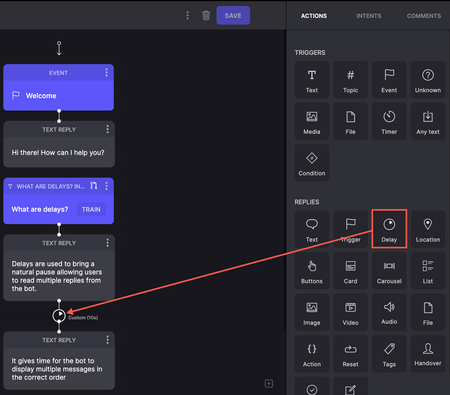
Enhancements Add delays to conversations In this release, we've introduced a Delay option in Replies in Dialogflow projects. When the bot sends multiple replies, you can add short pauses between messages to create a more natural conversational flow and enhance the user experience. These delays help ensure messages are processed and displayed in the correct order. In flows where the bot sends multiple text replies, a delay in delivering each message gives users enough time to read them. The following screenshot shows an example of multiple long messages that the bot sends. A delay added between the 2 messages allows users to take time to read the message as it appears. Read more on Delays.331ViewsSign in to react to this post0CommentsCommunity Classic 24.05
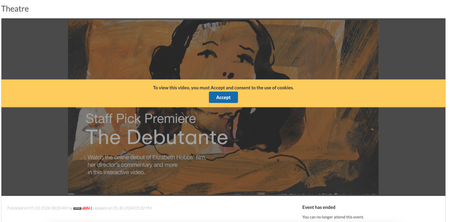
Member Experience Consent for third-party cookies usage in Events Removed limits on number of recipients for Private messages Member Experience Consent for third-party cookies usage in Events In Communities v23.10, we introduced an enhancement requiring users to explicitly consent for using cookies while uploading or viewing external videos in the posts. In this release, we have extended this enhancement to the Events. Now, members must explicitly consent to the usage of cookies when they use external videos to host Events on the Community. Below is an example of the consent banner on an events page: Removed limits on number of recipients for Private messages For communities in version 20.6 and later, messaging was limited to 10,000 users per message by default, with the option to configure this limit. With this release, we have removed these limitations altogether. You can now send messages to an unlimited number of users without any restrictions.1.9KViewsSign in to react to this post8CommentsKhoros Communities 19.12 Release Notes
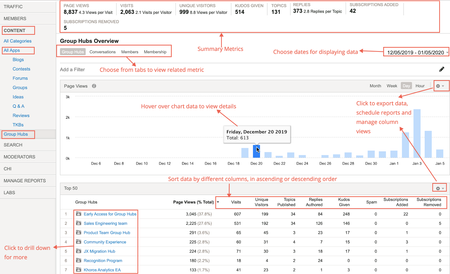
Khoros Communities 19.12 brings: New Features API Updates Bug Fixes New Features Group Hubs GA Private Messages v3 GA Enhancements to Search Subscriptions GA Group Hubs GA In the 19.8 Release Notes, we announced Early Access for our exciting new Group Hubs feature. Group Hubs is now in General Availability (GA). Group Hubs are our next generation to Groups. Therefore, we plan to sunset the legacy Groups feature late 2020. We believe you will find the extended capabilities and improvements to the user experience more than enough motivation to adopt this new way for your community users to interact. Group Hubs is enabled by default for all new Khoros Communities customers. Also, Group Hubs will be enabled by default for any customers who do not have Groups and are on Responsive. Any customers with Groups currently enabled must migrate to Group Hubs. Work closely with your Customer Success Manager (CSM) during the migration. See Group to Group Hubs migration for an overview of the migration path. Khoros will not initiate Group Hub enablement. After reading through the migration documentation, contact your CSM to begin the process. Group Hub membership types Every group hub has a membership type that controls access to the hub. A group hub can be: Open Closed Hidden In Open group hubs, all community users can browse and kudo all content, reply to posts, and comment on posts. Group hub members can create new content as well as browse, reply, and comment. Closed group hubs are visible to all users, but only members of the group hub can access content. Non-members do not have read or reply permissions for closed group hubs. Content in closed group hubs appears in the search results to group hub members only. Non-members who try to access a closed group hub are directed to a page explaining that the group hub is closed and that the user must request access. Members can create new content as well as browse and reply to existing content. Community users access Hidden group hubs either by invitation or by being added to the group hub directly in Community Admin. Hidden group hubs are hidden from non-members in the Community UI and cannot be searched. Non-members attempting to access the URL to a hidden group hub’s Group Hub Page or child nodes are directed to an error page. Requirements Group Hubs requires: Community version 19.12+ A Responsive skin Private Messages version 2+ Note: The Private Messages feature is required to send invitations to group hubs and to receive notifications that requests to join have been approved. In addition to Private Messages being enabled for the community, the community member receiving the invitation and receiving the approval notification must explicitly opt-in to receive private messages in My Settings > Preferences > Private Messenger. Important! Group Hubs provides new components. Two of these components, Group Hubs and My G…4.9KViewsSign in to react to this post76CommentsKhoros Communities 20.8 Release Notes
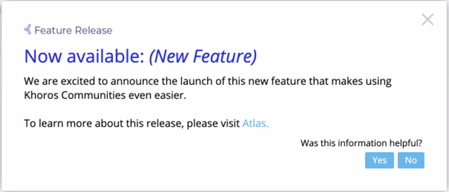
Community 20.8 delivers self-service for many Community page URL redirects, a sneak peek at improvements to Community in-app user guidance and help, as well as enhancements to several existing features and APIs. New Features API Updates Bug Fixes New Features and enhancement Coming Soon: Improved User Guidance and Help in Community URL redirect rules for Community pages Addition of new columns to Bulk Download of member data in Community Analytics Cookie Banner enhancements Coming Soon: Improved User Guidance and Help for Community In the coming months, we will be rolling out a new User Guidance/Help solution for Community and Community Analytics. First up will be in-app guides. These guides will provide you with a helpful information, including: New feature announcements Product alerts and notifications Tips to help you get the most out of community features Don’t be surprised if you start seeing guides like this in the coming weeks: And don’t worry, we won’t be spamming you with lots of pop-ups. These guides are intended to help you get the most out of the product and get out of your way fast. Next, we’ll be rolling out our new Resource Center, which you can open by clicking the question mark icon at the top-right corner of the application window. Use the Resource Center to get product help, access Release Notes, and learn about available Product Coaching sessions and community best practices. Note: Later this year, we plan to remove the existing Help drawer that appears at the bottom of the Admin and Studio apps. This feature-level help content will all be available within the Help section of the new Resource Center. Guides and Resource Center will be available in: Community Admin Studio App Creator Toolbox Moderation Community Analytics URL redirect rules for Community pages Over time, content on your community changes, moves, is deleted/archived, or replaced. When this happens, you want to make sure that Internet searches don’t show results that go to obsolete/missing pages. Or, sometimes, you might want to point people to newer or more relevant content. To help optimize these search results and make sure that people get to the right content, you can create redirects rules. Redirects enable you to keep page and link authority of your website when a website’s URL is redirected to another URL (for any reason). Basically, redirects help you keep the SEO of your website healthy and keep visitors engaged on your site. Properly defined redirects help keep your search rankings. The most common types of redirects are 301 (permanent) redirect and 302 (temporary) redirect. Previously, you needed to open a Support ticket to get these search redirect rules created. As of the 20.8 Release, you can create these search redirect rules yourself from Community Admin. Note: To create redirect rules other than 301 or 302 redirects, you must still …2.7KViewsSign in to react to this post26CommentsKhoros Communities 20.11 Release Notes
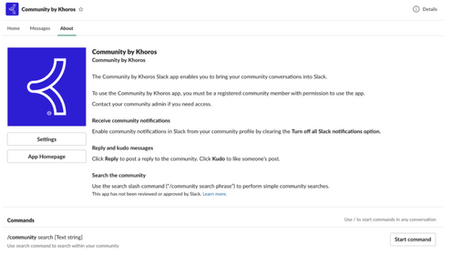
New Features Events (GA) Slack Integration (GA) Content Workflow and Approval improvements for Blogs and TKBs (EA) Email metrics (GA) Billing metrics (EA) Spam-related summary metrics in Community Analytics Filter for new posts in Community Analytics Multi-Factor Authentication (EA) Comments List Syndication (GA) API Updates Updated LiQL support to retrieve group hub members by membership role Create an abuse report for a private message Events (Occasions) API support Bug Fixes Events (GA) In the 20.10 Release Notes, we announced Early Access for our new discussion style, Events. We are excited to announce that Events is now in General Availability (GA). Note: Events is a paid feature but is included by default in certain community packages. To learn whether Events is included in your package or costs extra as well as request to have it enabled for your community, contact your Khoros Account Executive. Note: With the GA release, we provide API updates. While the front-end feature is called Events in the Community UI and feature documentation, the APIs and API documentation use the term occasions. Learn more about Events. Slack Integration (GA) In the 20.10 Release Notes, we announced Early Access for our Slack integration with the community. We are excited to announce that Slack integration is now in General Availability (GA) and enabled by default for all communities. Khoros Communities offers a Slack integration app that acts as a bridge between Slack and your community. Using the app, your employees can perform light-weight, common community tasks from within Slack. From the Community by Khoros Slack App, you can: Receive notifications Perform immediate actions (reply, kudo) Run simple community searches Learn more about setting up and using the Community by Khoros Slack app and participating in your community via Slack. Content Workflow and Approval improvements for Blogs and TKBs (EA) We are excited to announce the release of a new content workflow system to publish blogs and Tribal Knowledge Bases (TKBs). Blogs v3 and TKB v4 introduces a 3-step content-creation workflow that provides for authoring, editing and publishing. Note: You must open a support ticket to enable this feature. Content Workflow and Approval is the biggest change to the blogs and TKB discussion styles in several years and have been redesigned to focus on collaboration and usability. You now have more granular control over author, editor, and publisher permissions, enabling you to clearly define who can perform each task in the publishing workflow. Each blog or TKB article moves through different states and are assigned to members with specific roles. Thus, members always know what state an article is in, when it’s their turn to work on the content, and what they must do to move the article to the next step in the publishing workflow. This flowchart shows how an article m…2KViewsSign in to react to this post3Comments