Communities 2021: Mid-year Update
Greetings from the Communities team. We hope you, your family & friends are staying safe and healthy. As we finish the first half of the year and enter the second, let’s review where we are and also take a sneak peek into some exciting things on the anvil. Our goal is to help you build a comprehensive engagement strategy with your brand community - a vibrant space where your users find answers, develop expertise, share experiences, and in that process build your brand. A brand community that connects across dot com, SEO, social engagement, and digital care. Expanding user engagement: One of the key strategic objectives with the Communities roadmap is powering new and additional use cases for expanding end-user engagement. Last year, we took a big step in this direction with support for Group Hubs. Group Hubs enable creation of spaces within a Community around specific topics and special interests. While continuing to enhance Group Hubs capabilities, we added a new discussion style in Events early this year. Communities and Events go hand-in-hand. Support for a diverse choice of video technologies, Zoom being the latest, means that you can now go live from Communities. Glad to see your enthusiastic adoption of this new discussion style as you make your Communities the home for your brand's events. In addition to ICS support, enhanced Events APIs (1, 2), and Event Analytics released last month, we are currently readying support for Invite-by-email for Events. Events: Now supporting live Zoom events Redesigned with a focus on collaboration and usability, also released earlier this year was content workflow and approval enhancements for Blogs and TKBs. With granular permissions, a new dashboard, article history views, compare versions, internal comments and enhanced notifications, this enables teams of different sizes to collaborate on new & existing articles at scale without getting in each other's way. Nothing differentiates a community more than quality content. Redesigned Blogs and TKBs make it easier than ever to produce quality crowdsourced content in the community without the need for any external tools. Discussions and comments add a spark of excitement and engagement to most content because they can transform mundane browsing experiences into interactive conversations with experts. For example, Comments List Syndication creates a comment box on any external web page. The comments are mirrored in your community, effectively creating a network of interactive conversations across different web properties. In addition, the comment moderation is all handled through the Community Admin capabilities that already exist in the community - making it cost-effective and customizable for all types of pages. First half of this year, we further enriched Syndication capabilities and this continues to be a focus going forward as well. Many thanks for your feedback, ideas and suggestions around these. We are all ears and are looking into further enhancing the capabilities via extending Invite-by-email to Group Hubs, easier ways to administer Group Hubs, more granular permissions for Blogs and the like. Community Management & Security: Another key investment area is enabling easier management of Communities. Recent additions include support for Multi-Factor Authentication (MFA), Self-Serve SAML SSO, new permission controls for Video, Feature logs, and a host of other enhancements. While MFA provides an additional layer of security to help prevent unauthorized account access, SAML SSO is now available out-of-the box as a core product feature, instead of the plugin-based approach used earlier. This simplifies setting up SAML SSO in Communities and reduces the total cost of ownership. Feature logs can be used to generate feature specific logs in components and endpoints to help developers and administrators monitor and debug during Community customisation. Feature logs can be accessed in the Community Admin via Toolbox. We believe that video should be tied exclusively to the community message it was originally part of and these new permission controls are a step in that direction. Over the course of the last few months, we have also been beefing up community moderation capabilities via Engagement Manager (called Manager View earlier). Sporting a new moderation column, Engagement Manager supports an intelligent implementation of bulk processing whereby moderators can select a set of posts and take actions such as Approve, Reject, or Mark as Spam. This year, we also announced a partnership with Samurai Labs, an AI firm dedicated to preventing online violence, to help detect potentially offensive content. Offensive content can be automatically removed from communities without exposing moderators to this stressful material, ultimately creating healthier and more positive communities. Coming very soon is support for Bulk Content Archive. With a variety of filters around age, location, type and activity of the content, this upcoming feature makes it significantly easier to find and archive stale content in a few clicks. Analytics & Insights: With Billing metrics you can now access how your billing-related metrics trend against the contractual tier of your community. This metrics shows the current usage against the contractual tier limits for the metrics subscribed to in your contract. Metrics also shows the timeline view of usage of all the metrics subscribed in the contract. Also added this first half were support for Event Analytics and view upto 12-months at a time. Event Analytics provides key metrics such as RSVP responses, number of unique visitors to an Event page. It helps you measure the success of your community events and improve their engagement. As covered in our June roadmap webinar, a set of new Community Manager (CM) dashboards is in the works. Real-time insights with a bias for action, these new dashboards will include 2 key elements: a community snapshot, a summary view of a set of configurable headline metrics of your community - number of Active Members, Page Views, Unique Visitors so on a community dashboard, a ready reckoner to what has happened/happening in the community - what topics are trending and needing attention, how are key indicators like time-to-first replies faring, how is the user activity shaping up etc While we are working on these, we wanted to share that the beta rollout of the new CM dashboards is delayed by a quarter than originally planned. This delay is due to a change in the platform for these new dashboards. We wanted to fast track consolidation of all community analytics in one single interface, i.e. combine Admin Metrics, Community Analytics and the new CM dashboards into a single tool, over time. We completely understand and share your excitement around these new dashboards and will move forward on this, on priority. We will share further updates, as soon as we have them. Community Management Dashboards: Community Snapshot Voice-of-Customers (VoC) leveraging CX Insights is another key project we are excited about. VoC will help you further to build an actionable view of users to create world-class experiences. More details to come! New Community Experience: The new Community UI service, codenamed Project Aurora, is progressing well. Please watch the detailed breakout-session in our last webinar for a walkthrough of the key elements of this new, transformational community experience. The new community experience offers: a new, modern, beautiful user experience, that is ready out-of-the-box, accessible and optimized for web performance the community managers with simple front-end tools to theme & configure a new admin interface an enhanced developer experience This gives you a community platform that is ready off-the-shelf, with significantly reduced need for customizations (hence cheaper to maintain) and easy to develop against, thus reducing the Total Cost of Ownership (TCO). All this without any need for data migrations as the underlying platform remains the same while the front-end is re-imagined. Blog Article View User Avatars New Admin Interface While we will continue to share updates in our future webinars and via discussions on Atlas, do drop us a note if you have any questions or need any additional details. This is a major investment into the future of communities. We would want to work with you every step of the way and look forward to partnering with you as we bring this to life. In addition to these, we are also working on upgrading our back-end Search platform, enhancing Accessibility and improving Performance. Query Builder, our proposed tool for on-demand insights on content & members in the community is also in the works. As part of the mid-year review, we are proposing to move out Community - MS Teams integration and Ghost Authoring & Transfer Ownership for Blogs & TKBs from this year's roadmap to next year's. These remain on our backlog as priority items and we will bring them back to the roadmap as soon as some of the currently active projects such as the New Community Experience and CM Dashboards are close to roll out. This adjustment helps us to focus our energies on a limited number of high profile projects at a time and deliver them with quality. Hope this was helpful. As always, we would love to hear your feedback, thoughts, and suggestions. 8KViewsSign in to react to this post
 8Comments
Community Experience Upgrade: Out of the Box with Project Hermes
Brand communities are rapidly changing as a result of broader changes in the world over the last 12 months. In response to unforeseen circumstances, many brands had to shift priorities and resources and build new solutions. The same is true at Khoros, and we recently completed a major revamp of our technology that was not on our plan or roadmap. Since we didn't follow a typical product release and communication process you may not have heard of it. Accelerated need for communities It’s no secret we are living through a rough patch in human history. We are lucky to have incredible tools for digital connection - and none are more powerful than communities. In this time of change, having a brand community to build powerful networks that are more adaptable and resilient is helping many brands succeed. Other brands are therefore launching or expanding their own online communities. As a leader in the space for two decades, Khoros has built some of the most respected and successful brand communities in the world - like Airbnb, Google, Microsoft, Anaplan, eBay, Fitbit, Cisco, Sephora, Alteryx, and many more. One of the challenges we face is that new customers want to emulate these iconic, mature communities as quickly as possible. However, Rome wasn’t built in a day. Although we get better with every community we build, it still isn't possible to create these incredibly successful communities overnight. What we needed was to optimize the tools and resources we have available to help every new community achieve that success, avoid any pitfalls, and grow rapidly without needing the same level of resources as they did in the past. Solution Every new Khoros Community launch is based on years of best practice experiences and comes packaged with the optimal level of services; including front- and back-end engineering, experienced community strategists, in-person and on-demand training, and project management. This model still works, but to respond to the changing environment, we needed to accelerate our launches while ALSO delivering more of the most recent best practices and technology innovations in this shorter time frame - either via automation or “out-of-the-box.” Project Hermes was the internal codename for an initiative we launched in June of 2020 in response to rapidly increasing customer demands to simplify and accelerate community launches. We created a team that spanned every department in Khoros: Product, Engineering, Professional Services, Customer Success, Sales, Marketing, and Strategy. Everyone came to the table with a list of challenges uncovered in recent community launches and we all committed to put ourselves in the customer’s shoes to create the best possible community launch (or "relaunch" - more on that later). We wrapped up the project in November and here is what we did. Created a new default community theme, including: More modern UX reflecting the latest responsive updates for mobile-friendly, high-performance communities. Updated configurations and settings for to accommodate the newest strategies to optimize fast growth. Replaced “lorem ipsum” default content with actual best practices - such as a “How to Moderate threads” forum thread. Consolidated customer-specific customizations into a single plugin to simplify installation and enablement. Includes latest Accessibility capabilities driven by WCAG2.1 or RGAA (although not fully compliant on it's own). Benefits Reduce the time it takes to first get “hands-on” with a community from days to hours. Ensure the default UI incorporates the latest community features AND built-in instructions on how to use them. Add new default custom widgets like highlighted content, blogs, leaderboards, and more. Optimized the user experience across various screen sizes Accelerated launch timeline and introduced a lower cost, faster launch package to reduce the overall total cost of ownership of a community. Reduced the learning curve for new managers and moderators by leveraging best practices as the default content. What’s Next Not only did we create a list of impactful improvements really quickly, we immediately put it to use. We have launched almost a dozen communities on the new Hermes theme AND started applying it to existing communities to improve performance and user experience. Updating Existing Customers with Hermes for UX & Performance eBay is a great example of an established community that benefited from thsi new template. Like any digital property that’s been around for a while, they had a lot of customizations they had done to their communities. They even talked about it in a recent podcast! BEFORE AFTER So far, we have also seen improvements in performance - most notably page load times reduced more than 35%. We will continue to make improvements on this technology - and we have something even bigger planned for next year. If you are interested in learning more about Hermes for your community please contact your Khoros Account team to schedule a demo.6.2KViewsSign in to react to this post10CommentsWe’ve Joined the Instagram Partner Program!
We’re excited to announce that we are now part of the Instagram Partner Program, a program that helps marketers find the best-in-class technology partners to drive successful results for Ad Tech, Community Management, Content Marketing and Media Buying. Inclusion in the program provides us with deeper access to features that help brands monitor conversations, engage with customers and showcase their visual style on Instagram. With over 500M users, Instagram is a key mobile destination for brands and here at Lithium we are continuing to invest in tools and features that allow our customers to make Instagram part of their Total Community strategy. We have a deep history of incorporating Instagram capabilities into our products, from using the platform to help calculate Klout Scores to implementing it into our newest features for Lithium Reach and Response. In fact, we recently shared that Instagram support for Reach is GA, and users can report on engagement metrics in the Shared Dashboard, Monitor Wall and using exportable reports. Many Lithium customers are currently using Instagram for customer engagement through Lithium Reach and Response including Electronic Arts, HSN, Petco, StubHub and more. Let us know if you’d like to be one too!8.9KViewsSign in to react to this post2CommentsNew Community Features - Autumn Launch Overview
The Community Roundtable hosted an event recently called “Perspectives on Community & Collaboration Technology,” and it was a great conversation. My favorite part was the opening by Jillian Bejtlich from BAE Systems because she really called out our entire industry for not innovating much in the past year or two. Challenge. Accepted. Well, I am happy to be able to respond with our biggest community launch ever for this Autumn Innovation Launch. We have new discussion types (Events) with unique features like Live social video, new integrations with game-changing technologies (Slack), better community management tools, new analytics, and our biggest syndication feature yet. Here’s the wrap up of what is launching through the rest of this year. Accelerated Community Management Community management has become more important now than ever, yet the tools for community managers have not changed very much. At Khoros, previously Lithium, we helped community managers build and maintain the largest brand communities on the planet - and we built many of the tools that people have been using for the last decade. However, Khoros also has best-in-class tools for social and contact center management from Spredfast. After a year of looking at them side by side, we have combined the best parts of both and built some new features to help moderate communities at any scale. We are proud to bring the first of these capabilities to market under the name Accelerated Community Management. Here’s a sneak peek. If you would like to learn more about how to do things like set up feeds for super users, first time posters, or specific topics, contact us for a demo today! Slack Integration for better engagement Slack is one of the most popular communication tools today because it makes it easier to manage the flow of information from multiple different channels. By creating more connections between employee spaces in Slack and customer communities, it is easier to engage in both. With this integration, Khoros Communities notifications flow into Slack, which allows you to: Kudo or Like them in a single click Reply in Slack Share easily to others to discuss in an internal sidebar Search for community content from within Slack Watch this to see it in action! Also, I know what you are thinking, and the answer is yes! We are working on other apps besides Slack. Events in Communities We announced Events at Khoros Engage, and we are really excited about this upcoming launch. Events include all the features you expect; date, time, invitations, maps, threaded discussions, multimedia sharing, featured guests AND live social video. With Events, you can harness the enthusiasm generated by interactions between your customers, company, and brand ambassadors and foster deeper connections with your customers. Events provide a platform to schedule, announce, inform, and discuss all kinds of topics with as many, or as few, people as you want. How do we know this will work? Because some brands are already running very successful events programs through their Khoros communities! Fitbit, Splunk, Atlassian, Anaplan, Cisco, Qlik, and Microsoft already drive local meetups and even large conferences through their customer communities. Release Notes with more information. Email Analytics I know we just talked about Slack, but email is still a pretty big thing. In fact, people open emails from their communities at a pretty astounding rate. See Exhibit A. Giving community owners these analytics shows the big picture when it comes to community engagement. Most community notifications include the entire message of the post, so frequently people do not need to click through to get the message. That means that just tracking visits to content doesn’t give you the full view of how that content is reaching your community. It is important to see the delivery and open rate, and how the click rate drives people to the community. Even more important is understanding who is reading, what they are reading, and when they click! It’s all here now in Email analytics. Comment Syndication: Interactive discussions Syndication is one of the most unique and innovative capabilities of the Khoros platform. With this release, syndication now includes interactive forums, or commenting! Customers are already using this to bring commenting back to popular blogs, or to enhance FAQs by making them interactive. It’s a very powerful tool that is only just beginning to make an impact on some of our most advanced communities. Contact us for a discussion today on how you can leverage comment syndication, and stay tuned for this feature on our own site! Continuing Innovation through 2020 and beyond We are working hard to finish this year with a strong set of new features. We are also continuing to improve performance across all of our existing features, including a lot of search upgrades. We plan to accelerate this pace next year even further as we continue to put an industry-leading 20% of revenue back into R&D. If you have ideas about how Khoros can improve, please visit the Ideas board and let us know.6.5KViewsSign in to react to this post10CommentsIntroducing Promoted Search: Boost content in community search results
Community owners and managers always think of hosting the best possible content on community. The best possible content takes different forms. Sometimes it can be official company information and company news, other times it’s event information, news items, new products, reviews. Great content is unique for every brand. From time to time, you might want specific community content to display at the top of the search results list when users search for specific keywords or phrases. With Promoted Search in 18.12, you can now associate specific searches to specific community posts to boost specific pieces of content to the top of the search results list. The content could be any Community content; from an Accepted Solution for a high visibility product issue to announcing a new product launch to publicizing an upcoming company conference. Some examples of what you can accomplish with Promoted Search include: Promote company response to a product question – When your brand knows the conversation around your products, you are often in the best position to provide the best answer for a product question. Boost this content in the search results. For example, if a user searches for a particular printer issue, you might want to highlight a specific result at the top of the search results list. This will be the best resource on this specific printer query. Announce news – Announce company or product news using Promoted Search to provide more visibility. When you launch a new product variant or a new pricing, surface it to users when they search for related products. For example, if a user searches for “wireless hub”, it benefits her, as well as the brand, if she sees a company-written post on “Latest in technology - wi-fi hub A110 launched”. Surface documentation, newsletters - Usually the best time to show company-issued guides, documentation, how-to articles is when users seek help for setting up devices. Publicise events – Broaden your audience for upcoming events. Set a wide range of keywords in your Promoted Search rules so that your events, e.g. customer conferences, reach a maximum audience. How does it work? Promoted Search is built on the principle that the community owner knows which is the best content to boost and in context of which search terms. The set of rules that you set up to show Promoted Search results are key to that. Extending the above example where your brand launched the cutting-edge technology wi-fi hub. A promoted search rule that you might set would be: What this translates to is: If search query contains <keyword>, then show the <content link> And the community end-user experience looks like this: If you don’t want to include the “Recommended” label on your Promoted Search results, you can omit it. This way, your Promoted Search results will merge with the organic results and not seem different. If you want to use a different label, we provide you with a few options. You can read more details about Promoted Search in our release notes. We want to hear how you are using Promoted Search to create more value for your customers. Please share your ideas on how you are implementing Promoted Search in your community, and feel free to ask any questions or provide feedback below.16KViewsSign in to react to this post12CommentsLithium Integrates Paid, Earned & Owned Social in One Platform for Digital Marketers
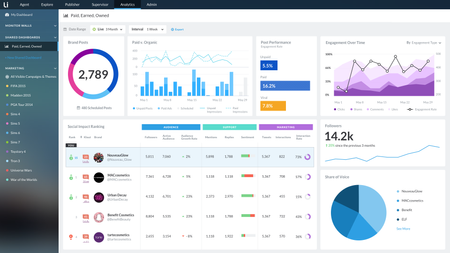
Think of your last interaction with a company. Did you call them? Email them? Tweet them? Visit a store? Research products on their website or read their reviews? If you’re like more and more customers, then your interaction involved typing on a mobile device. And let’s be honest, most of our communication with each other is increasingly digital, too. According to a recent Harris Poll, 65% of customers will stop using a brand’s product (even if they love it) if they have a bad experience with the brand. Since these experiences are likely to be digital, the stakes are incredibly high. Brands are listening to customers across more digital channels, responding to more conversations, publishing more content, finding new ways to reach customers…all with higher expectations for authenticity and brand stewardship. It’s exhausting! What makes this overwhelming job for digital marketers and care even harder is treating each initiative separately. A thousand ad-hoc cuts vs a cohesive plan smartly executed. Paid, earned and owned Social play roles at each stage of the consumer journey—from the way brands acquire new customers, to how they serve and grow existing ones. And the management of PEO is optimized when approached holistically. A unified approach to PEO simplifies and advances a brand’s digital CX strategy. For example, consider analytics and the ROI story a unified dashboard tells vs separate, siloed views. Lithium announced integrations today with best-in-class partners across the digital spectrum, bringing PEO together and earning a position as a leader in the SMMS market by Forrester. We're thrilled to roll out: Ads integrations: with paid ad automation tools Brand Networks, Nanigans, and Smartly.io, Lithium now supports the most ads integrations in the market enabling marketers to schedule and analyze paid ads alongside organic content. Listening integrations: social intelligence platforms Netbase and Synthesio allow marketers to sharpen their campaign strategies, act upon trends and intelligence, and better manage brand health. Social Impact Ranking: new competitive benchmarking capabilities allow marketers to measure how they stack up against competitors in areas like influence, sentiment, audience, and more. Comprehensive mobile publishing: available on Android and iOS, Lithium’s mobile app offers sophisticated capabilities, such as easy live-tweeting and the industry’s only way to auto-schedule posts for the optimal time of day. Learn more in our press release.7KViewsSign in to react to this post0Comments
Workflow Enhancements: TKBs and Blogs
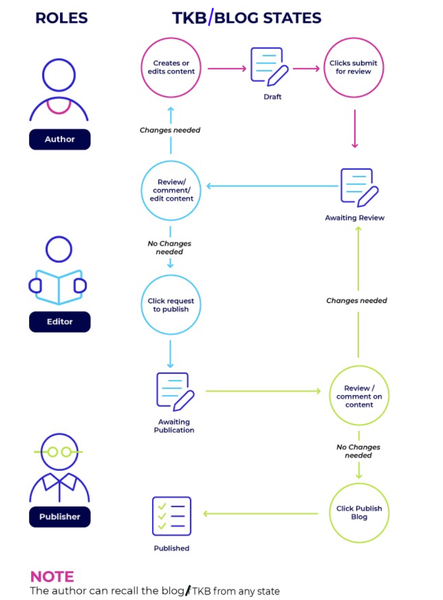
We are happy to announce that Khoros Communities has launched workflow enhancements for TKB and Blog articles. The new streamlined workflow caters to the needs of enterprises to create, collaborate, review and publish articles within the community. The workflow consists of 3 steps - Draft, Awaiting Review & Awaiting Publication - achieved through 3 roles - Author, Editor & Publisher. The following diagram shows how the article flows through different states before it is published and the actions the respective role performs at each state: We have introduced granular permissions to support different content roles, Author, Editor, Publisher, for create, review and publish respectively. With granular control over author, editor, and publisher permissions, you can clearly define who can perform each task in the publishing workflow. Since the capabilities are supported by different permissions, flexible workflows can achieved: 3-step workflow: Assign Author, Editor and Publisher to 3 different members respectively. This will mean that Author can send the draft for review, Editor will review and send the draft for publication, Publisher will approve the article and finally publish. A self-publish workflow: Assign all the three to a single community member (Admin, SMEs or Super users) so that the member can create and directly publish. 2-step workflow: Assign Author role to one member and assign both Editor & Publisher to another so that Author will work on a draft, send it for review & the other community member can review & publish. Workflow comes with the following capabilities for better collaboration & tracking: Co-Authors: Ability to add co-authors for an article to collaborate on the draft. Co-authors have authoring permissions for the articles they are added into. Notifications: Email Notifications to relevant community members at every stage in the Workflow. Improvised Dashboard: Improved article dashboard to track an article’s journey in the publishing workflow and make it easier to take relevant actions. Compare two versions of an article: Compare any two versions when the article is in the workflow process or after the article is published. The differences between two versions are highlighted and displayed in an easy readable format. Workflow enhancements are part of Blogs v3 & TKB v4. For setting up the workflow & detailed feature documentation, visit Blogs v3 and TKB v4. In future, we are looking to provide enhancements such as changing the author of an existing article so that community admins can change ownership of the article of a different member and ghost authoring an article i.e. to publish as another community member. Stay tuned!2.2KViewsSign in to react to this post2CommentsComing soon: Self-administer users on Experiences and Intelligence
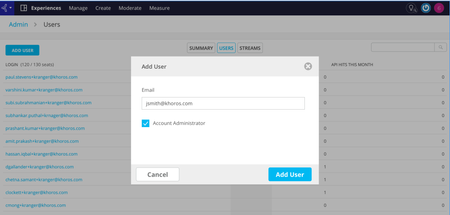
Your experience when on-boarding with Experiences and Intelligence products is of primary importance to us. Hence currently in development, is a user administration panel that will allow addition of new users, removal of users, as well as editing email ids of existing users. Once a new user is added to an instance, an invitation email would be sent to the user with directions on how to register in the product, and how to start using it. While this functionality is in development, I invite your feedback and suggestions on your existing problems around managing users. Please comment on this post or DM me and I will follow-up!469ViewsSign in to react to this post5CommentsMarketing Platform Update as of 1.29.20 10:07 PM CST
All, It’s Wednesday night and, as we’ve announced on the status.khoros.com page, we are delaying the expected go live of the Khoros Marketing platform until tomorrow morning. We are keenly aware of the magnitude of this disruption to you and continue to work around the clock to restore you and your teams. At the same time, we cannot take shortcuts when it comes to your security -- in that, we are holding ourselves to the highest standards. I cannot say it more plainly: the severity of our action matched the severity of the threat. Our team has been working around the clock to complete comprehensive security protocols that we believe will put us in a position to keep you and your brand’s integrity safe. As of this evening, we have the site up internally and are testing exhaustively across our Engineering and Product teams. In parallel, our Support and Customer Success teams are documenting the workflows to get you back up and running successfully and securely tomorrow. As painful as this incident has been, it is critical that we get this right. As I said in my last note, we take very seriously the trust you have placed in us, and as we are committed to a thoughtful and thorough resolution. We will continue to share material information with you as we have it on status.khoros.com and on Atlas. Please look for an update tomorrow by 9:00 am CST on status.khoros.com with a more specific window on your service restoration. Thank you. Jack654ViewsSign in to react to this post1Comment
Securing Community with Multi-Factor Authentication (MFA)
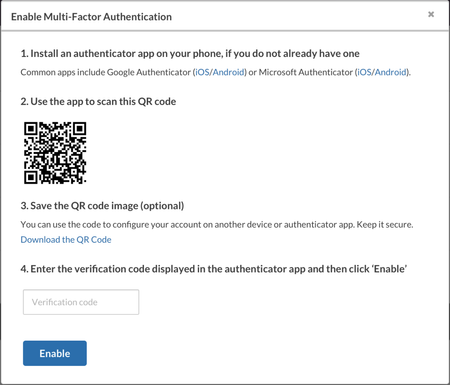
Security is an important aspect of any community. To provide an additional layer of security for user accounts with privileged access rights within the community (usually Admins), Khoros has introduced Multi-Factor Authentication (MFA) support for communities. MFA increases user account security by requiring additional verification factors to prove a user’s identity when signing into the community application. Khoros provides MFA via the authenticator app mechanism. Once MFA is enabled for a community, all privileged users (identified by the system on the basis of twenty six critical user permissions) will be prompted to set up MFA for their accounts. Users will provide their mobile number, and scan a QR code to add the Khoros community account in an authenticator app of their choice (Google authenticator/ Microsoft authenticator/ Authy, etc). When these users login to the community, in addition to their username and password, they will have to go through another layer of authentication where they will be entering a Time-based One-Time Passcode (TOTP) from the authenticator app. Post verification, the user will be logged into the community. First time setup: Subsequent logins: Communities can opt for MFA. Open a Support ticket to enable MFA for your community. MFA support is currently available for non SSO communities. SSO Communities should configure MFA at their end with the SSO provider. You can follow the links below to Learn more about MFA. Set up MFA for your account Sign in to your community with MFA FAQs3KViewsSign in to react to this post6Comments