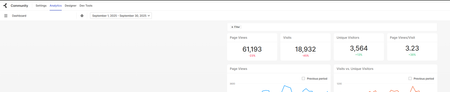
Dashboard Data Not Matching Reports — Need Help
Hi everyone, I’m trying to pull dashboard data, pageViews, visits, uniqueVisitors, etc. but the numbers I’m getting aren’t matching. I’m really new to this and trying to get the data for reporting, and I’ve been stuck for a few months. I tried the Bulk API, but the numbers came out really low. So I decided to download the report from Analytics instead. Dashboard Report Can anyone explain why the dashboard numbers don’t match the report? Is anyone using a different method to get this data? I’m trying to bring everything into Power BI. Can I get this data using Aurora GraphQL API? Thanks! 1.3KViewsSign in to react to this post
 2Comments
As far as anyone knows is there a way to transfer posts, etc., from PROD to STAGE
Has anyone come up with a script to do this? Querying Production and Posting to stage with either curl or the API? It would just be nice to be able to populate more and more realistic content on the Stage instance. Or even just to post articles programmatically? There's the REST API https://developer.khoros.com/khoroscommunitydevdocs/reference/rest But I don't see where the body of the messagePostBody goes. Example: POST (Create): <#assign subject = http.request.parameters.name.get("subject", "") /> <#if subject?length gt 0> <#-- Build the requestBody parameter and assign it to a variable--> <#assign messagePostBody = { "type": "message", "subject": subject, "board": { "type": "board", "id": "Otis" } } /> <#-- Make your REST call --> <#assign resp = rest("2.0", "/messages", "POST", messagePostBody) /> ${apiv2.toJson(resp)} <#else> { "status": "error", "message": "no subject parameter passed." } </#if> Do I just add a "body" member property to that messagePostBody with whatever the body of the message is? Or is there some esoteric way of doing it? For the example given, PUT: <#assign messagePostBody = { "type": "message", "id": "34", "subject": "How do I post a REST API message?" } /> There's a subject, a type, an id, but no body. How do I add body content? Or do I have to use cURL as noted here in "recipes"? Does one need to authenticate using cURL? Can it be done within components? A lot of this seems vague. There's not a lot of context I can find. Most recipes have instructions for what to do with the ingredients ... https://developer.khoros.com/khoroscommunitydevdocs/recipes/create-a-new-message-with-products Do we run this in Freemarker? How? Do we create a component? Do we use authentication? How? In a terminal? With a fox? In a box? With green eggs and ham? 😉 This would be very helpful information. These "recipes" assume a lot of knowledge about how to use cURL within the Khoros Community that isn't provided. I would love to run this in a component. But there's no information nearby that explains that. Please clarify? A lot? Complete examples in the context of the Community product would make all the difference. curl --request POST \ --url https://community-domain/api/2.0/messages \ --header 'Accept: application/json' \ --header 'Content-Type: application/json' { "data": { "type": "message", "board": { "id": "runningShoes" }, "subject": "Alternative to Nike Revolution Running Shoes", "body": "I have the Nike Revolution Shoes and got the Reebok Protonium shoes, but it feels very stiff while running - not much comfort/cushion while running and uncomfortable. I originally switched to Saucony because it was very comfortable and lightweight. suggestions for Saucony running shoes for women? I run only about 10mi/wk. <li-image id=\"336i254DB2339\"/>", "tags": { "items": [ { "text": "trail running" }, { "text": "running shoes" } ] }, "labels": { "items": [ { "id": "RunningShoes", "text": "Running Shoes" }, { "id": "Suggestions", "text": "Suggestions" } ] }, "products": { "items": [ { "id": "54" }, { "id": "56" } ], "list_item_type": "product" } } } Thanks, just rather unclear on the documentation around this.Solved1.3KViewsSign in to react to this post13Comments- Akenefick3 years agoGenius
I think maybe we're misunderstanding each other a little. When you say embed the cURL call, cURL is how you would make an API call from the command line. You wouldn't use cURL inside a Khoros component. You would use restBuilder or rest or restadmin to make the same API call with freemarker. Or if you were using JavaScript, you would use fetch maybe or XMLHttpRequest. So, I think when you say "cURL call" you are referring to the same thing I mean when I say "API call".
The examples I shared are making those calls embedded in a component.
I will take the cURL example from here Create message (khoros.com) and rewrite it using restBuilder so you can see what I mean.
So here is an example with cURL from the link above.
curl -L -X POST 'https://[COMMUNITY-DOMAIN]/api/2.0/messages/' \
-H 'Content-Type: application/json' \
-H 'Li-Api-Session-Key: [SESSION-KEY]' \
--data-raw '{
    "data": {
        "type": "message",
        "board": {
            "id": "runningShoes"
        },
        "subject": "Alternative to Saucony Ride 10 GTX",
        "body": "I have the Saucony Ride 9 and got the Saucony Ride 10 GTX, but it feels very stiff while running - not much comfort/cushion while running and uncomfortable. I originally switched to Saucony because it was very comfortable and lightweight. suggestions for Saucony running shoes for women? I run only about 10mi/wk. <li-image id=\"336i254DB2339\"/>",
        "tags": {
            "items": [
                {
                    "text": "trail running"
                },
                {
                    "text": "running shoes"
                }
            ]
        },
        "labels": {
            "items": [
                {
                    "id": "womensRunningShoes",
                    "text": "Womens Running Shoes"
                },
                {
                    "id": "recommendations",
                    "text": "Recommendations"
                }
            ]
        },
        "products": {
            "items": [
                {
                    "id": "sauconyRide10gtx"
                },
                {
                    "id": "sauconyFreedomIso"
                }
            ],
            "list_item_type": "product"
        }
    }
}'
Here is my (untested) attempt to rewrite with restBuilder which you could include in a component.
<#assign messagePostCall = restBuilder()
   .method("POST")
   .path("/messages")
   .version("v2")
   .header("Content-Type","application/json")
   .header("Li-Api-Session-Key","[SESSION-KEY]")
   .body({
        "type": "message",
        "board": {
            "id": "runningShoes"
        },
        "subject": "Alternative to Saucony Ride 10 GTX",
        "body": "I have the Saucony Ride 9 and got the Saucony Ride 10 GTX, but it feels very stiff while running - not much comfort/cushion while running and uncomfortable. I originally switched to Saucony because it was very comfortable and lightweight. suggestions for Saucony running shoes for women? I run only about 10mi/wk. <li-image id=\"336i254DB2339\"/>",
        "tags": {
            "items": [
                {
                    "text": "trail running"
                },
                {
                    "text": "running shoes"
                }
            ]
        },
        "labels": {
            "items": [
                {
                    "id": "womensRunningShoes",
                    "text": "Womens Running Shoes"
                },
                {
                    "id": "recommendations",
                    "text": "Recommendations"
                }
            ]
        },
        "products": {
            "items": [
                {
                    "id": "sauconyRide10gtx"
                },
                {
                    "id": "sauconyFreedomIso"
                }
            ],
            "list_item_type": "product"
        }
    }) />

<#assign resp = messagePostCall.call() />
So, to compare the two:
- First line from cURL lists "POST" as the method which goes in "method" on restbuilder.
- Also from the first line of the cURL example is the URL 'https://[COMMUNITY-DOMAIN]/api/2.0/messages/'. Because you are inside a Khoros component you don't need to include the community domain. You also don't need to include api/2.0 as that is covered by the ".version" in restBuilder. So, all you need from the URL is the /messages which goes in the "path" on restBuilder.
- Next the content type and session key would go under .header in restBuilder.
- Lastly the "data" from cURL would be the .body in restBuilder.
Some additional notes. You don't actually need the .version("v2") here because v2 is the default. You really only need it if you are using API v1.
Also, because you are in a component, you don't really need a session key. If you are logged in Khoros knows who you are. I included it just so you could see everything from the cURL example.
Finally, if you want to make this call with admin permissions, you would add ".admin(true)" to the restBuilder.
Complete Example:
As mentioned in a previous post I was working on a component to create an abuse report. This is very similar to posting a regular message and I can share it here. This has two parts. First, a custom endpoint created in studio which is where I use restBuilder to make the API call to create the abuse report. Second, a custom compnent which I added to the "Content Archived Page". This component calls the custom endpoint I made when a button is clicked and passes along the message id.
Endpoint Code
<#assign messageId = http.request.parameters.name.get("id", "") />
<#assign path = "messages/" + messageId + "/abuse_reports" />

<#if config.getString("phase", "prod") == "stage">
    <#assign body = "***UNARCHIVE REQUEST***  https://community.stage.ptc.com/t5/contentarchivals/viewpage/message-uid/" + messageId />
<#else>
    <#assign body = "***UNARCHIVE REQUEST***  https://community.ptc.com/t5/contentarchivals/viewpage/message-uid/" + messageId />
</#if>

<#assign unarchiveCall = restBuilder()
   .method("POST")
   .path("${path}")
   .body({
        "data":{
            "type":"abuse_report",
            "body":"${body}"
        }
    })
   .admin(true) />
<#assign resp = unarchiveCall.call() />

{
    "http_code":"${resp.http_code}",
    "status" : "${resp.status}"
}
Component Code
<div id="unarchive-button-container-ak">
    <span class="lia-button lia-button-primary" id="unarchive-button-ak">Request Unarchive</span>
</div>

<div id="result-message-ak"></div>

<style>
    div#result-message-ak {
        margin-top: 20px;
    }

    #result-message-ak p {
        padding: 10px;
        font-size: 16px;
        text-align: center;
    }

    div#unarchive-button-container-ak {
        width: 194px;
        margin-left: auto;
        margin-right: auto;
    }
</style>

<@liaAddScript>
    ;(function($) {

        const unarchiveButton = document.getElementById('unarchive-button-ak');

        unarchiveButton.addEventListener("click", () => {
            const loc = window.location.pathname;
            const locArray = loc.split("/");
            const messageID = locArray[locArray.length - 1];
            console.log(messageID);
            const resultMessage = document.getElementById('result-message-ak');

            const url = '/sejnu66972/plugins/custom/ptc/ptc1/unarchive?id=' + messageID

            async function unarchiveRequest(url) {
                const response = await fetch(url, {
                    method: "POST",
                    headers: {
                        "Content-Type": "application/json"
                    }
                })

                const result = await response.json();

                console.log(result);

                if (result.status == "success") {
                    resultMessage.innerHTML = "<p>Your request was successfully sent. You should hear from a moderator within 24 business hours.</p>"
                } else {
                    resultMessage.innerHTML = "<p>There was a problem sending your request. Please try again later or contact the community team directly at [email protected]</p>"
                }
            }

            unarchiveRequest(url);
        })

    })(LITHIUM.jQuery);
</@liaAddScript>
Sorry for the wall of text. Again, hopefully that's not too much info. Also, sorry there are no comments in my code let me know if you have any questions.
Sign in to react to this post

The total number of views in bulk data table doesn't match the views display in community,
Hello all, I have a question, I search all the action keys of an article from the bulk data API table, Gives this result: ACTION_KEY COUNT(KHO.ACTION_KEY) moderation.mark-unread 1 visits.member-entrance 15 moderation.mark-read 1 messages.edit 1 view 57 visits.visit-summary 24 total counts is: 99 for all actions, and the view is 57, but the views display 181 in community. why the number of views in database doesn't match the views display in community, the difference between these two numbers is so significant. any idea?1.1KViewsSign in to react to this post4CommentsNeed Help Finding Khoros API for Usage Data
Hi there, I’m new to Khoros and trying to set up a simple dashboard to track usage data like Unique Visitors per Month, Total Visitors, Net Topics per Month, Accepted Solution Views, Page Views, and so on. I’ve been looking around but can’t seem to find the right API endpoint or documentation for this kind of data. Any help to get this data is really appreciated! Thanks a lot for your help! Best, DanziSolved1.1KViewsSign in to react to this post3CommentsI wasn't the one who set up our integration into Tableau, but I can at least point you to the documentation.
- Bulk API v3, for communities on Aurora: https://developer.khoros.com/khorosauroradevdocs/docs/bulk-data-api-v-30
- Bulk API v2, for communities on Classic
- Overview documentation (there are a few documents, which you can access via the nav on the left on this page): https://community.khoros.com/kb/khoros-communities-classic-docs/using-the-khoros-bulk-data-api/178715?guideId=guide%3A52
- Dev docs: https://developer.khoros.com/khoroscommunitydevdocs/reference/bulk-data-api-v2
Sign in to react to this post

Particular action key in Bulk Data API (v 3.0)
I want to bring only "users.registration" type of action key events using Bulk Data API (v 3.0). Can we achieve this in any way by modifying the api url. Any help is appreciated. Thanks in advance. Thanks, Aishwarya1.1KViewsSign in to react to this post6Comments
visit duration not available for visits.visit-summary events in Bulk Data API v2
Hi there, Does anyone know the reason why some of the 'visits.visit-summary' events might not be propagating anything in the visit_duration? According to the Bulk Data API v2 documentation that is the sole purpose of this action_type. Also, does anyone know how is the visit_duration generated for single action_type visits such as view? Can someone please help our team figure this out?1.1KViewsSign in to react to this post5Comments
LithiumVisitor decryption & bulk API visit id access
Hi all, I would greatly appreciate any insight into a few questions I have surrounding both visitor cookies and a property exposed via the bulk data API: How can I decrypt the LithiumVisitor cookie in order to access the underlying “visitor.id” value? I'm looking to gather some metrics on un-authenticated users. My understanding with visit.id (available via bulk data API) is getting generated internally, do I have access to it anywhere on the client side? Is it only generated for authenticated users? Thanks900ViewsSign in to react to this post9Comments
list of all users subscribed to all board
I am using the below api to find the users permitted to a particular board: https://[COMMUNITY DOMAIN]/restapi/vc/boards/id/<board ID>/subscribers/email/board But the problem with above api and my use case is that I want to view the list of all the boards and its permitted users in one request. Whereas, the above api is only allowing to look for only a single board at a time. Is there a way in which I can get the list of all the boards in a community and it's subscribed users in a single hit?899ViewsSign in to react to this post2CommentsCan somebody help me with session keys?
Hello, We'd like to connect one of our group hub with our Power BI report. We'd like to see the list of users synched automatically (it's a hidden group hub, and whoever joins the group grabs a license automatically to our beta software too). So far it seems that Bulk API was not really helpful with that, but Search API would be a great fit. However, this is where we have our problem - it requires a session key, that we don't know how to get. We use SSO on our site (SAML), and I can't seem to find anything useful in the documentation (https://developer.khoros.com/khoroscommunitydevdocs/docs/search-api-overview)... Can somebody help me how to make this work? We're running on Classic currently. Thanks, Noémi838ViewsSign in to react to this post1Comment