Lab / Idea / Unconference Meetup?
I have a couple things on my community backlog that probably require some level of customization - I tend to be looking for stuff in Atlas that already has some traction or headway AND I see lots of "under consideration" ideas AND I see lots of "Did anybody make an XYZ widget in their community..." questions BUT what I haven't yet found (beyond this forum itself) is an available time and place for Devs to get together on their own and either attack a specific common problem OR talk together through a top of mind issue. It could be anything from a KhorosLed affair or even just an Unconference we put on ourselves. Would be REALLY great if there was a vanilla lab stood up to do actual live-action work that participants could then try to leverage in their own environments later. Am I just not finding this yet? Do we need to bootstrap something? BlakeH - has this come up before? 3.3KViewsSign in to react to this post
 26Comments
Cannot run li serve-sass command when using Hermes as a parent skin
Has anyone utilizing the Hermes theme as a parent skin been able to successfully leverage the li serve-sass command via the SDK? I've used the command heavily with our previous skin but with our new skin (which leverages Hermes as a parent skin) we get the following error: (node:5279) UnhandledPromiseRejectionWarning: Unhandled promise rejection (rejection id: 3): Error: ENOENT: no such file or directory, stat '/path/to/<sdk_project_name>/coreplugin/other/res/skins/theme_hermes'Solved2.3KViewsSign in to react to this post5Comments- TysonN5 years agoKhoros Alumni (Retired)
We definitely should add Community SDK support for Hermes, yes. In the meantime, I'm happy to share the Hermes v1 and v1.1 skins with any customers looking to use the Community SDK. Let me discuss how to distribute with SuzieH .
Sign in to react to this post
Set the visitor UI language automatically
Background: Our instance supports 8 different languages for the user interface. Our CDN/Reverse Proxy detects a user's location and can set a user's language based on that. It will, at a minimum, set a cookie. In the past, in the page.init, we would detect if the cookie language was different than the session language and and return a redirect while adding the "?profile.language=xx" parameter. Unfortunately, this caused significant delays for users in China because of the extra round trip. Currently our CDN/reverse proxy rewrites all URLs as they pass through, adding the profile.language parameter to *every* page load. This causes some odd side-effects, especially in the admin panel. It's also very challenging to debug when something is off. Does anyone know the recommended approach to making sure that a user (including anonymous users) gets the Khoros page UI in their translated language? Our CDN/reverse proxy does place a cookie that we can read or it could deliver a special header. I imagine we could read this in page.init, but I don't see anywhere in the docs where we can tell the session to switch languages. This all gives hints: This seems to give some suggestion: https://developer.khoros.com/khoroscommunitydevdocs/reference/requestlang Which leans to info about page.init. Which I think leads me to the http.session: https://developer.khoros.com/khoroscommunitydevdocs/reference/httpsession-1 But, what's the attribute that needs setting? Is it "lang"? If anyone has a list of session attributes, that could be helpful. Other related threads I have read: https://community.khoros.com/t5/Khoros-Community-Product/How-can-users-be-directed-to-a-localized-community-based-on/m-p/564967 https://community.khoros.com/t5/Khoros-Community-Product/Launching-a-new-language-language-functionality/m-p/610975 Thanks! Mark1.9KViewsSign in to react to this post12CommentsView logged out text keys?
Hi all, Trying to find the text key for a specific button that only appears for logged-out users (Community Classic). I know how to do the "show text keys", but I only know how to do it when logged in. I found this thread, but it's not helpful: View logged out text keys | Atlas Specifically, I'm looking for the text key for the "Comment" link that appears on blog posts when not signed in. I found the key for "You must be a registered user to add a comment..." text, since that's easy enough to search for. But the "Comment" link is basically impossible to search for since the word "Comment" is so generic. I'll file a support case too, as I suspect this may require their help. Cheers!Solved1.7KViewsSign in to react to this post10CommentsConfirmed w/ support that there's no way to view the text keys for things that are only visible to logged-out users.
Support did go the extra mile to find the text key for us (by painstakingly searching the available keys & testing, just like I would have had to). This specific text key is: blog.articleactions.comment-on-this-button.title. HOWEVER - note that the same text key is used for "Comment" buttons/links for both anonymous and logged-in users.
Sign in to react to this post

Home Page Styling issue
Does anyone know why I can't get rid of a max-width: 1200px; .lia-content>.lia-top-quilt>.lia-quilt-row-main, .lia-content>.lia-top-quilt>.lia-quilt-row:not(.lia-quilt-row-header):not(.lia-quilt-row-main):not(.lia-quilt-row-main-bottom):not(.lia-quilt-row-footer)>.lia-quilt-column That is the class that has that max-width and when ever I try and override that it doesn't do anything it keeps that max-width and then adds my override as a separate class.Solved1.6KViewsSign in to react to this post9Comments- AbhishekGu4 years agoKhoros Alumni (Retired)
tavasjn24 Below solution should have worked for you:
.lia-quilt-community-page .lia-quilt-column.lia-quilt-column-24.lia-quilt-column-single.lia-quilt-column-main-top-content {width: 100% !important;
padding: 0px !important;
}
Let me know if you have any other query, happy to help!!Sign in to react to this post

Customizing the My Settings page
Hi, I am trying to figure out how to customize the elements that are part of the My Settings page such as My Bookmarks and My Subscriptions. However there is no pages in the Studio Page-editor for those. All I see is a component called tabs. Please let me know what I am missing.Solved1.3KViewsSign in to react to this post6CommentsHi bishalgoswami,
The quilt for the My Settings page (as mentioned by CarolineS) is called MyProfilePage. However, the primary functionality of the settings page is handled in an out-of-the-box component called "tabs" which is not editable in Studio.
In my environment where I wanted to make changes to the settings page, I created my own component (which I called "custom.user.settings.tabs") where I first rendered the out-of-the-box component while wrapping it in my own custom div so I could make CSS-based changes, as shown below.
<#-- Render the out-of-the-box component -->
<div class="rsa-c-user-settings-tabs">
  <@component id="tabs"/>
</div>
I then used the <@liaAddScript> functionality to add jQuery to make other changes I needed, such as hiding the ability to change their email address or first/last name. See the screenshots below.
Hope this helps!
Sign in to react to this post

Add Root Message (Topic) and Solution to each page
Hello, How can I add the root message (Topic) and also the Solution to every page? At the moment I only see them on the first page, but If I go to pagination number 2 I only see the comment list. I hope I was clear on my questionSolved1.2KViewsSign in to react to this post5Comments MattV3 years agoKhoros Staff
SheenaK Forums v5 primarily enables threading, correct. But as a part of that, I think it allows the root message to appear on every page.
Atlas uses Forums v5, which is how they are able to do that.
This is the Quilt XML for the Atlas community ForumTopicPage.
<?xml version="1.0" encoding="UTF-8"?> <quilt layout="two-column.main-side" nestable="false" disableTopCssClass="false"> <add to="common-footer"> <component id="quilt:Footer"/> </add> <add to="side-content"> <component id="forums.widget.recent-threads" mode="slim"/> <component id="recommendations.widget.recommended-content-taplet" mode="slim"/> <component id="theme-lib.related-topics"/> <component id="forums.widget.related-messages-taplet" mode="slim"/> <component id="custom_content_15"/> </add> <add to="main-content"> <component id="Lingotek_CP_Dashboard"/> <component id="forums.widget.related-messages-taplet" mode="slim"/> <component id="topic-message"/> <component id="thread-pager"/> <component id="solution-count-conditional"/> <component id="solution-list"/> <component id="reply-count-conditional"/> <component id="message-pager"/> <component id="message-list-detail-with-inline-editors"/> <component id="comment-editor-submit-button-alert-forum"/> </add> <add to="common-header"> <component id="quilt:Header"/> <component id="custom_content_19"/> </add> <remove from="sub-header-main" for="Header"> <component id="common.widget.page-title"/> </remove> </quilt>Sign in to react to this post
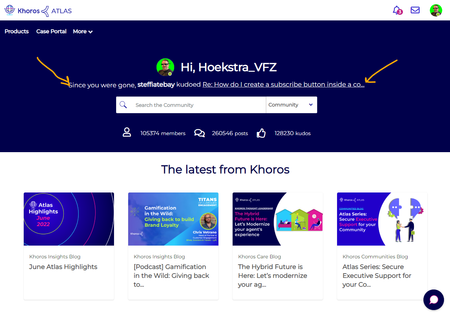
We like the 'Since you were gone' feature here on Atlas - We recreated it and shared the component
We really like the 'Since you were gone' feature here on Atlas. We want to implement this on our Communities. We asked support if this is a component that is available in Studio, it is not. The 'Since you were gone' feature is a custom made component just for Atlas. We would love Khoros to share the content of this component so we can fast-track our development of such a component. We feel the entire community here might benefit from sharing this with all of us 🙂Solved1.2KViewsSign in to react to this post8CommentsHoekstra_VFZ we deployed this functionality in our community, as shown in the screenshot below.
You can find my code for the component and the associated macro library below to give you a starting point.
- Component: custom.homePage.hero.profileNotifications.ftl
- Macro Library: custom.macro.common.notifications.ftl
Feel free to send me a DM if you have any questions.
Sign in to react to this post

HTML support for GraphQL API
Hi Khoros, I've been roadmapping usage for the GraphQL API that allows for the creation of a Knowledge Base Article: https://developer.khoros.com/khorosauroradevdocs/docs/create-a-knowledge-base-article#create-a-knowledge-base-article When it comes to populating the GraphQL, I noticed some fields that we can use to populate an article, like "subject", "body", "introduction". However, when it comes to creating a Knowledge Base Article, I'm curious if there is support for some things I can do with the GraphQL API that we can already do with the UI version of creating a Knowledge Base Article. For example, in the UI, I can open the Source Code field in the editor of the article (please see attached screenshot). What this allows me to do is to essentially author the article in HTML, rather than in plaintext. So, as seen in the screenshot, I can set the Source Code for the new Knowledge Base Article. My question is this: with the GraphQL API, can I submit the body content as straight HTML just like I can in the UI > SourceCode? If the answer is no, my question we then be, is there a way we can set the HTML of a new Knowledge Base Article using the GraphQL API in any way (Source Code or otherwise)? Thanks, Edson999ViewsSign in to react to this post1Comment