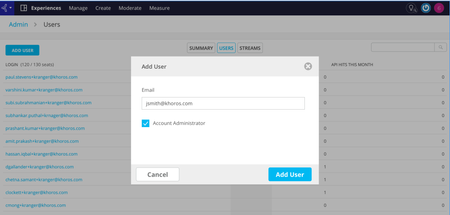
Coming soon: Self-administer users on Experiences and Intelligence
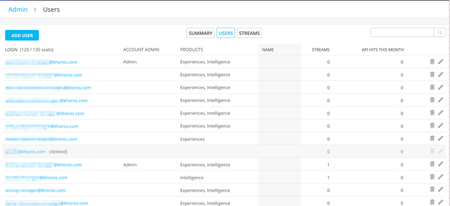
Your experience when on-boarding with Experiences and Intelligence products is of primary importance to us. Hence currently in development, is a user administration panel that will allow addition of new users, removal of users, as well as editing email ids of existing users. Once a new user is added to an instance, an invitation email would be sent to the user with directions on how to register in the product, and how to start using it. While this functionality is in development, I invite your feedback and suggestions on your existing problems around managing users. Please comment on this post or DM me and I will follow-up! 468ViewsSign in to react to this post
 5Comments
Marketing Platform Update as of 1.29.20 10:07 PM CST
All, It’s Wednesday night and, as we’ve announced on the status.khoros.com page, we are delaying the expected go live of the Khoros Marketing platform until tomorrow morning. We are keenly aware of the magnitude of this disruption to you and continue to work around the clock to restore you and your teams. At the same time, we cannot take shortcuts when it comes to your security -- in that, we are holding ourselves to the highest standards. I cannot say it more plainly: the severity of our action matched the severity of the threat. Our team has been working around the clock to complete comprehensive security protocols that we believe will put us in a position to keep you and your brand’s integrity safe. As of this evening, we have the site up internally and are testing exhaustively across our Engineering and Product teams. In parallel, our Support and Customer Success teams are documenting the workflows to get you back up and running successfully and securely tomorrow. As painful as this incident has been, it is critical that we get this right. As I said in my last note, we take very seriously the trust you have placed in us, and as we are committed to a thoughtful and thorough resolution. We will continue to share material information with you as we have it on status.khoros.com and on Atlas. Please look for an update tomorrow by 9:00 am CST on status.khoros.com with a more specific window on your service restoration. Thank you. Jack653ViewsSign in to react to this post1Comment[Confidential] Early Access to TikTok Organic Analytics
What is happening? We are excited to announce (confidentially and under our NDA with you) that we are working with TikTok to test their new Organic Analytics API. We are pleased to extend early access to this API to our customers inside the Khoros Marketing platform. Please read on for more information on how to request access and what will be available. Why does this matter? TikTok is one of the fastest-growing digital channels in the world, and one of the most highly requested integrations across our customer base. We’re pleased to be one of the first partners to offer customers this new organic analytics functionality. That said, please keep in mind that this API is new and you may occasionally experience issues. We will want your feedback on that! Also, this early access program should be considered confidential and under NDA. So, it is expected that participants do not discuss the program publicly. While this early access opportunity includes organic analytics only, we will continue to advocate for more API features to be made available, and hope to have more news to share in the near future! How do I request early access? Please fill out this form. Your TikTok account has to be allowlisted in order to participate in the program. You will be contacted by a member of the Khoros team once they are and you'll be able to authenticate your account into the platform. Feature Overview Administration The account must be a business account and allowlisted in order to be authenticated into the platform. It can be authenticated using the same authentication process as other social accounts. However, you'll need to be logged into the account to finalize the process. More information on authentication can be found here. Calendar Once authenticated, TikTok content from the prior thirty days will be visible in the calendar. It can take up to an hour to populate. The channel and account filters can be used for TikTok like other social channels. TikTok content can also be included as part of plans and have labels applied to it for filtering and use in analytics. Metrics will be visible in the calendar side panel within the results tab. Analytics Analytics can take up to 24 hours to populate after authentication. There is a TikTok template available and the following TikTok metrics are available in Marketing Dashboards, Custom Metrics and Data Exports. Note that some of these metrics need to be added into widgets to appear. Khoros Metric Name TikTok Metric Name Definition Followers Followers Number of account followers Published Posts Not Available Total number of posts (videos) Engagement Not Available Total number of likes, comments and shares on a video Video Views Views Total number of video views Applause Like Total number of likes on the video Conversation Comment Total number of comments on the video Amplification Shares Total number of times the video has been shared Engagement Per Post Not Available Total engagement / total published posts (videos) TikTok Post Video Views Views Total number of video views TikTok Video Length Not Available Video length in seconds TikTok Post Likes Like Total number of likes on the video TikTok Post Comments Comment Total number of comments on the video TikTok Post Shares Shares Total number of times the video has been shared TikTok Post Reach Reach Audience Total number of unique users who viewed the video TikTok Post Video Views - Complete Watched Full Video Percentage of views that completed watching the full video TikTok Total Play Time Total Play Time Total watchtime of video aggregated across all views TikTok Video Average Watch Time Average Watch Time Average watchtime of video calculated across all views TikTok will be supported in the following Marketing analytics widgets: Widget Name Followers Followers by Country* Published Posts Video Views Post Engagement Average Engagement Per Post Scorecard Channel Explorer Account Explorer Label Explorer Format Explorer Post Explorer Post Gallery Best Performing Day, Time and Format Post Engagement by Account Post Engagement by Channel Post Engagement by Format Posts Engagement by Label Video Views by Account Video View by Channel View Views by Label *The Followers by Country widget does not support net value for TikTok, meaning it only shows total followers for that country and not followers gained during the time period.1.3KViewsSign in to react to this post8CommentsNow Available: SRT file support for video publishing
When the user adds the appropriate channel (Facebook/Youtube/Twitter) and uploads a video, there will be a new section called ‘Captions’ that is available under the message box. Please note that the 'Captions' option will come up only after uploading a video. Inside the ‘Captions’ section the users will get options based on the channel that is selected. Facebook For Facebook, there will be an option to upload a file. The file has to be as per the required format. Once the SRT files are uploaded there will be a ‘Default Caption’ option next to the caption files uploaded. Users can select the default caption file as per the need. For Facebook, multiple SRT files can be uploaded for a single video There is a basic check on the file format. If the format is not correct then the caption file will not be uploaded and a warning message will be shown. User can see the applicable language and country codes by clicking on the link Youtube For Youtube, the options are different from that of Facebook. Inside the 'Captions' section user will have to click on the ‘Add Closed Caption file’ option to upload the SRT files. For each SRT file upload, the user will have to select the Language and upload a valid SRT file with Timing. Note: SRT files without timing are not supported Users can upload multiple SRT files for the video being published to Youtube. If the user selects the same language again an error is thrown. Twitter Users can upload only a single SRT file to any video while publishing to Twitter. When the user selects the language option then the applicable languages are shown. The user can upload the SRT file and publish the post Side Panel changes In the Calander side panel, we have created a new field called ‘Accessibility’ under the ‘Basics’ tab. This field will be set to ‘Video has subtitles’ if any channel in the post has at least one SRT file. This is mainly to identify the posts which have the subtitle file. Post publishing Post publishing, the subtitle will be shown on the video based on the captions settings on the respective platform Handling SRT file issues If the platform does not accept the SRT while publishing the video then the post will be published but in the side panel, an error will be shown that the caption file is not updated in the video. The user has to go native to correct the issue.1.2KViewsSign in to react to this post5CommentsNow Available: Custom Metrics
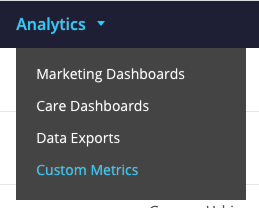
Now Available: Custom Defined Metrics What is this? Within Khoros Marketing Analytics, customers now have the ability to create their own custom metrics! When would I use this? Do you ever find yourself wishing that you could recalculate Engagement? Does your company have a specific formula you use to calculate a metric? Starting today, you can now calculate metrics in ways that make sense for you. This sounds great! Where can I find it? If you have Full Access to Analytics, you can build your own custom metrics within Khoros Marketing Analytics. From the Analytics dropdown, choose Custom Metrics. Click the Create Custom Metric button. Create a new metric by giving it a name and a description. Select the type of metric that you would like to create: ad, organic post, or account metric. Notice that you cannot combine metric types. We have prevented this, as do many analytics tools, to prevent you from trying to combine apples with oranges. Create your calculation by selecting metrics and defining your order of operations. You can select a metric by typing the name of the metric or selecting it from the searchable and filtered list. Determine if you would like your metric to be displayed as a percentage, number, or currency. Click the Create button to save the custom metric. Who has access to the new metrics and widgets? Anyone can use a custom metric that has been created, but only roles with Full Access to Analytics can create a custom metric. You can only edit and delete custom metrics that you have created. Where can I use these metrics in my reporting? The metrics can be found in Data Exports. We will follow up with adding Custom Metrics to the dashboards and widgets, but we wanted to put this in your hands as quickly as possible to use and provide feedback. What else do I need to know? We have limited the number of custom metrics that you can create to 10 custom metrics. Within each custom metric, you can include up to 20 metrics. We hope that these limits help you keep your data clean. If you find that you are too restricted, please reach out to our Support team to have the number of available custom metrics increased. Where can I share feedback? If you already see opportunities for valuable enhancements to the feature, please share your feedback in the Marketing Idea Board in Atlas. If you have questions about functionality that the documentation does not include, you can post in the Marketing Discussion Board in Atlas or reach out to your account team who can get you answers.908ViewsSign in to react to this post5CommentsNow Available: Marketing Monitor Walls
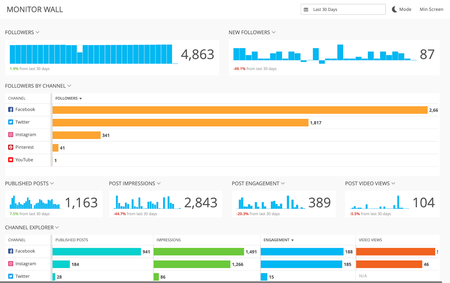
What is this? Marketing Dashboards can now be shared and viewed outside the platform! Users can generate an external link to dashboards they’ve created and share or put it into a browser where it can be viewed without login. Viewers see the same data as a user logged into the platform and can change the date, click into widgets for more detail and put the dashboard into dark mode or full browser view. Gridlines for different monitor resolutions have also been added to assist with layout. When would I use this? Whenever you want to share a Marketing dashboard on a monitor or with someone that doesn’t have access to the platform. This could be via a monitor in a public room or directly with someone outside the platform interested in viewing the performance of your social channels. This sounds great! Where can I find it? By using the existing share modal connected to the share button in dashboards and the people and link icons in the dashboard admin panel. The modal now contains an external sharing tab with a share toggle that generates an external link. The link can be copied using the “copy” button, as well as password protected and restricted to specific IP addresses or CIDR (classless inter-domain routing) ranges. Once a dashboard is shared the link icon in the dashboard admin panel turns blue indicating it has been shared externally. In order to stop sharing the share toggle has to be turned off. What else do I need to know? The share modal can only be accessed by the creator of the dashboard, which means only they can share the dashboard and generate the link. The date range, filtering and layout will all be carried over to the shared dashboard, as will any updates made to the dashboard. A shared dashboard refreshes every 15 minutes at which time any updates to the original dashboard are reflected. The shared dashboard can also be manually refreshed via the browser. Viewers are unable to edit the dashboard outside of selecting the date, mode and browser view. Full Screen browser view and monitor grid lines work best for a direct HDMI connection. Casting with a tool like Google Chromecast may have different requirements such as using a 1400 X 672 custom gridlines and keeping it out of the full screen browser view. Learn more about sharing dashboards.482ViewsSign in to react to this post2CommentsKhoros Marketing: January Incident Summary and FAQ UPDATED 2/2/2020
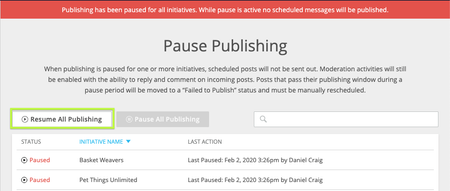
On January 28th 2020, Khoros suffered an attack on its Social Marketing platform. Below summarizes what happened, how Khoros contained the threat, and what we have done to safely restore our customers to service. Summary On Tuesday afternoon, Khoros observed suspicious activity in the Khoros Marketing platform that triggered an immediate investigation by our engineering team, resulting in our decision to temporarily shut down the platform. This attack was preceded by an independent incident on Monday, when we helped a customer recover from a malicious social attack. On Tuesday, we became the target ourselves. We took swift and decisive action upon identifying the intrusion, and shut down access to the platform. With the platform locked down, we conducted a thorough root cause analysis and we identified the issue. The issue is now resolved, and Khoros Social Marketing, Intelligence, Experience, Vault and Promotions products are back online. What was the nature and impact of the suspicious activity? On Tuesday 1/28, the malicious actor exploited a vulnerability with a password reset code in the Khoros Marketing Platform and were able to access a small number of user accounts. No passwords were compromised. How widespread was the impact? Based on a thorough review of activity logs across the platform, we have determined that the bad actor was able to access a very small number of Khoros Marketing customer accounts. Per the above, no passwords were compromised. Khoros has communicated directly with all impacted customers. We shut down the platform as a precaution as we pursued resolution; as a result Social Marketing and Vault customers were unable to use the platform from late afternoon on Tuesday until Thursday afternoon CST. Intelligence, Experiences, and Promotions customers regained access Friday night CST. How are we certifying that the vulnerability has been thoroughly resolved? Khoros has engaged an independent third party to complete a pentest on the platform, certifying that the vulnerability has been addressed. Was Khoros Care or Khoros Community affected? Absolutely no data in Khoros Community or Khoros Care (including the CRM integration) was impacted by the incident in Khoros Marketing solution. Any cross-platform ties were severed during the investigation. What specific actions did Khoros take? Suspended customer access to the Khoros Marketing platform Communicated to customers via status.khoros.com updates, customer Atlas Marketing blog updates, and email communication to all Khoros Marketing company admins Khoros reset all passwords for all users across Khoros Marketing and has increased password complexity requirements Khoros has accelerated multi-factor authentication and is expected as an obligatory sign-in measure within the next two weeks Directly emailed all customer admins to communicate updates on the vulnerability and when access was restored to the Khoros Marketing platform Only enabled users across verified domains and requested each company’s administrators to re-enable other users When will Khoros Marketing be restored to service? All Khoros Marketing Platform products are back online and restored to service. Is the Khoros Marketing platform still ingesting data? Khoros Marketing has continued to ingest data from all authenticated social channels during the shutdown. Was my scheduled content saved in the system? Did content auto-publish when Khoros Marketing was brought back online? All previously scheduled content and workflows were saved in Social Marketing. Content which was scheduled to be sent while the Social Market platform was offline was placed in an error state, and was not published. All other outbound content and moderation was Paused by default, in order to ensure your company could make any needed adjustments to the Content Calendar before resuming activities. How can I resume publishing and moderation activities in Social Marketing? Administrators can only resume activity for the Initiatives they have access to. Once you have reviewed existing content and are happy to resume activity, Company Administrators (or users with advanced administrative roles), have two options in the Pause Publishing screen, accessible via https://admin.spredfast.com/company-settings/pause-publishing: Option 1: Resume all moderation and publishing activity - Click ‘Resume All Publishing’ to resume activity for all visible initiatives in the list. Option 2: Resume moderation activity only - Click ‘Resume All Publishing’. Then, for any initiative which you only wish to allow moderation activity to occur from, click the Pause icon in it’s associated row. This will disable publishing, but continue to allow moderation to occur. Who can I contact if I have more questions? For further questions, please contact [email protected]. All media inquiries should be directed to [email protected]655ViewsSign in to react to this post2CommentsSchedule the Deletion of Posts: Now Available!
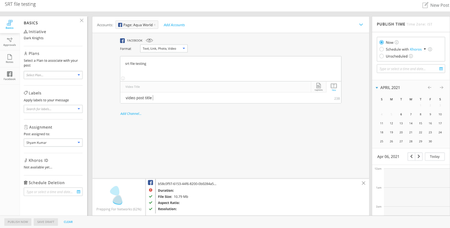
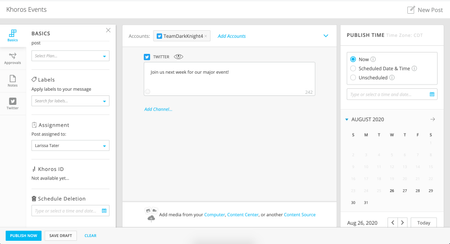
What is this? Customers now have the ability to schedule the deletion of native posts from within Khoros. Check out our documentation to delete native posts to find more information about which posts can be deleted automatically. When would I use this? This feature is helpful when you know you will need to delete a post from the network at a future date. This sounds great! Where can I find it? You can schedule the deletion of a post at the time of creation, after the post is scheduled for publishing, and after the post has been published. Schedule to Delete Upon Creation When you’re creating your post, under the Basics tab, you’ll see a new section called Schedule Deletion. Click in the calendar box to open the calendar function. Select a date and time that is at least 24 hours into the future. Once a date has been selected, click Schedule. Schedule Deletion from the Side Panel In the overflow menu, you will find a new option that says “Schedule Deletion from Native Channel”. Click it to select a schedule date. Click in the calendar box to open the calendar function. Click Schedule Deletion to complete the action. You will see the updated status of Deletion Scheduled in the Side Panel. Edit or Remove the Scheduled Deletion Date If you need to edit or remove a scheduled deletion date, choose the appropriate option in the overflow menu in the Side Panel. If you choose to edit the deletion date, you will be asked to choose a new one from the modal. If you choose to remove the scheduled deletion date, you will be asked to confirm the action.593ViewsSign in to react to this post8CommentsSelf-administer users on Experiences and Intelligence
The Experiences and Intelligence team is working to smoothen the user management of these two products. We do this by providing Khoros Marketing customers a way to view the existing users on Experiences or Intelligence , and the functionality to add new users, grant admin privileges, and delete users so as to remove their access. Till now, to manage users, it was required to interact with Khoros support team. However, starting now, to manage users, you can navigate to the Admin screen. You will see buttons to add new users, edit users to update their access level or email logins, and to delete users as well. Please note, when a user is deleted, all her owned streams and saved searches are removed. You will be informed of these details beforehand, and you can choose to proceed accordingly. Find detailed steps under the974ViewsSign in to react to this post3CommentsUsing user-generated content on Instagram
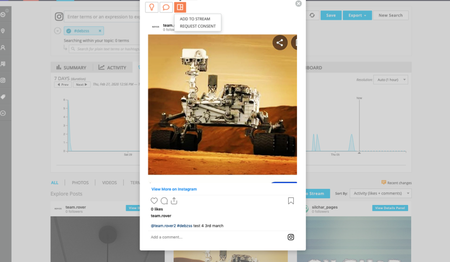
Content like text, videos, and images created and posted by fans of your brand promotes trust and drives purchase decisions. To make it easier for you to find and use User-Generated Content (UGC) in your brand marketing, we are bringing back the ability to request user consent on Instagram. As of today, there is no built-in functionality to ask an end-user for her consent if you want to use one of her Instagram posts in an Experiences ' visualisation. With this release, you can ask for end-user consent in Experiences, or from search results directly inIntelligence . However, to request consent from Intelligence search result, customer must have access to Experiences as well. Once you have requested consent, your post will show as 'pending consent' under the Experiences stream, and/or under the Intelligence watchboard (depending on if you have requested consent in intelligence). After the end-user expresses her consent by commenting an easy consent phrase, for example by commenting with “#Yes” on her post, you can re-use this content. With this change, you have a quick and easy way to ask for end-user consent, and then functionality to re-purpose the content as soon as the end-user approves. As with any interaction over a social network, we recommend posting unique and personalised comments asking for consent, rather than similar looking and repetitive content. Your feedback is welcome. Please comment on this post with your thoughts or to share how your marketing plan incorporates user-generated content! If you are interested in walking through the latest Instagram Consent workflow in Experiences hands-on with an Experiences Product Coach, sign up for your complimentary coaching session here. To go over the consent workflows, this is a good places to begin: Using Consent Overview, more specifically Request reply consent for Instagram posts545ViewsSign in to react to this post3Comments