Khoros Social Marketing: Training Videos and Coaching Sessions
To enhance your social marketing expertise , we offer a comprehensive suite of world class training videos and unique product coaching sessions. Our tailored resources are designed to guide you through every step of your learning journey, from foundational concepts to advanced features. By leveraging our expert-led-training & personalised coaching, you can unlock the full potential of our social marketing product and achieve remarkable results. Khoros Social Marketing: Start your journey here Social Marketing Admin Hub: Admin Training Videos Getting Started as an Admin Admin Tab Navigation Structured Labels Approvals Personal Settings Marketing Integration Admin Product Coaching (1-on-1) Sessions Admin Panel Overview Link Tagging Overview Social Marketing Analytics Hub: Marketing Analytics Training Videos Introduction to Marketing Analytics Analytics Dashboard Data Exports Talkwalker and Marketing Dashboards Inbox and Moderation Marketing Analytics Product Coaching (1-on-1) sessions Customising Your Dashboards Ads Analytics Overview Social Marketing Publishing Hub: Publishing/Agent Training Videos Getting Started as a Marketer Personal Settings Content Center Publish a Message using Social Marketing Instagram Publishing Marketing Calendar Tips and Tricks Approvals Organic Posts Vs Ad's Paid Promotion vs Paid Boost Best Performing Reports Publishing Product Coaching (1-on-1) sessions Content Center Overview Publishing to Instagram Don't see the session you need? Sign up for a 20-minute Q&A Coaching session if you have specific questions for Khoros Social Marketing. Register for Khoros Academy, our new on-demand learning platform currently in Early Access. 15KViewsSign in to react to this post
 4Comments
[Confidential] Early Access to TikTok Organic Analytics
What is happening? We are excited to announce (confidentially and under our NDA with you) that we are working with TikTok to test their new Organic Analytics API. We are pleased to extend early access to this API to our customers inside the Khoros Marketing platform. Please read on for more information on how to request access and what will be available. Why does this matter? TikTok is one of the fastest-growing digital channels in the world, and one of the most highly requested integrations across our customer base. We’re pleased to be one of the first partners to offer customers this new organic analytics functionality. That said, please keep in mind that this API is new and you may occasionally experience issues. We will want your feedback on that! Also, this early access program should be considered confidential and under NDA. So, it is expected that participants do not discuss the program publicly. While this early access opportunity includes organic analytics only, we will continue to advocate for more API features to be made available, and hope to have more news to share in the near future! How do I request early access? Please fill out this form. Your TikTok account has to be allowlisted in order to participate in the program. You will be contacted by a member of the Khoros team once they are and you'll be able to authenticate your account into the platform. Feature Overview Administration The account must be a business account and allowlisted in order to be authenticated into the platform. It can be authenticated using the same authentication process as other social accounts. However, you'll need to be logged into the account to finalize the process. More information on authentication can be found here. Calendar Once authenticated, TikTok content from the prior thirty days will be visible in the calendar. It can take up to an hour to populate. The channel and account filters can be used for TikTok like other social channels. TikTok content can also be included as part of plans and have labels applied to it for filtering and use in analytics. Metrics will be visible in the calendar side panel within the results tab. Analytics Analytics can take up to 24 hours to populate after authentication. There is a TikTok template available and the following TikTok metrics are available in Marketing Dashboards, Custom Metrics and Data Exports. Note that some of these metrics need to be added into widgets to appear. Khoros Metric Name TikTok Metric Name Definition Followers Followers Number of account followers Published Posts Not Available Total number of posts (videos) Engagement Not Available Total number of likes, comments and shares on a video Video Views Views Total number of video views Applause Like Total number of likes on the video Conversation Comment Total number of comments on the video Amplification Shares Total number of times the video has been shared Engagement Per Post Not Available Total engagement / total published posts (videos) TikTok Post Video Views Views Total number of video views TikTok Video Length Not Available Video length in seconds TikTok Post Likes Like Total number of likes on the video TikTok Post Comments Comment Total number of comments on the video TikTok Post Shares Shares Total number of times the video has been shared TikTok Post Reach Reach Audience Total number of unique users who viewed the video TikTok Post Video Views - Complete Watched Full Video Percentage of views that completed watching the full video TikTok Total Play Time Total Play Time Total watchtime of video aggregated across all views TikTok Video Average Watch Time Average Watch Time Average watchtime of video calculated across all views TikTok will be supported in the following Marketing analytics widgets: Widget Name Followers Followers by Country* Published Posts Video Views Post Engagement Average Engagement Per Post Scorecard Channel Explorer Account Explorer Label Explorer Format Explorer Post Explorer Post Gallery Best Performing Day, Time and Format Post Engagement by Account Post Engagement by Channel Post Engagement by Format Posts Engagement by Label Video Views by Account Video View by Channel View Views by Label *The Followers by Country widget does not support net value for TikTok, meaning it only shows total followers for that country and not followers gained during the time period.1.3KViewsSign in to react to this post8CommentsNow Available: Instagram Reels in the Calendar and Analytics
What is this? Due to a recent API update, Instagram Reels and related metrics are now visible in the Marketing calendar and analytics. Publishing capabilities will be available in the future, but currently auto-imported Reels are appearing in both places. This sounds great! Where can I find it? Reels began appearing in the Marketing platform whenever the Instagram business account was migrated to the updated API and are auto-imported as far back as the API allows. For most accounts this is likely after June 28, 2022 when the announcement was made. Reels appear as a format within analytics filters and widgets and include a slightly smaller set of available metrics. However, over the next few weeks all of the following metrics will be available within dashboards, exports and custom metrics. Side panel results will also be updated to show additional Reels specific metrics. Metric Name Description Engagement Calculated metric combining comments, likes, saves and shares Instagram Post Comments Number of comments on the reel. Instagram Post Likes Number of likes on the reel. Instagram Post Reach Number of unique accounts that have seen the reel at least once. Reach is different from impressions, which can include multiple views of a reel by the same account. Metric is estimated. Instagram Post Saves Number of saves of the reel. Instagram Post Shares (Reels) Number of shares of the reel. Instagram Post Plays (Reels) Number of times the reels start to play after an impression is already counted. This is defined as video sessions with 1 ms or more of playback and excludes replays. What else do I need to know? Metrics such as impressions and engagement rate are not available natively or via the API. Metrics are also not available for Reels older than 90 days. However, very few Reels older than 90 days have been auto-imported into the platform.1.2KViewsSign in to react to this post3CommentsOrganic & Paid Reporting in Khoros Marketing
Written by EmmaO and EricKra Using native tools like Facebook Ads Manager or LinkedIn Campaign Manager for your paid reporting needs can be an effective solution across your team. Still, it’s essential to recognize some of the limitations that may impact your workflows' operational efficiency. Having your paid data siloed across these native tools makes it difficult for cross-channel analysis and isolates your paid and organic performance metrics. This can get increasingly fragmented and time-consuming when you have multiple ad accounts with data that needs to be individually exported before being combined. Khoros Marketing Analytics and Ad Capabilities can save your team time by providing access to data from multiple social and ad accounts through one platform. Additionally, this data can be visualized and categorized in ways that can’t be done natively. Let’s dive into some of the organic and paid reporting foundations. _________________________________________________________________________________________ Defining Content Types: Posts vs. Ads & Promoted vs. Dark There are two different content types in Khoros - posts, and ads. Both are sourced from different APIs and have unique widgets, exports, and filters. Posts include organic data across social channels and paid metrics connected to Facebook promoted and dark posts. The term promoted post references an organic post used to create an ad. This is the same thing as Facebook and Instagram “boosted” posts. It’s also the post associated with LinkedIn Sponsored Ads. Facebook promoted post metrics are the same metrics found within native Facebook Insights. In Khoros, as within Facebook Insights, some metrics such as reach and impressions are broken down into paid and organic metrics. Others such as engagement are not. Due to API limitations, only the organic metrics connected to LinkedIn and Instagram promoted posts are contained within posts widgets and exports. The paid metrics associated with these promoted posts are only accessible via the ad account and Khoros ad widgets and exports. This differs from native insights in which paid and organic metrics are shown for promoted posts. _________________________________________________________________________________________ Facebook dark posts are a bi-product of the Facebook API and contain paid metrics. However, it’s best to exclude them due to inconsistencies in what’s provided by Facebook. The term dark ad references an ad made with new creative rather than existing organic content. Posts widgets also contain LinkedIn dark posts connected to Direct Sponsored Ads. However, these posts contain no metrics. They will only appear if Direct Sponsored Ads are running through an authenticated ad account. Ad widgets and exports contain data sourced directly from ad accounts. They include paid metrics connected to dark ads and promoted posts. The following summarizes the content and metrics contained within each content-type: Content-Type Inclusions Post Organic Posts Across All Channels Organic Portion of Instagram and LinkedIn Promoted Posts Facebook Promoted Posts: Paid and Organic Metrics Facebook Dark Posts: Paid Metrics LinkedIn Dark Posts: No Metrics Ad Dark Ads Across Facebook, Instagram and LinkedIn Paid Portion of Promoted Facebook, Instagram, and LinkedIn _________________________________________________________________________________________ Organic Reporting: Modifying post widgets to get needed results Post widgets and exports are the only way to report on organic performance. However, they include Facebook paid metrics described above as well as LinkedIn dark posts with no metrics. The dark post filter can be used to remove Facebook dark posts. Once dark posts are removed, Facebook promoted posts and LinkedIn Dark posts remain. Labels can be utilized to remove this content from a dashboard. You can either label this content and filter it out by selecting “include unlabeled” and all other labels but that one within the label filter. Or you can label all organic content and select “exclude unlabeled” and the label within the label filter. Content can be labeled retroactively in bulk within the calendar’s list view and may take up to 24 hours to be reflected within analytics. As a reminder, when promoted posts are excluded, the organic metrics connected to them are also removed. Facebook includes paid and organic metrics with these posts and, in many cases, does not break the metrics apart. There is a new content type filter available that identifies posts connected to ads within the platform. Based on this information, it classifies posts as promoted or non-promoted. While this filter can streamline isolating non-promoted (organic) content the ad account needs to be authenticated into the platform to do this. Future iterations of this filter will better identify promoted posts even if the related ad isn’t authenticated in the platform. Use Post Widgets or Exports Exclude Dark Posts Label Facebook promoted and LinkedIn Dark Posts OR organic content Filter dashboards or widgets accordingly _________________________________________________________________________________________ Organic and Paid Reporting: Combining and filtering post and ad widgets effectively Reporting on organic and paid metrics together require a combination of post and ad widgets and the authentication of an ad account. As mentioned above, post widgets contain Facebook promoted posts with paid and organic metrics and the organic portion of Instagram and LinkedIn promoted posts. While ad widgets contain paid metrics connected to promoted posts and dark ads. Including post widgets and their ad counterpart (e.g., post impression and ad impressions widget) provides a breakdown of paid and organic and an overall picture of performance. Filters can be applied to focus on specific social and ad accounts. Additionally, ad filters such as campaign and ad set can be used to focus on specific ad types. For example, selecting campaigns connected to dark ads will cause those to be the only results that populate in the ads widgets. These filters can be applied at the dashboard, export or widget level. Learn more about ad filtering and reporting. It’s worth noting some overlap between posts and ad widgets and exports when it comes to Facebook promoted posts metrics since they live in both places. The only way to remove this would be to exclude the campaign or ad set connected to those posts or exclude Facebook altogether. Include post metrics and their ad counterpart Filter to specific social and ad accounts Exclude dark posts Use ad filters to bring in results for specific ad types as needed _________________________________________________________________________________________ Questions? Comments? Thoughts? If you have any questions on the tips provided, please comment below and I’ll get back to you! Additionally, you can schedule a 1:1 product coaching session at your convenience!1.2KViewsSign in to react to this post0CommentsFacebook API Changes for EU Messaging [Now Restored]
UPDATE: We are excited to announce that as of April 13th, 2021 Facebook has restored the features that impacted Khoros customers as a result of the changes made to the Messenger API in December 2020. Please read our change log for more information. ___________________________________ Facebook announced that they will be making updates to their Messaging platforms as part of their continuing efforts to comply with new privacy rules in Europe. Beginning December 16, several Messenger and IG DM API features will no longer be available for businesses in Europe, or for people in Europe who connect with businesses globally. These API updates impact all Facebook developers and partners working with Messaging APIs. Please bookmark this Atlas post to stay up to date on how Khoros will be impacted as a result of these Facebook API changes. We will keep the blog updated with the latest information from our partners at Facebook as we have it. Please note that Khoros is working closely with Facebook to outline exactly how these changes will impact Khoros products, and leading up to December 16, we will keep this blog post regularly updated as we learn more. ______________________________________ Which conversations are impacted? ALL conversations will be impacted for: Business pages in all 27 European Union member states, Norway, Iceland, Liechtenstein and the United Kingdom Any page with an admin in Europe SOME conversations will be impacted for: Any non-EU page (when messaging with an EU User) If you are experiencing impacts as an EU page, but believe you shouldn’t be based on your business’ location, please contact [email protected] and we can help troubleshoot with Facebook. What this means for your usage of Khoros: At this time, we anticipate Facebook’s API changes will primarily impact the following features for both Khoros Care and Khoros Marketing customers: Messenger will be impacted in the following ways: User profile information, including name and avatar, may be unavailable for impacted conversations. There will be no impact to Khoros’ current ability to display threaded conversation history for customer care purposes. Now that Facebook’s changes are rolling out (as of December 16), we are continuing to investigate the full impact to user profile information, and will update this post with any new information. Impacted conversations will only display images. No other attachment types (audio, video, files, etc.) sent by the user will be displayed. Pages can continue to send images and some message templates (see list below) for impacted conversations but the templates may render only on iOS and Android mobile devices for the end user. This applies to messages sent both via automation (bots) and via human agents through Khoros. Generic Template, Button Template and Media Template will keep working as currently on Android and iOS, only web clients will be affected by the upcoming changes. URL Buttons, Postback Buttons, Call Buttons will keep working as currently on Android and iOS, only web clients will be affected by the upcoming changes. For Pages integrated with a bot using Messenger Platform’s Handover Protocol (HOP), any non text or image messages sent by the bot for an impacted conversation will not be displayed in Khoros Care or Khoros Marketing (Social Inbox) UIs. Instagram Direct will be impacted in the following ways: Impacted conversations will be able to receive only text content in direct messages. As such, story mentions, shared media messages, and any other media types sent by the user will not be available. Impacted conversations will not be able to send rich content (including media, file, like heart, etc.). Also, the ability to like a specific user message will not be possible. Change Log (updated 4.14.21): In our original assessment of the impact, we stated that User profile data on Public Facebook Page Content (visitor posts, comments, replies) would not be available for EU users. However after further clarification from Facebook, we have determined that this will not be the case. There will be no changes to our ability to display the User’s name and avatar on these public items where they are currently being shown. In their initial announcement, Facebook previously indicated that pages integrated with a bot using Messenger Platform’s Handover Protocol (HOP) would not be able to have bots pass control of the conversation to a human agent or vice versa via HOP. As of December 3rd, Facebook announced that this is no longer the case, and conversations WILL continue to be passed between a bot and a human agent via HOP. Note, HOP restrictions around any non text or image message being captured by Khoros Care and Khoros Marketing still apply (see above). In our original assessment of the impact, we stated that User profile names and avatars would not be available for impacted Messenger conversations. However, after further testing and clarification from Facebook, we have determined that user profile information may remain available. As previously stated, there will also be no impact to Khoros’ current ability to display threaded conversation history for customer care purposes. We will continue to update this post as we learn more about the availability of User profile information in Messenger (see above). Since these changes took effect, Facebook has been working to restore impacted features to full functionality. We are excited to share that Facebook is targeting to restore the main features that impact our platform within Q1 of this year. This includes bringing back IG DM functionality to receive and reply to story mentions, shared media messages, and other non-text media types. Exact timing for feature restoration is still TBD; for details on feature restoration and estimated timelines, please refer to Facebook's developer documentation. As of April 13, 2021, Facebook announced that they have restored many of the features in the Messenger API that weren’t available to businesses located or with page admins in Europe and Japan, and for people in Europe and Japan trying to connect with businesses globally. The current list of restored features should remove all privacy policy error messages from showing within Khoros, effective immediately. Based on our initial testing, we believe all features that impacted Khoros and our customers should be fully functioning. Facebook does still have additional features to restore, and will continue working on those throughout Q2. If you continue to experience any issues related to this topic, please contact [email protected]. For details on feature restoration and estimated timelines, please refer to Facebook's developer documentation. Please continue to check this blog post for updates, and please don’t hesitate to reach out to your Khoros team or [email protected] to discuss; we’re here to help you navigate these upcoming API changes from Facebook as smoothly as possible.1.1KViewsSign in to react to this post2CommentsNow Available: SRT file support for video publishing
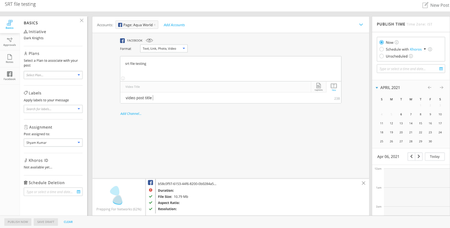
When the user adds the appropriate channel (Facebook/Youtube/Twitter) and uploads a video, there will be a new section called ‘Captions’ that is available under the message box. Please note that the 'Captions' option will come up only after uploading a video. Inside the ‘Captions’ section the users will get options based on the channel that is selected. Facebook For Facebook, there will be an option to upload a file. The file has to be as per the required format. Once the SRT files are uploaded there will be a ‘Default Caption’ option next to the caption files uploaded. Users can select the default caption file as per the need. For Facebook, multiple SRT files can be uploaded for a single video There is a basic check on the file format. If the format is not correct then the caption file will not be uploaded and a warning message will be shown. User can see the applicable language and country codes by clicking on the link Youtube For Youtube, the options are different from that of Facebook. Inside the 'Captions' section user will have to click on the ‘Add Closed Caption file’ option to upload the SRT files. For each SRT file upload, the user will have to select the Language and upload a valid SRT file with Timing. Note: SRT files without timing are not supported Users can upload multiple SRT files for the video being published to Youtube. If the user selects the same language again an error is thrown. Twitter Users can upload only a single SRT file to any video while publishing to Twitter. When the user selects the language option then the applicable languages are shown. The user can upload the SRT file and publish the post Side Panel changes In the Calander side panel, we have created a new field called ‘Accessibility’ under the ‘Basics’ tab. This field will be set to ‘Video has subtitles’ if any channel in the post has at least one SRT file. This is mainly to identify the posts which have the subtitle file. Post publishing Post publishing, the subtitle will be shown on the video based on the captions settings on the respective platform Handling SRT file issues If the platform does not accept the SRT while publishing the video then the post will be published but in the side panel, an error will be shown that the caption file is not updated in the video. The user has to go native to correct the issue.1.1KViewsSign in to react to this post5CommentsChanges to Instagram Authentication in Social Marketing
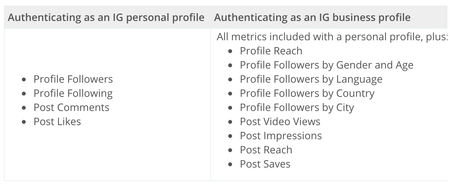
Khoros Social Marketing Customers, Effective September 3, we are revising the method to authenticate Instagram accounts in Khoros Social Marketing (formerly Conversations). For existing customers, you will recall a two-step authentication process involving: 1) Instagram.com and 2) Facebook page login with admin access. Going forward, Khoros is moving new Instagram account authentications and account re-authentications to a one-step process, involving Facebook only. This change is consistent with Facebook’s prior announcement of future Instagram to Facebook API changes (Facebook blog post). What this means for customers: For customers with Instagram business accounts, no actions are required. For customers with Instagram personal (non-business) accounts, further actions are outlined below. Authenticating new non-business accounts: Khoros is no longer supporting new, non-business Instagram accounts. Upon enablement, customers will be prompted to convert to business profiles. Re-authenticating non-business accounts: Khoros is no longer supporting re-authentication of non-business Instagram accounts. Customers will experience no interruption to planning, auto importing and reporting through Khoros Marketing products, unless and until a re-authentication is prompted. Why convert to a business account: Converting an Instagram account to a business profile gives API access to deeper analytics and measurement metrics for your account. See below for a list of analytics business profiles will have access to in Khoros Marketing: How to convert to a business account: Facebook - Switch to a Business Account. How to add an Instagram account in Social Marketing: Add and Authenticate Instagram in Khoros Social Marketing. If you have any questions or concerns, please reach out to [email protected]. Thank you on behalf of Khoros.1.1KViewsSign in to react to this post0CommentsCopying Content Between Calendars
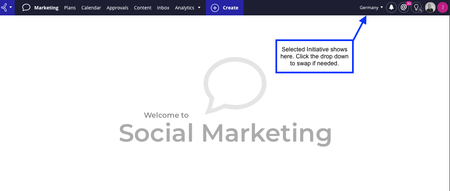
Scenario: You work in the Germany Marketing team, the US team produces some great social posts you’d love to localise and use on your own social channels. The US team has given you permission, now you just need an easy way to copy the posts without having to download everything and re-upload it again. There’s an easy way in Khoros Marketing! Prerequisites: You’ll need to have Publishing access in the Initiative you’ll be copying the content to and you’ll need View access to the Initiative you’ll be copying from. Your Administrator can check this in the User tab of the Company Settings. Start in the Initiative that you’d like to copy the post to (in our scenario the Germany initiative), not the one you’ll be copying the post from (US). You can check which Initiative you’re in using the picker in the top right corner. Next click on the Calendar tab and click on Filters. Find the filter for Initiative and click the drop-down. Within the drop-down, find the Initiative you’d like to copy from (US in our scenario). The posts from that Initiative should now overlay on your calendar. Click on a post to open the sidebar, then click the … button to reveal the Copy option. The Publish window will open, with the post image/video, text, and labels already applied. Select the account you wish to publish from, adjust any other details then click Schedule. You’re all set! The post is ready to go and will follow the usual approval paths for your Initiative.1KViewsSign in to react to this post2CommentsNow Live! Marketing Security Feature: Email Domain Allow-listing
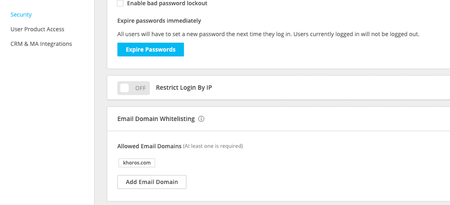
What Did Khoros Marketing Release? Email Domain Allow-listing is here! This feature increases control for Global Administrators, ensuring any new user created must have an email address that is part of a sanctioned email domain. This is a new security feature has been added below the existing Global Administrator's Security Configurations in Company Settings: How Can I Turn This On? There is no action required. This has been enabled for all customers across all Marketing products. We have pre-populated your email domains*, to ensure there is as little disruption on team as possible. However, we encourage your Global Administrator(s) to review and ensure familiarity with this feature. To review your settings: Click your avatar in the top right corner of the navigation toolbar and select Company Settings. Click Company on the top menu bar and then click Security on the left. To add an additional domain: If there is a need to add an additional email domain, select the option to Add Email Domain. *Please note: If you have users with email addresses under these email domains: gmail.com hotmail.com outlook.com me.com Any existing user with those domains will be able to continue their use of the product. However, we have not pre-populated those email domains. If you would like to sanction further additional new users for these domains, we ask Global Administrators to take the action to permit these email domains. *Additional note: Any company owners who change user emails will need to abide by this existing email domain allowlist as well. Any questions or issues? Please let us know.1KViewsSign in to react to this post0CommentsSelf-administer users on Experiences and Intelligence
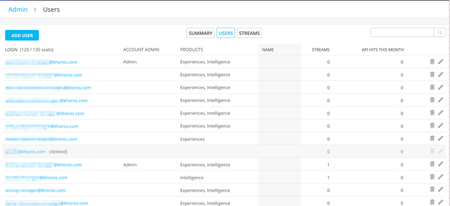
The Experiences and Intelligence team is working to smoothen the user management of these two products. We do this by providing Khoros Marketing customers a way to view the existing users on Experiences or Intelligence , and the functionality to add new users, grant admin privileges, and delete users so as to remove their access. Till now, to manage users, it was required to interact with Khoros support team. However, starting now, to manage users, you can navigate to the Admin screen. You will see buttons to add new users, edit users to update their access level or email logins, and to delete users as well. Please note, when a user is deleted, all her owned streams and saved searches are removed. You will be informed of these details beforehand, and you can choose to proceed accordingly. Find detailed steps under the945ViewsSign in to react to this post3Comments